torchview
- TorchView 0.2.6

TorchView ให้การสร้างภาพของโมเดล Pytorch ในรูปแบบของกราฟภาพ การสร้างภาพรวมประกอบด้วยเทนเซอร์โมดูลคบเพลิงฟังก์ชั่นและข้อมูลเช่นรูปร่างอินพุต/เอาต์พุต
Pytorch เวอร์ชันของ plot_model of keras (และอีกมากมาย)
รองรับเวอร์ชัน pytorch

ก่อนอื่นคุณต้องติดตั้ง Graphviz
pip install graphvizสำหรับอินเทอร์เฟซ Python ของ Graphiz ในการทำงานคุณต้องมีคำสั่ง Dot Layout ที่ทำงานในระบบของคุณ หากยังไม่ได้ติดตั้งแล้วฉันขอแนะนำให้คุณเรียกใช้ depeding ต่อไปนี้บนระบบปฏิบัติการของคุณ
Linux Distro (เช่น Ubuntu):
apt-get install graphvizWindows:
choco install graphvizแม็กอส
brew install graphvizดูรายละเอียดเพิ่มเติมที่นี่
จากนั้นดำเนินการติดตั้ง TorchView โดยใช้ PIP
pip install torchviewหรือถ้าคุณต้องการผ่าน conda
conda install -c conda-forge torchviewหรือหากคุณต้องการเวอร์ชันที่ทันสมัยที่สุดให้ติดตั้งโดยตรงจาก repo
pip install git+https://github.com/mert-kurttutan/torchview.git from torchview import draw_graph
model = MLP ()
batch_size = 2
# device='meta' -> no memory is consumed for visualization
model_graph = draw_graph ( model , input_size = ( batch_size , 128 ), device = 'meta' )
model_graph . visual_graph 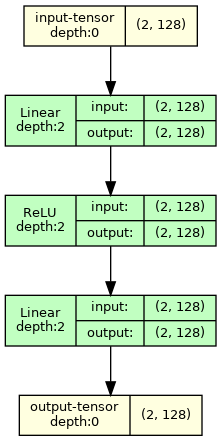
สำหรับตัวอย่างเพิ่มเติมดูสมุดบันทึก Colab ด้านล่าง
โน๊ตบุ๊คบทนำ:
รุ่นคอมพิวเตอร์วิสัยทัศน์:
รุ่น NLP:
หมายเหตุ: ภาพกราฟ Visuals เอาต์พุตกลับมาด้วยขนาดที่ต้องการ แต่บางครั้งบน vscode รูปร่างบางอย่างกำลังถูกครอบตัดเนื่องจากขนาดใหญ่และการแสดงผล SVG โดย VScode เพื่อแก้ปัญหานี้ฉันขอแนะนำให้คุณเรียกใช้สิ่งต่อไปนี้
 import graphviz
graphviz . set_jupyter_format ( 'png' )
ปัญหานี้ไม่ได้เกิดขึ้นบนแพลตฟอร์มอื่น ๆ เช่น Jupyterlab หรือ Google Colab
 def draw_graph (
    model : nn . Module ,
    input_data : INPUT_DATA_TYPE | None = None ,
    input_size : INPUT_SIZE_TYPE | None = None ,
    graph_name : str = 'model' ,
    depth : int | float = 3 ,
    device : torch . device | str | None = None ,
    dtypes : list [ torch . dtype ] | None = None ,
    mode : str | None = None ,
    strict : bool = True ,
    expand_nested : bool = False ,
    graph_dir : str | None = None ,
    hide_module_functions : bool = True ,
    hide_inner_tensors : bool = True ,
    roll : bool = False ,
    show_shapes : bool = True ,
    save_graph : bool = False ,
    filename : str | None = None ,
    directory : str = '.' ,
    ** kwargs : Any ,
) -> ComputationGraph :
    '''Returns visual representation of the input Pytorch Module with
    ComputationGraph object. ComputationGraph object contains:

    1) Root nodes (usually tensor node for input tensors) which connect to all
    the other nodes of computation graph of pytorch module recorded during forward
    propagation.

    2) graphviz.Digraph object that contains visual representation of computation
    graph of pytorch module. This graph visual shows modules/ module hierarchy,
    torch_functions, shapes and tensors recorded during forward prop, for examples
    see documentation, and colab notebooks.


    Args:
        model (nn.Module):
            Pytorch model to represent visually.

        input_data (data structure containing torch.Tensor):
            input for forward method of model. Wrap it in a list for
            multiple args or in a dict or kwargs

        input_size (Sequence of Sizes):
            Shape of input data as a List/Tuple/torch.Size
            (dtypes must match model input, default is FloatTensors).
            Default: None

        graph_name (str):
            Name for graphviz.Digraph object. Also default name graphviz file
            of Graph Visualization
            Default: 'model'

        depth (int):
            Upper limit for depth of nodes to be shown in visualization.
            Depth is measured how far is module/tensor inside the module hierarchy.
            For instance, main module has depth=0, whereas submodule of main module
            has depth=1, and so on.
            Default: 3

        device (str or torch.device):
            Device to place and input tensors. Defaults to
            gpu if cuda is seen by pytorch, otherwise to cpu.
            Default: None

        dtypes (list of torch.dtype):
            Uses dtypes to set the types of input tensor if
            input size is given.

        mode (str):
            Mode of model to use for forward prop. Defaults
            to Eval mode if not given
            Default: None

        strict (bool):
            if true, graphviz visual does not allow multiple edges
            between nodes. Mutiple edge occurs e.g. when there are tensors
            from module node to module node and hiding those tensors
            Default: True

        expand_nested(bool):
            if true shows nested modules with dashed borders

        graph_dir (str):
            Sets the direction of visual graph
            'TB' -> Top to Bottom
            'LR' -> Left to Right
            'BT' -> Bottom to Top
            'RL' -> Right to Left
            Default: None -> TB

        hide_module_function (bool):
            Determines whether to hide module torch_functions. Some
            modules consist only of torch_functions (no submodule),
            e.g. nn.Conv2d.
            True => Dont include module functions in graphviz
            False => Include modules function in graphviz
            Default: True

        hide_inner_tensors (bool):
            Inner tensor is all the tensors of computation graph
            but input and output tensors
            True => Does not show inner tensors in graphviz
            False => Shows inner tensors in graphviz
            Default: True

        roll (bool):
            If true, rolls recursive modules.
            Default: False

        show_shapes (bool):
            True => Show shape of tensor, input, and output
            False => Dont show
            Default: True

        save_graph (bool):
            True => Saves output file of graphviz graph
            False => Does not save
            Default: False

        filename (str):
            name of the file to store dot syntax representation and
            image file of graphviz graph. Defaults to graph_name

        directory (str):
            directory in which to store graphviz output files.
            Default: .

    Returns:
        ComputationGraph object that contains visualization of the input
        pytorch model in the form of graphviz Digraph object
''' from torchview import draw_graph
model_graph = draw_graph (
SimpleRNN (), input_size = ( 2 , 3 ),
graph_name = 'RecursiveNet' ,
roll = True
)
model_graph . visual_graph 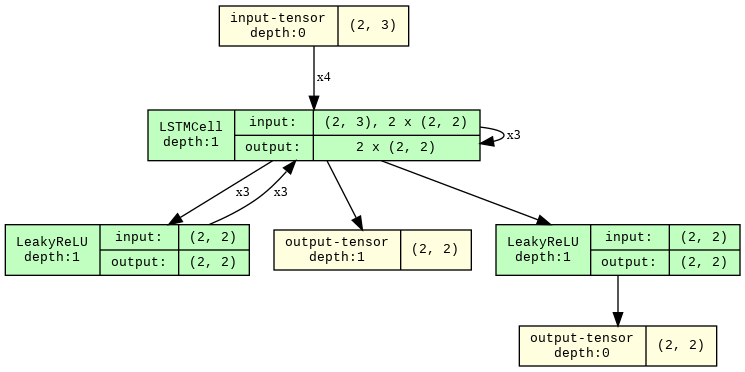
 # Show inner tensors and Functionals
model_graph = draw_graph (
    MLP (), input_size = ( 2 , 128 ),
    graph_name = 'MLP' ,
    hide_inner_tensors = False ,
    hide_module_functions = False ,
)

model_graph . visual_graph 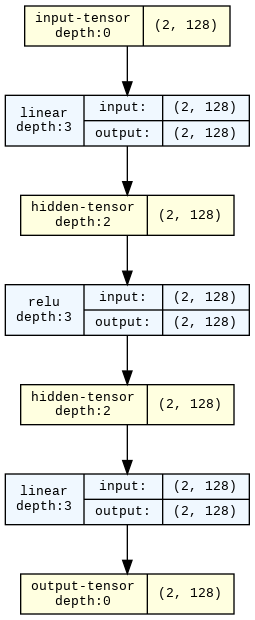
 import torchvision

model_graph = draw_graph ( resnet18 (), input_size = ( 1 , 3 , 32 , 32 ), expand_nested = True )
model_graph . visual_graph 
ปัญหาทั้งหมดและคำขอดึงได้รับการชื่นชมมาก! หากคุณสงสัยว่าจะสร้างโครงการได้อย่างไร:
pip install -r requirements-dev.txt เราใช้แพ็คเกจ DEV เวอร์ชันล่าสุดpytestpytest --overwritepytest --no-output __torch_function__ และ torch.Tensor subclassing Tensor ขอบคุณมากสำหรับทุกคนที่พัฒนา API นี้ !! ที่นี่ฟังก์ชั่นที่ใช้คบเพลิงหมายถึงฟังก์ชั่นใด ๆ ที่ใช้ฟังก์ชั่นและโมดูลคบเพลิงเท่านั้น นี่เป็นเรื่องทั่วไปมากกว่าโมดูล








