ganspace
1.0.0

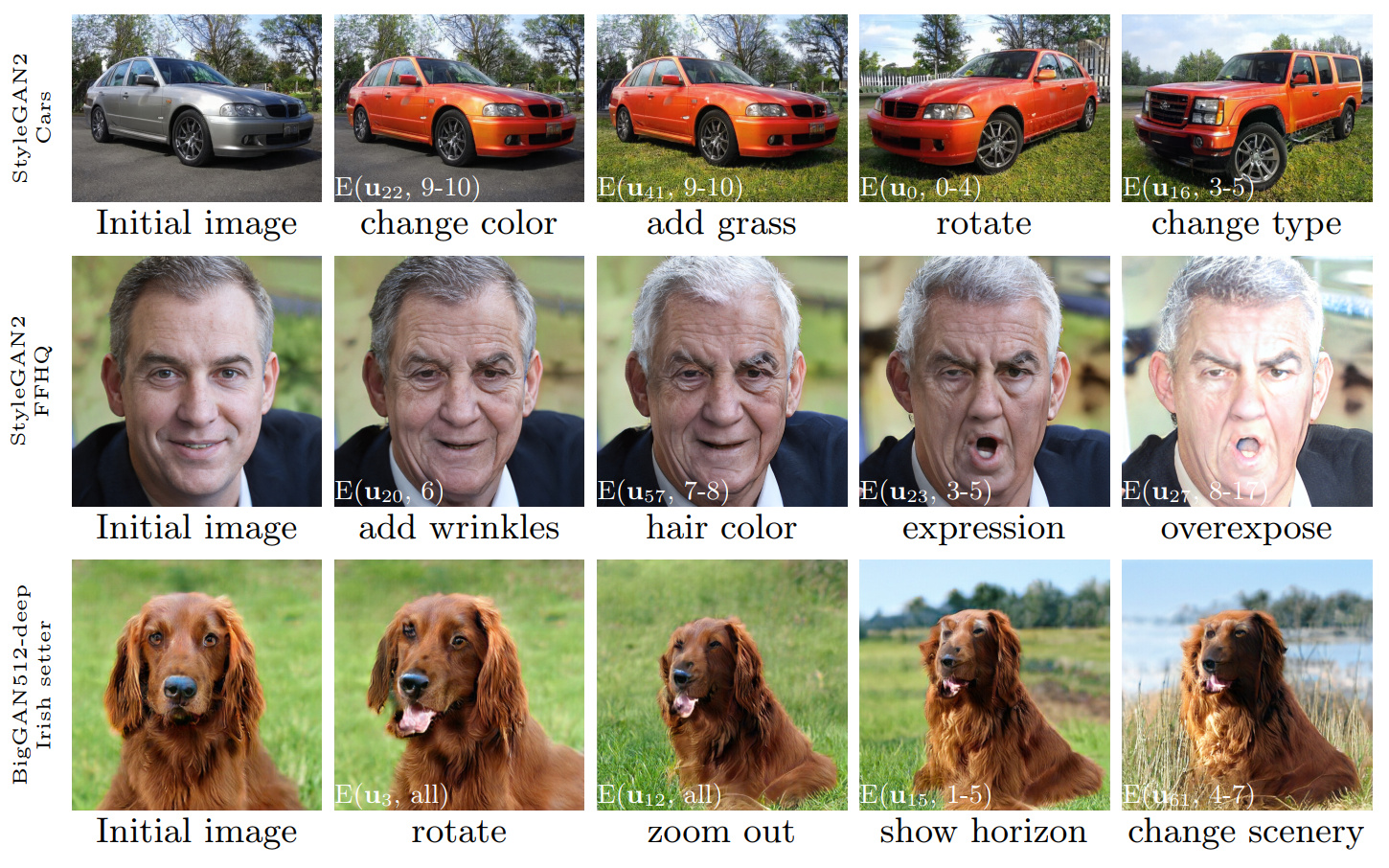
รูปที่ 1: ลำดับของการแก้ไขภาพที่ดำเนินการโดยใช้การควบคุมที่ค้นพบด้วยวิธีการของเรานำไปใช้กับสาม gans ที่แตกต่างกัน ภาพประกอบสีขาวระบุการแก้ไขเฉพาะโดยใช้สัญลักษณ์ที่อธิบายไว้ในส่วน 3.4 ('การแก้ไขเลเยอร์ที่ชาญฉลาด')
Ganspace: ค้นพบการควบคุม GAN ที่ตีความได้
Erik Härkönen 1,2 , Aaron Hertzmann 2 , Jaakko Lehtinen 1,3 , Sylvain Paris 2
1 Aalto University, 2 Adobe Research, 3 Nvidia
https://arxiv.org/abs/2004.02546บทคัดย่อ: บทความนี้อธิบายเทคนิคง่ายๆในการวิเคราะห์เครือข่ายฝ่ายตรงข้าม (GANS) และสร้างการควบคุมที่ตีความได้สำหรับการสังเคราะห์ภาพเช่นการเปลี่ยนแปลงมุมมองอายุแสงแสงและเวลาของวัน เราระบุทิศทางแฝงที่สำคัญตามการวิเคราะห์ส่วนประกอบหลัก (PCA) ที่ใช้ในพื้นที่เปิดใช้งาน จากนั้นเราแสดงให้เห็นว่าการแก้ไขที่ตีความได้สามารถกำหนดได้ตามแอปพลิเคชันเลเยอร์ที่ชาญฉลาดของทิศทางการแก้ไขเหล่านี้ ยิ่งไปกว่านั้นเราแสดงให้เห็นว่า Biggan สามารถควบคุมได้ด้วยอินพุตที่ชาญฉลาดเลเยอร์ในลักษณะที่มีสไตล์เหมือนกัน ผู้ใช้อาจระบุตัวควบคุมที่ตีความได้จำนวนมากด้วยกลไกเหล่านี้ เราแสดงผลลัพธ์เกี่ยวกับ GANS จากชุดข้อมูลต่าง ๆ
วิดีโอ: https://youtu.be/jdticda_eai
ดูคำแนะนำการตั้งค่า
พื้นที่เก็บข้อมูลนี้รวมถึงรุ่นของ Biggan, Stylegan และ Stylegan2 ดัดแปลงเพื่อรองรับเวกเตอร์แฝงต่อชั้น
การสำรวจแบบจำลองเชิงโต้ตอบ
 # Explore BigGAN-deep husky
python interactive.py --model=BigGAN-512 --class=husky --layer=generator.gen_z -n=1_000_000

# Explore StyleGAN2 ffhq in W space
python interactive.py --model=StyleGAN2 --class=ffhq --layer=style --use_w -n=1_000_000 -b=10_000

# Explore StyleGAN2 cars in Z space
python interactive.py --model=StyleGAN2 --class=car --layer=style -n=1_000_000 -b=10_000
 # Apply previously saved edits interactively
python interactive.py --model=StyleGAN2 --class=ffhq --layer=style --use_w --inputs=out/directions
แสดงภาพองค์ประกอบหลัก
 # Visualize StyleGAN2 ffhq W principal components
python visualize.py --model=StyleGAN2 --class=ffhq --use_w --layer=style -b=10_000

# Create videos of StyleGAN wikiart components (saved to ./out)
python visualize.py --model=StyleGAN --class=wikiart --use_w --layer=g_mapping -b=10_000 --batch --video
ตัวเลือก
 Command line paramaters:
  --model      one of [ProGAN, BigGAN-512, BigGAN-256, BigGAN-128, StyleGAN, StyleGAN2]
  --class      class name; leave empty to list options
  --layer      layer at which to perform PCA; leave empty to list options
  --use_w      treat W as the main latent space (StyleGAN / StyleGAN2)
  --inputs     load previously exported edits from directory
  --sigma      number of stdevs to use in visualize.py
  -n           number of PCA samples
  -b           override automatic minibatch size detection
  -c           number of components to keep
ตัวเลขทั้งหมดที่นำเสนอในบทความหลักสามารถสร้างขึ้นใหม่ได้โดยใช้สมุดบันทึก Jupyter ที่รวมอยู่ด้วย:
figure_teaser.ipynbfigure_pca_illustration.ipynbfigure_pca_cleanup.ipynbfigure_style_content_sep.ipynbfigure_supervised_comp.ipynbfigure_biggan_style_resampling.ipynbfigure_edit_zoo.ipynb models/wrappers.py โดยใช้อินเตอร์เฟส BaseModelget_model() ใน models/wrappers.py มันเป็นไปได้ที่จะนำเข้า stylegan ที่ผ่านการฝึกอบรมและ stylegan2 น้ำหนักจาก tensorflow ไปยัง Ganspace
conda install tensorflow-gpu=1.*__init__() , load_model() ใน models/wrappers.py ภายใต้ Class Stylegancheckpoints/stylegan2/<dataset>_<resolution>.pt__init__() , download_checkpoint() ใน models/wrappers.py ภายใต้ Class Stylegan2 เราขอขอบคุณ:
 @inproceedings{härkönen2020ganspace,
  title     = {GANSpace: Discovering Interpretable GAN Controls},
  author    = {Erik Härkönen and Aaron Hertzmann and Jaakko Lehtinen and Sylvain Paris},
  booktitle = {Proc. NeurIPS},
  year      = {2020}
}
รหัสของที่เก็บนี้จะถูกเผยแพร่ภายใต้ใบอนุญาต Apache 2.0
ไดเรกทอรี netdissect เป็นอนุพันธ์ของโครงการแยก GAN และมีให้ภายใต้ใบอนุญาต MIT
models/biggan และ models/stylegan2 มีให้ภายใต้ใบอนุญาต MIT








