ganspace
1.0.0

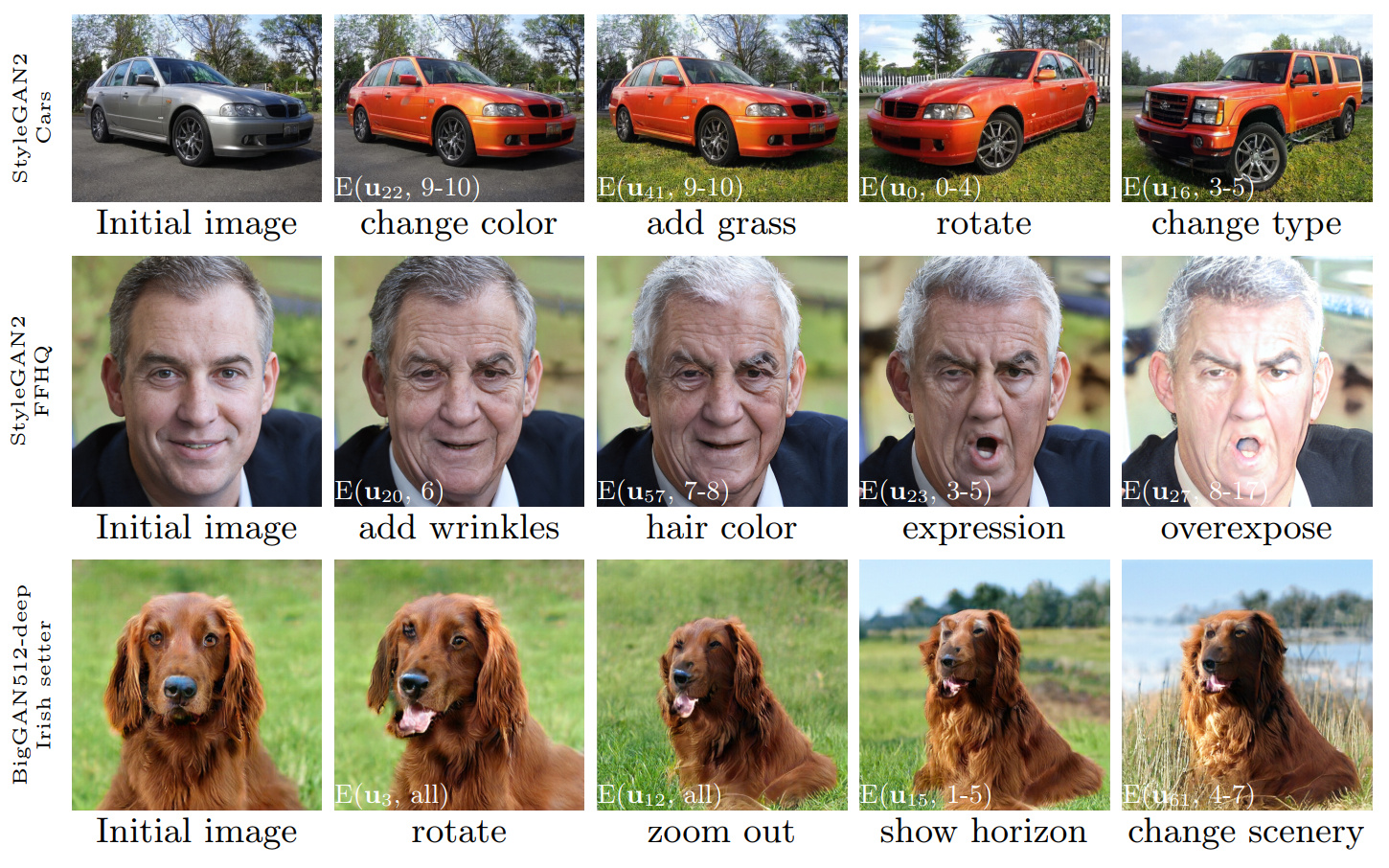
그림 1 : 우리의 방법으로 발견 된 제어를 사용하여 수행 된 이미지 편집 시퀀스는 세 가지 다른 GAN에 적용됩니다. 흰색 삽입은 섹션 3.4에 설명 된 표기법을 사용하여 특정 편집물을 지정합니다 ( '계층 별 편집').
GANSPACE : 해석 가능한 GAN 컨트롤 발견
Erik Härkönen 1,2 , Aaron Hertzmann 2 , Jaakko Lehtinen 1,3 , Sylvain Paris 2
1 Aalto University, 2 Adobe Research, 3 Nvidia
https://arxiv.org/abs/2004.02546초록 : 이 논문은 생성 적대성 네트워크 (GANS)를 분석하고 관점 변화, 노화, 조명 및 시간과 같은 이미지 합성을위한 해석 가능한 컨트롤을 만드는 간단한 기술을 설명합니다. 우리는 활성화 공간에 적용되는 주요 구성 요소 분석 (PCA)을 기반으로 중요한 잠재 방향을 식별합니다. 그런 다음 해석 가능한 편집은 이러한 편집 방향의 계층 별 응용 프로그램을 기반으로 정의 할 수 있음을 보여줍니다. 또한, 우리는 Biggan이 Stylegan과 같은 방식으로 계층 별 입력으로 제어 될 수 있음을 보여줍니다. 사용자는 이러한 메커니즘으로 많은 수의 해석 가능한 컨트롤을 식별 할 수 있습니다. 우리는 다양한 데이터 세트의 GAN에 대한 결과를 보여줍니다.
비디오 : https://youtu.be/jdticda_eai
설정 지침을 참조하십시오.
이 저장소에는 Biggan, Stylegan 및 Stylegan2 버전이 포함되어 있으며, 매당 잠재적 인 벡터를 지원하도록 수정되었습니다.
대화식 모델 탐색
 # Explore BigGAN-deep husky
python interactive.py --model=BigGAN-512 --class=husky --layer=generator.gen_z -n=1_000_000

# Explore StyleGAN2 ffhq in W space
python interactive.py --model=StyleGAN2 --class=ffhq --layer=style --use_w -n=1_000_000 -b=10_000

# Explore StyleGAN2 cars in Z space
python interactive.py --model=StyleGAN2 --class=car --layer=style -n=1_000_000 -b=10_000
 # Apply previously saved edits interactively
python interactive.py --model=StyleGAN2 --class=ffhq --layer=style --use_w --inputs=out/directions
주요 구성 요소를 시각화합니다
 # Visualize StyleGAN2 ffhq W principal components
python visualize.py --model=StyleGAN2 --class=ffhq --use_w --layer=style -b=10_000

# Create videos of StyleGAN wikiart components (saved to ./out)
python visualize.py --model=StyleGAN --class=wikiart --use_w --layer=g_mapping -b=10_000 --batch --video
옵션
 Command line paramaters:
  --model      one of [ProGAN, BigGAN-512, BigGAN-256, BigGAN-128, StyleGAN, StyleGAN2]
  --class      class name; leave empty to list options
  --layer      layer at which to perform PCA; leave empty to list options
  --use_w      treat W as the main latent space (StyleGAN / StyleGAN2)
  --inputs     load previously exported edits from directory
  --sigma      number of stdevs to use in visualize.py
  -n           number of PCA samples
  -b           override automatic minibatch size detection
  -c           number of components to keep
메인 논문에 제시된 모든 수치는 포함 된 Jupyter 노트북을 사용하여 재현 할 수 있습니다.
figure_teaser.ipynbfigure_pca_illustration.ipynbfigure_pca_cleanup.ipynbfigure_style_content_sep.ipynbfigure_supervised_comp.ipynbfigure_biggan_style_resampling.ipynbfigure_edit_zoo.ipynb BaseModel 인터페이스를 사용하여 models/wrappers.py 에서 모델 용 래퍼를 만듭니다.models/wrappers.py 에서 get_model() 에 모델을 추가하십시오. Tensorflow에서 Ganspace로 훈련 된 Stylegan 및 Stylegan2 가중치를 가져올 수 있습니다.
conda install tensorflow-gpu=1.* .__init__() , load_model() models/wrappers.py 클래스 Stylegan에서.checkpoints/stylegan2/<dataset>_<resolution>.pt 로 저장하십시오.__init__() , download_checkpoint() models/wrappers.py class Stylegan2에서. 우리는 감사합니다 :
 @inproceedings{härkönen2020ganspace,
  title     = {GANSpace: Discovering Interpretable GAN Controls},
  author    = {Erik Härkönen and Aaron Hertzmann and Jaakko Lehtinen and Sylvain Paris},
  booktitle = {Proc. NeurIPS},
  year      = {2020}
}
이 저장소의 코드는 Apache 2.0 라이센스에 따라 릴리스됩니다.
Directory netdissect 는 GAN 해부 프로젝트의 파생물이며 MIT 라이센스에 따라 제공됩니다.
디렉토리 models/biggan 및 models/stylegan2 MIT 라이센스에 따라 제공됩니다.








