codeprompts
v1.0.0

เครื่องมือบรรทัดคำสั่ง (และ TUI) สำหรับการสร้างพรอมต์ LLM จากรหัสของคุณโดยใช้เทมเพลต HandleBars
นี่เป็นโครงการที่จะแปรงขึ้นไปบนสนิมและขึ้นอยู่กับ Code2Prompt ด้วยฟังก์ชั่นเพิ่มเติมบางอย่างที่ฉันพบว่ามีประโยชน์
คัดลอกและวางรหัสและรหัสตัวอย่างไปยัง LLMs ด้วยตนเองมีปัญหาหลายประการ:
เพื่อให้ได้รับประโยชน์สูงสุดจาก LLMS การแจ้งเตือนจะต้องมีความชัดเจนครอบคลุมและสอดคล้องกัน รหัสแจ้งให้แก้ไขปัญหาเหล่านี้อย่างไร:
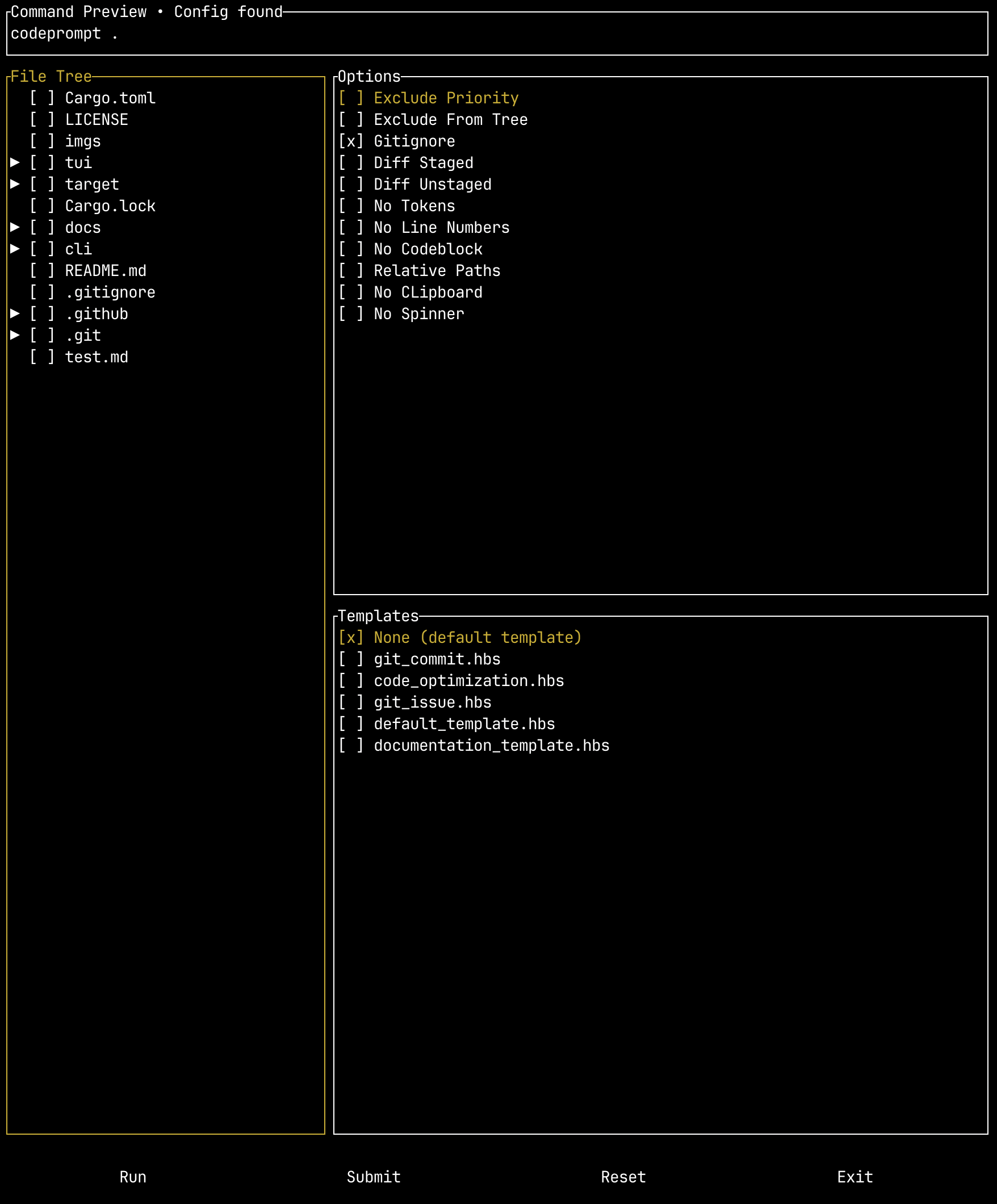
โครงการยังรวมถึง wrapper TUI ที่เป็นตัวเลือกซึ่งคุณสามารถจัดเตรียมไฟล์กำหนดค่าเพื่อแทนที่ธงต่างๆและดูว่าคำสั่งนั้นมีโครงสร้างอย่างไรก่อนที่จะเรียกใช้
ในการดาวน์โหลดและใช้เครื่องมือบรรทัดคำสั่ง codeprompts คุณมีสองตัวเลือก: คุณสามารถดาวน์โหลดไบนารีรุ่นหรือคอมไพล์ได้จากแหล่งที่มา สำหรับขั้นตอนโดยละเอียดเพิ่มเติมรวมถึงการตั้งค่าความสมบูรณ์ของแท็บดูคู่มือการตั้งค่า
หากต้องการดาวน์โหลดไบนารีรุ่นให้ไปที่รุ่นและดาวน์โหลดไบนารีสำหรับระบบปฏิบัติการของคุณ
หมายเหตุ : ในการใช้ Binary TUI คุณจะต้องเพิ่ม CLI ไบนารีลงในเส้นทางของคุณและ:
codepromptในการสร้างจากแหล่งที่มาคุณจะต้องติดตั้ง Git, Rust และ Cargo (จะติดตั้งด้วย Rust)
โคลนครั้งแรกที่เก็บ:
git clone [email protected]:seankim658/codeprompts.gitจากนั้นรวบรวมไบนารีรุ่น:
 cd codeprompts/
cargo build --releaseคู่มือการใช้งานโดยละเอียดเพิ่มเติมสามารถพบได้ที่นี่
เอกสารที่ครอบคลุมมากขึ้นเกี่ยวกับตัวเลือกสามารถพบได้ที่นี่ รหัส Prompts เครื่องมือบรรทัดคำสั่งมีอาร์กิวเมนต์ต่อไปนี้:
Create standardized LLM prompts from your code

Usage: codeprompt [OPTIONS] [PATH] [COMMAND]

Commands:
  completion  Generate shell completion scripts.
  help        Print this message or the help of the given subcommand(s)

Arguments:
  [PATH]  Path to project directory

Options:
      --include <INCLUDE>    Glob patterns to include
      --exclude <EXCLUDE>    Glob patterns to exclude
      --exclude-priority     Change pattern priority in case of conflict to prioritize the exclusion pattern
      --exclude-from-tree    Eclude files/folders from the source tree based on exclude patterns
      --gitignore            Don't respect .gitignore file
  -d, --diff-staged          Capture the git diff for staged changes only (equivalent to running `git diff --cached` or `git diff --staged`
  -u, --diff-unstaged        Capture the git diff for unstaged changes only (equivalent to running `git diff`)
      --no-tokens            Don't display approximate token count of the genrated prompt
  -c, --encoding <ENCODING>  Tokenizer to use for token count [default: cl100k]
  -o, --output <OUTPUT>      Redirect output to file
  -l, --no-line-numbers      Turn off line numbers in source code blocks
      --no-codeblock         Disable wrapping code inside markdown code blocks
      --relative-paths       Use relative paths instead of absolute paths, including parent directory
      --no-clipboard         Disable copying to clipboard
  -t, --template <TEMPLATE>  Optional path to Handlebars template
      --no-spinner           Whether to render the spinner
      --json                 Whether to print the output as JSON. Defaults to False
      --issue <ISSUE>        Fetch a specific Github issue for the repository
      --verbose              Run in verbose mode to investigate glob pattern matching
  -h, --help                 Print help (see more with '--help')
-V, --version Print versionเทมเพลตใช้ภาษาเทมเพลตง่าย ๆ ที่เรียกว่าแฮนด์บาร์
เทมเพลตที่กำหนดไว้ล่วงหน้าสามารถดาวน์โหลดได้จากการเปิดตัวโครงการ ดาวน์โหลด templates.zip
ปัจจุบันเทมเพลตที่กำหนดไว้ล่วงหน้าคือ:
| ชื่อเทมเพลต | คำอธิบาย |
|---|---|
default_template.hbs | นี่คือเทมเพลตเริ่มต้นง่าย ๆ ที่จะจัดโครงสร้างเส้นทางโครงการของคุณแผนผังต้นทางและบล็อกรหัส |
documentation_template.hbs | เทมเพลตเอกสารสร้างพรอมต์สำหรับการบันทึกรหัส แนวทางเอกสารสอดคล้องกับแนวทางของ Hive Lab และข้อกำหนดด้านเอกสาร |
git_commit.hbs | เทมเพลตสำหรับการสร้างข้อความ GIT COMMING GIT ที่กระชับและแม่นยำ สามารถใช้กับตัวเลือกทั้ง diff-staged และ diff-unstaged |
git_issues.hbs | เทมเพลตสำหรับการใช้การเปลี่ยนแปลงตามปัญหา GitHub |
code_optimization.hbs | เทมเพลตสำหรับการเพิ่มประสิทธิภาพรหัสในเวลาและความซับซ้อนของอวกาศ |








