codeprompts
v1.0.0

핸들 바 템플릿을 사용하여 코드에서 LLM 프롬프트를 생성하기위한 명령 줄 (및 TUI) 도구.
이것은 Rust를 닦는 프로젝트였으며 유용한 추가 기능을 갖춘 Code2Prompt를 기반으로합니다.
코드 및 코드 스 니펫을 수동으로 복사 및 붙여 넣기 LLMS에 수동으로 나옵니다. 몇 가지 문제가 있습니다.
LLM을 최대한 활용하려면 프롬프트는 명확하고 포괄적이며 일관성이 있어야합니다. 코드가 이러한 문제를 해결하는 방법 :
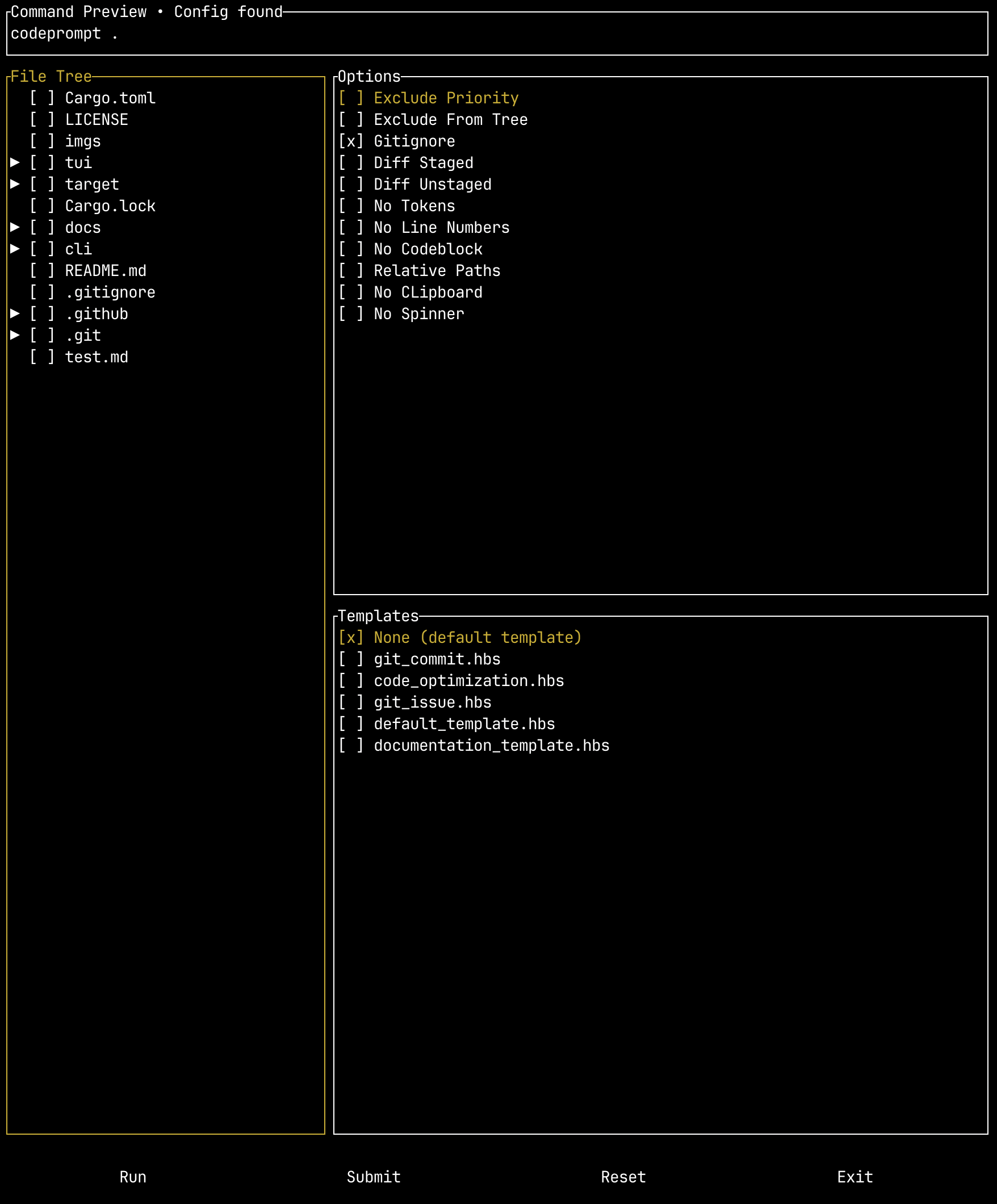
이 프로젝트에는 다양한 플래그를 무시하고 실행하기 전에 명령이 어떻게 구성되는지 확인할 수있는 구성 파일을 제공 할 수있는 옵션 TUI 래퍼도 포함되어 있습니다.
CodePrompts 명령 줄 도구를 다운로드하여 사용하려면 두 가지 옵션이 있습니다. 릴리스 바이너리를 다운로드하거나 소스에서 컴파일 할 수 있습니다. 탭 완성 설정을 포함한 자세한 단계는 설정 안내서를 참조하십시오.
릴리스 바이너리를 다운로드하려면 릴리스로 이동하여 OS 용 바이너리를 다운로드하십시오.
참고 : Tui Binary를 사용하려면 CLI 바이너리를 경로에 추가해야합니다.
codeprompt 로 바꿉니다소스에서 구축하려면 Git, Rust 및 Cargo (녹으로 설치)가 설치되어 있어야합니다.
먼저 저장소를 복제하십시오.
git clone [email protected]:seankim658/codeprompts.git그런 다음 릴리스 바이너리를 컴파일합니다.
 cd codeprompts/
cargo build --release보다 자세한 사용 안내서는 여기에서 찾을 수 있습니다.
옵션에 대한보다 광범위한 문서는 여기에서 찾을 수 있습니다. 코드 프롬프트 명령 줄 도구에는 다음과 같은 인수가 있습니다.
Create standardized LLM prompts from your code

Usage: codeprompt [OPTIONS] [PATH] [COMMAND]

Commands:
  completion  Generate shell completion scripts.
  help        Print this message or the help of the given subcommand(s)

Arguments:
  [PATH]  Path to project directory

Options:
      --include <INCLUDE>    Glob patterns to include
      --exclude <EXCLUDE>    Glob patterns to exclude
      --exclude-priority     Change pattern priority in case of conflict to prioritize the exclusion pattern
      --exclude-from-tree    Eclude files/folders from the source tree based on exclude patterns
      --gitignore            Don't respect .gitignore file
  -d, --diff-staged          Capture the git diff for staged changes only (equivalent to running `git diff --cached` or `git diff --staged`
  -u, --diff-unstaged        Capture the git diff for unstaged changes only (equivalent to running `git diff`)
      --no-tokens            Don't display approximate token count of the genrated prompt
  -c, --encoding <ENCODING>  Tokenizer to use for token count [default: cl100k]
  -o, --output <OUTPUT>      Redirect output to file
  -l, --no-line-numbers      Turn off line numbers in source code blocks
      --no-codeblock         Disable wrapping code inside markdown code blocks
      --relative-paths       Use relative paths instead of absolute paths, including parent directory
      --no-clipboard         Disable copying to clipboard
  -t, --template <TEMPLATE>  Optional path to Handlebars template
      --no-spinner           Whether to render the spinner
      --json                 Whether to print the output as JSON. Defaults to False
      --issue <ISSUE>        Fetch a specific Github issue for the repository
      --verbose              Run in verbose mode to investigate glob pattern matching
  -h, --help                 Print help (see more with '--help')
-V, --version Print version템플릿은 핸들 바라는 간단한 템플릿 언어를 사용합니다.
사전 정의 된 템플릿은 프로젝트 릴리스에서 다운로드 할 수 있습니다. templates.zip 을 다운로드하십시오.
현재 포함 된 사전 정의 된 템플릿은 다음과 같습니다.
| 템플릿 이름 | 설명 |
|---|---|
default_template.hbs | 프로젝트 경로, 소스 트리 및 코드 블록을 구성하는 간단한 기본 템플릿입니다. |
documentation_template.hbs | 문서 템플릿은 코드를 문서화 할 프롬프트를 만듭니다. 문서 지침은 Hive Lab 지침 및 문서 요구 사항과 일치합니다. |
git_commit.hbs | 간결하고 정확한 GIT 커밋 메시지를 작성하기위한 템플릿. diff-staged 및 diff-unstaged 옵션 모두에서 사용할 수 있습니다. |
git_issues.hbs | GitHub 문제를 기반으로 변경 사항을 구현하기위한 템플릿. |
code_optimization.hbs | 시간 및 공간 복잡성에서 코드를 최적화하기위한 템플릿. |








