PromptAgent
1.0.0


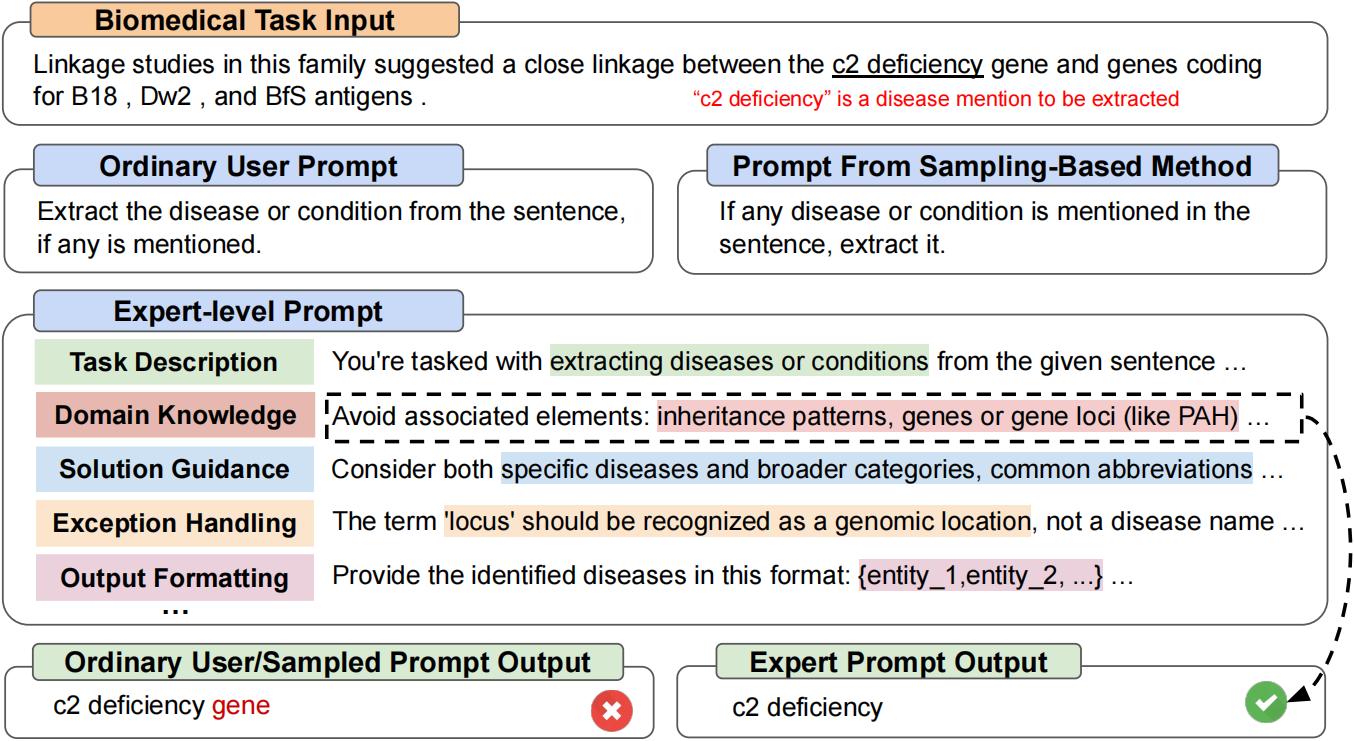
นี่คือ repo อย่างเป็นทางการสำหรับ "Promptagent: การวางแผนเชิงกลยุทธ์กับแบบจำลองภาษาช่วยให้การเพิ่มประสิทธิภาพระดับผู้เชี่ยวชาญในระดับผู้เชี่ยวชาญ" Promptagent เป็นวิธีการเพิ่มประสิทธิภาพที่รวดเร็วโดยอัตโนมัติซึ่งงานฝีมือแบบอัตโนมัติพร้อมที่จะมีคุณภาพเทียบเท่ากับมือที่ทำด้วยมือโดยผู้เชี่ยวชาญเช่นพรอมต์ระดับผู้เชี่ยวชาญ [arxiv]
git clone https://github.com/XinyuanWangCS/PromptAgent.git
cd PromptAgent
conda create -n prompt_agent
conda activate prompt_agent
pip install -r requirements.txtคำสั่งต่อไปนี้เรียกใช้ Protptagent เพื่อสร้างพรอมต์ผู้เชี่ยวชาญสำหรับงานขนาดใหญ่ Penguins_in_a_Table การทำงานอาจใช้เวลาพอสมควรขึ้นอยู่กับความเร็วการอนุมานของ OpenAI API และขนาดของชุดข้อมูล
หมายเหตุ : ก่อนที่จะเรียกใช้คำสั่งนี้โปรดเพิ่มคีย์ (OpenAI) API ของคุณลงในไฟล์ example_config.yaml (base_model_setting: api_key และ optim_model_setting: api_key) นอกจากนี้คุณยังสามารถตรวจสอบ Auguments อื่น ๆ ทั้งหมดในไฟล์ YAML
python src/main.py --config_dir example_config.yaml penguins_in_a_table เป็นงานทำความเข้าใจตารางเพื่อตอบคำถามเกี่ยวกับสัตว์ที่มีอยู่ในตาราง ตัวอย่างจากชุดข้อมูลต้นฉบับจะเป็นแบบนี้:
 Here is a table where the first line is a header and each subsequent line is a penguin:

name, age, height (cm), weight (kg)
Louis, 7, 50, 11
Bernard, 5, 80, 13
Vincent, 9, 60, 11
Gwen, 8, 70, 15

For example: the age of Louis is 7, the weight of Gwen is 15 kg, the height of
Bernard is 80 cm.

Which penguin is taller than the other ones? Answer:
จากนั้นผลลัพธ์ที่คาดหวังคือ Bernard
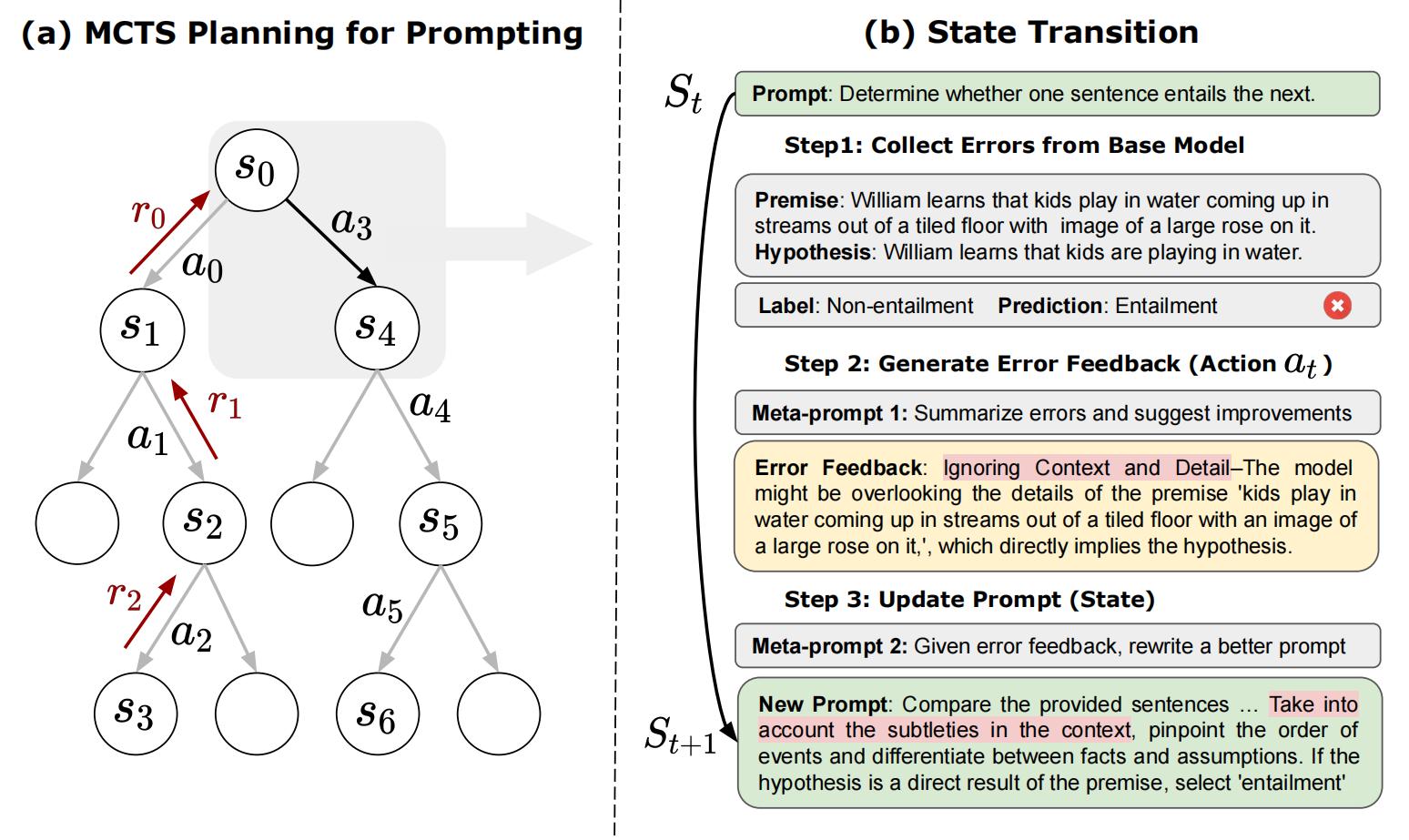
แบบสอบถามเริ่มต้นจากชุดข้อมูลขนาดใหญ่คือ Answer questions about a table of penguins and their attributes. เริ่มต้นด้วยพรอมต์ธรรมดาดังกล่าว ProttAgent จะตัวอย่างข้อผิดพลาดของแบบจำลองเชิงกลยุทธ์ (จากโมเดลพื้นฐาน) สร้างข้อเสนอแนะข้อผิดพลาด (การกระทำ) จำลองผลตอบแทนในอนาคตและค้นหาเส้นทางที่ได้รับรางวัลสูงซึ่งนำไปสู่การแจ้งเตือนจากผู้เชี่ยวชาญ พรอมต์ที่ได้รับการปรับปรุงสำหรับ penguins_in_a_table จะมีลักษณะเช่นนี้ (ผลลัพธ์ที่แน่นอนอาจแตกต่างกันไปเนื่องจากไม่ได้กำหนด):
 As you delve into a dataset of penguins, assess essential attributes like names, ages,
and gender. Decode the significance of each attribute in the context of every penguin
while keeping in mind that the dataset may be modified, including addition or removal
of penguins. When such modifications are made, immediately revise your understanding,
redo your computations, and ensure that your subsequent calculations consider these
changes. The crux of your task is to identify relationships and patterns within
the attributes, giving special attention to the names and ages of the penguins.

For complex tasks, break them down into manageable chunks ensuring no essential detail
is missed. When a change is made to the dataset, recompute your values taking into
consideration these changes, paying extra attention to cumulative computations. Ensure
that your understanding of ’more than’, ’less than’, and ’equal to’ is precise and
that you correctly interpret these in context of the question.

...
ใช้เวลาประมาณสองชั่วโมงในการดำเนินการทดลองข้างต้นซึ่งมีค่าใช้จ่ายประมาณ $ 5 โดยใช้ OpenAI API (ประมาณ $ 4 สำหรับ GPT-4 และ $ 1 สำหรับ GPT-3.5) หลังจากเสร็จสิ้นการเพิ่มประสิทธิภาพโหนดและเส้นทางกลางทั้งหมดจะถูกเก็บไว้ในไฟล์ JSON เราจะรักษาโหนดรางวัล K-K, โหนดสุดท้ายในเส้นทางรางวัลเฉลี่ยสูงสุดและโหนดรางวัลสูงสุดในเส้นทางการให้รางวัลเฉลี่ยสูงสุด ในกระดาษเราใช้โหนดรางวัลสูงสุดในเส้นทางรางวัลเฉลี่ยสูงสุดเป็นกลยุทธ์การเลือก
เราสามารถเรียกใช้ test.py เพื่อทดสอบประสิทธิภาพการแจ้งเตือนใด ๆ ด้วยคำสั่งต่อไปนี้:
ป้อนพรอมต์ในบรรทัดคำสั่ง:
python src/test.py --task_name bigbench --prompt " Answer questions about a table of penguins and their attributes. " --prompt_file " prompt file path " --train_size 70 --eval_size 50 --test_size 79 --seed 42 --base_model_type " openai " --base_model_name ' gpt-3.5-turbo ' --data_dir " datasets/penguins_in_a_table.json " --base_api_key " your_api " หรือ
ใส่พรอมต์ในไฟล์. txt หากพรอมต์ยาวมาก:
python src/test.py --task_name bigbench --prompt_file " prompt file path " --train_size 70 --eval_size 50 --test_size 79 --seed 42 --base_model_type " openai " --base_model_name ' gpt-3.5-turbo ' --data_dir " datasets/penguins_in_a_table.json " --base_api_key " your_api " หากคุณใช้รูปแบบการสร้างข้อความ HuggingFace โปรดแก้ไข BASE_MODEL_SETTING หรือ OPTIC_MODEL_SETTING ในไฟล์. yAML หากคุณวางแผนที่จะใช้โมเดลโอเพนซอร์ซเราขอแนะนำให้ใช้โมเดลที่ปรับแต่งด้วยขนาดปานกลางเช่น Mistralai/Mistral-7b-Instruct-V0.2 ดังที่เราได้กล่าวถึงในบทความพรอมต์ระดับผู้เชี่ยวชาญได้รับการจัดทำขึ้นสำหรับ LLM ที่ค่อนข้างสูง
หมายเหตุ : คุณสามารถแก้ไขพารามิเตอร์ของโมเดล HuggingFace (เช่น MAX_NEW_TOKENS) เนื่องจากรุ่นเหล่านี้อาจมีหน้าต่างอินพุตหรือการตั้งค่าอื่น ๆ
นี่คือตัวอย่างของการใช้ mistralai/mistral-7b-instruct-v0.2:
base_model_setting:
  model_type: hf_textgeneration # openai | palm | hf_text2text | hf_textgeneration | ct_model
  model_name: mistralai/Mistral-7B-Instruct-v0.2 # api-based model'name or huggingface model name
  temperature: 0.0
  api_key: null # if need api key
  device: cuda # cuda | cpu | cuda:x, e.g. 0,1,2...
model_path: null # ct model requires the downloaded model's path คุณสามารถเพิ่มไฟล์. py ใหม่รวมถึงรุ่นใหม่ของคุณ คลาสของโมเดลต้องการสองฟังก์ชั่น: batch_forward_func: ป้อนชุดของพรอมต์, ส่งออกชุดของการตอบสนองของโมเดล
def batch_forward_func(self, batch_prompts: List(str)):
  ...
  return List(str)
สร้าง: อินพุตหนึ่งพรอมต์, เอาต์พุตหนึ่งการตอบสนอง
def generate(self, input: str):
  ...
  return str
จากนั้นคุณสามารถเพิ่มชื่อ model_type และชื่อคลาสใน init .py ในโฟลเดอร์ language_model นอกจากนี้คุณยังสามารถติดต่อเราหากคุณพบปัญหาใด ๆ หรือต้องการเพิ่มลงใน repo อย่างเป็นทางการ
คลาสงานพื้นฐานของเราสามารถเห็นได้ในไฟล์/base_task.py ไฟล์ซึ่งมีการอธิบายฟังก์ชั่นเฉพาะของงานในรายละเอียด งานปัจจุบันของเรารวมถึงงานการเลือกและงาน ner การเพิ่มงานการเลือกใหม่นั้นค่อนข้างง่าย โปรดดูไฟล์. py ในโฟลเดอร์งาน ก่อนอื่นให้สร้างไฟล์งานใหม่และคลาส CustomTask ใหม่ จากนั้นมีฟังก์ชั่นเฉพาะงานหลายอย่างที่จะนำไปใช้ในไฟล์งานที่กำหนดเองของคุณ:
หลังจากนั้นคุณสามารถเรียกใช้ PreftedAgent ในชุดข้อมูลที่กำหนดเองของคุณ!
หากคุณพบว่ากระดาษและรหัสมีประโยชน์โปรดแสดงความโปรดปรานของ repo นี้และอ้างอิงกระดาษต่อไปนี้ อย่าลังเลที่จะติดต่อ [email protected] และ [email protected] หรือเปิดปัญหาหากคุณมีคำถามใด ๆ ขอบคุณมาก!
 @article { wang2023promptagent ,
  title = { PromptAgent: Strategic Planning with Language Models Enables Expert-level Prompt Optimization } ,
  author = { Wang, Xinyuan and Li, Chenxi and Wang, Zhen and Bai, Fan and Luo, Haotian and Zhang, Jiayou and Jojic, Nebojsa and Xing, Eric P and Hu, Zhiting } ,
  journal = { arXiv preprint arXiv:2310.16427 } ,
  year = { 2023 }
}







