PromptAgent
1.0.0


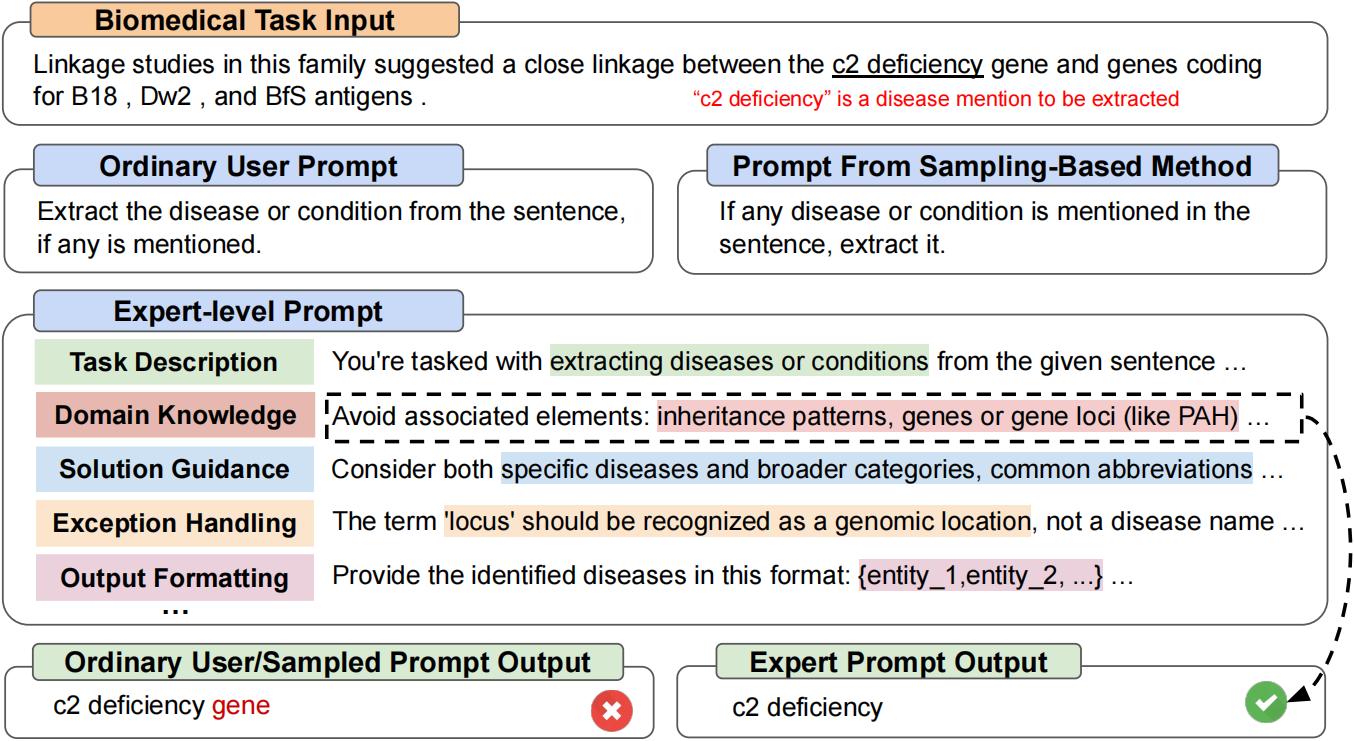
이는 "Promptagent : 언어 모델을 갖춘 전략 계획은 전문가 수준의 프롬프트 최적화를 가능하게하는 공식 리포입니다. Promptagent는 전문가, 즉 전문가 수준의 프롬프트가 수공예품에 해당하는 품질에 동등한 품질을 자율적으로 공예하는 새로운 자동 프롬프트 최적화 방법입니다. [arxiv]
git clone https://github.com/XinyuanWangCS/PromptAgent.git
cd PromptAgent
conda create -n prompt_agent
conda activate prompt_agent
pip install -r requirements.txt다음 명령은 Promptagent를 실행하여 큰 벤치 작업을위한 전문가 프롬프트, Penguins_in_a_table을 제작합니다. 실행은 OpenAI API의 추론 속도와 데이터 세트의 크기에 따라 시간이 걸릴 수 있습니다.
참고 :이 명령을 실행하기 전에 example_config.yaml 파일에 (OpenAi) API 키를 추가하십시오 (base_model_setting : api_key 및 Optim_Model_Setting : API_Key). YAML 파일에서 다른 모든 활어를 확인할 수도 있습니다.
python src/main.py --config_dir example_config.yaml penguins_in_a_table 은 테이블에 포함 된 동물에 대한 질문에 답변하는 테이블 이해 작업입니다. 원래 데이터 세트의 예는 다음과 같습니다.
 Here is a table where the first line is a header and each subsequent line is a penguin:

name, age, height (cm), weight (kg)
Louis, 7, 50, 11
Bernard, 5, 80, 13
Vincent, 9, 60, 11
Gwen, 8, 70, 15

For example: the age of Louis is 7, the weight of Gwen is 15 kg, the height of
Bernard is 80 cm.

Which penguin is taller than the other ones? Answer:
그런 다음 예상 결과는 Bernard 입니다.
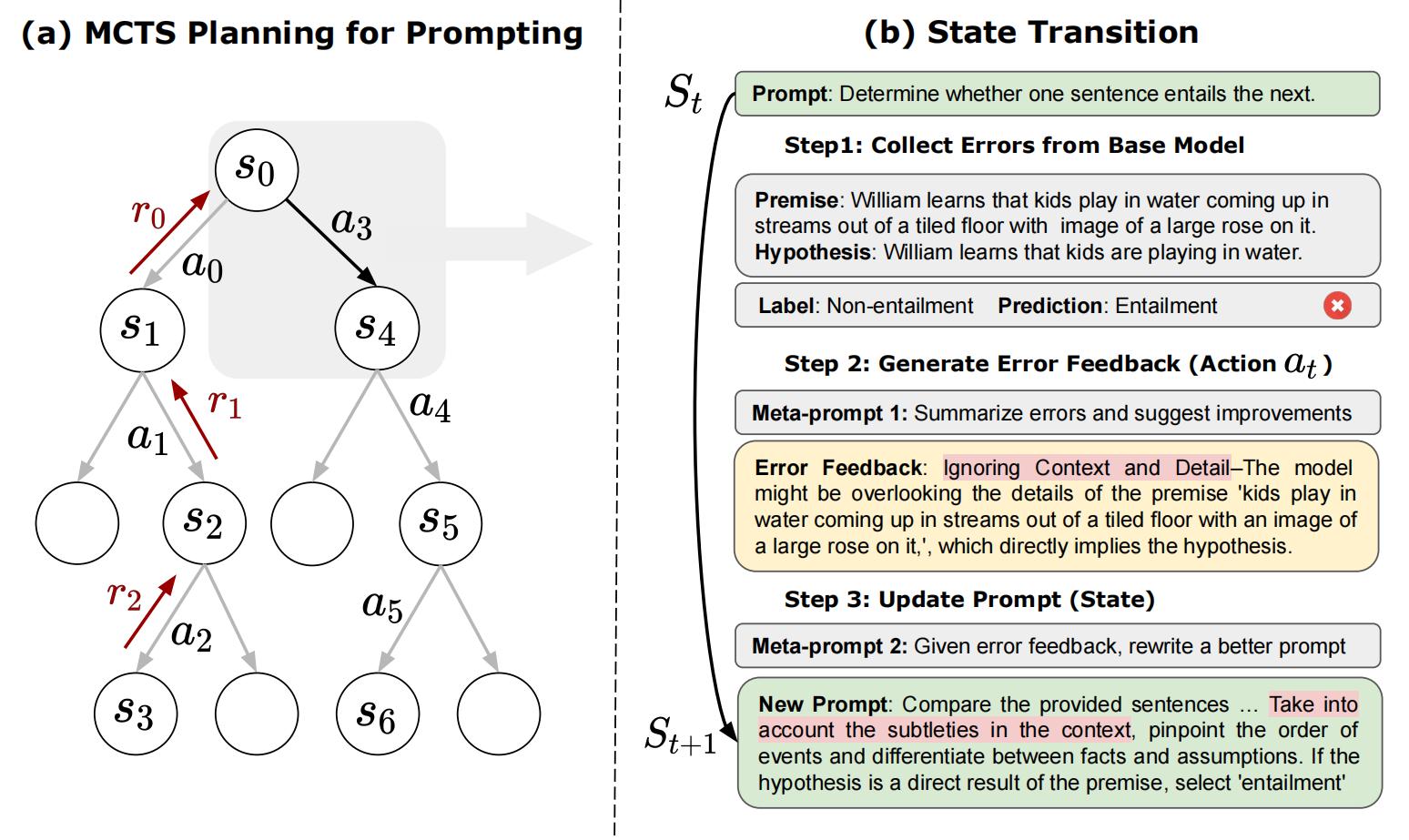
Big-Bench 데이터 세트의 초기 쿼리는 Answer questions about a table of penguins and their attributes. 이러한 일반적인 프롬프트부터 Promptagent는 전략적으로 모델 오류 (기본 모델에서), 오류 피드백 (조치)을 생성하고 향후 보상을 시뮬레이션하며 전문가 프롬프트로 이어지는 높은 보상 경로를 검색합니다. penguins_in_a_table 에 대한 최적화 된 프롬프트는 다음과 같습니다 (정확한 결과는 결정적이지 않기 때문에 정확한 결과가 다를 수 있음).
 As you delve into a dataset of penguins, assess essential attributes like names, ages,
and gender. Decode the significance of each attribute in the context of every penguin
while keeping in mind that the dataset may be modified, including addition or removal
of penguins. When such modifications are made, immediately revise your understanding,
redo your computations, and ensure that your subsequent calculations consider these
changes. The crux of your task is to identify relationships and patterns within
the attributes, giving special attention to the names and ages of the penguins.

For complex tasks, break them down into manageable chunks ensuring no essential detail
is missed. When a change is made to the dataset, recompute your values taking into
consideration these changes, paying extra attention to cumulative computations. Ensure
that your understanding of ’more than’, ’less than’, and ’equal to’ is precise and
that you correctly interpret these in context of the question.

...
위의 실험을 실행하는 데 약 2 시간이 걸리며, OpenAI API를 사용하여 약 $ 5 (GPT-4의 경우 약 $ 4, GPT-3.5의 경우 $ 1). 최적화를 마치면 모든 중간 노드와 경로가 JSON 파일에 저장됩니다. 우리는 Top-K 보상 노드, 최고 평균 보상 경로의 마지막 노드 및 최고 평균 보상 경로에서 가장 높은 보상 노드를 유지합니다. 이 논문에서, 우리는 선택 전략으로 최고 평균 보상 경로에서 가장 높은 보상 노드를 사용합니다.
test.py 실행하여 다음 명령으로 신속한 성능을 테스트 할 수 있습니다.
명령 줄에 프롬프트를 입력하십시오.
python src/test.py --task_name bigbench --prompt " Answer questions about a table of penguins and their attributes. " --prompt_file " prompt file path " --train_size 70 --eval_size 50 --test_size 79 --seed 42 --base_model_type " openai " --base_model_name ' gpt-3.5-turbo ' --data_dir " datasets/penguins_in_a_table.json " --base_api_key " your_api " 또는
프롬프트가 매우 길면 .txt 파일에 프롬프트를 넣으십시오.
python src/test.py --task_name bigbench --prompt_file " prompt file path " --train_size 70 --eval_size 50 --test_size 79 --seed 42 --base_model_type " openai " --base_model_name ' gpt-3.5-turbo ' --data_dir " datasets/penguins_in_a_table.json " --base_api_key " your_api " Huggingface TextGeneration 모델을 사용하는 경우 .yaml 파일에서 Base_Model_Setting 또는 Optim_Model_Setting을 수정하십시오. 오픈 소스 모델을 사용하려는 경우 Mistralai/Mistral-7B-Instruct-V0.2와 같이 적당한 크기의 명령 조정 모델을 사용하는 것이 좋습니다. 논문에서 언급했듯이, 비교적 고급 LLM에 대한 전문가 수준의 프롬프트가 준비됩니다.
참고 :이 모델마다 입력 창 또는 기타 설정이있을 수 있으므로 Huggingface 모델 (예 : Max_New_Tokens)의 매개 변수를 수정할 수 있습니다.
다음은 mistralai/mistral-7b-instruct-v0.2를 사용하는 예입니다.
base_model_setting:
  model_type: hf_textgeneration # openai | palm | hf_text2text | hf_textgeneration | ct_model
  model_name: mistralai/Mistral-7B-Instruct-v0.2 # api-based model'name or huggingface model name
  temperature: 0.0
  api_key: null # if need api key
  device: cuda # cuda | cpu | cuda:x, e.g. 0,1,2...
model_path: null # ct model requires the downloaded model's path 새 모델을 포함한 새 .py 파일을 추가 할 수 있습니다. 모델의 클래스에는 두 가지 기능이 필요합니다. Batch_forward_func : 프롬프트 배치를 입력하고 모델의 응답 배치를 출력합니다.
def batch_forward_func(self, batch_prompts: List(str)):
  ...
  return List(str)
생성 : 하나의 프롬프트를 입력하고 하나의 응답을 출력하십시오
def generate(self, input: str):
  ...
  return str
그런 다음 language_model 폴더의 init .py에 model_type 이름과 클래스 이름을 추가 할 수 있습니다. 문제를 충족하거나 공식 Promptagent Repo에 추가하려는 경우 저희에게 연락 할 수도 있습니다.
우리의 기본 작업 클래스는 작업/base_task.py 파일에서 볼 수 있으며, 여기서 작업 별 기능이 자세히 설명되어 있습니다. 우리의 현재 작업에는 선택 질문 작업 및 NER 작업이 포함됩니다. 새로운 선택 작업을 추가하는 것은 비교적 쉽습니다. 작업 폴더의 .py 파일을 참조하십시오. 먼저 새 task.py 파일과 새 CustomTask 클래스를 만듭니다. 그런 다음 사용자 정의 된 task.py 파일에서 구현할 몇 가지 작업 별 기능이 있습니다.
그런 다음 사용자 정의 데이터 세트에서 Promptagent를 실행할 수 있습니다!
논문과 코드가 유용하다고 생각되면이 리브리로 친절하게 주연하고 다음 논문을 인용하십시오. [email protected] 및 [email protected]에 문의하거나 궁금한 점이 있으면 문제를 열어보십시오. 정말 감사합니다!
 @article { wang2023promptagent ,
  title = { PromptAgent: Strategic Planning with Language Models Enables Expert-level Prompt Optimization } ,
  author = { Wang, Xinyuan and Li, Chenxi and Wang, Zhen and Bai, Fan and Luo, Haotian and Zhang, Jiayou and Jojic, Nebojsa and Xing, Eric P and Hu, Zhiting } ,
  journal = { arXiv preprint arXiv:2310.16427 } ,
  year = { 2023 }
}







