PromptAgent
1.0.0


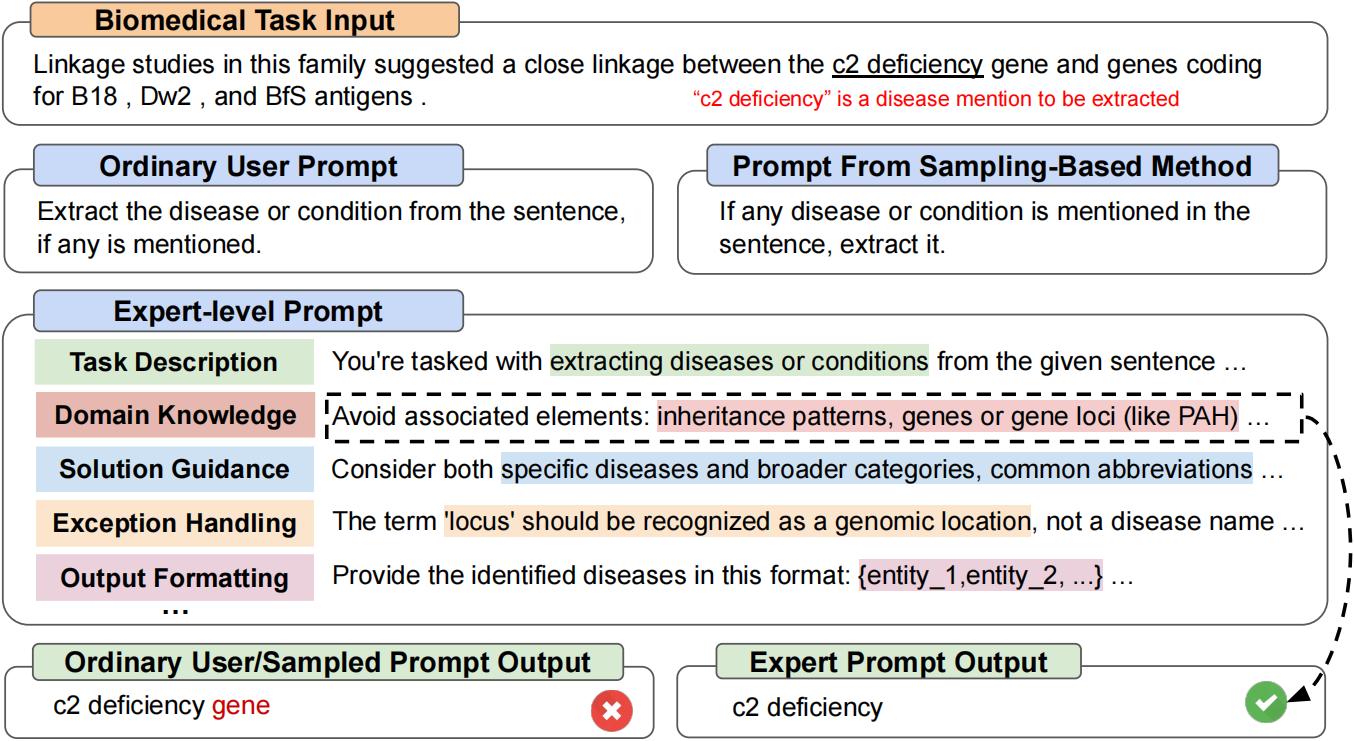
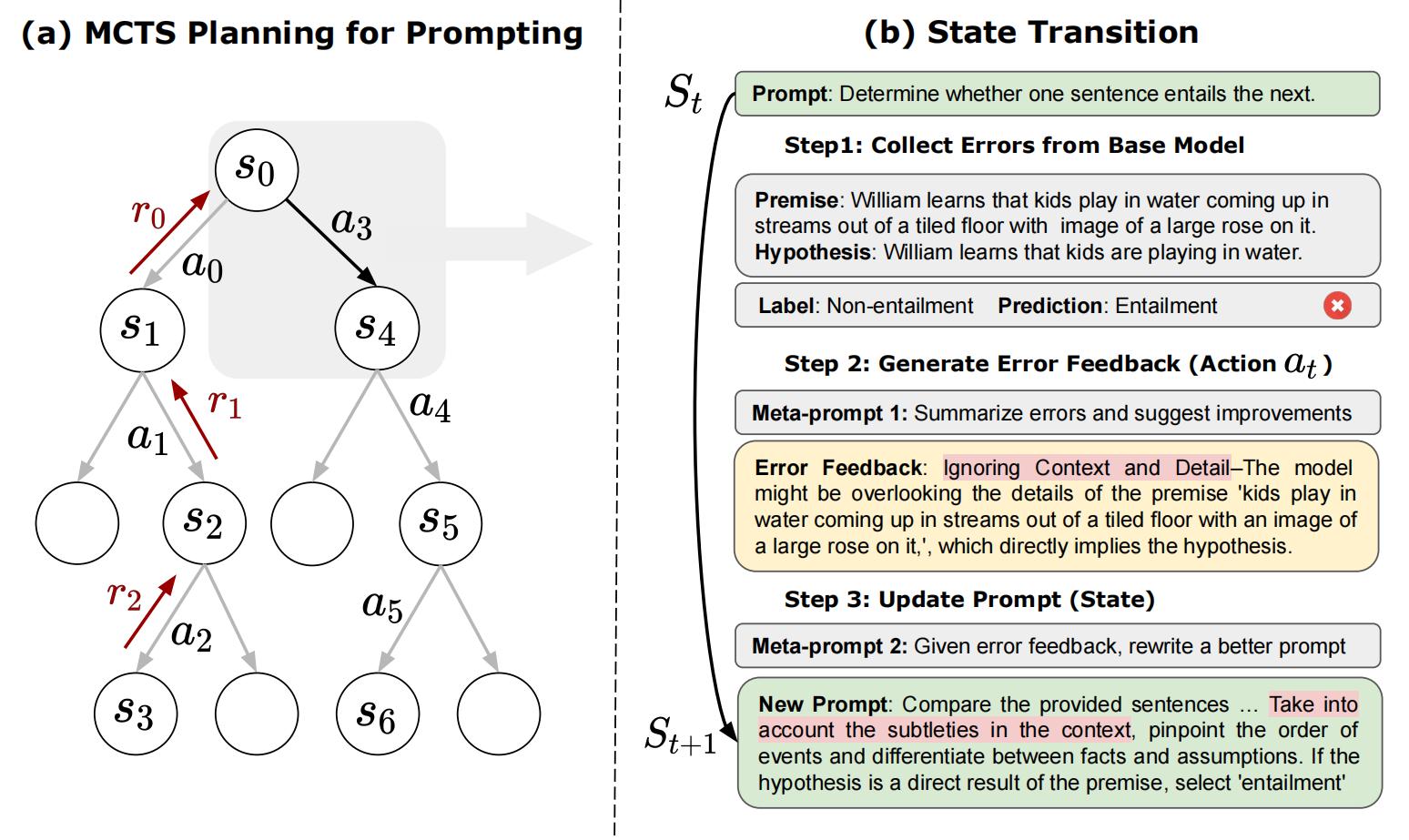
これは、「PROMPTAGENT:言語モデルを使用した戦略的計画がエキスパートレベルの迅速な最適化を可能にする」の公式リポジトリです。 ProStagentは、専門家、すなわち専門家レベルのプロンプトによって手作りされたものと同等の品質を自律的に促進する新しい自動プロンプト最適化方法です。 [arxiv]
git clone https://github.com/XinyuanWangCS/PromptAgent.git
cd PromptAgent
conda create -n prompt_agent
conda activate prompt_agent
pip install -r requirements.txt次のコマンドは、Big-Benchタスクの専門家プロンプト、Penguins_in_a_tableの専門家プロンプトを作成するために実行されます。 Openai APIの推論速度とデータセットのサイズに応じて、ランニングには時間がかかる場合があります。
注:このコマンドを実行する前に、(OpenAI)APIキーをexample_config.yamlファイル(base_model_setting:api_keyおよびoptim_model_setting:api_key)に追加してください。また、YAMLファイルの他のすべてのアウグを確認することもできます。
python src/main.py --config_dir example_config.yaml penguins_in_a_tableは、表に含まれる動物に関する質問に答えるためのテーブル理解タスクです。元のデータセットの例は次のようになります:
 Here is a table where the first line is a header and each subsequent line is a penguin:

name, age, height (cm), weight (kg)
Louis, 7, 50, 11
Bernard, 5, 80, 13
Vincent, 9, 60, 11
Gwen, 8, 70, 15

For example: the age of Louis is 7, the weight of Gwen is 15 kg, the height of
Bernard is 80 cm.

Which penguin is taller than the other ones? Answer:
次に、予想される結果はBernardです。
Big-Benchデータセットからの最初のクエリはAnswer questions about a table of penguins and their attributes.このような通常のプロンプトから始めて、PropentAgentはモデルエラーを戦略的に(ベースモデルから)サンプリングし、エラーフィードバック(アクション)を生成し、将来の報酬をシミュレートし、エキスパートプロンプトにつながる高報酬パスを検索します。 penguins_in_a_tableの最適化されたプロンプトは、このように見えます(これは決定論的ではないため、正確な結果は異なる場合があります):
 As you delve into a dataset of penguins, assess essential attributes like names, ages,
and gender. Decode the significance of each attribute in the context of every penguin
while keeping in mind that the dataset may be modified, including addition or removal
of penguins. When such modifications are made, immediately revise your understanding,
redo your computations, and ensure that your subsequent calculations consider these
changes. The crux of your task is to identify relationships and patterns within
the attributes, giving special attention to the names and ages of the penguins.

For complex tasks, break them down into manageable chunks ensuring no essential detail
is missed. When a change is made to the dataset, recompute your values taking into
consideration these changes, paying extra attention to cumulative computations. Ensure
that your understanding of ’more than’, ’less than’, and ’equal to’ is precise and
that you correctly interpret these in context of the question.

...
上記の実験を実行するのに約2時間かかります。これには、OpenAI APIを使用して約5ドルかかります(GPT-4で約4ドル、GPT-3.5で1ドル)。最適化を終了した後、すべての中間ノードとパスはJSONファイルに保存されます。 Top-K報酬ノード、最高の平均報酬パスの最後のノード、および最高の平均報酬パスの最高の報酬ノードを維持します。論文では、選択戦略として最高の平均報酬パスで最高の報酬ノードを使用します。
test.pyを実行して、次のコマンドで迅速なパフォーマンスをテストできます。
コマンドラインにプロンプトを入力してください。
python src/test.py --task_name bigbench --prompt " Answer questions about a table of penguins and their attributes. " --prompt_file " prompt file path " --train_size 70 --eval_size 50 --test_size 79 --seed 42 --base_model_type " openai " --base_model_name ' gpt-3.5-turbo ' --data_dir " datasets/penguins_in_a_table.json " --base_api_key " your_api "または
プロンプトが非常に長い場合は、.txtファイルにプロンプトを入れます。
python src/test.py --task_name bigbench --prompt_file " prompt file path " --train_size 70 --eval_size 50 --test_size 79 --seed 42 --base_model_type " openai " --base_model_name ' gpt-3.5-turbo ' --data_dir " datasets/penguins_in_a_table.json " --base_api_key " your_api " Huggingface TextGenerationモデルを使用している場合は、.yamlファイルでbase_model_settingまたはoptim_model_settingを変更してください。オープンソースモデルの使用を計画している場合は、Mistralai/Mistral-7B-Instruct-V0.2などの中程度のサイズの命令チューニングモデルを使用することを推奨します。論文で述べたように、エキスパートレベルのプロンプトは、比較的高度なLLMのために準備されています。
注:これらのモデルには異なる入力ウィンドウまたはその他の設定がある可能性があるため、Huggingfaceモデル(max_new_tokensなど)のパラメーターを変更できます。
Mistralai/Mistral-7B-Instruct-V0.2を使用する例は次のとおりです。
base_model_setting:
  model_type: hf_textgeneration # openai | palm | hf_text2text | hf_textgeneration | ct_model
  model_name: mistralai/Mistral-7B-Instruct-v0.2 # api-based model'name or huggingface model name
  temperature: 0.0
  api_key: null # if need api key
  device: cuda # cuda | cpu | cuda:x, e.g. 0,1,2...
model_path: null # ct model requires the downloaded model's path 新しいモデルを含む新しい.pyファイルを追加できます。モデルのクラスには、batch_forward_func:プロンプトのバッチを入力し、モデルの応答のバッチを出力する2つの機能が必要です。
def batch_forward_func(self, batch_prompts: List(str)):
  ...
  return List(str)
生成:1つのプロンプトを入力し、1つの応答を出力します
def generate(self, input: str):
  ...
return str次に、Language_modelフォルダーのinit.pyにoder_type名とクラス名を追加できます。問題を満たしている場合、または公式のPropentagent Repoに追加したい場合は、お問い合わせください。
ベースタスククラスは、タスク/base_task.pyファイルで見ることができます。このファイルでは、タスク固有の関数について詳しく説明します。現在のタスクには、選択の質問タスクとnerタスクが含まれています。新しい選択タスクを追加するのは比較的簡単です。タスクフォルダーの.pyファイルを参照してください。まず、新しいTask.pyファイルと新しいCustomTaskクラスを作成します。次に、カスタマイズされたタスクに実装するタスク固有の機能がいくつかあります。
その後、カスタマイズされたデータセットでProStagentを実行できます!
論文とコードが役立つと思われる場合は、このレポを主演させて、次の論文を引用してください。 [email protected]および[email protected]にお気軽にお問い合わせいただくか、質問がある場合は問題を開きます。本当にありがとう!
 @article { wang2023promptagent ,
  title = { PromptAgent: Strategic Planning with Language Models Enables Expert-level Prompt Optimization } ,
  author = { Wang, Xinyuan and Li, Chenxi and Wang, Zhen and Bai, Fan and Luo, Haotian and Zhang, Jiayou and Jojic, Nebojsa and Xing, Eric P and Hu, Zhiting } ,
  journal = { arXiv preprint arXiv:2310.16427 } ,
  year = { 2023 }
}







