aws_practices
1.0.0

1_1_vpc_1_public_subnet_1_instance_1_internet_gateway.json: สแต็กง่าย ๆ ที่มี one VPC one public subnet Internet gateway และ one instance ที่เชื่อมต่อกับอินเทอร์เน็ตผ่านทางเกตเวย์
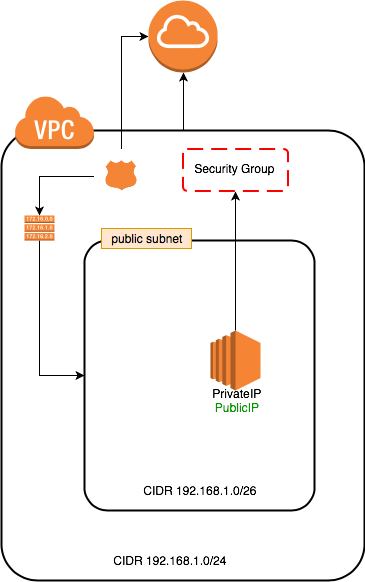
2_1_vpc_1_public_subnet_2_instances_1_internet_gateway.json: สแต็กง่าย ๆ ที่มี one VPC one public subnet Internet gateway และ two instances ที่เชื่อมต่อกับอินเทอร์เน็ตผ่านเกตเวย์
ตัวอย่างข้างต้นได้รับการอัปเดตเป็น:
icmp จากพอร์ต 8 ถึงทั้งหมด -1 ใน SecurityGroup เพื่อเปิดใช้งานการร้องขอ ping ระหว่างเครื่อง 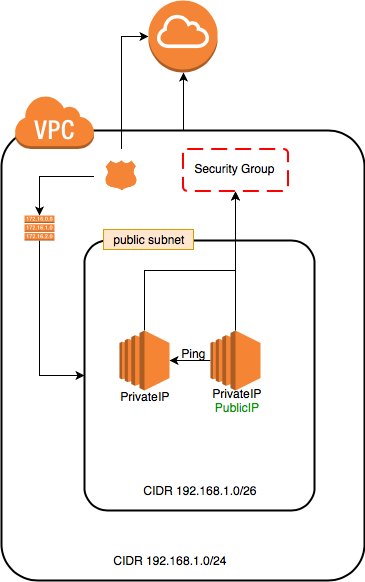
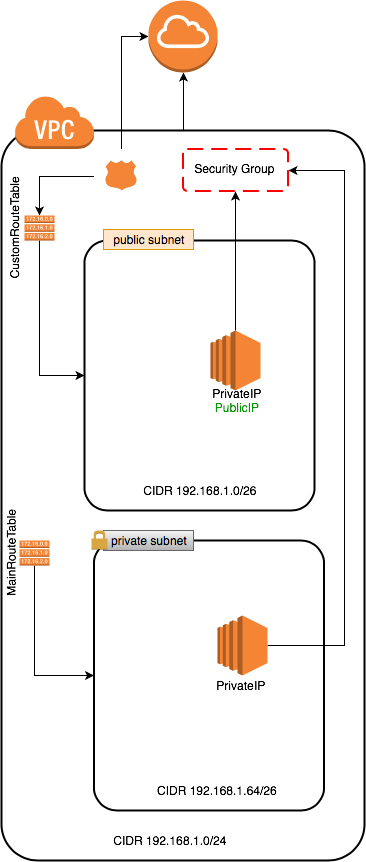
3_1_vpc_1_public_subnet_1_private_subnet_2_instances_1_internet_gateway.json: สแต็กง่าย ๆ ที่มี one VPC one public subnet one private subnet Internet gateway และ two instances public subnet ที่เชื่อมต่อกับอินเทอร์เน็ตผ่านเส้นทาง CustomRouteTable การรับส่งข้อมูลไปยัง Internet gateway private subnet ไม่ได้เชื่อมต่อกับอินเทอร์เน็ตและใช้ MainRouteTable
ตัวอย่างข้างต้นได้รับการอัปเดตเป็น:
4_1_vpc_1_public_subnet_1_instance_1_internet_gateway_recovery_alarm.json: เหมือนกับเกตเวย์ VPC/Subnet/อินเทอร์เน็ต (1 อินสแตนซ์) แต่เพิ่มการกู้คืน CloudWatch UserData เพิ่มลงใน Start Jenkins Server บน 8080 สำหรับการใช้งานในภายหลัง
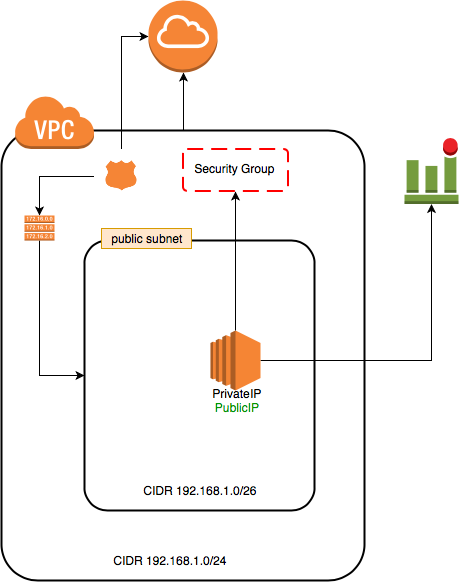
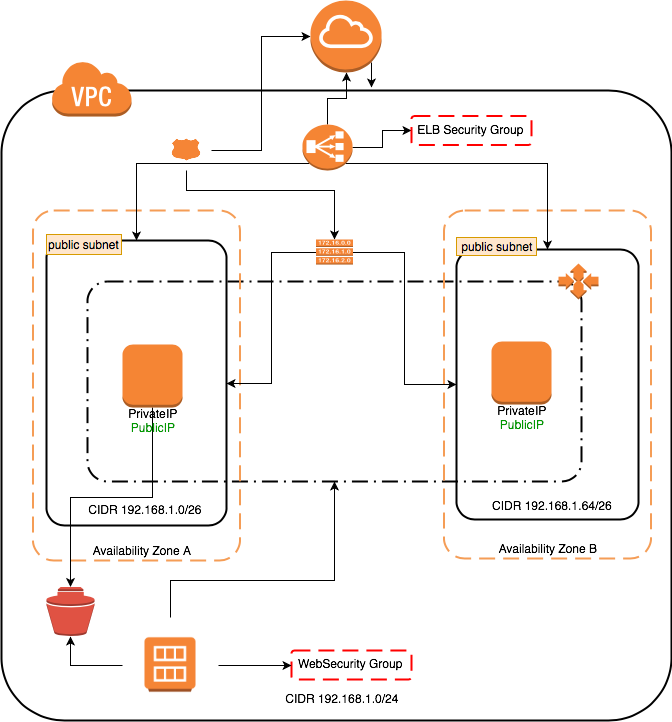
two instances : สแต็กง่าย ๆ ที่มี one VPC , two public subnets , Internet gateway , launch configruation และ autoscaling for one instance min/max subnets ที่เชื่อมต่อกับอินเทอร์เน็ตผ่านเส้นทาง CustomRouteTable การรับส่งข้อมูลไปยัง Internet gateway
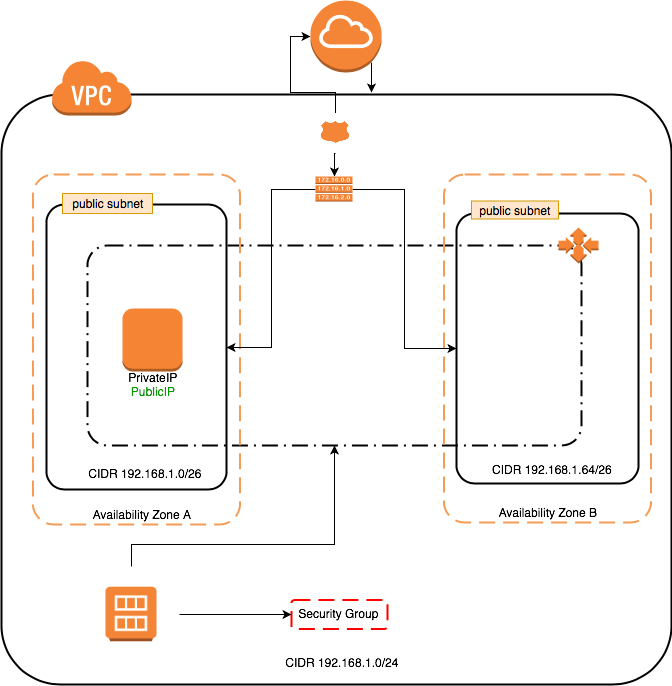
6_1_vpc_2_public_subnet_1_internet_gateway_autoscaling_ebs_recovery.json: เหมือนกับ VPC/2 Subnets/Internet Gateway/Autoscaling (1 อินส imageId ซ์ optional /นาที) ดังนั้นเราจึงทำได้:
aws ec2 create-image --instance-id=i-0ad5005528a7ed71f --name jenkins-instance
รอจนกว่าจะ available รับสถานะภาพ
aws ec2 describe-images --image-id $newImageId --query "Images[].State"
aws cloudformation update-stack --stack-name $stackName --template-url $tempateUrl --parameters ParameterKey=JenkinsAdminPassword,UsePreviousValue=true ParameterKey=AMISnapshot,ParameterValue=$newImageId
aws ec2 terminate-instances --instance-ids $instanceId
ทำงานด้านล่าง:
 aws cloudformation delete-stack --stack-name $stackName
aws cloudformation describe-stacks --stack-name $stackName #wait until return error or stack deleted.
aws ec2 deregister-image --image-id $newImageId
aws ec2 delete-snapshot --snapshot-id $snapshotId
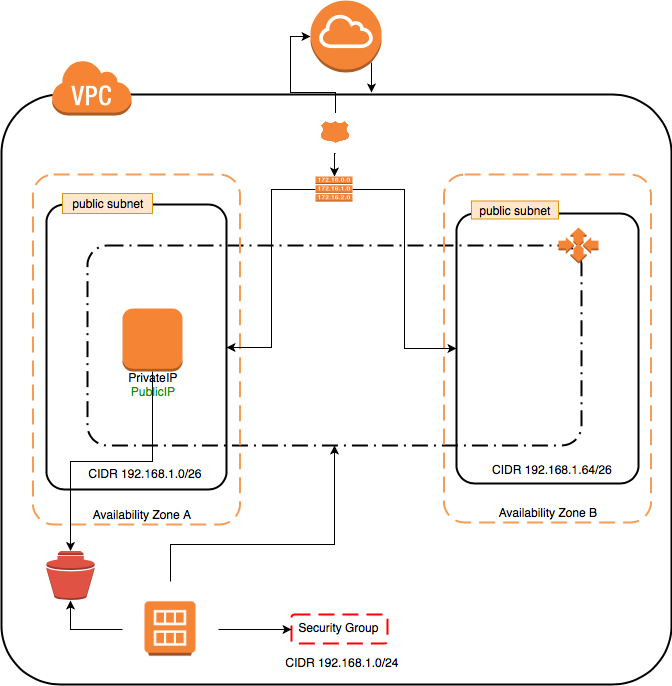
7_1_vpc_2_public_subnet_1_internet_gateway_autoscaling_ebs_recovery_elastic_ip.json: เหมือนกับ VPC/2 Subnets/Internet Gateway/Autoscaling/EBS อีกครั้ง โดยค่าเริ่มต้นคุณยังไม่สามารถใช้ IP ยืดหยุ่นเป็นที่อยู่ IP สาธารณะสำหรับเซิร์ฟเวอร์เสมือนที่เปิดตัวโดยการปรับขนาดอัตโนมัติ
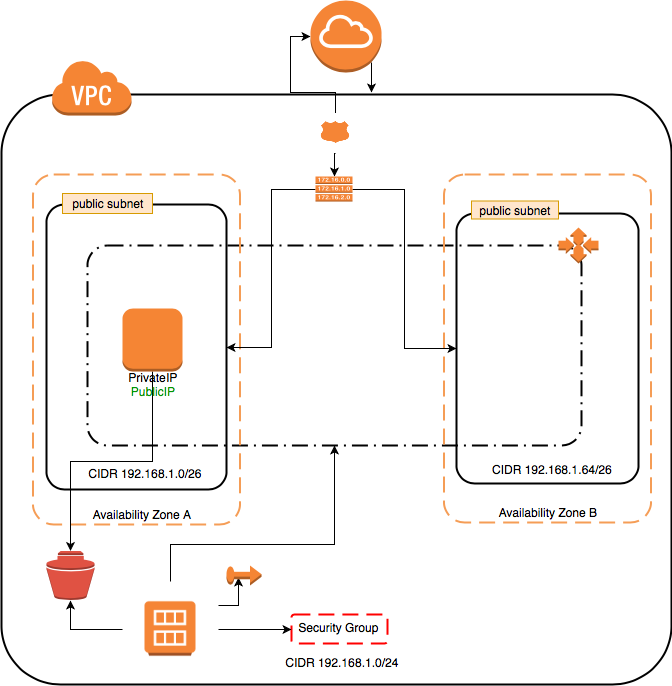
8_1_vpc_2_public_subnet_1_internet_gateway_autoscaling_ebs_recovery_loadbalancer.json: เหมือนกับ VPC/2 Subnets/Internet Gateway/Autoscaling/EBS อีกครั้ง ด้วยเหตุนี้ LoadBalancer จึงถูกสร้างขึ้นเพื่อแจกจ่ายปริมาณการใช้งานไปยังอินสแตนซ์ EC2 เมื่อมีการสร้างอินสแตนซ์ใหม่แล้วมันจะลงทะเบียนกับ Loadbalaner