aws_practices
1.0.0

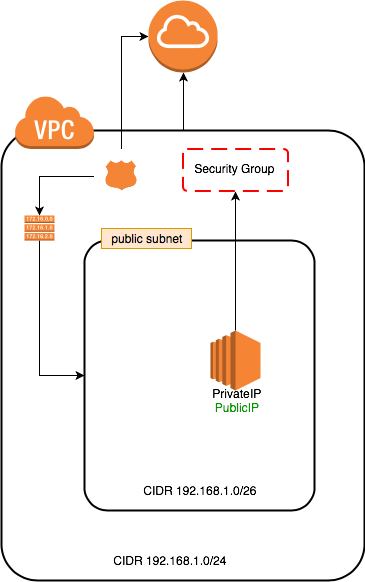
1_1_vpc_1_public_subnet_1_instance_1_internet_gateway.json:
Simple stack that contains one VPC, one public subnet, Internet gateway and one instance connected to the internet through the gateway.
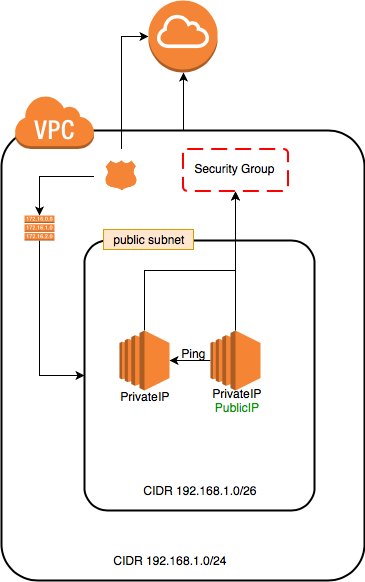
2_1_vpc_1_public_subnet_2_instances_1_internet_gateway.json:
Simple stack that contains one VPC, one public subnet, Internet gateway and two instances connected to the internet through the gateway.
The above sample has been updated to:
icmp from port 8 to all -1 in SecurityGroup to enable ping request between the machines.
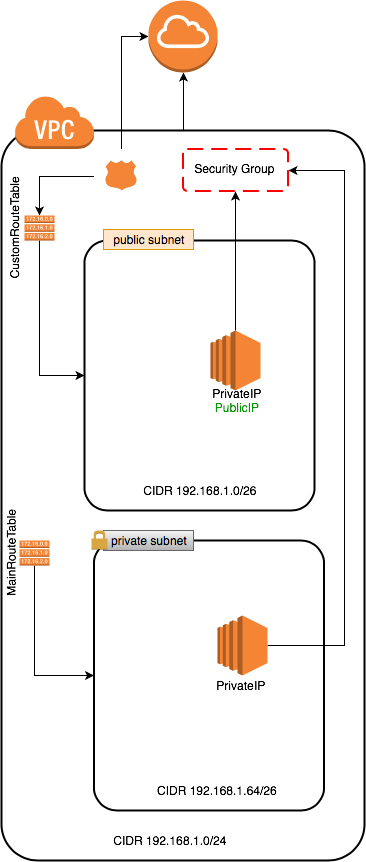
3_1_vpc_1_public_subnet_1_private_subnet_2_instances_1_internet_gateway.json:
Simple stack that contains one VPC, one public subnet, one private subnet, Internet gateway and two instances. The public subnet connected to the internet through the CustomRouteTable route the traffic to the Internet gateway. The private subnet is not connected to the internet and use the MainRouteTable.
The above sample has been updated to:
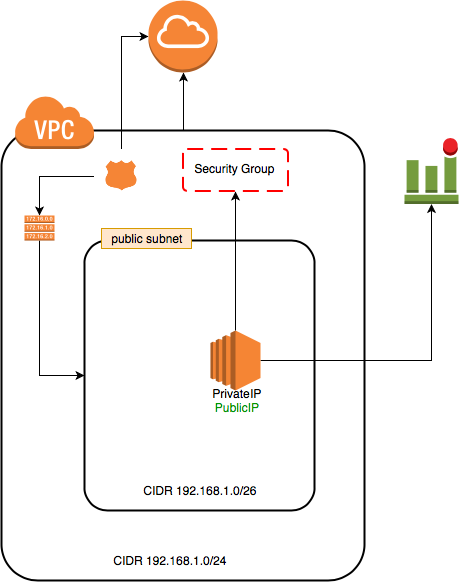
4_1_vpc_1_public_subnet_1_instance_1_internet_gateway_recovery_alarm.json:
Same as VPC/Subnet/Internet Gateway (1 instance) but a recovery alarm CloudWatch was added.
UserData added to start jenkins server on 8080 for later use
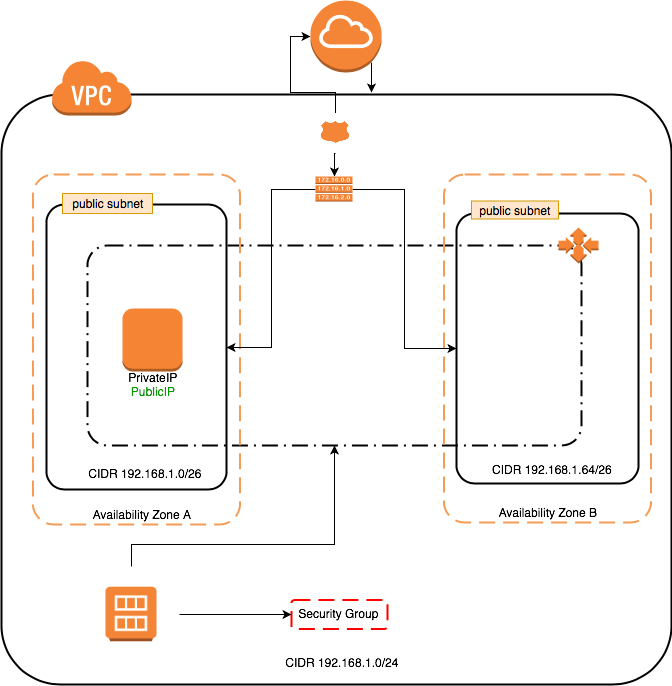
5_1_vpc_2_public_subnet_1_internet_gateway_autoscaling.json:
Simple stack that contains one VPC, two public subnets, Internet gateway, launch configruation and autoscaling for one instance min/max two instances. The subnets connected to the internet through the CustomRouteTable route the traffic to the Internet gateway.
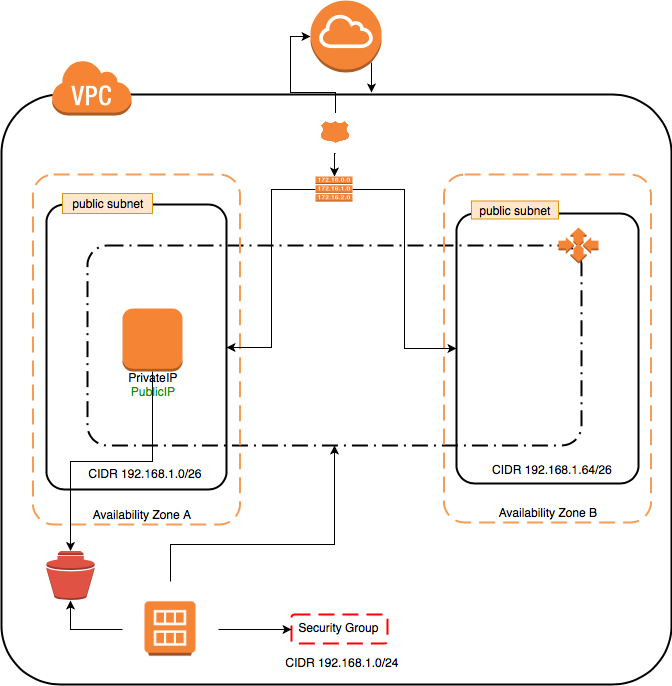
6_1_vpc_2_public_subnet_1_internet_gateway_autoscaling_ebs_recovery.json:
Same as VPC/2 Subnets/Internet Gateway/AutoScaling (1 instance max/min) but the imageId is parameterized as an optional parameter. so we can:
aws ec2 create-image --instance-id=i-0ad5005528a7ed71f --name jenkins-instance
wait until recieving available for the image status.
aws ec2 describe-images --image-id $newImageId --query "Images[].State"
aws cloudformation update-stack --stack-name $stackName --template-url $tempateUrl --parameters ParameterKey=JenkinsAdminPassword,UsePreviousValue=true ParameterKey=AMISnapshot,ParameterValue=$newImageId
aws ec2 terminate-instances --instance-ids $instanceId
Run below:
aws cloudformation delete-stack --stack-name $stackName
aws cloudformation describe-stacks --stack-name $stackName #wait until return error or stack deleted.
aws ec2 deregister-image --image-id $newImageId
aws ec2 delete-snapshot --snapshot-id $snapshotId
7_1_vpc_2_public_subnet_1_internet_gateway_autoscaling_ebs_recovery_elastic_ip.json: Same as VPC/2 Subnets/Internet Gateway/AutoScaling/EBS Recovery (1 instance max/min) but overcoming the problem of assigning another publicIP/PrivateIP to the new instance in another availability zone since we can't keep the same publicIP between different zones. By default, you also can’t use an Elastic IP as a public IP address for a virtual server launched by auto-scaling.
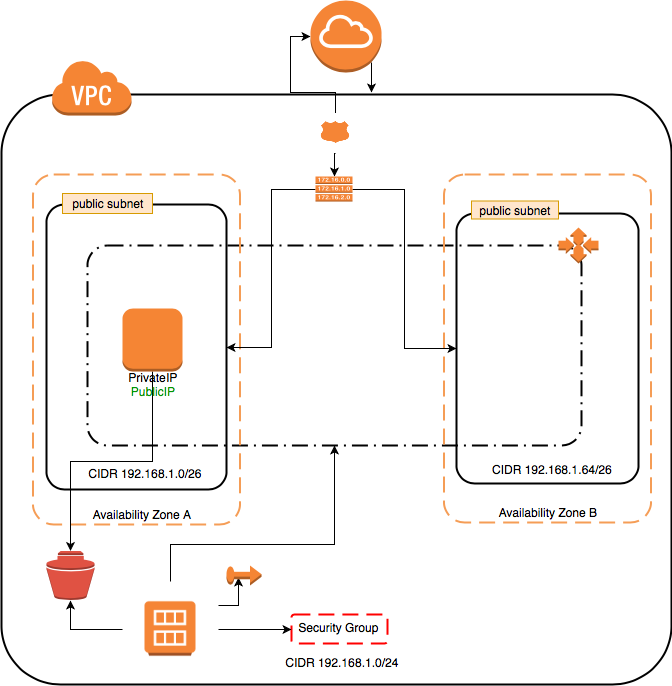
8_1_vpc_2_public_subnet_1_internet_gateway_autoscaling_ebs_recovery_loadbalancer.json: Same as VPC/2 Subnets/Internet Gateway/AutoScaling/EBS Recovery (1 instance max/min) but overcoming the problem of assigning another publicIP/PrivateIP to the new instance in another availability zone since we can't keep the same publicIP between different zones. For that reason, a loadbalancer has been created to distribute the traffic to the EC2 instances. Once a new instance created, It registers itself to the loadbalaner.