mac cleanup py
v3.1.2

Mac-Cleanup-Py เป็นสคริปต์การทำความสะอาดที่ทรงพลังสำหรับ MacOS
โครงการนี้เป็นการเขียนใหม่ของ Mac-Cleanup-SH ที่เขียนขึ้นใหม่ใน Python
Mac-cleanup-py ช่วยคุณ:
adobe - ล้างไฟล์แคช Adobeandroid - ล้างแคช Androidbrew - ล้างแคช Homebrewbun - ล้างแคช ขนมปังcacher - ล้างบันทึก Cacherchrome - ล้างแคช Google Chromechromium - ล้างไฟล์แคช โครเมียมcomposer - ล้างแคช นักแต่งเพลงconan - ล้างแคช โคนันdocker - ทำความสะอาดภาพ Docker Docker และหยุดคอนเทนเนอร์dns_cache - ล้างแคช DNSdropbox - ล้างแคช Dropboxea - ล้างไฟล์แคช แอป EAgem - ทำความสะอาด อัญมณี รุ่นเก่า ๆgo - เคลียร์ แคชgoogle_drive - ล้างแคช Google ไดรฟ์gradle - เคลียร์แคช Gradleinactive_memory - ล้าง หน่วยความจำที่ไม่ได้ใช้งานios_apps - แอปพลิเคชันการล้างข้อมูล iOSios_backups - ลบ การสำรองข้อมูลอุปกรณ์ iOSjava_cache - ลบ java head dumps ออกจาก Home Directoryjetbrains - ลบบันทึกจาก phpstorm , pycharm ฯลฯkite - ลบบันทึกว่า วlunarclient - ลบบันทึกไคล เอน ต์และแคชminecraft - ลบบันทึก Minecraft และแคชmicrosoft_teams - ลบบันทึก ของทีม Microsoft และแคชnpm - Cleanup NPM Cacheobsidian - ล้างไฟล์แคช Obsidiannuget - Clears .nuget Package Filespnpm - Cleanup PNPM Cachepod - Cleanup Cocoapods Cache Filespoetry - ล้างแคช บทกวีpyenv - Cleanup Pyenv -Virtualenv Cachesteam - ลบบันทึก ไอน้ำ และแคชsystem_caches - Clear System Cachesystem_log - ล้างไฟล์ บันทึกระบบtelegram - แคช โทรเลข เก่าเคลียร์trash - ล้างถัง ขยะ ในปริมาณที่ติดตั้งทั้งหมดและ HDD หลักwget_logs - ลบบันทึกและโฮสต์ WGETxcode - การล้างข้อมูล Xcode ที่ได้รับข้อมูล และ เอกสารสำคัญxcode_simulators - รีเซ็ต iOS Simulatorsyarn - Cleanup Yarn Cache brew tap mac-cleanup/mac-cleanup-py
brew install mac-cleanup-pypip3 install mac-cleanupbrew uninstall mac-cleanup-py
brew untap mac-cleanup/mac-cleanup-pypip3 uninstall mac-cleanupเมนูช่วยเหลือ:
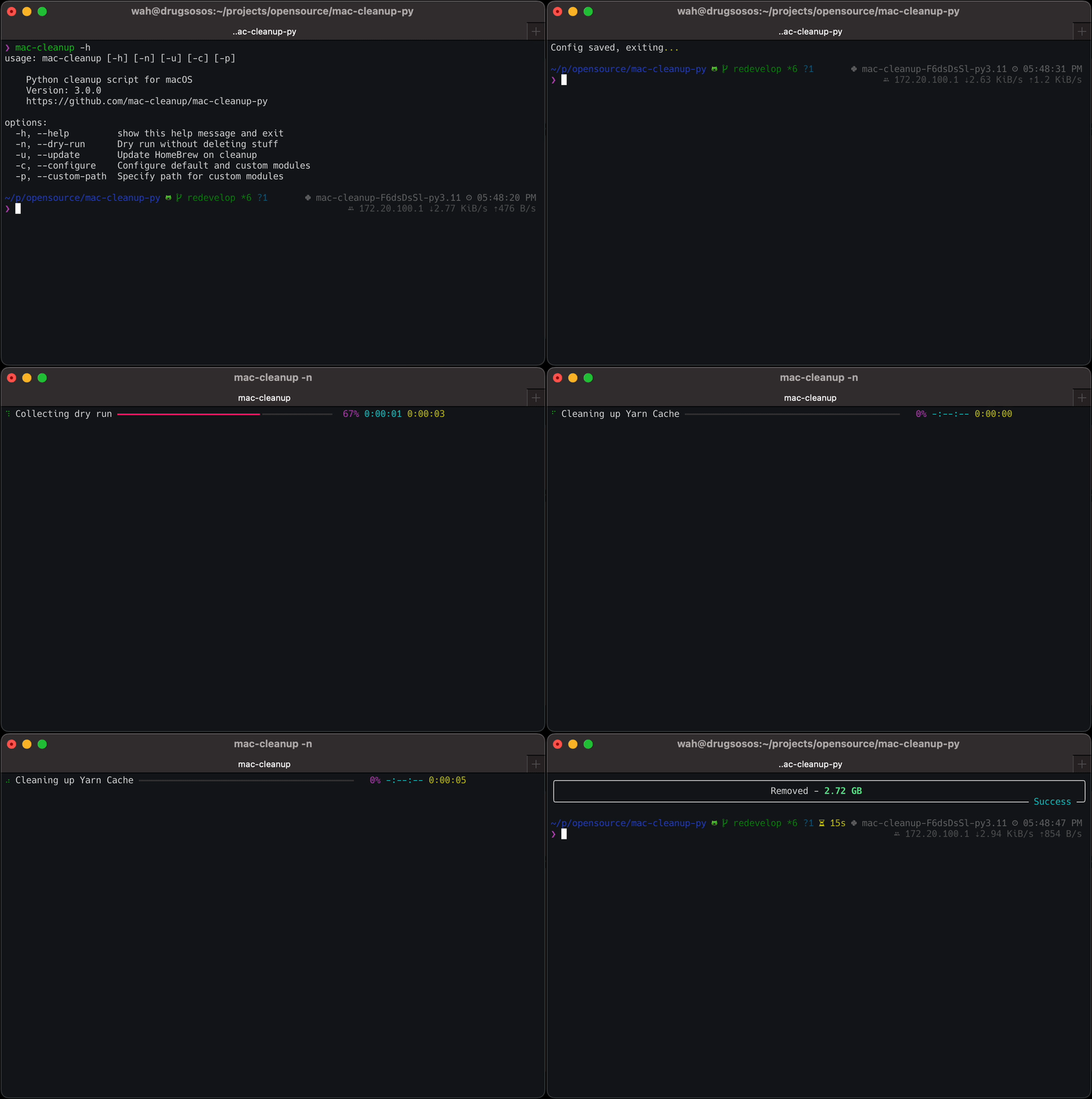
 $ mac-cleanup -h
usage: mac-cleanup [-h] [-n] [-u] [-c] [-p] [-f]

    Python cleanup script for macOS
    Version: 3.1.2
    https://github.com/mac-cleanup/mac-cleanup-py

options:
  -h, --help         show this help message and exit
  -n, --dry-run      Run without deleting stuff
  -u, --update       Update Homebrew on cleanup
  -c, --configure    Open module configuration screen
  -p, --custom-path  Specify path for custom modules
  -f, --force        Accept all warnings
ยินดีต้อนรับการมีส่วนร่วมเสมอ!
หากคุณมีแนวคิดคำแนะนำหรือรายงานข้อผิดพลาดใด ๆ อย่าลังเลที่จะส่งปัญหาหรือเปิดคำขอดึง
โครงการนี้ได้รับใบอนุญาตภายใต้ใบอนุญาต Apache-2.0
โครงการนี้ได้รับการพัฒนาโดยใช้เครื่องมือที่จัดทำโดย Jetbrains OSS Development Program
ค้นหาข้อมูลเพิ่มเติมเกี่ยวกับโปรแกรมของพวกเขาและวิธีการสนับสนุนโอเพนซอร์สที่นี่





