Stream responses
1.0.0

รหัสคือการแสดงให้เห็นถึงการใช้สตรีมมิ่งด้วย GPT-4 API, ChatGPT API และ InstructGPT (GPT-3.5.) รุ่น & Streamlit-App
วิธีการใช้เฉพาะ OpenAI และ Time Libraries และพิมพ์สตรีมใหม่โดยใช้ Print (end = '', flush = true):
!p ip install - - upgrade openai
import openai
import time
openai . api_key = user_secrets . get_secret ( "OPENAI_API_KEY" )
startime = time . time ()
ข้อจำกัดความรับผิดชอบ: ข้อเสียของการสตรีมในการใช้งานการผลิตคือการควบคุมนโยบายการใช้งานที่เหมาะสม: https://beta.openai.com/docs/usage-guidelines ซึ่งควรได้รับการตรวจสอบล่วงหน้าสำหรับแต่ละแอปพลิเคชันดังนั้นฉันขอแนะนำให้ดูนโยบายนี้ก่อนตัดสินใจใช้สตรีมมิ่ง
เรียกใช้ไฟล์ streams.ipnyb ส่วนแรก
 ### STREAM GPT-4 API RESPONSES
delay_time = 0.01 #  faster
max_response_length = 8000
answer = ''
# ASK QUESTION
prompt = input ( "Ask a question: " )
start_time = time . time ()

response = openai . ChatCompletion . create (
    # GPT-4 API REQQUEST
    model = 'gpt-4' ,
    messages = [
        { 'role' : 'user' , 'content' : f' { prompt } ' }
    ],
    max_tokens = max_response_length ,
    temperature = 0 ,
    stream = True ,  # this time, we set stream=True
)

for event in response :
    # STREAM THE ANSWER
    print ( answer , end = '' , flush = True ) # Print the response
    # RETRIEVE THE TEXT FROM THE RESPONSE
    event_time = time . time () - start_time  # CALCULATE TIME DELAY BY THE EVENT
    event_text = event [ 'choices' ][ 0 ][ 'delta' ] # EVENT DELTA RESPONSE
    answer = event_text . get ( 'content' , '' ) # RETRIEVE CONTENT
    time . sleep ( delay_time )
หลังจากแทรกอินพุตของผู้ใช้และกด Enter แล้วคุณควรเห็นเอาต์พุตที่พิมพ์ออกมา:

เรียกใช้ File Streams.IPNYB ส่วนที่สอง เพิ่มอินพุตของผู้ใช้และคุณควรเห็นคล้ายกับด้านล่าง:
 ### STREAM CHATGPT API RESPONSES
delay_time = 0.01 #  faster
max_response_length = 200
answer = ''
# ASK QUESTION
prompt = input ( "Ask a question: " )
start_time = time . time ()

response = openai . ChatCompletion . create (
    # CHATPG GPT API REQQUEST
    model = 'gpt-3.5-turbo' ,
    messages = [
        { 'role' : 'user' , 'content' : f' { prompt } ' }
    ],
    max_tokens = max_response_length ,
    temperature = 0 ,
    stream = True ,  # this time, we set stream=True
)

for event in response :
    # STREAM THE ANSWER
    print ( answer , end = '' , flush = True ) # Print the response
    # RETRIEVE THE TEXT FROM THE RESPONSE
    event_time = time . time () - start_time  # CALCULATE TIME DELAY BY THE EVENT
    event_text = event [ 'choices' ][ 0 ][ 'delta' ] # EVENT DELTA RESPONSE
    answer = event_text . get ( 'content' , '' ) # RETRIEVE CONTENT
    time . sleep ( delay_time )
เรียกใช้ File Streams.pnyb ส่วนที่สาม เพิ่มอินพุตของผู้ใช้และคุณควรเห็นคล้ายกับด้านล่าง:
 collected_events = []
completion_text = []
speed = 0.05 #smaller is faster
max_response_length = 200
start_time = time . time ()
prompt = input ( "Ask a question: " )
# Generate Answer
response = openai . Completion . create (
    model = 'text-davinci-003' ,
    prompt = prompt ,
    max_tokens = max_response_length ,
    temperature = 0 ,
    stream = True ,  # this time, we set stream=True
)

# Stream Answer
for event in response :
    event_time = time . time () - start_time  # calculate the time delay of the event
    collected_events . append ( event )  # save the event response
    event_text = event [ 'choices' ][ 0 ][ 'text' ]  # extract the text
    completion_text += event_text  # append the text
    time . sleep ( speed )
    print ( f" { event_text } " , end = "" , flush = True )
ฉันเพิ่ม "app_streamlit.py" -file ที่ใช้งานได้ซึ่งคุณสามารถแยกไปยังที่เก็บข้อมูลของคุณด้วย "ข้อกำหนด. txt" และปรับใช้ใน Streamlit
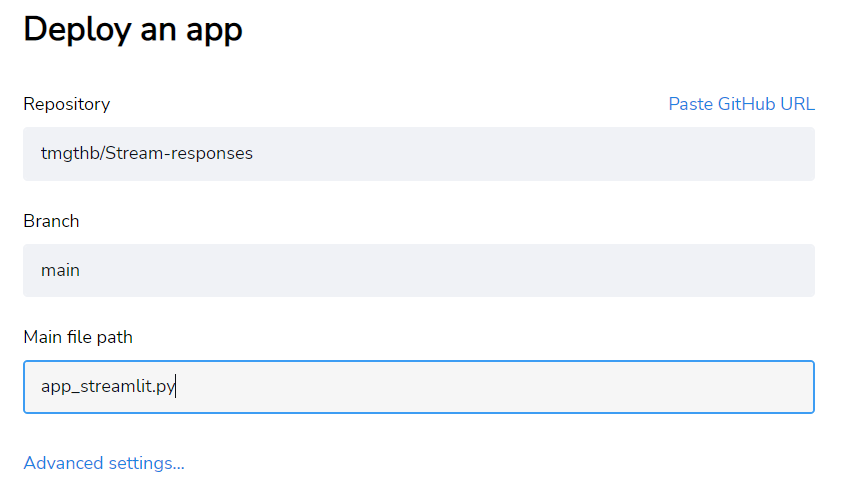
ในการตั้งค่าขั้นสูงเพิ่ม openai_api_key-variable โดยใช้รูปแบบ:
OPENAI_API_KEY = "INSERT HERE YOUR KEY" อย่าลังเลที่จะแยกและปรับปรุงรหัสตามใบอนุญาต ตัวอย่างเช่นคุณสามารถปรับปรุง CHATML เพิ่มเติมเพื่อให้แน่ใจว่าโฟลว์เป็นไปตามกฎ "ระบบ" ที่ต้องการ ตอนนี้ฉันปล่อยให้ว่างเปล่าเหล่านี้เพื่อทำให้สคริปต์พื้นฐานนี้เป็นเรื่องธรรมดามาก ฉันขอแนะนำให้ตรวจสอบบทความของฉันเฉพาะกับ Chatgpt API เกี่ยวกับการตอบสนองการสตรีมในสื่อที่เกี่ยวข้องกับการสตรีม, chatml: คำแนะนำพร้อมกับระบบผู้ช่วยและบทบาทของผู้ใช้





