AmoebaLLM
1.0.0

Yonggan Fu, Zhongzhi YU, Junwei Li, Jiayi Qian, Yongan Zhang, Xiangchi Yuan, Dachuan Shi, Roman Yakunin e Yingyan (Celine) Lin
Aceito no Neurips 2024 [Paper | Deslizar].
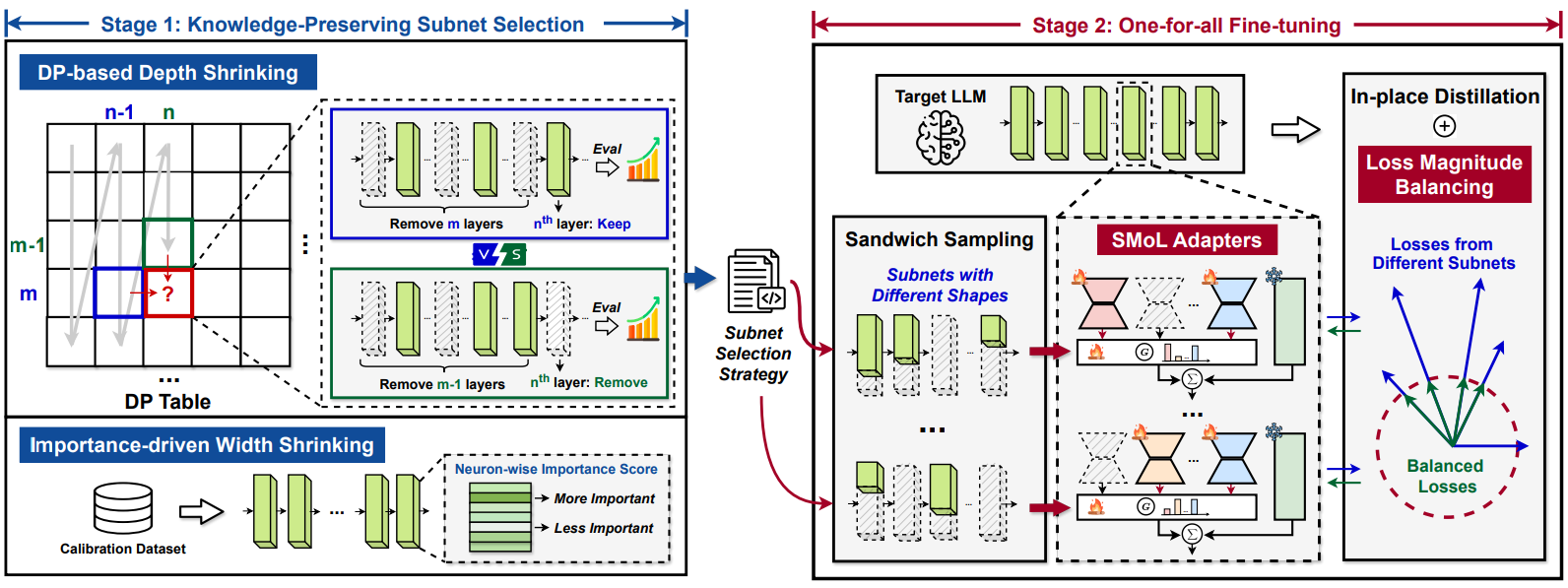
Use o CONDA para configurar o ambiente com base no env.yml fornecido:
conda env create -f env.yml
CUDA_VISIBLE_DEVICES=0 python main.py --model_name_or_path meta-llama/Llama-2-7b-hf --fp16 --output_dir ./output/calib_dp --do_train False --do_eval False --no_eval_orig --layer_calib_dp --calib_dataset mmlu --enable_shrinking --num_calib_sample 40 --calib_metric acc --min_num_layer 20 --dp_keep_last_layer 1
CUDA_VISIBLE_DEVICES=0 python main.py --model_name_or_path meta-llama/Llama-2-7b-hf --fp16 --output_dir ./output/width_calib --do_train False --do_eval False --use_auth_token --no_eval_orig --width_calib --num_calib_sample 512 --prune_width_method flap
dp_selection_strategy.npy (também fornecemos esse arquivo para LLAMA2-7B no repositório): python utils/merge_depth_width.py
--do_train True e --enable_shrinking e especifique a estratégia de seleção de subconjunto fornecida pelo estágio 1 com --shrinking_file dp_selection_strategy.npy : CUDA_VISIBLE_DEVICES=0 python main.py --model_name_or_path meta-llama/Llama-2-7b-hf --output_dir ./output/ft --dataset alpaca-gpt4 --use_auth_token --do_train True --do_eval True --do_mmlu_eval True --do_eval_wikitext2 True --lora_modules all --fp16 --source_max_len 384 --target_max_len 128 --gradient_accumulation_steps 4 --logging_steps 10 --max_steps 10000 --save_strategy steps --data_seed 42 --save_steps 1000 --save_total_limit 1 --evaluation_strategy steps --eval_dataset_size 1024 --max_eval_samples 1000 --eval_steps 1000 --optim paged_adamw_32bit --ddp_find_unused_parameters --enable_shrinking --kd_weight 1 --min_num_layer 20 --random_sample_num_layer 2 --distill_method sp --shrinking_method calib_dp --shrinking_file dp_selection_strategy.npy --shrinkable_width --width_choice [1,7/8,3/4,5/8] --prune_width_method flap --use_moe_lora --moe_num_expert 5 --moe_topk 2
amoeba_llama2 , aqui. Você pode baixar e descompactá -lo usando o seguinte comando: pip install gdown
gdown 1lwOiQa-UOYOXn72wo5gvzUvFat_PTg6b
unzip amoeba_llama2.zip
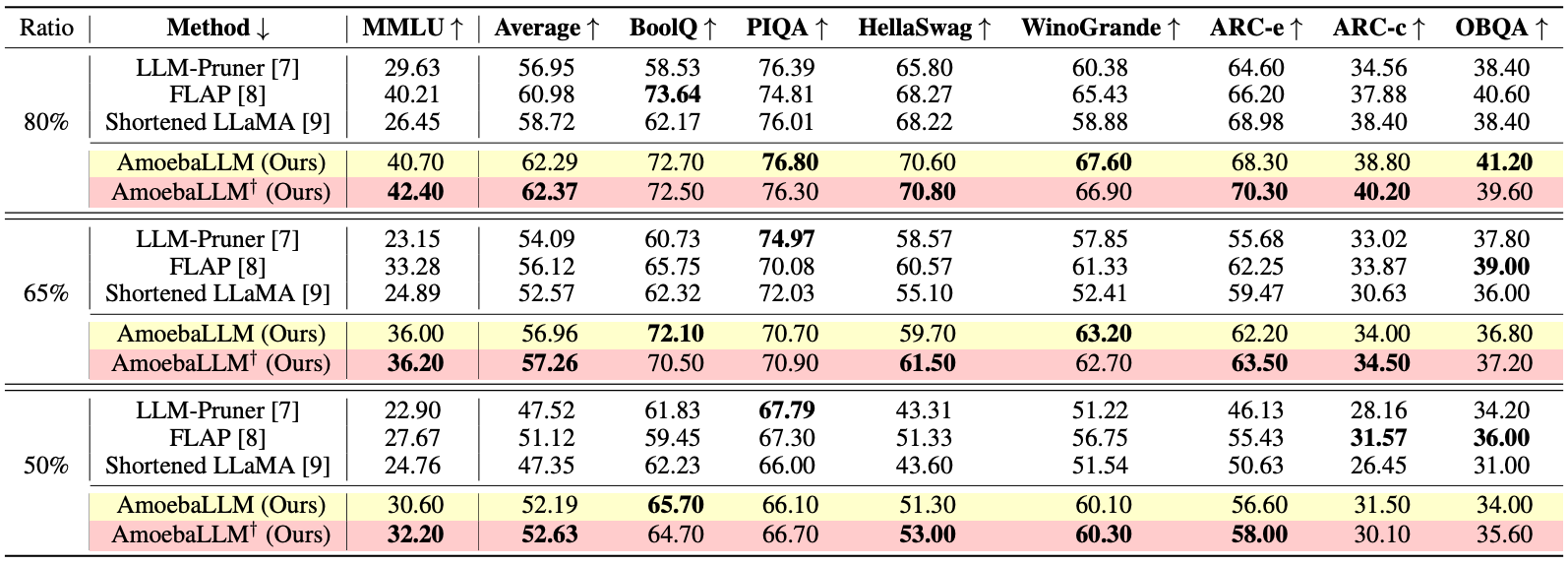
--output_dir como o caminho para o modelo ajustado e especifique as taxas de profundidade e largura alvo usando --eval_num_layer e --eval_num_width , respectivamente: CUDA_VISIBLE_DEVICES=0 python main.py --model_name_or_path meta-llama/Llama-2-7b-hf --output_dir amoeba_llama2 --do_train False --do_eval True --do_mmlu_eval True --bits 8 --bf16 --enable_shrinking --min_num_layer 20 --shrinking_method calib_dp --shrinking_file dp_selection_strategy.npy --shrinkable_width --width_choice [1,7/8,3/4,5/8] --prune_width_method flap --use_moe_lora --moe_num_expert 5 --moe_topk 2 --eval_num_layer 24 --eval_num_width 0.875 --do_lm_eval True --do_lm_eval_task arc_easy,piqa,hellaswag
Nós nos referimos às implementações em Qlora.
 @inproceedings{fuamoeballm,
  title={AmoebaLLM: Constructing Any-Shape Large Language Models for Efficient and Instant Deployment},
  author={Fu, Yonggan and Yu, Zhongzhi and Li, Junwei and Qian, Jiayi and Zhang, Yongan and Yuan, Xiangchi and Shi, Dachuan and Yakunin, Roman and Lin, Yingyan Celine},
  booktitle={The Thirty-eighth Annual Conference on Neural Information Processing Systems}
}







