AmoebaLLM
1.0.0

Yonggan Fu ، Zhongzhi Yu ، Junwei Li ، Jiayi Qian ، Yongan Zhang ، Xiangchi Yuan ، Dachuan Shi ، Roman Yakunin ، and Yingyan (Celine) Lin
مقبولة في Neups 2024 [ورقة | شريحة].
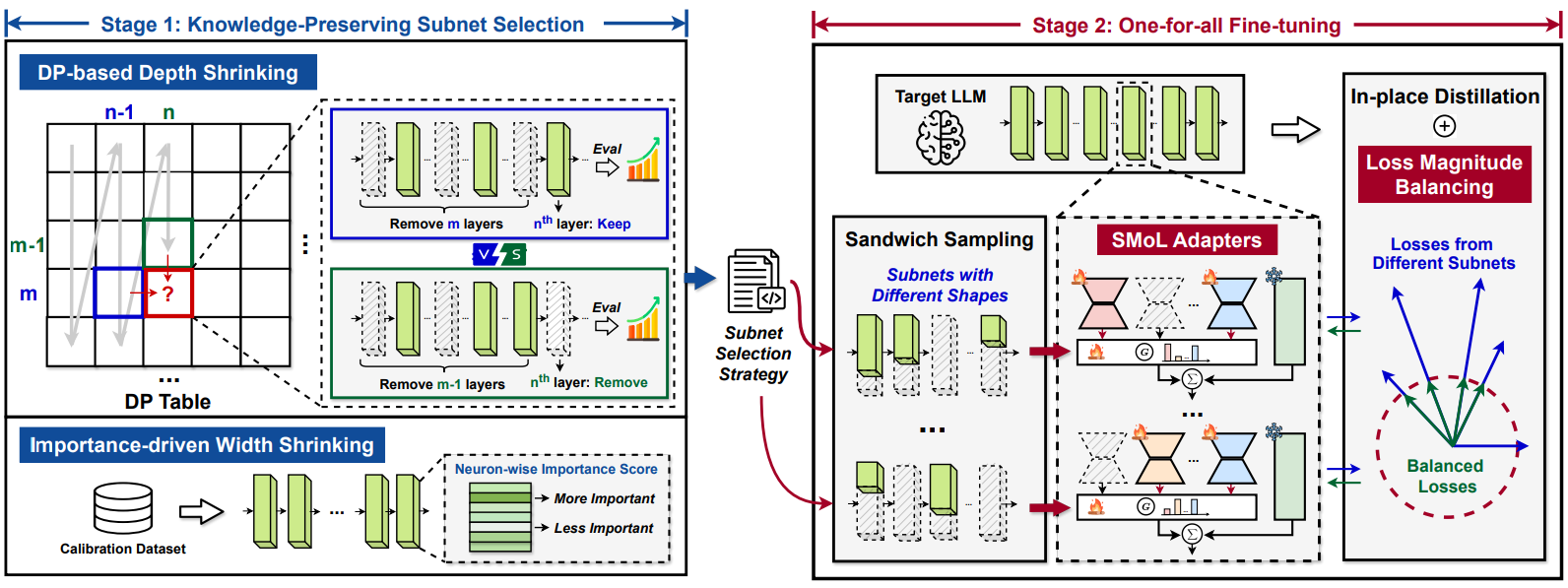
استخدم كوندا لإعداد البيئة بناءً على env.yml المقدمة:
conda env create -f env.yml
CUDA_VISIBLE_DEVICES=0 python main.py --model_name_or_path meta-llama/Llama-2-7b-hf --fp16 --output_dir ./output/calib_dp --do_train False --do_eval False --no_eval_orig --layer_calib_dp --calib_dataset mmlu --enable_shrinking --num_calib_sample 40 --calib_metric acc --min_num_layer 20 --dp_keep_last_layer 1
CUDA_VISIBLE_DEVICES=0 python main.py --model_name_or_path meta-llama/Llama-2-7b-hf --fp16 --output_dir ./output/width_calib --do_train False --do_eval False --use_auth_token --no_eval_orig --width_calib --num_calib_sample 512 --prune_width_method flap
dp_selection_strategy.npy (قمنا أيضًا بتوفير هذا الملف لـ llama2-7b في الريبو): python utils/merge_depth_width.py
--do_train True و- --enable_shrinking ، وحدد استراتيجية اختيار المجموعة الفرعية المقدمة بموجب المرحلة 1 مع- --shrinking_file dp_selection_strategy.npy : CUDA_VISIBLE_DEVICES=0 python main.py --model_name_or_path meta-llama/Llama-2-7b-hf --output_dir ./output/ft --dataset alpaca-gpt4 --use_auth_token --do_train True --do_eval True --do_mmlu_eval True --do_eval_wikitext2 True --lora_modules all --fp16 --source_max_len 384 --target_max_len 128 --gradient_accumulation_steps 4 --logging_steps 10 --max_steps 10000 --save_strategy steps --data_seed 42 --save_steps 1000 --save_total_limit 1 --evaluation_strategy steps --eval_dataset_size 1024 --max_eval_samples 1000 --eval_steps 1000 --optim paged_adamw_32bit --ddp_find_unused_parameters --enable_shrinking --kd_weight 1 --min_num_layer 20 --random_sample_num_layer 2 --distill_method sp --shrinking_method calib_dp --shrinking_file dp_selection_strategy.npy --shrinkable_width --width_choice [1,7/8,3/4,5/8] --prune_width_method flap --use_moe_lora --moe_num_expert 5 --moe_topk 2
amoeba_llama2 ، هنا. يمكنك تنزيله وفك ضغطه باستخدام الأمر التالي: pip install gdown
gdown 1lwOiQa-UOYOXn72wo5gvzUvFat_PTg6b
unzip amoeba_llama2.zip
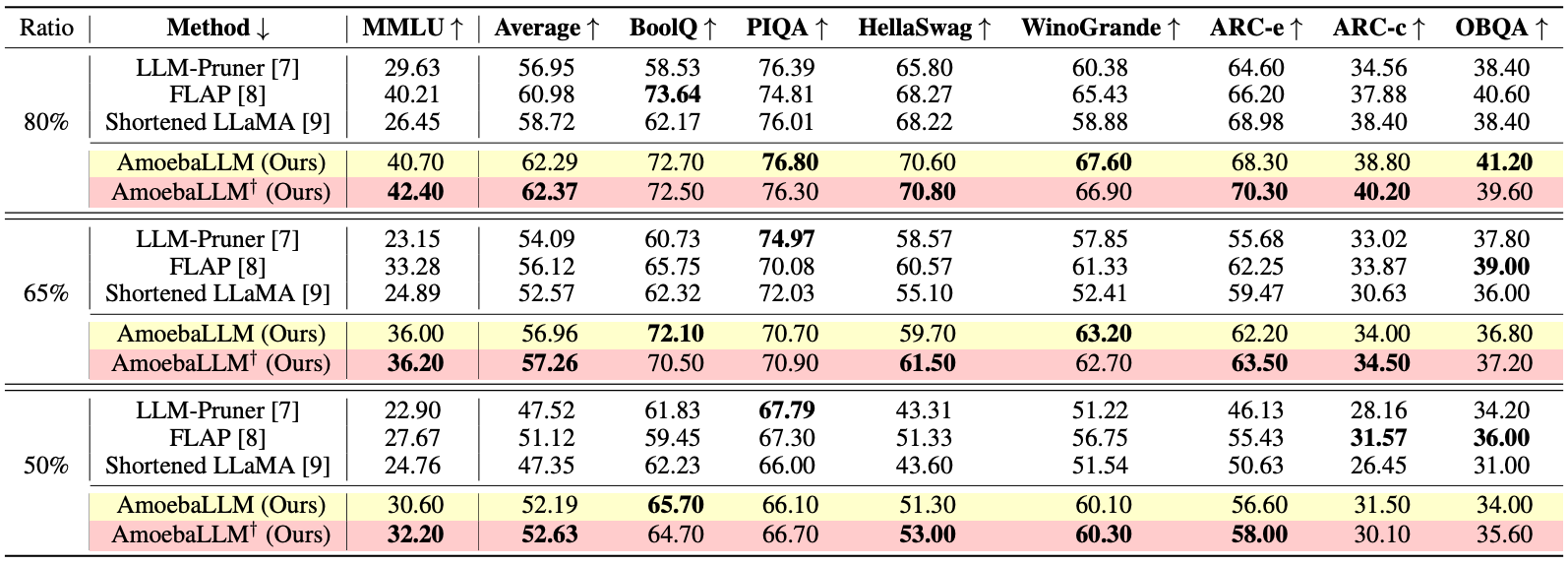
--output_dir باعتباره المسار إلى النموذج الذي تم ضبطه وحدد نسب العمق ونسب العرض الهدف باستخدام- --eval_num_layer و- --eval_num_width ، على التوالي: CUDA_VISIBLE_DEVICES=0 python main.py --model_name_or_path meta-llama/Llama-2-7b-hf --output_dir amoeba_llama2 --do_train False --do_eval True --do_mmlu_eval True --bits 8 --bf16 --enable_shrinking --min_num_layer 20 --shrinking_method calib_dp --shrinking_file dp_selection_strategy.npy --shrinkable_width --width_choice [1,7/8,3/4,5/8] --prune_width_method flap --use_moe_lora --moe_num_expert 5 --moe_topk 2 --eval_num_layer 24 --eval_num_width 0.875 --do_lm_eval True --do_lm_eval_task arc_easy,piqa,hellaswag
نشير إلى التطبيقات في qlora.
 @inproceedings{fuamoeballm,
  title={AmoebaLLM: Constructing Any-Shape Large Language Models for Efficient and Instant Deployment},
  author={Fu, Yonggan and Yu, Zhongzhi and Li, Junwei and Qian, Jiayi and Zhang, Yongan and Yuan, Xiangchi and Shi, Dachuan and Yakunin, Roman and Lin, Yingyan Celine},
  booktitle={The Thirty-eighth Annual Conference on Neural Information Processing Systems}
}







