overlay_container
1.0.0

Um widget de vibração que torna seu filho fora da hierarquia original do widget.
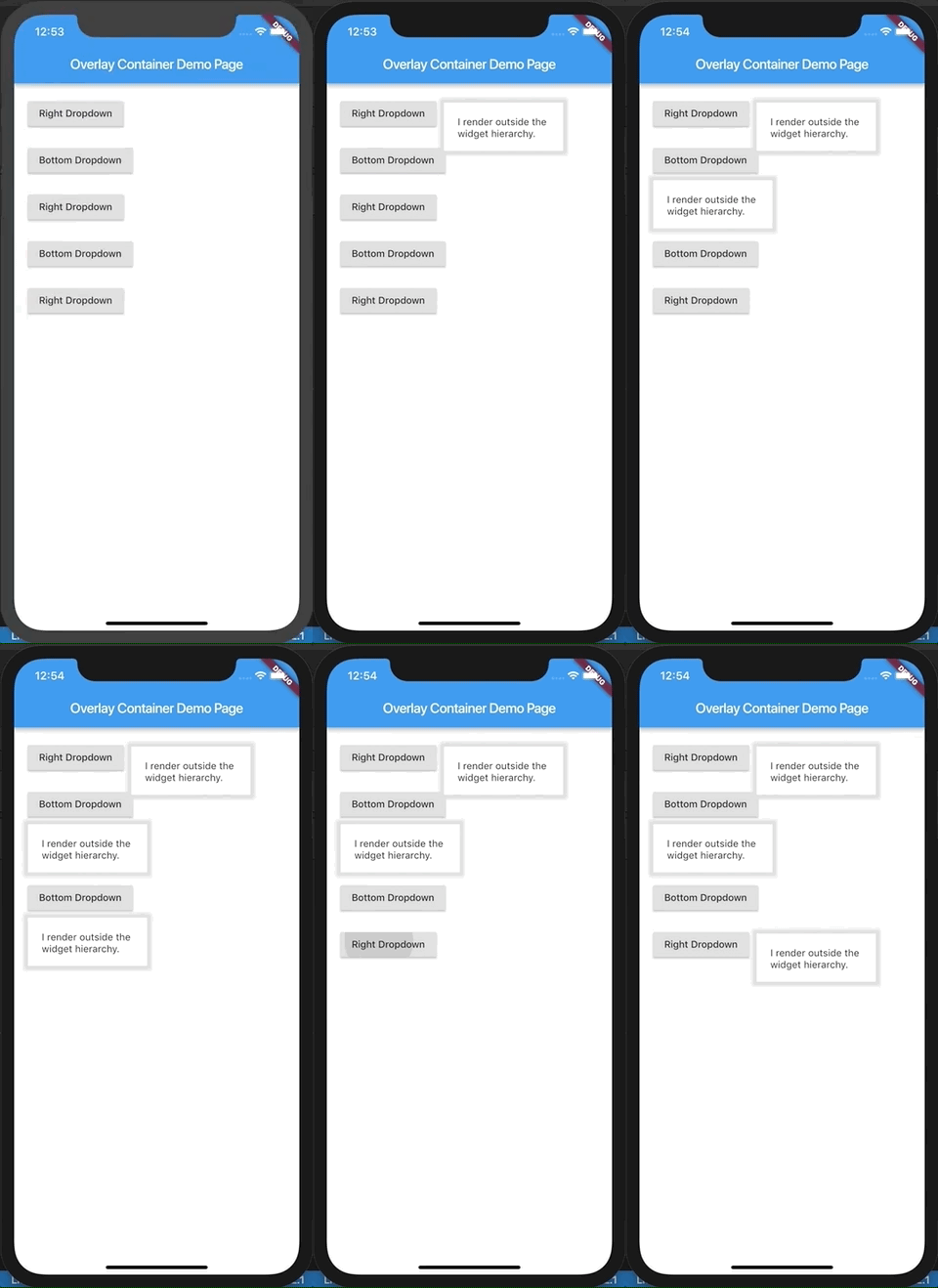
Esta demonstração está presente como um exemplo aqui. Você também pode verificar a pasta examples .
A criança passou para esse widget é renderizada fora da hierarquia do widget como uma sobreposição à árvore de widgets exisitantes. Como resultado, esse widget é altamente adequado para criar opções de suspensão personalizadas, sugestões de preenchimento automático, diálogos etc. Pense nisso como o widget colocado absolutamente e com um índice z positivo sobre o restante da árvore do widget. Na verdade, é um invólucro amigável sobre as APIs de sobreposição e sobreposição da vibração.
Se você já usou o React, isso tenta fazer o que o React Portal faz, de certa forma.
 import 'package:flutter/material.dart' ;
import 'package:overlay_container/overlay_container.dart' ;

class MyApp extends StatelessWidget {
  @override
  Widget build ( BuildContext context) {
    return MaterialApp (
      title : 'Overlay Container Demo' ,
      theme : ThemeData (
        primarySwatch : Colors .blue,
      ),
      home : MyHomePage (),
    );
  }
}

class MyHomePage extends StatefulWidget {
  _MyHomePageState createState () => _MyHomePageState ();
}

class _MyHomePageState extends State < MyHomePage > {
  // Need to maintain a "show" state either locally or inside
  // a bloc.
  bool _dropdownShown = false ;

  void _toggleDropdown () {
    setState (() {
      _dropdownShown = ! _dropdownShown;
    });
  }

  @override
  Widget build ( BuildContext context) {
    return Scaffold (
      appBar : AppBar (
        title : Text ( 'Overlay Container Demo Page' ),
      ),
      body : Padding (
        padding : const EdgeInsets . all ( 20 ),
        child : Column (
          crossAxisAlignment : CrossAxisAlignment .start,
          children : < Widget > [
            RaisedButton (
              onPressed : _toggleDropdown,
              child : Column (
                children : < Widget > [
                  Text ( "Dropdown button" ),
                ],
              ),
            ),
            // By default the overlay (since this is a Column) will
            // be added right below the raised button
            // but outside the widget tree.
            // We can change that by supplying a "position".
            OverlayContainer (
              show : _dropdownShown,
              // Let's position this overlay to the right of the button.
              position : OverlayContainerPosition (
                // Left position.
                150 ,
                // Bottom position.
                45 ,
              ),
              // The content inside the overlay.
              child : Container (
                height : 70 ,
                padding : const EdgeInsets . all ( 20 ),
                margin : const EdgeInsets . only (top : 5 ),
                decoration : BoxDecoration (
                  color : Colors .white,
                  boxShadow : < BoxShadow > [
                    BoxShadow (
                      color : Colors .grey[ 300 ],
                      blurRadius : 3 ,
                      spreadRadius : 6 ,
                    )
                  ],
                ),
                child : Text ( "I render outside the n widget hierarchy." ),
              ),
            ),
          ],
        ),
      ),
    );
  }
}
Um exemplo mais elaborado é encontrado aqui.





