overlay_container
1.0.0

Un widget de Flutter que hace a su hijo fuera de la jerarquía de widgets original.
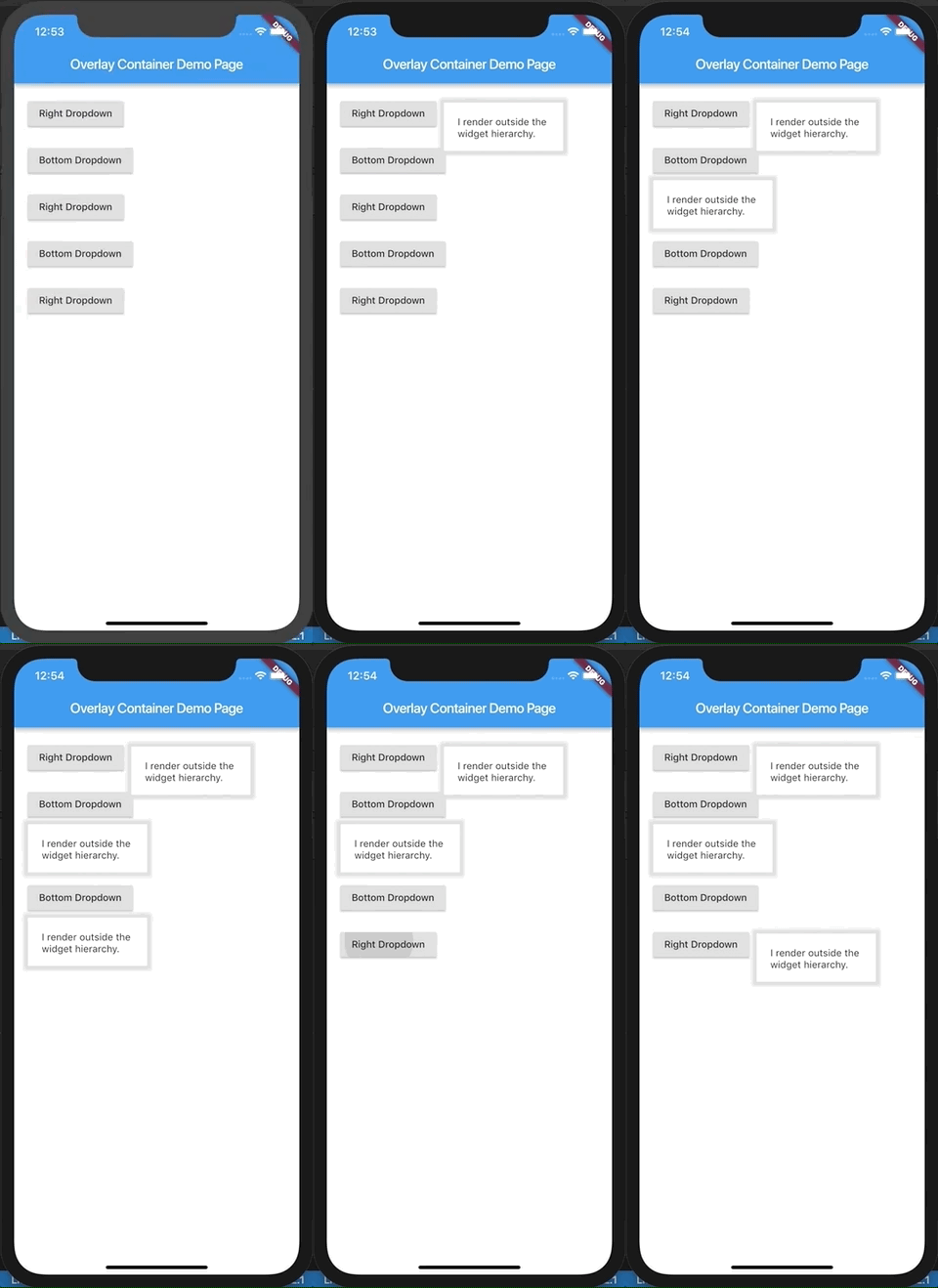
Esta demostración está presente como ejemplo aquí. También puede pagar la carpeta de examples .
El niño que pasó a este widget se representa fuera de la jerarquía de widgets como una superposición al exisitante árbol de widgets. Como resultado, este widget es muy adecuado para construir opciones desplegables personalizadas, sugerencias de autocompletos, diálogos, etc. Piense en él como un widget colocado absolutamente y tener un índice Z positivo sobre el resto del árbol del widget. En realidad, es un envoltorio amistoso sobre las API de superposición de Flutter y superposición.
Si alguna vez ha usado React, esto intenta hacer lo que React Portal hace, en cierto modo.
 import 'package:flutter/material.dart' ;
import 'package:overlay_container/overlay_container.dart' ;

class MyApp extends StatelessWidget {
  @override
  Widget build ( BuildContext context) {
    return MaterialApp (
      title : 'Overlay Container Demo' ,
      theme : ThemeData (
        primarySwatch : Colors .blue,
      ),
      home : MyHomePage (),
    );
  }
}

class MyHomePage extends StatefulWidget {
  _MyHomePageState createState () => _MyHomePageState ();
}

class _MyHomePageState extends State < MyHomePage > {
  // Need to maintain a "show" state either locally or inside
  // a bloc.
  bool _dropdownShown = false ;

  void _toggleDropdown () {
    setState (() {
      _dropdownShown = ! _dropdownShown;
    });
  }

  @override
  Widget build ( BuildContext context) {
    return Scaffold (
      appBar : AppBar (
        title : Text ( 'Overlay Container Demo Page' ),
      ),
      body : Padding (
        padding : const EdgeInsets . all ( 20 ),
        child : Column (
          crossAxisAlignment : CrossAxisAlignment .start,
          children : < Widget > [
            RaisedButton (
              onPressed : _toggleDropdown,
              child : Column (
                children : < Widget > [
                  Text ( "Dropdown button" ),
                ],
              ),
            ),
            // By default the overlay (since this is a Column) will
            // be added right below the raised button
            // but outside the widget tree.
            // We can change that by supplying a "position".
            OverlayContainer (
              show : _dropdownShown,
              // Let's position this overlay to the right of the button.
              position : OverlayContainerPosition (
                // Left position.
                150 ,
                // Bottom position.
                45 ,
              ),
              // The content inside the overlay.
              child : Container (
                height : 70 ,
                padding : const EdgeInsets . all ( 20 ),
                margin : const EdgeInsets . only (top : 5 ),
                decoration : BoxDecoration (
                  color : Colors .white,
                  boxShadow : < BoxShadow > [
                    BoxShadow (
                      color : Colors .grey[ 300 ],
                      blurRadius : 3 ,
                      spreadRadius : 6 ,
                    )
                  ],
                ),
                child : Text ( "I render outside the n widget hierarchy." ),
              ),
            ),
          ],
        ),
      ),
    );
  }
}
Aquí se encuentra un ejemplo más elaborado.





