overlay_container
1.0.0

Un widget de flottement qui rend son enfant à l'extérieur de la hiérarchie du widget d'origine.
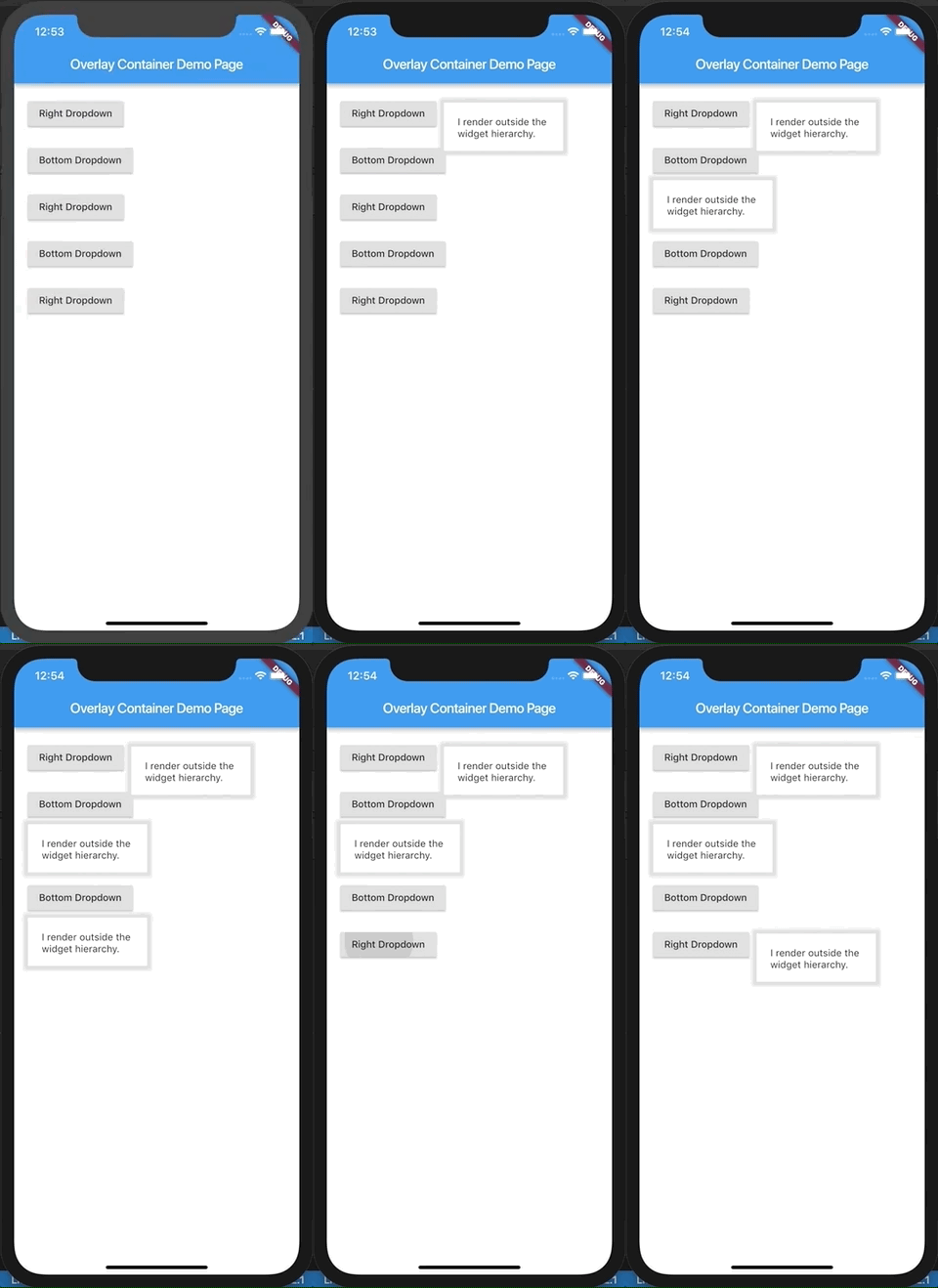
Cette démo est présente comme exemple ici. Vous pouvez également vérifier le dossier examples .
L'enfant transmis à ce widget est rendu à l'extérieur de la hiérarchie du widget en tant que superposition de l'arbre du widget existant. En conséquence, ce widget est très adapté pour construire des options de liste déroulante personnalisées, des suggestions de saisie automatique, des dialogues, etc. Considérez-le comme un widget placé absolument et ayant un indice Z positif sur le reste du widget arbre. C'est en fait un wrapper amical sur la superposition du flottement et les API de superposition.
Si vous avez déjà utilisé React, cela essaie de faire ce que fait React Portal, d'une certaine manière.
 import 'package:flutter/material.dart' ;
import 'package:overlay_container/overlay_container.dart' ;

class MyApp extends StatelessWidget {
  @override
  Widget build ( BuildContext context) {
    return MaterialApp (
      title : 'Overlay Container Demo' ,
      theme : ThemeData (
        primarySwatch : Colors .blue,
      ),
      home : MyHomePage (),
    );
  }
}

class MyHomePage extends StatefulWidget {
  _MyHomePageState createState () => _MyHomePageState ();
}

class _MyHomePageState extends State < MyHomePage > {
  // Need to maintain a "show" state either locally or inside
  // a bloc.
  bool _dropdownShown = false ;

  void _toggleDropdown () {
    setState (() {
      _dropdownShown = ! _dropdownShown;
    });
  }

  @override
  Widget build ( BuildContext context) {
    return Scaffold (
      appBar : AppBar (
        title : Text ( 'Overlay Container Demo Page' ),
      ),
      body : Padding (
        padding : const EdgeInsets . all ( 20 ),
        child : Column (
          crossAxisAlignment : CrossAxisAlignment .start,
          children : < Widget > [
            RaisedButton (
              onPressed : _toggleDropdown,
              child : Column (
                children : < Widget > [
                  Text ( "Dropdown button" ),
                ],
              ),
            ),
            // By default the overlay (since this is a Column) will
            // be added right below the raised button
            // but outside the widget tree.
            // We can change that by supplying a "position".
            OverlayContainer (
              show : _dropdownShown,
              // Let's position this overlay to the right of the button.
              position : OverlayContainerPosition (
                // Left position.
                150 ,
                // Bottom position.
                45 ,
              ),
              // The content inside the overlay.
              child : Container (
                height : 70 ,
                padding : const EdgeInsets . all ( 20 ),
                margin : const EdgeInsets . only (top : 5 ),
                decoration : BoxDecoration (
                  color : Colors .white,
                  boxShadow : < BoxShadow > [
                    BoxShadow (
                      color : Colors .grey[ 300 ],
                      blurRadius : 3 ,
                      spreadRadius : 6 ,
                    )
                  ],
                ),
                child : Text ( "I render outside the n widget hierarchy." ),
              ),
            ),
          ],
        ),
      ),
    );
  }
}
Un exemple plus élaboré est trouvé ici.





