twitch chatlog
v7.0.0

twitch-chatlog 와 함께 명령 줄에서 Chatlog를 Twitch Vod로 가져 오십시오.
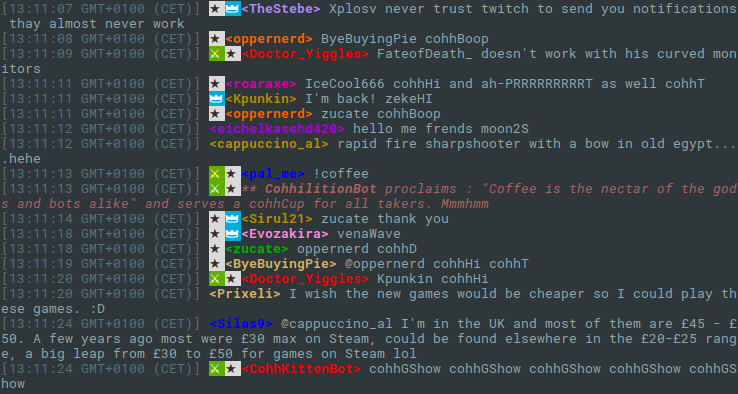
이 작은 명령은 전체 채팅 로그를 Twitch Vod로 다운로드 할 수 있습니다. VOD (1111111 또는 이와 유사한)의 ID를 인수로 만 사용합니다. 명령의 사용법에 대해 알아 보려면 twitch-chatlog -h 사용하십시오.
출력은 선택적으로 -c 또는 --color 로 색칠하거나 환경 변수 TWITCH_CHATLOG_COLOR 설정하여 색칠 할 수 있습니다.
자신의 Twitch 응용 프로그램 클라이언트 ID를 사용하려면 명령 줄 옵션 -C 또는 --client-id 로 제공하거나 환경 변수 TWITCH_CHATLOG_CLIENT_ID 설정할 수 있습니다. 클라이언트 ID의 기본값은 2016 년 8 월 8 일부터 작동하도록 보장되지 않으며,이 경우 직접 제공해야합니다.
채팅 로그의 일부를 가져 오기 위해 --start , --length 및 --end 사용할 수 있습니다. 아래의 사용 섹션을 참조하십시오. 기본적으로 명령은 처음 10 분만 채팅 로그를 가져와 요청 금액을 최소화합니다.
npm install -g twitch-chatlog Fetch the chat log to a Twitch VOD.
Usage: twitch-chatlog <vod_id>
vod_id is the ID from the VOD URL, optionally prefixed with v (deprecated).
Options:
-c, --color Colorize output [boolean] [default: false]
-C, --client-id Twitch application client ID [string] [default: (Client-ID)]
-l, --length Amount of time from the log to fetch in seconds. Gets
shortened to the VOD length if bigger. 0 loads everything but
is not recommended. The output will run until the next end of
a log fragment. [number] [default: (10 min)]
-s, --start Start time. Can either be a time relative to the VOD start or
actual time. [string] [default: "00:00:00"]
-e, --end End time. Alternative to specifying a length. A time like for
start. [string]
-r, --raw Print the raw JSON output instead of a formatted chat log.
[boolean] [default: false]
-h, --help Show help [boolean]
-v, --version Show version number [boolean]
Examples:
twitch-chatlog 79240813 Load the first ten minutes of chat
for the VOD
https://twitch.tv/ec0ke/v/79040813
twitch-chatlog -c --end 00:15:00 79240813 Load the first 15 minutes of chat
for the VOD and colorize the output.
twitch-chatlog 79240813 Load the chat log until the given
--end=2016-07-20T20:37:44+0000 date.
이 프로그램은 비공식 트 위치 API를 사용하여 언제라도 작동을 중단 할 수 있습니다. 또한 잠재적으로 많은 요청을 빠르게 연속적으로 보낼 수 있으며, 이로 인해 Twitch가 이에 대한 조치를 취하기 때문에 프로그램 및/또는 Twitch 경험이 줄어 듭니다.







