twitch chatlog
v7.0.0

twitch-chatlogを使用して、コマンドラインからChatLogをTwitch Vodに連れて行きます。
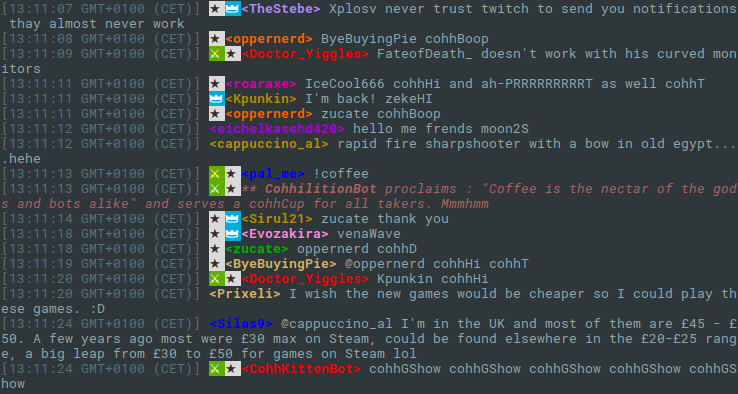
この小さなコマンドは、チャットログ全体をTwitch VODにダウンロードできます。 VODのID(1111111以降)を引数のみとして取得します。コマンドの使用について学ぶには、 twitch-chatlog -h使用してください。
出力は、オプションで-cまたは--colorで色付けするか、環境変数TWITCH_CHATLOG_COLORを設定することで色付けできます。
独自のTwitchアプリケーションクライアントIDを使用するには、コマンドラインオプション-Cまたは--client-idとして提供するか、環境変数TWITCH_CHATLOG_CLIENT_IDを設定できます。クライアントIDのデフォルト値は、2016年8月8日過ぎに動作することを保証されていません。その場合、独自のものを提供する必要があります。
チャットログの部分を制御するには、 --start 、 --length 、および--end使用できます。以下の使用セクションを参照してください。デフォルトでは、コマンドはチャットログの最初の10分間のみを取得して、リクエストの量を最小限に抑えます。
npm install -g twitch-chatlog Fetch the chat log to a Twitch VOD.
Usage: twitch-chatlog <vod_id>
vod_id is the ID from the VOD URL, optionally prefixed with v (deprecated).
Options:
-c, --color Colorize output [boolean] [default: false]
-C, --client-id Twitch application client ID [string] [default: (Client-ID)]
-l, --length Amount of time from the log to fetch in seconds. Gets
shortened to the VOD length if bigger. 0 loads everything but
is not recommended. The output will run until the next end of
a log fragment. [number] [default: (10 min)]
-s, --start Start time. Can either be a time relative to the VOD start or
actual time. [string] [default: "00:00:00"]
-e, --end End time. Alternative to specifying a length. A time like for
start. [string]
-r, --raw Print the raw JSON output instead of a formatted chat log.
[boolean] [default: false]
-h, --help Show help [boolean]
-v, --version Show version number [boolean]
Examples:
twitch-chatlog 79240813 Load the first ten minutes of chat
for the VOD
https://twitch.tv/ec0ke/v/79040813
twitch-chatlog -c --end 00:15:00 79240813 Load the first 15 minutes of chat
for the VOD and colorize the output.
twitch-chatlog 79240813 Load the chat log until the given
--end=2016-07-20T20:37:44+0000 date.
このプログラムでは、任意の時点で動作を停止する可能性のある非公式のTwitch APIを使用しています。また、多くの要求を迅速に連続して送信する可能性があります。







