factura electronica Web Service C Sharp
1.0.0



이 서비스는 2021 년 4 월 1 일부터 이용할 수 없게 될 것입니다. 새로운 버전의 API에는 감사에서 SAT의 검증 또는 처벌에 많은 시간을 촉진하고 절약 할 수있는 더 많은 도구가 있습니다. https://develers.mx/refortion/-desarrollo에서 새로운 문서를 널리 검토하는 것이 좋습니다.
새로운 API 액세스 서비스는 다음과 같이 게시됩니다.
 https://testapi.facturoporti.com.mx/
https://api.facturoporti.com.mx/
샌드 박스 또는 생산을 사용하는 환경에 따라.
서비스가 필요하거나 서비스를 고용해야합니까? [email protected] [email protected]로 이메일을 보내 주시고, 페이지로 이동하여 https://www.facturoporti.com.mx 우리에게 온라인으로 알려 주거나 555 546 2288 또는 558 421 767로 전화하십시오.
이것은 송장, 메모, 영수증, 급여, 베어링 편지, 지불 보완 등을 생성하기 위해 C#에서 웹 서비스를 사용하는 데 사용되는 예입니다) .
이 서비스는 자신의 수단으로 이미 XML을 생성하고 스탬핑 만 필요할 때 이상적입니다. 통합은 10 분 안에 쉽고 빠릅니다. 테스트 환경에서 1 시간 이내에 생산을 테스트 환경에서 방송 할 것입니다.
또한 웹 서비스는 하나 이상의 CFDI를 취소 할 수 있습니다.
Visual Studio Development IDE 2017 커뮤니티를 사용하는 것이 좋습니다. 모든 커뮤니티 버전은 무료이며 https://visualstudio.microsoft.com/es/vs/communch/에서 다운로드 할 수 있습니다.
FacturoPorti C#의 최신 버전을
git clone https://github.com/facturoporti/factura-electronica-Web-Service-C-Sharp.git
스탬핑 프로세스를 수행하는 데 필요한 내용이 포함 된 저장소를 다운로드하십시오.
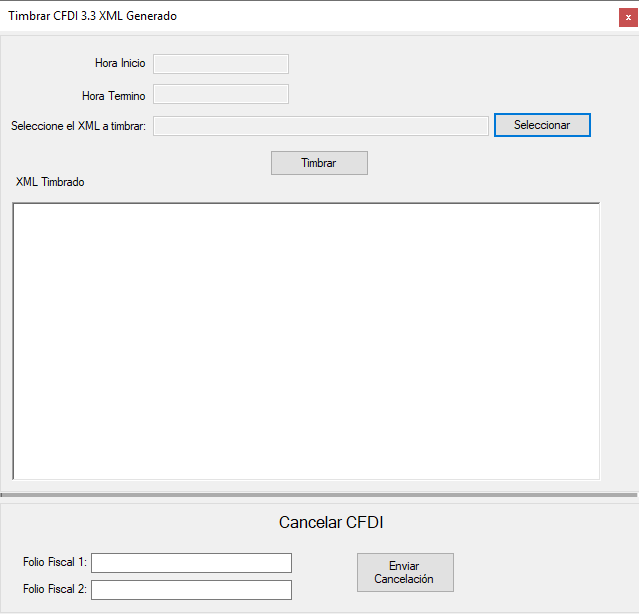
프레스 팀 브라 파일을 선택하면 시스템이 다음을 수행합니다.
 if ( txtArchivoXML . Text . Trim ( ) . Length == 0 )
            {
                MessageBox . Show ( "Seleccione un archivo antes de continuar." , "Error al Timbrar Documento" ) ;
            }
            else
            {
                txtFechaInicio . Text = DateTime . Now . ToString ( ) ;

                Cursor . Show ( ) ;
                Cursor . Current = Cursors . WaitCursor ;

                CertificarClient certificar = new CertificarClient ( ) ;
                AutenticarPeticion autenticar = new AutenticarPeticion ( ) ;
                TimbrarCFDIPeticion xml = new TimbrarCFDIPeticion ( ) ;

                // Asigna los parametros de configuracion de conexion
                autenticar . Usuario = "PruebasTimbrado" ;
                autenticar . Contrasenia = "@Notiene1" ;

                // abre el archivo XMl que fue seleccionado
                FileStream resultado = null ;
                resultado = new FileStream ( txtArchivoXML . Text , FileMode . Open , FileAccess . Read , FileShare . Read ) ;
                using ( StreamReader contenidoArchivo = new StreamReader ( resultado ) )
                {
                    xml . XMLEntrada = contenidoArchivo . ReadToEnd ( ) ;
                    contenidoArchivo . Close ( ) ;
                }

                TimbrarCFDIRespuesta respuesta = certificar . TimbradoMultiEmpresas ( autenticar , xml ) ;

                certificar . Close ( ) ;

                txtFechaTermino . Text = DateTime . Now . ToString ( ) ;

                if ( respuesta . Estatus . Codigo == "000" )
                {
                    txtXMLTimbrado . Text = respuesta . Timbrado . TimbreXML ;
                }

                MessageBox . Show ( respuesta . Estatus . Descripcion , "Generación CFDI" ) ;

                Cursor . Current = Cursors . Default ;
} 이 시스템은 스탬핑의 결과가 재정 목재를 보여줄 것임을 나타냅니다.
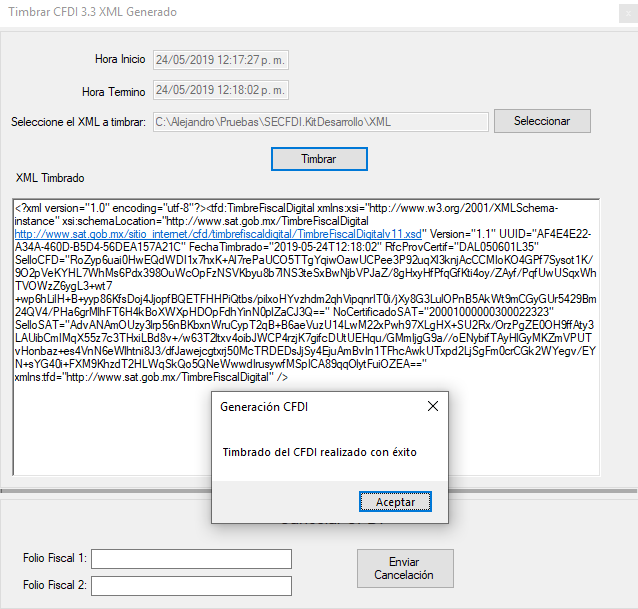
중고 C# 버전
Visual Studio 2017 Community con Framework 4.5
취소를 수행하려면 재정 폴리오 (UUID)에 입력하십시오.
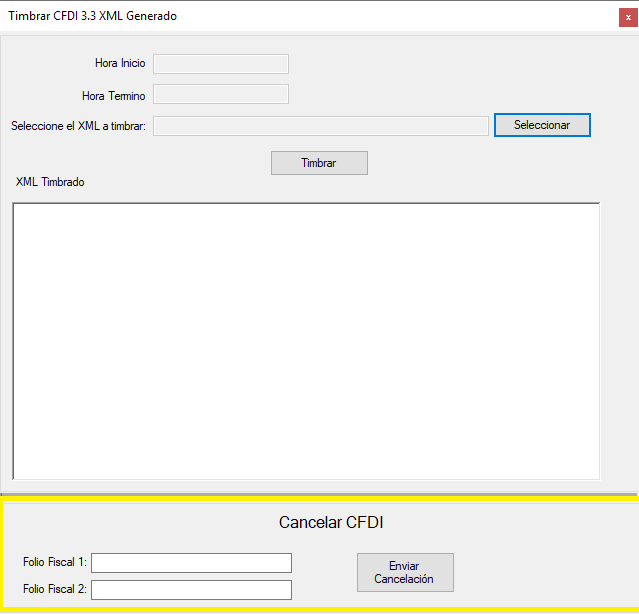
 if ( txtFolioFiscal1 . Text . Trim ( ) . Length == 0 && txtFolioFiscal2 . Text . Trim ( ) . Length == 0 )
            {
                MessageBox . Show ( "Ingrese al menos un Folio Fiscal antes de continuar." , "Error al cancelar el CFDI" ) ;
            }
            else
            {
                // Genera XMl con los Folios a enviar se pueden enviar uno o mas CFDI para cancelacion
                // Solo se podran enviar CFDI timbrados con nuestro servicio no hay el limite de CFDI que se puean cancelar

                Cursor . Show ( ) ;
                Cursor . Current = Cursors . WaitCursor ;

                CertificarClient certificar = new CertificarClient ( ) ;
                AutenticarPeticion autenticar = new AutenticarPeticion ( ) ;
                CancelarCFDIPACPeticion cancelar = new CancelarCFDIPACPeticion ( ) ;

                // Asigna los parametros de configuracion de conexion
                autenticar . Usuario = "PruebasTimbrado" ;
                autenticar . Contrasenia = "@Notiene1" ;

                cancelar . RFC = "AAA010101AAA" ; // RFC del emisor del CFDI;
                cancelar . Password = "12345678a" ;

                Archivos archivo = new Archivos ( ) ;
                cancelar . PFX = archivo . ConvertirStreamToByte ( archivo . Abrir ( ObtieneDirectorioAplicacion ( ) + @"CertificadoAAA010101AAA.pfx" ) ) ;  //"Se debe de enviar el certificado en formato PFX para realizar la cancelacion";

                List < string > folios = new List < string > ( ) ;

                if ( ! string . IsNullOrEmpty ( txtFolioFiscal1 . Text ) )
                    folios . Add ( txtFolioFiscal1 . Text . Trim ( ) ) ;

                if ( ! string . IsNullOrEmpty ( txtFolioFiscal2 . Text ) )
                    folios . Add ( txtFolioFiscal2 . Text . Trim ( ) ) ;

                cancelar . UUID = folios . ToArray ( ) ;

                CancelarCFDIRespuesta respuesta =  certificar . CancelarCFDICualquierPAC ( autenticar , cancelar ) ;

                certificar . Close ( ) ;

                txtFechaTermino . Text = DateTime . Now . ToString ( ) ;

                Cursor . Current = Cursors . Default ;

                // No hay limite para el envio de cancelaciones en el ejemplo solo en envian 3 pero pueden ser todos los que el usuario
                // desee cancelar al mismo tiempo
                for ( int contador = 0 ; contador < respuesta . FoliosRespuesta . Length ; contador ++ )
			    {
                    if ( respuesta . FoliosRespuesta [ contador ] . Estatus != null )
                        MessageBox . Show ( respuesta . FoliosRespuesta [ contador ] . Estatus . Descripcion , "Generación CFDI" ) ;
			    }

} CODE를 실행하기 전에 송신 버튼을 실행하십시오. 재정 데이터로 값을 업데이트해야합니다. 실행이 끝나면 답을 얻을 수 있습니다.
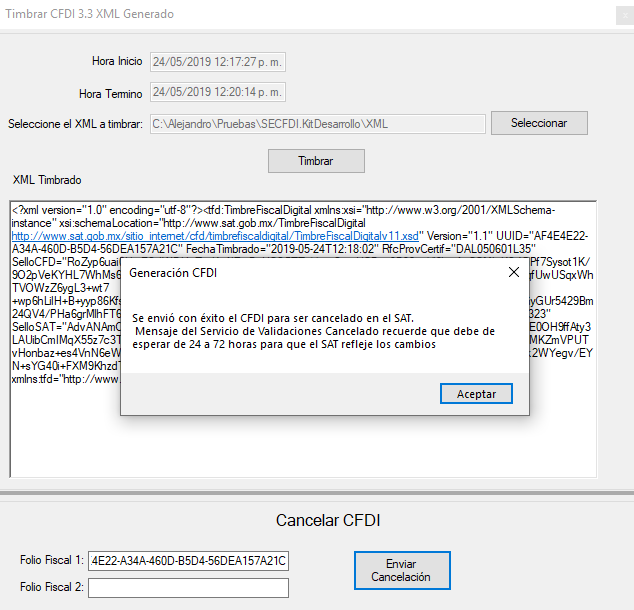
참고 : 전송 해야하는 디지털 인증서는 올바른 인증서가 취소 오류를 보내는 경우 PFX 유형 중 하나입니다.
더 많은 웹 서비스 정보를 원한다면 통합 안내서를 다운로드하면 허용되는 값 외에 모든 속성 및 설명이 포함되어 있습니다.
저장소를 포크하십시오
클로나 저장소
git clone [email protected] : yourusername/invoice-electronics-web-service-c-sharp.git
지점을 만듭니다
    git checkout desarrollo
    git pull al original desarrollo
    # Podrás escoger el nombre de tu rama
    git checkout -b <feature/my_branch>
    git add .
    git commit -m "mis cambios"
git push origin <feature/my_branch>
***-
Facturoporti에 의해 멕시코에서 개발되었습니다. 라이센스를 사용하십시오.






