factura electronica Web Service C Sharp
1.0.0



These services will cease to be available from April 1, 2021 , the new version of the API has these and more tools that will facilitate and save a lot of time in validations or penalties of the SAT in audits, we recommend widely reviewing you the new documentation at https://develers.facturoPorti.com.mx/reference/api-desarrollo-facturo as part of the new features can be part of the new features.
新しいAPIアクセスサービスは、次のように公開されています。
 https://testapi.facturoporti.com.mx/
https://api.facturoporti.com.mx/
サンドボックスまたは生産を使用する環境に応じて。
サービスが必要ですか、それともサービスを雇う必要がありますか? [email protected] [email protected]にメールを送信してください。ページhttps://www.facturoporti.com.mxにアクセスしてください。
これは、請求書、メモ、領収書、給与、ベアリングレター、支払いの補完などを生成するために、C#でWebサービスを消費する使用の例です。
このサービスは、既にXMLを独自の手段で生成し、スタンピングのみが必要な場合に理想的です。統合は10分で簡単かつ高速です。テスト環境で1時間以内に生産をCFDIで放送します。
さらに、Webサービスは1つ以上のCFDIをキャンセルできるようにします
Visual Studio Development IDE 2017 Community以上を使用することをお勧めします。すべてのコミュニティバージョンは無料で、https://visualstudio.microsoft.com/es/vs/communch/からダウンロードできます。
facturoporti c#の最新バージョンを取得します。
git clone https://github.com/facturoporti/factura-electronica-Web-Service-C-Sharp.git
スタンピングプロセスを実行するために必要なものを含むリポジトリをダウンロードします。
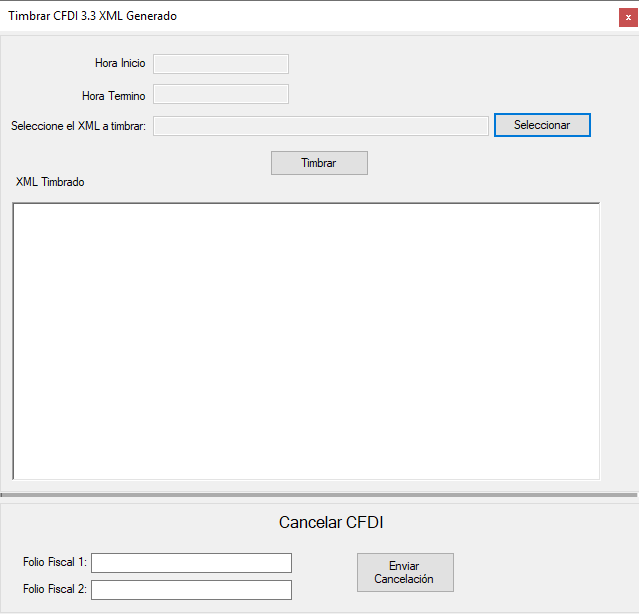
ファイルを選択して、Timbrarを押すと、システムは以下を実行します。
 if ( txtArchivoXML . Text . Trim ( ) . Length == 0 )
            {
                MessageBox . Show ( "Seleccione un archivo antes de continuar." , "Error al Timbrar Documento" ) ;
            }
            else
            {
                txtFechaInicio . Text = DateTime . Now . ToString ( ) ;

                Cursor . Show ( ) ;
                Cursor . Current = Cursors . WaitCursor ;

                CertificarClient certificar = new CertificarClient ( ) ;
                AutenticarPeticion autenticar = new AutenticarPeticion ( ) ;
                TimbrarCFDIPeticion xml = new TimbrarCFDIPeticion ( ) ;

                // Asigna los parametros de configuracion de conexion
                autenticar . Usuario = "PruebasTimbrado" ;
                autenticar . Contrasenia = "@Notiene1" ;

                // abre el archivo XMl que fue seleccionado
                FileStream resultado = null ;
                resultado = new FileStream ( txtArchivoXML . Text , FileMode . Open , FileAccess . Read , FileShare . Read ) ;
                using ( StreamReader contenidoArchivo = new StreamReader ( resultado ) )
                {
                    xml . XMLEntrada = contenidoArchivo . ReadToEnd ( ) ;
                    contenidoArchivo . Close ( ) ;
                }

                TimbrarCFDIRespuesta respuesta = certificar . TimbradoMultiEmpresas ( autenticar , xml ) ;

                certificar . Close ( ) ;

                txtFechaTermino . Text = DateTime . Now . ToString ( ) ;

                if ( respuesta . Estatus . Codigo == "000" )
                {
                    txtXMLTimbrado . Text = respuesta . Timbrado . TimbreXML ;
                }

                MessageBox . Show ( respuesta . Estatus . Descripcion , "Generación CFDI" ) ;

                Cursor . Current = Cursors . Default ;
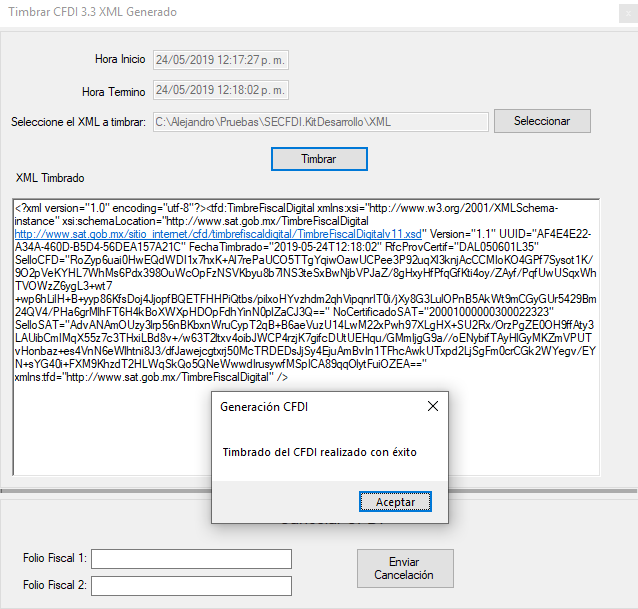
} この用語では、システムがスタンピングの結果を示します。また、財政音色を示します。
使用したC#バージョン
Visual Studio 2017 Community con Framework 4.5
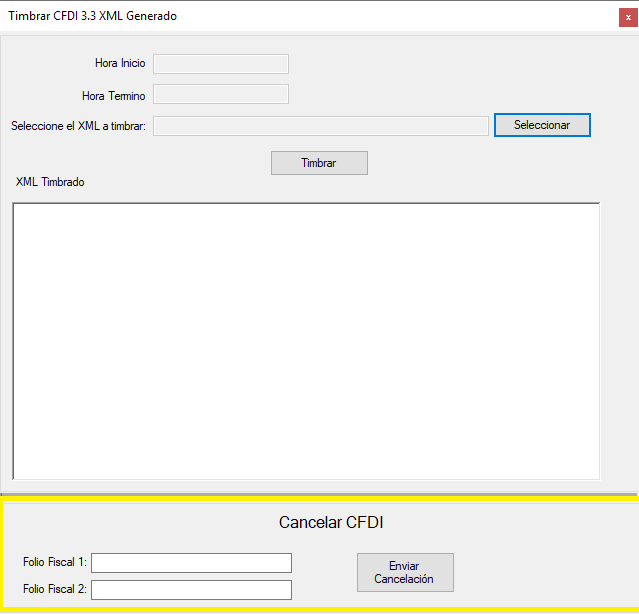
キャンセルを実行するには、財政フォリオ(UUID)を入力してください。
 if ( txtFolioFiscal1 . Text . Trim ( ) . Length == 0 && txtFolioFiscal2 . Text . Trim ( ) . Length == 0 )
            {
                MessageBox . Show ( "Ingrese al menos un Folio Fiscal antes de continuar." , "Error al cancelar el CFDI" ) ;
            }
            else
            {
                // Genera XMl con los Folios a enviar se pueden enviar uno o mas CFDI para cancelacion
                // Solo se podran enviar CFDI timbrados con nuestro servicio no hay el limite de CFDI que se puean cancelar

                Cursor . Show ( ) ;
                Cursor . Current = Cursors . WaitCursor ;

                CertificarClient certificar = new CertificarClient ( ) ;
                AutenticarPeticion autenticar = new AutenticarPeticion ( ) ;
                CancelarCFDIPACPeticion cancelar = new CancelarCFDIPACPeticion ( ) ;

                // Asigna los parametros de configuracion de conexion
                autenticar . Usuario = "PruebasTimbrado" ;
                autenticar . Contrasenia = "@Notiene1" ;

                cancelar . RFC = "AAA010101AAA" ; // RFC del emisor del CFDI;
                cancelar . Password = "12345678a" ;

                Archivos archivo = new Archivos ( ) ;
                cancelar . PFX = archivo . ConvertirStreamToByte ( archivo . Abrir ( ObtieneDirectorioAplicacion ( ) + @"CertificadoAAA010101AAA.pfx" ) ) ;  //"Se debe de enviar el certificado en formato PFX para realizar la cancelacion";

                List < string > folios = new List < string > ( ) ;

                if ( ! string . IsNullOrEmpty ( txtFolioFiscal1 . Text ) )
                    folios . Add ( txtFolioFiscal1 . Text . Trim ( ) ) ;

                if ( ! string . IsNullOrEmpty ( txtFolioFiscal2 . Text ) )
                    folios . Add ( txtFolioFiscal2 . Text . Trim ( ) ) ;

                cancelar . UUID = folios . ToArray ( ) ;

                CancelarCFDIRespuesta respuesta =  certificar . CancelarCFDICualquierPAC ( autenticar , cancelar ) ;

                certificar . Close ( ) ;

                txtFechaTermino . Text = DateTime . Now . ToString ( ) ;

                Cursor . Current = Cursors . Default ;

                // No hay limite para el envio de cancelaciones en el ejemplo solo en envian 3 pero pueden ser todos los que el usuario
                // desee cancelar al mismo tiempo
                for ( int contador = 0 ; contador < respuesta . FoliosRespuesta . Length ; contador ++ )
			    {
                    if ( respuesta . FoliosRespuesta [ contador ] . Estatus != null )
                        MessageBox . Show ( respuesta . FoliosRespuesta [ contador ] . Estatus . Descripcion , "Generación CFDI" ) ;
			    }

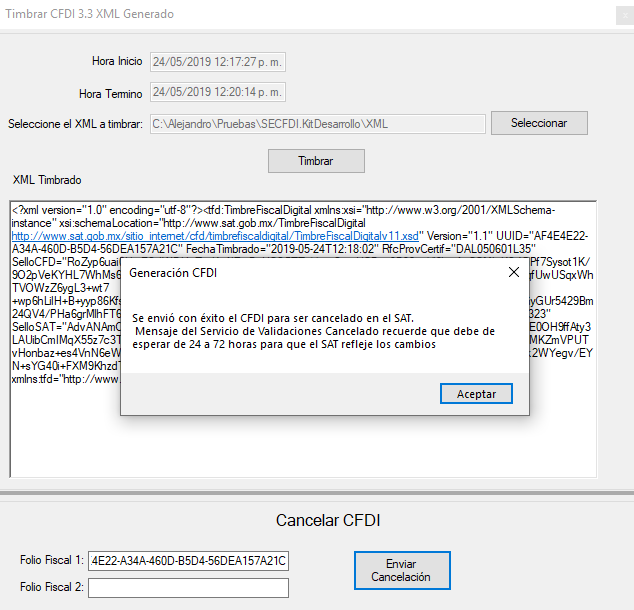
} 送信キャンセルボタンを実行すると、コードを実行する前に、財政データで値を更新する必要があります。実行の終わりに、答えが得られます:
注:送信する必要があるデジタル証明書は、正しいものがキャンセルエラーを送信する場合、PFXタイプの1つです
より多くのWebサービス情報が必要な場合は、統合ガイドをダウンロードしてください。許可されている値に加えて、すべての属性とその説明が含まれています
リポジトリをフォークします
クロナリポジトリ
git clone [email protected]:yourusername/invoice-electronics-web-service-charp.git
ブランチを作成します
    git checkout desarrollo
    git pull al original desarrollo
    # Podrás escoger el nombre de tu rama
    git checkout -b <feature/my_branch>
    git add .
    git commit -m "mis cambios"
git push origin <feature/my_branch>
*** -
MexicoでFacturoportiによって開発されました。ライセンスの使用詳細をご覧ください。






