factura electronica Web Service C Sharp
1.0.0



These services will cease to be available from April 1, 2021 , the new version of the API has these and more tools that will facilitate and save a lot of time in validations or penalties of the SAT in audits, we recommend widely reviewing you the new documentation at https://develers.facturoPorti.com.mx/reference/api-desarrollo-facturo as part of the new features can be part of the new features.
The new API access services are published in:
 https://testapi.facturoporti.com.mx/
https://api.facturoporti.com.mx/
Depending on the environment in which you are to use sandbox or production.
Do you need help or need to hire services? Send us an email to [email protected] [email protected], go to the page https://www.facturoporti.com.mx Tell us with us online or call us 555 546 2288 or 558 421 767 We can gladly give you what you need.
This is the example of use to consume the web service in C# to generate invoices, notes, receipts, payroll, bearing letter, complement of payments, etc) .
This service is ideal when you already generate the XML by your own means and you only need stamping. Integration is easy and fast in 10 minutes you will be broadcasting in our test environment the CFDI the production in less than 1 hour.
In addition the web service will allow canceling one or more CFDI
It is recommended to use the Visual Studio Development IDE 2017 Community or higher. All Community versions are free and can be downloaded from https://visualstudio.microsoft.com/es/vs/communch/
Get the latest version of Facturoporti C# in:
git clone https://github.com/facturoporti/factura-electronica-Web-Service-C-Sharp.git
Download the repository that contains what is necessary to perform the stamping process.
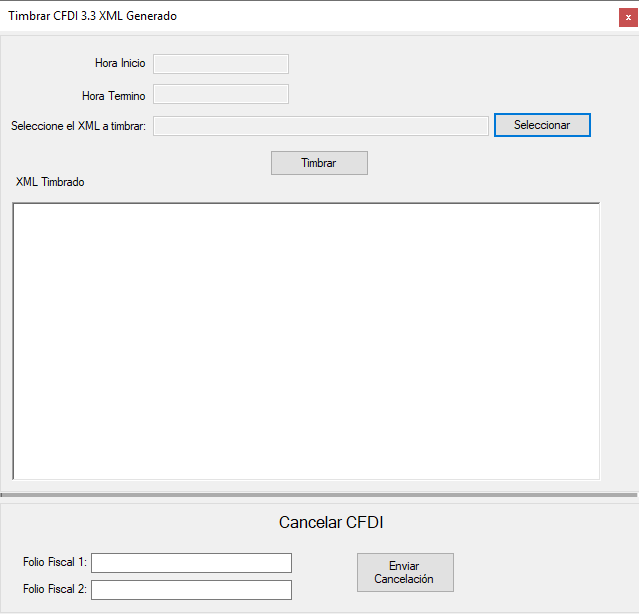
Select the file press Timbrar, the system will perform the following:
 if ( txtArchivoXML . Text . Trim ( ) . Length == 0 )
            {
                MessageBox . Show ( "Seleccione un archivo antes de continuar." , "Error al Timbrar Documento" ) ;
            }
            else
            {
                txtFechaInicio . Text = DateTime . Now . ToString ( ) ;

                Cursor . Show ( ) ;
                Cursor . Current = Cursors . WaitCursor ;

                CertificarClient certificar = new CertificarClient ( ) ;
                AutenticarPeticion autenticar = new AutenticarPeticion ( ) ;
                TimbrarCFDIPeticion xml = new TimbrarCFDIPeticion ( ) ;

                // Asigna los parametros de configuracion de conexion
                autenticar . Usuario = "PruebasTimbrado" ;
                autenticar . Contrasenia = "@Notiene1" ;

                // abre el archivo XMl que fue seleccionado
                FileStream resultado = null ;
                resultado = new FileStream ( txtArchivoXML . Text , FileMode . Open , FileAccess . Read , FileShare . Read ) ;
                using ( StreamReader contenidoArchivo = new StreamReader ( resultado ) )
                {
                    xml . XMLEntrada = contenidoArchivo . ReadToEnd ( ) ;
                    contenidoArchivo . Close ( ) ;
                }

                TimbrarCFDIRespuesta respuesta = certificar . TimbradoMultiEmpresas ( autenticar , xml ) ;

                certificar . Close ( ) ;

                txtFechaTermino . Text = DateTime . Now . ToString ( ) ;

                if ( respuesta . Estatus . Codigo == "000" )
                {
                    txtXMLTimbrado . Text = respuesta . Timbrado . TimbreXML ;
                }

                MessageBox . Show ( respuesta . Estatus . Descripcion , "Generación CFDI" ) ;

                Cursor . Current = Cursors . Default ;
} At the term the system indicates the result of the stamping will also show you the fiscal timbre:
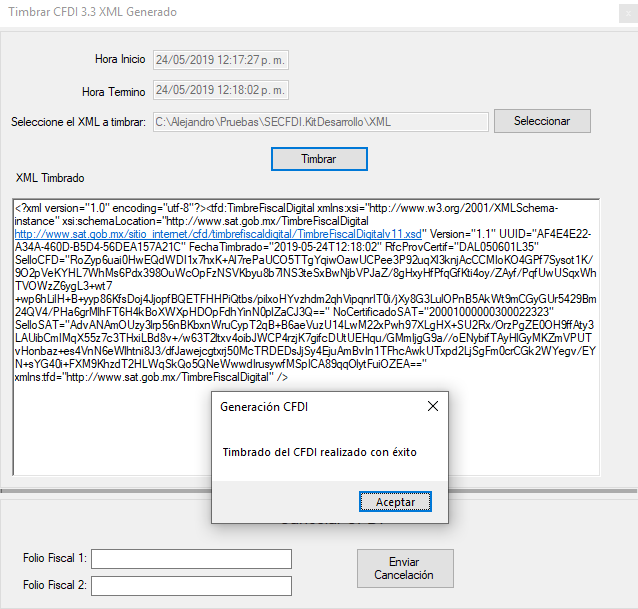
Used C# version
Visual Studio 2017 Community con Framework 4.5
Enter the fiscal folio (UUID) to carry out the cancellation:
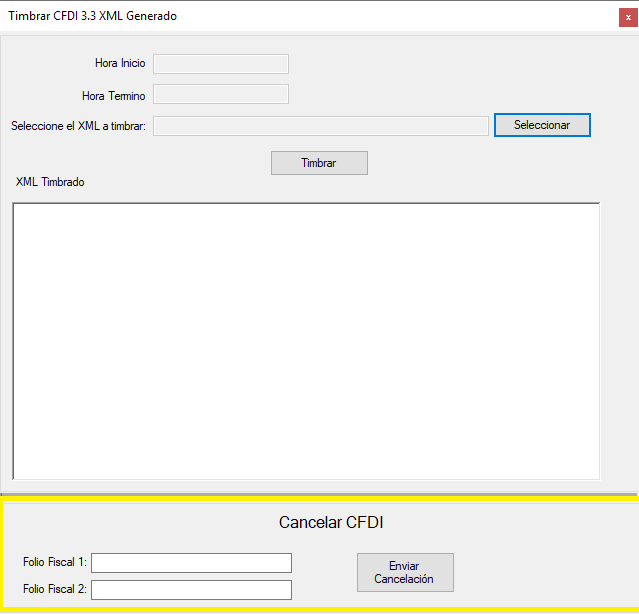
 if ( txtFolioFiscal1 . Text . Trim ( ) . Length == 0 && txtFolioFiscal2 . Text . Trim ( ) . Length == 0 )
            {
                MessageBox . Show ( "Ingrese al menos un Folio Fiscal antes de continuar." , "Error al cancelar el CFDI" ) ;
            }
            else
            {
                // Genera XMl con los Folios a enviar se pueden enviar uno o mas CFDI para cancelacion
                // Solo se podran enviar CFDI timbrados con nuestro servicio no hay el limite de CFDI que se puean cancelar

                Cursor . Show ( ) ;
                Cursor . Current = Cursors . WaitCursor ;

                CertificarClient certificar = new CertificarClient ( ) ;
                AutenticarPeticion autenticar = new AutenticarPeticion ( ) ;
                CancelarCFDIPACPeticion cancelar = new CancelarCFDIPACPeticion ( ) ;

                // Asigna los parametros de configuracion de conexion
                autenticar . Usuario = "PruebasTimbrado" ;
                autenticar . Contrasenia = "@Notiene1" ;

                cancelar . RFC = "AAA010101AAA" ; // RFC del emisor del CFDI;
                cancelar . Password = "12345678a" ;

                Archivos archivo = new Archivos ( ) ;
                cancelar . PFX = archivo . ConvertirStreamToByte ( archivo . Abrir ( ObtieneDirectorioAplicacion ( ) + @"CertificadoAAA010101AAA.pfx" ) ) ;  //"Se debe de enviar el certificado en formato PFX para realizar la cancelacion";

                List < string > folios = new List < string > ( ) ;

                if ( ! string . IsNullOrEmpty ( txtFolioFiscal1 . Text ) )
                    folios . Add ( txtFolioFiscal1 . Text . Trim ( ) ) ;

                if ( ! string . IsNullOrEmpty ( txtFolioFiscal2 . Text ) )
                    folios . Add ( txtFolioFiscal2 . Text . Trim ( ) ) ;

                cancelar . UUID = folios . ToArray ( ) ;

                CancelarCFDIRespuesta respuesta =  certificar . CancelarCFDICualquierPAC ( autenticar , cancelar ) ;

                certificar . Close ( ) ;

                txtFechaTermino . Text = DateTime . Now . ToString ( ) ;

                Cursor . Current = Cursors . Default ;

                // No hay limite para el envio de cancelaciones en el ejemplo solo en envian 3 pero pueden ser todos los que el usuario
                // desee cancelar al mismo tiempo
                for ( int contador = 0 ; contador < respuesta . FoliosRespuesta . Length ; contador ++ )
			    {
                    if ( respuesta . FoliosRespuesta [ contador ] . Estatus != null )
                        MessageBox . Show ( respuesta . FoliosRespuesta [ contador ] . Estatus . Descripcion , "Generación CFDI" ) ;
			    }

} Execute the Send Cancellation button, before executing the code you must update the values with your fiscal data; At the end of the execution you will get the answer:
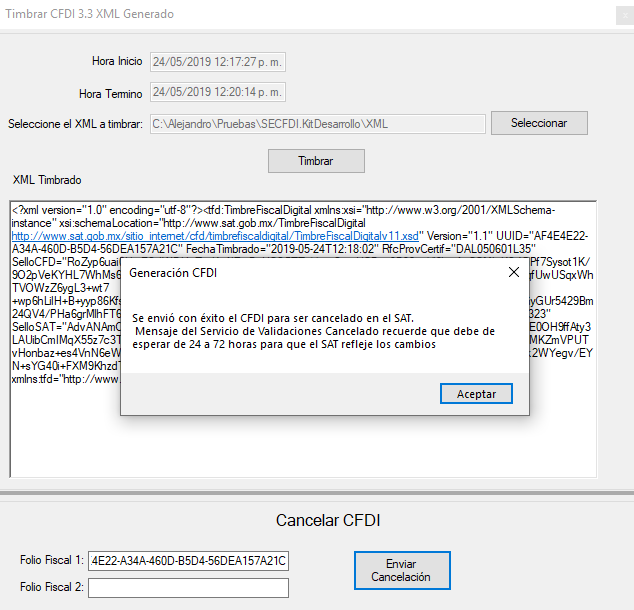
Note: The digital certificate that must be sent is one of the PFX type if the correct one will send the cancellation error
If you want more web service information, download the integration guide, it contains all the attributes and its description in addition to the values that are allowed
Fork the repository
Clona the repository
Git clone [email protected]: Yourusername/Invoice-electronics-Web-Service-C-Sharp.git
Create a branch
    git checkout desarrollo
    git pull al original desarrollo
    # Podrás escoger el nombre de tu rama
    git checkout -b <feature/my_branch>
    git add .
    git commit -m "mis cambios"
git push origin <feature/my_branch>
***-
Developed in Mexico by Facturoporti. Use license see more.






