archgw
release 0.1.5 ?

아치는 API로 AI 에이전트를 보호, 관찰 및 개인화하도록 설계된 지능형 레이어 7 분산 프록시입니다.
Arch는 목적에 맞춰진 LLM으로 설계된 프롬프트의 취급 및 처리와 관련된 비판적이지만 미분화되지 않은 작업을 처리하고, 탈옥 시도를 탐지하고 거부하고, "백엔드"API를 지능적으로 부르기 위해 "백엔드"API를 부르기 위해 사용자의 요청을 충족시키고, 중앙에있는 경력 및 LLM 중간체의 관찰 가능성을 관리합니다.
아치는 다음과 같은 믿음을 가진 Envoy 대리를 기반으로하고 (그리고 핵심 기고자들에 의해) :
프롬프트는 미묘한 및 불투명 한 사용자 요청으로 보안 처리, 지능형 라우팅, 강력한 관찰 가능성 및 개인화를위한 Backend (API) 시스템 통합을 포함한 기존의 HTTP 요청과 동일한 기능이 필요합니다.
핵심 기능 :
아치를 사용하여 Genai 앱의 속도, 보안 및 개인화를 향상시키는 방법을 배우기 위해 문서로 이동하십시오 .
중요한
오늘날 에이전트 및 래그 시나리오를 위해 설계된 LLM (Arch-Function)을 호출하는 기능은 미국 중부 지역에서 무료로 주최됩니다. 일관된 대기 시간과 처리량을 제공하고 비용을 관리하기 위해 곧 개발자 키를 통해 호스팅 된 버전에 액세스 할 수 있으며 해당 LLM을 로컬로 실행할 수있는 옵션을 제공합니다. 자세한 내용은이 문제 #258을 참조하십시오
우리와 연락하려면 Discord 서버에 가입하십시오. 우리는 적극적으로 모니터링하고 그곳에서 지원을 제공 할 것입니다.
이 안내서를 따라 아치를 빠르게 설정하고 생성 AI 응용 프로그램에 통합하는 방법을 알아보십시오.
시작하기 전에 다음과 같은 사항을 확인하십시오.
Docker & Python 설치되었습니다API Keys (외부 LLM을 사용하는 경우)Arch의 CLI를 사용하면 Arch Gateway를 효율적으로 관리하고 상호 작용할 수 있습니다. CLI를 설치하려면 다음 명령을 실행하기 만하면 다음 명령을 실행합니다. 팁 : 개발자는 아치를 설치하기 전에 종속성을 분리하기 위해 새로운 Python 가상 환경을 만들어 보는 것이 좋습니다. 이를 통해 ARCGW와 그 종속성은 시스템의 다른 패키지를 방해하지 않도록합니다.
더 진행하기 전에 다음 유틸리티를 설치했는지 확인하십시오.
$ python -m venv venv
$ source venv/bin/activate   # On Windows, use: venvScriptsactivate
$ pip install archgw아치는 LLM 제공 업체, 프롬프트 대상, 가드 레일 등을 정의 할 수있는 구성 파일을 기반으로 작동합니다. 아래는 시작하기위한 예제 구성입니다.
 version : v0.1
listener :
  address : 127.0.0.1
  port : 8080 # If you configure port 443, you'll need to update the listener with tls_certificates
  message_format : huggingface

# Centralized way to manage LLMs, manage keys, retry logic, failover and limits in a central way
llm_providers :
  - name : OpenAI
    provider : openai
    access_key : $OPENAI_API_KEY
    model : gpt-3.5-turbo
    default : true

# default system prompt used by all prompt targets
system_prompt : |
  You are a network assistant that helps operators with a better understanding of network traffic flow and perform actions on networking operations. No advice on manufacturers or purchasing decisions.

prompt_targets :
    - name : device_summary
      description : Retrieve network statistics for specific devices within a time range
      endpoint :
        name : app_server
        path : /agent/device_summary
      parameters :
        - name : device_ids
          type : list
          description : A list of device identifiers (IDs) to retrieve statistics for.
          required : true  # device_ids are required to get device statistics
        - name : days
          type : int
          description : The number of days for which to gather device statistics.
          default : " 7 "
    - name : reboot_devices
      description : Reboot a list of devices
      endpoint :
        name : app_server
        path : /agent/device_reboot
      parameters :
        - name : device_ids
          type : list
          description : A list of device identifiers (IDs).
          required : true
        - name : days
          type : int
          description : A list of device identifiers (IDs)
          default : " 7 "

# Arch creates a round-robin load balancing between different endpoints, managed via the cluster subsystem.
endpoints :
  app_server :
    # value could be ip address or a hostname with port
    # this could also be a list of endpoints for load balancing
    # for example endpoint: [ ip1:port, ip2:port ]
    endpoint : host.docker.internal:18083
    # max time to wait for a connection to be established
connect_timeout : 0.005s아치를 통해 아웃 바운드 호출을하십시오
 from openai import OpenAI

# Use the OpenAI client as usual
client = OpenAI (
  # No need to set a specific openai.api_key since it's configured in Arch's gateway
  api_key = '--' ,
  # Set the OpenAI API base URL to the Arch gateway endpoint
  base_url = "http://127.0.0.1:12000/v1"
)

response = client . chat . completions . create (
    # we select model from arch_config file
    model = "--" ,
    messages = [{ "role" : "user" , "content" : "What is the capital of France?" }],
)

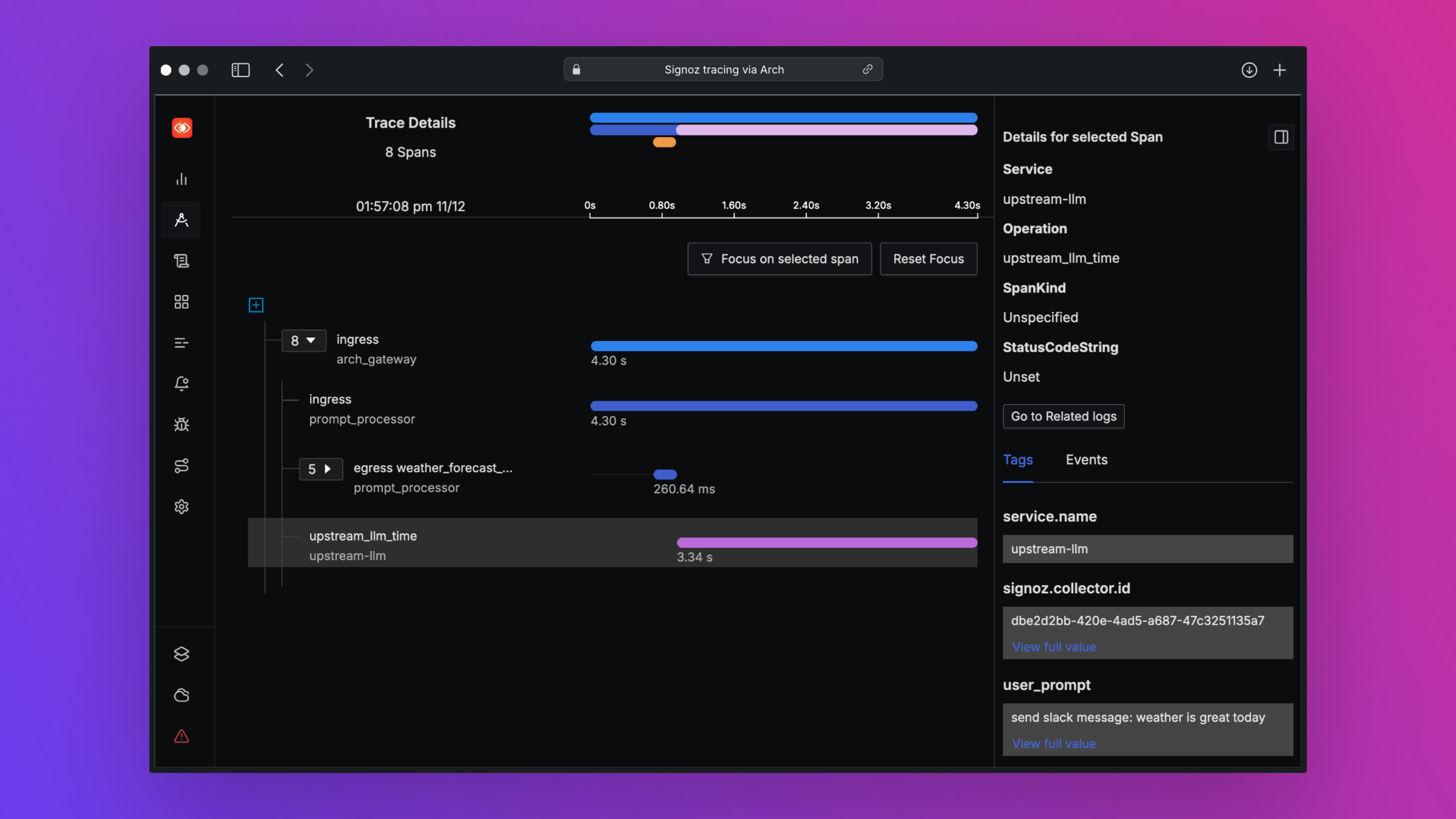
print ( "OpenAI Response:" , response . choices [ 0 ]. message . content )Arch는 개방형 표준을 지원함으로써 베스트 인 클래스 관찰 가능성을 지원하도록 설계되었습니다. 추적, 메트릭 및 로그에 대한 자세한 내용은 관찰 가능성에 대한 문서를 읽으십시오.
우리는 로드맵에 대한 피드백을 좋아하고 Arch 에 대한 기여를 환영합니다! 버그 수정, 새로운 기능 추가, 문서 개선 또는 자습서 만들 든 도움에 감사드립니다. 자세한 내용은 기여 가이드를 방문하십시오





