react native calendars
1.1307.0

このモジュールには、このカスタマイズ可能なReactネイティブカレンダーコンポーネントの使用方法に関する情報が含まれています。
パッケージは、 AndroidとiOSの両方と互換性があります
公式文書
このREADMEは
react-native-calendarsを始める方法の基本的な例を提供します。詳細については、公式ドキュメントサイトを参照してください。
これらの手順を使用してサンプルモジュールを実行できます。
 $ git clone [email protected]:wix/react-native-calendars.git

$ cd react-native-calendars

$ yarn install

$ cd ios && pod install && cd ..

$ react-native run-ios
サンプルモジュール画面で画面ソースコードを確認できます
このプロジェクトはExpo/CRNA(排出なし)と互換性があり、例はExpoで公開されています
React-Native-CalendarsをReactネイティブプロジェクトで始める方法は次のとおりです。
$ yarn add react-native-calendars
RNカレンダーはJavaScriptに実装されるため、ネイティブモジュールのリンクは必要ありません。
ライブラリの基本的な使用例
Calendarコンポーネントのインポート import { Calendar , CalendarList , Agenda } from 'react-native-calendars' ;Calendarコンポーネントを使用します。 < Calendar
onDayPress = { day => {
console . log ( 'selected day' , day ) ;
} }
/> React-Native-Calendarsの主要な機能のいくつかを使用する方法を示すコードスニペットをいくつか紹介します。
 import React , { useState } from 'react' ;
import { Calendar , LocaleConfig } from 'react-native-calendars' ;

const App = ( ) => {
  const [ selected , setSelected ] = useState ( '' ) ;

  return (
    < Calendar
      onDayPress = { day => {
        setSelected ( day . dateString ) ;
      } }
      markedDates = { {
        [ selected ] : { selected : true , disableTouchEvent : true , selectedDotColor : 'orange' }
      } }
    />
  ) ;
} ;

export default App ; < Calendar
// Customize the appearance of the calendar
style = { {
borderWidth : 1 ,
borderColor : 'gray' ,
height : 350
} }
// Specify the current date
current = { '2012-03-01' }
// Callback that gets called when the user selects a day
onDayPress = { day => {
console . log ( 'selected day' , day ) ;
} }
// Mark specific dates as marked
markedDates = { {
'2012-03-01' : { selected : true , marked : true , selectedColor : 'blue' } ,
'2012-03-02' : { marked : true } ,
'2012-03-03' : { selected : true , marked : true , selectedColor : 'blue' }
} }
/> import { LocaleConfig } from 'react-native-calendars' ;
import React , { useState } from 'react' ;
import { Calendar , LocaleConfig } from 'react-native-calendars' ;
LocaleConfig . locales [ 'fr' ] = {
monthNames : [
'Janvier' ,
'Février' ,
'Mars' ,
'Avril' ,
'Mai' ,
'Juin' ,
'Juillet' ,
'Août' ,
'Septembre' ,
'Octobre' ,
'Novembre' ,
'Décembre'
] ,
monthNamesShort : [ 'Janv.' , 'Févr.' , 'Mars' , 'Avril' , 'Mai' , 'Juin' , 'Juil.' , 'Août' , 'Sept.' , 'Oct.' , 'Nov.' , 'Déc.' ] ,
dayNames : [ 'Dimanche' , 'Lundi' , 'Mardi' , 'Mercredi' , 'Jeudi' , 'Vendredi' , 'Samedi' ] ,
dayNamesShort : [ 'Dim.' , 'Lun.' , 'Mar.' , 'Mer.' , 'Jeu.' , 'Ven.' , 'Sam.' ] ,
today : "Aujourd'hui"
} ;
LocaleConfig . defaultLocale = 'fr' ;
const App = ( ) => {
const [ selected , setSelected ] = useState ( '' ) ;
return (
< Calendar
onDayPress = { day => {
setSelected ( day . dateString ) ;
} }
markedDates = { {
[ selected ] : { selected : true , disableTouchEvent : true , selectedDotColor : 'orange' }
} }
/>
) ;
} ;
export default App ; < Calendar
style = { {
borderWidth : 1 ,
borderColor : 'gray' ,
height : 350 ,
} }
theme = { {
backgroundColor : '#ffffff' ,
calendarBackground : '#ffffff' ,
textSectionTitleColor : '#b6c1cd' ,
selectedDayBackgroundColor : '#00adf5' ,
selectedDayTextColor : '#ffffff' ,
todayTextColor : '#00adf5' ,
dayTextColor : '#2d4150' ,
textDisabledColor : '#dd99ee'
} }
</ Calendar > 
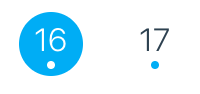
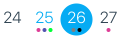
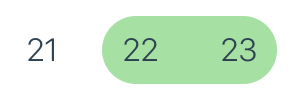

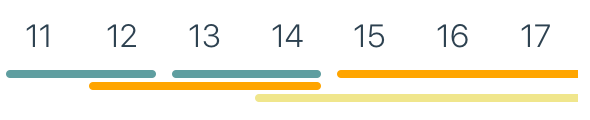




このプロジェクトに参加した貢献者のリストも参照してください。
React-Native-Calendarsへの貢献を歓迎します。
新機能のアイデアがある場合、またはバグを発見した場合は、問題を開いてください。
変更をプッシュする前に、 yarn testとyarn lintお願いします。
あなたが解決しようとしている問題と提案された解決策を説明するタイトルと説明を追加することを忘れないでください。
スクリーンショットとGIFは、レビューのためにPRに追加するのに非常に役立ちます。
ファイルをフォーマットしないでください - 統一された構文を維持し、レビュープロセスを高速かつシンプルに保ちます。
ReactネイティブカレンダーはMITライセンスを取得しています





