IGDIPlusMod
1.0.0

La bibliothèque Igdiplus modifiée pour Lazarus, Codetyphon et Delphi.
La bibliothèque gratuite et open source pour Delphi. Il permet des implémentations rapides et faciles d'applications GDI + complexes, dans un code naturel favorable au Pascal.
Auteur: Boian Mitov
Page d'accueil: http://mitov.com/products/igdi+#overview
http://mitov.com/products/igdi+#Icense
Ce logiciel est fourni «tel quel», sans aucune garantie expresse ou implicite. L'auteur ne sera en aucun cas tenu responsable de tout dommage résultant de l'utilisation de ce logiciel.
L'autorisation est accordée à quiconque d'utiliser ce logiciel à quelque fin que ce soit, y compris les applications commerciales, et de la modifier et de la redistribuer librement, sous réserve des restrictions suivantes:
L'origine de ce logiciel ne doit pas être déformée, vous ne devez pas prétendre que vous avez écrit le logiciel d'origine. Si vous utilisez ce logiciel dans un produit, une reconnaissance de la documentation du produit serait appréciée mais n'est pas requise.
Les versions de source modifiées doivent être clairement marquées comme telles et ne doivent pas être déformées comme étant le logiciel d'origine.
Cet avis ne peut être supprimé ou modifié de toute distribution de source.
Vous pouvez faire avec mon code ce que vous voulez sans aucun coût et sans aucune limitation.
IGDIPlusHelpers.pas , IGDIPlusAPI_FPC.inc , IGDIPlusAPI_DCC.inc .Application de démonstration d'Igdiplus originale compilée avec Lazarus.
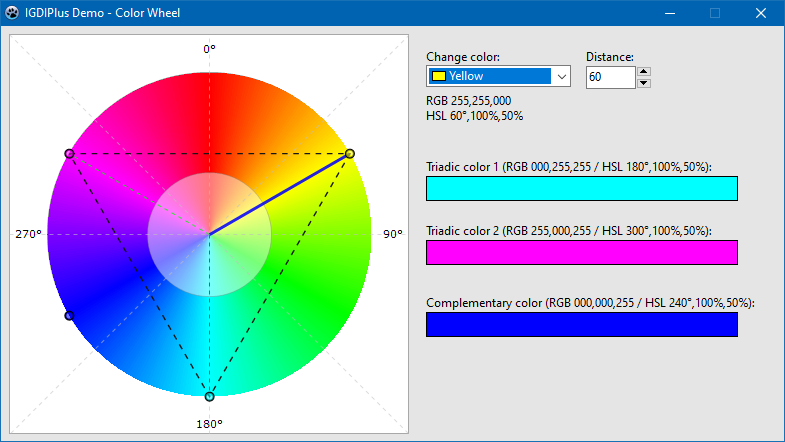
Démo supplémentaire - roue chromatique
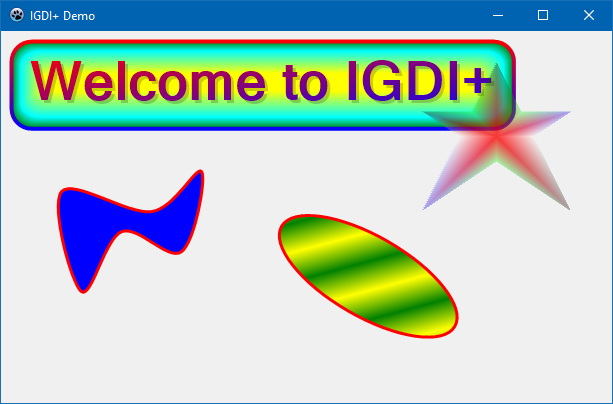
Démo 1 Procédure principale.
 procedure TForm1.FormPaint (Sender: TObject);
var
  AGraphics       : IGPGraphics;
  AFont           : IGPFont;
  ALeftTopCorner  : TPointF;
  ARect           : TIGPRectF;
  ARect1          : TIGPRectF;
  APath           : IGPGraphicsPath;
begin
  AGraphics := TIGPGraphics.Create( Canvas );
  AGraphics.SmoothingMode := SmoothingModeAntiAlias;
  AGraphics.TextRenderingHint := TextRenderingHintAntiAlias;

  ALeftTopCorner := TPointF.Create( 20 , 20 );
  AFont := TIGPFont.Create( ' Microsoft Sans Serif ' , 40 , [ fsBold ] );
  ARect := AGraphics.GetStringBoundingBoxF( ' Welcome to IGDI+ ' , AFont, ALeftTopCorner );
  ARect1 := GPInflateRectF( ARect, 10 , 10 );

  // Draw a fancy rounded rectangle.
  AGraphics.DrawRoundRectangleF(
              TIGPPen.Create( TIGPLinearGradientBrush.Create( GPInflateRectF( ARect1, 2 , 2 ), aclRed, aclBlue, LinearGradientModeVertical ), 4 ),
              TIGPPathGradientBrush.Create(
                  TIGPGraphicsPath.Create().AddRoundRectangleF( ARect1, TIGPSizeF.Create( 20 , 20 ) )
                   )
                .SetInterpolationColorArrays( [ aclGreen, aclCyan, aclYellow ], [ 0 , 0.3 , 1 ] )
                .SetCenterPointF( TPointF.Create( 250 , 50 ))
                .SetFocusScales( 0.87 , 0.2 ),
              ARect1, TIGPSizeF.Create( 20 , 20 ) );

  // Draw a text with semitransparent shadow.
  AGraphics.DrawStringF( ' Welcome to IGDI+ ' ,
                        AFont,
                        TPointF.Create( 23 , 23 ),
                        TIGPSolidBrush.Create( MakeARGBColor( 50 , aclBlack )) )

           .DrawStringF( ' Welcome to IGDI+ ' ,
                        AFont,
                        ALeftTopCorner,
                        TIGPLinearGradientBrush.Create( ARect, aclRed, aclBlue, LinearGradientModeForwardDiagonal ));


  // Draw a closed curve.
  AGraphics.DrawClosedCurveF( TIGPPen.Create( aclRed, 3 ), TIGPSolidBrush.Create( aclBlue ),
              [
              TPointF.Create( 60 ,  160 ),
              TPointF.Create( 150 , 180 ),
              TPointF.Create( 200 , 140 ),
              TPointF.Create( 180 , 220 ),
              TPointF.Create( 120 , 200 ),
              TPointF.Create( 80 ,  260 )
              ] );

  // Draw a semitransparent star.
  APath := TIGPGraphicsPath.Create();
  APath.AddLinesF(
    [
    TPointF.Create( 75 , 0 ),
    TPointF.Create( 100 , 50 ),
    TPointF.Create( 150 , 50 ),
    TPointF.Create( 112 , 75 ),
    TPointF.Create( 150 , 150 ),
    TPointF.Create( 75 , 100 ),
    TPointF.Create( 0 , 150 ),
    TPointF.Create( 37 , 75 ),
    TPointF.Create( 0 , 50 ),
    TPointF.Create( 50 , 50 )
     ] );

  AGraphics.TranslateTransform( 420 , 30 )
           .FillPath(
              TIGPPathGradientBrush.Create( APath )
                .SetCenterColor( MakeColor( 200 , 255 , 0 , 0 ))
                .SetSurroundColors(
                  [
                  MakeColor( 80 , 0 , 0 , 0 ),
                  MakeColor( 80 , 0 , 255 , 0 ),
                  MakeColor( 80 , 0 , 0 , 255 ),
                  MakeColor( 80 , 255 , 255 , 255 ),
                  MakeColor( 80 , 0 , 0 , 0 ),
                  MakeColor( 80 , 0 , 255 , 0 ),
                  MakeColor( 80 , 0 , 0 , 255 ),
                  MakeColor( 80 , 255 , 255 , 255 ),
                  MakeColor( 80 , 0 , 0 , 0 ),
                  MakeColor( 80 , 0 , 255 , 0 )
                  ] ),

              APath );

  // Draw rotated ellipse.
  AGraphics.ResetTransform()
           .TranslateTransform( 300 , 160 )
           .RotateTransform( 30 )
           .DrawEllipseF(
              TIGPPen.Create( aclRed, 3 ),
              TIGPLinearGradientBrush.Create( TPointF.Create( 0 , 0 ), TPointF.Create( 20 , 20 ), aclYellow, aclGreen )
              .SetWrapMode( WrapModeTileFlipX ),
              0 , 0 , 200 , 80 );
end ; Dans le répertoire des packages , vous trouverez des packages pour Delphi XE2 - 10.3 Rio. Installez le package approprié (fichier DPK), puis dans les options IDE, ajoutez au répertoire du chemin de la bibliothèque avec le fichier IGDIPlus.pas .
Vous avez deux options:
packagesLazaruslazigdiplus.lpk .LazIGDIPlus aux packages requis .IGDIPlus.pas aux options du compilateur -> chemins de terre -> d'autres fichiers unitaires . Procédez comme dans le cas de Lazarus, seul le fichier avec le package d'installation est packagesCodeTyphonlazigdiplus.ctpkg .
23.01.2020
Support Delphi XE2 et XE3.
Ajout de packages pour Delphi XE2 - 10.3 Rio.
Ajout d'une démo principale pour XE2, démo des roues couleurs pour XE2 et XE7.
Igdiplushelpers: Quelques routines auxiliaires liées à la conversion de hattustyle.
19.01.2020
Ajout de packages pour Lazarus et CodetyPhon.
15.01.2020
Libération initiale avec support Pascal gratuit.







