IGDIPlusMod
1.0.0

La biblioteca Igdiplus modificada para Lázaro, Codetyphon y Delphi.
La biblioteca de código libre y libre para Delphi. Permite implementaciones rápidas y fáciles de aplicaciones GDI+ complejas, en un código natural amigable para Pascal.
Autor: Boian Mitov
Página de inicio: http://mitov.com/products/igdi+#overview
http://mitov.com/products/igdi+#license
Este software se proporciona 'as-es', sin ninguna garantía expresa o implícita. En ningún caso, el autor será considerado responsable de los daños derivados del uso de este software.
Se otorga permiso a cualquier persona para usar este software para cualquier propósito, incluidas las aplicaciones comerciales, y para alterarlo y redistribuirlo libremente, sujeto a las siguientes restricciones:
El origen de este software no debe tergiversarse, no debe afirmar que escribió el software original. Si usa este software en un producto, se agradecería un reconocimiento en la documentación del producto, pero no es necesario.
Las versiones de origen alteradas deben estar claramente marcadas como tales, y no deben tergiversarse como el software original.
Este aviso no puede eliminarse o alterarse de ninguna distribución de fuente.
Puede hacer con mi código lo que desee sin ningún costo y sin limitaciones.
IGDIPlusHelpers.pas , IGDIPlusAPI_FPC.inc , IGDIPlusAPI_DCC.inc .Aplicación de demostración Igdiplus original compilada con Lázaro.
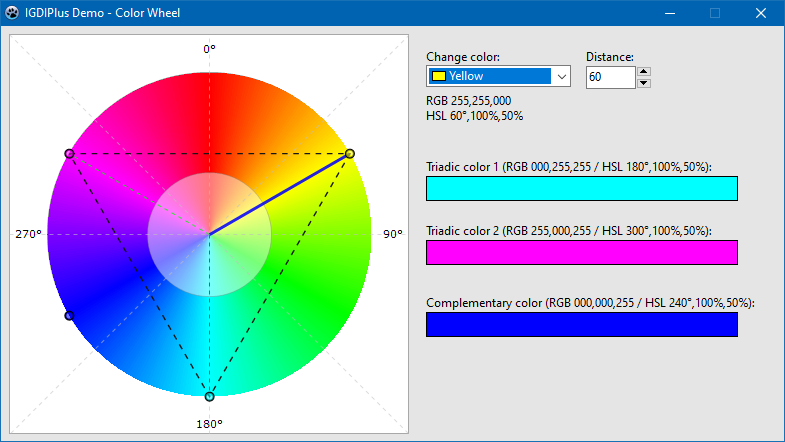
Demo adicional - Rueda de color
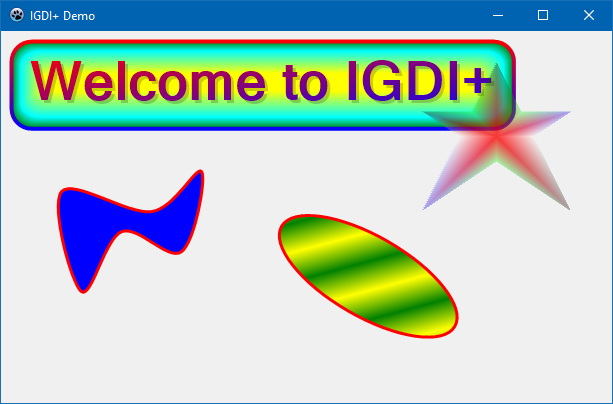
Demo 1 Procedimiento principal.
 procedure TForm1.FormPaint (Sender: TObject);
var
  AGraphics       : IGPGraphics;
  AFont           : IGPFont;
  ALeftTopCorner  : TPointF;
  ARect           : TIGPRectF;
  ARect1          : TIGPRectF;
  APath           : IGPGraphicsPath;
begin
  AGraphics := TIGPGraphics.Create( Canvas );
  AGraphics.SmoothingMode := SmoothingModeAntiAlias;
  AGraphics.TextRenderingHint := TextRenderingHintAntiAlias;

  ALeftTopCorner := TPointF.Create( 20 , 20 );
  AFont := TIGPFont.Create( ' Microsoft Sans Serif ' , 40 , [ fsBold ] );
  ARect := AGraphics.GetStringBoundingBoxF( ' Welcome to IGDI+ ' , AFont, ALeftTopCorner );
  ARect1 := GPInflateRectF( ARect, 10 , 10 );

  // Draw a fancy rounded rectangle.
  AGraphics.DrawRoundRectangleF(
              TIGPPen.Create( TIGPLinearGradientBrush.Create( GPInflateRectF( ARect1, 2 , 2 ), aclRed, aclBlue, LinearGradientModeVertical ), 4 ),
              TIGPPathGradientBrush.Create(
                  TIGPGraphicsPath.Create().AddRoundRectangleF( ARect1, TIGPSizeF.Create( 20 , 20 ) )
                   )
                .SetInterpolationColorArrays( [ aclGreen, aclCyan, aclYellow ], [ 0 , 0.3 , 1 ] )
                .SetCenterPointF( TPointF.Create( 250 , 50 ))
                .SetFocusScales( 0.87 , 0.2 ),
              ARect1, TIGPSizeF.Create( 20 , 20 ) );

  // Draw a text with semitransparent shadow.
  AGraphics.DrawStringF( ' Welcome to IGDI+ ' ,
                        AFont,
                        TPointF.Create( 23 , 23 ),
                        TIGPSolidBrush.Create( MakeARGBColor( 50 , aclBlack )) )

           .DrawStringF( ' Welcome to IGDI+ ' ,
                        AFont,
                        ALeftTopCorner,
                        TIGPLinearGradientBrush.Create( ARect, aclRed, aclBlue, LinearGradientModeForwardDiagonal ));


  // Draw a closed curve.
  AGraphics.DrawClosedCurveF( TIGPPen.Create( aclRed, 3 ), TIGPSolidBrush.Create( aclBlue ),
              [
              TPointF.Create( 60 ,  160 ),
              TPointF.Create( 150 , 180 ),
              TPointF.Create( 200 , 140 ),
              TPointF.Create( 180 , 220 ),
              TPointF.Create( 120 , 200 ),
              TPointF.Create( 80 ,  260 )
              ] );

  // Draw a semitransparent star.
  APath := TIGPGraphicsPath.Create();
  APath.AddLinesF(
    [
    TPointF.Create( 75 , 0 ),
    TPointF.Create( 100 , 50 ),
    TPointF.Create( 150 , 50 ),
    TPointF.Create( 112 , 75 ),
    TPointF.Create( 150 , 150 ),
    TPointF.Create( 75 , 100 ),
    TPointF.Create( 0 , 150 ),
    TPointF.Create( 37 , 75 ),
    TPointF.Create( 0 , 50 ),
    TPointF.Create( 50 , 50 )
     ] );

  AGraphics.TranslateTransform( 420 , 30 )
           .FillPath(
              TIGPPathGradientBrush.Create( APath )
                .SetCenterColor( MakeColor( 200 , 255 , 0 , 0 ))
                .SetSurroundColors(
                  [
                  MakeColor( 80 , 0 , 0 , 0 ),
                  MakeColor( 80 , 0 , 255 , 0 ),
                  MakeColor( 80 , 0 , 0 , 255 ),
                  MakeColor( 80 , 255 , 255 , 255 ),
                  MakeColor( 80 , 0 , 0 , 0 ),
                  MakeColor( 80 , 0 , 255 , 0 ),
                  MakeColor( 80 , 0 , 0 , 255 ),
                  MakeColor( 80 , 255 , 255 , 255 ),
                  MakeColor( 80 , 0 , 0 , 0 ),
                  MakeColor( 80 , 0 , 255 , 0 )
                  ] ),

              APath );

  // Draw rotated ellipse.
  AGraphics.ResetTransform()
           .TranslateTransform( 300 , 160 )
           .RotateTransform( 30 )
           .DrawEllipseF(
              TIGPPen.Create( aclRed, 3 ),
              TIGPLinearGradientBrush.Create( TPointF.Create( 0 , 0 ), TPointF.Create( 20 , 20 ), aclYellow, aclGreen )
              .SetWrapMode( WrapModeTileFlipX ),
              0 , 0 , 200 , 80 );
end ; En el directorio de paquetes encontrará paquetes para Delphi XE2 - 10.3 Río. Instale el paquete apropiado (archivo DPK), luego en las opciones IDE, agregue al directorio de ruta de la biblioteca con el archivo IGDIPlus.pas .
Tienes dos opciones:
packagesLazaruslazigdiplus.lpk Paquete.LazIGDIPlus a los paquetes requeridos .IGDIPlus.pas a las opciones del compilador -> rutas -> Otros archivos de la unidad . Proceda como en el caso de Lázaro, solo el archivo con el paquete de instalación son packagesCodeTyphonlazigdiplus.ctpkg .
23.01.2020
Soporte de Delphi XE2 y XE3.
Paquetes agregados para Delphi XE2 - 10.3 Rio.
Se agregó una demostración principal para XE2, demostración de la rueda de color para XE2 y XE7.
Igdiplushelpers: algunas rutinas de ayuda relacionadas con la conversión del estilo Hatchstyle.
19.01.2020
Paquetes agregados para Lázaro y CodetyPhon.
15.01.2020
Lanzamiento inicial con soporte de Pascal gratuito.







