IGDIPlusMod
1.0.0

Die modifizierte Igdiplus -Bibliothek für Lazarus, Codetyphon und Delphi.
Die freie und Open -Source -Bibliothek für Delphi. Es ermöglicht schnelle und einfache Implementierungen komplexer GDI+ -Anwendungen in einem natürlichen pascal-freundlichen Code.
Autor: Boian Mitov
Homepage: http://mitov.com/products/igdi+#overview
http://mitov.com/products/igdi+##license
Diese Software wird "As-is" ohne ausdrückliche oder implizite Garantie bereitgestellt. In keiner Veranstaltung haftet der Autor für Schäden, die sich aus der Verwendung dieser Software ergeben.
Die Erlaubnis wird jedem erteilt, diese Software für jeden Zweck, einschließlich kommerzieller Anwendungen, zu verwenden, sie zu ändern und frei zu verteilen, vorbehaltlich der folgenden Einschränkungen:
Der Ursprung dieser Software darf nicht falsch dargestellt werden, Sie dürfen nicht behaupten, dass Sie die ursprüngliche Software geschrieben haben. Wenn Sie diese Software in einem Produkt verwenden, wäre eine Bestätigung in der Produktdokumentation geschätzt, ist jedoch nicht erforderlich.
Veränderte Quellversionen müssen als solche deutlich markiert sein und dürfen nicht als Originalsoftware falsch dargestellt werden.
Diese Mitteilung darf nicht aus einer Quellverteilung entfernt oder geändert werden.
Sie können mit meinem Code, was Sie wollen, ohne Kosten und ohne Einschränkungen tun.
IGDIPlusHelpers.pas , IGDIPlusAPI_FPC.inc , IGDIPlusAPI_DCC.inc .Original Igdiplus Demo -Anwendung mit Lazarus zusammengestellt.
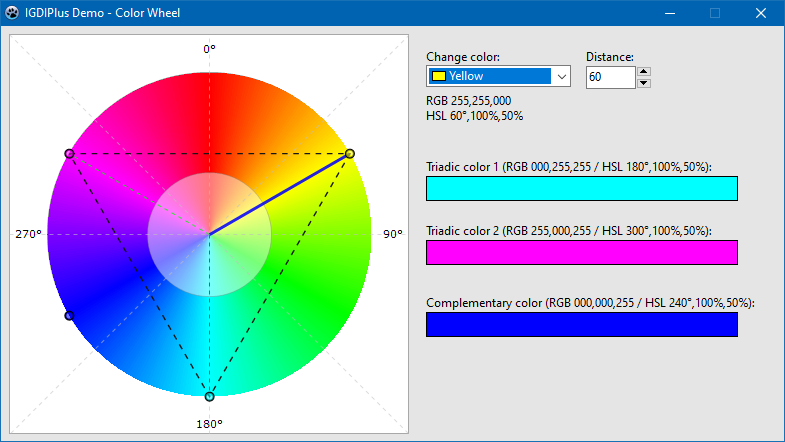
Zusätzliches Demo - Farbrad
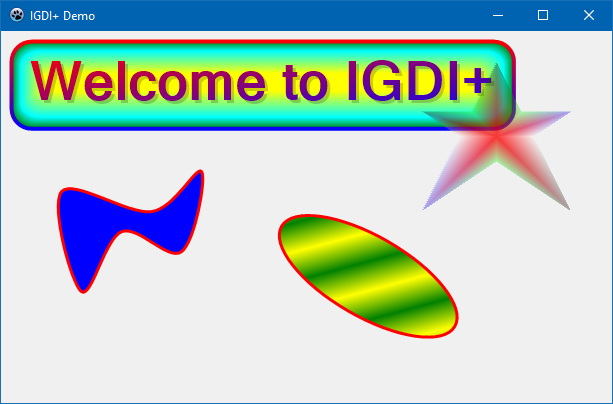
Demo 1 Hauptverfahren.
 procedure TForm1.FormPaint (Sender: TObject);
var
  AGraphics       : IGPGraphics;
  AFont           : IGPFont;
  ALeftTopCorner  : TPointF;
  ARect           : TIGPRectF;
  ARect1          : TIGPRectF;
  APath           : IGPGraphicsPath;
begin
  AGraphics := TIGPGraphics.Create( Canvas );
  AGraphics.SmoothingMode := SmoothingModeAntiAlias;
  AGraphics.TextRenderingHint := TextRenderingHintAntiAlias;

  ALeftTopCorner := TPointF.Create( 20 , 20 );
  AFont := TIGPFont.Create( ' Microsoft Sans Serif ' , 40 , [ fsBold ] );
  ARect := AGraphics.GetStringBoundingBoxF( ' Welcome to IGDI+ ' , AFont, ALeftTopCorner );
  ARect1 := GPInflateRectF( ARect, 10 , 10 );

  // Draw a fancy rounded rectangle.
  AGraphics.DrawRoundRectangleF(
              TIGPPen.Create( TIGPLinearGradientBrush.Create( GPInflateRectF( ARect1, 2 , 2 ), aclRed, aclBlue, LinearGradientModeVertical ), 4 ),
              TIGPPathGradientBrush.Create(
                  TIGPGraphicsPath.Create().AddRoundRectangleF( ARect1, TIGPSizeF.Create( 20 , 20 ) )
                   )
                .SetInterpolationColorArrays( [ aclGreen, aclCyan, aclYellow ], [ 0 , 0.3 , 1 ] )
                .SetCenterPointF( TPointF.Create( 250 , 50 ))
                .SetFocusScales( 0.87 , 0.2 ),
              ARect1, TIGPSizeF.Create( 20 , 20 ) );

  // Draw a text with semitransparent shadow.
  AGraphics.DrawStringF( ' Welcome to IGDI+ ' ,
                        AFont,
                        TPointF.Create( 23 , 23 ),
                        TIGPSolidBrush.Create( MakeARGBColor( 50 , aclBlack )) )

           .DrawStringF( ' Welcome to IGDI+ ' ,
                        AFont,
                        ALeftTopCorner,
                        TIGPLinearGradientBrush.Create( ARect, aclRed, aclBlue, LinearGradientModeForwardDiagonal ));


  // Draw a closed curve.
  AGraphics.DrawClosedCurveF( TIGPPen.Create( aclRed, 3 ), TIGPSolidBrush.Create( aclBlue ),
              [
              TPointF.Create( 60 ,  160 ),
              TPointF.Create( 150 , 180 ),
              TPointF.Create( 200 , 140 ),
              TPointF.Create( 180 , 220 ),
              TPointF.Create( 120 , 200 ),
              TPointF.Create( 80 ,  260 )
              ] );

  // Draw a semitransparent star.
  APath := TIGPGraphicsPath.Create();
  APath.AddLinesF(
    [
    TPointF.Create( 75 , 0 ),
    TPointF.Create( 100 , 50 ),
    TPointF.Create( 150 , 50 ),
    TPointF.Create( 112 , 75 ),
    TPointF.Create( 150 , 150 ),
    TPointF.Create( 75 , 100 ),
    TPointF.Create( 0 , 150 ),
    TPointF.Create( 37 , 75 ),
    TPointF.Create( 0 , 50 ),
    TPointF.Create( 50 , 50 )
     ] );

  AGraphics.TranslateTransform( 420 , 30 )
           .FillPath(
              TIGPPathGradientBrush.Create( APath )
                .SetCenterColor( MakeColor( 200 , 255 , 0 , 0 ))
                .SetSurroundColors(
                  [
                  MakeColor( 80 , 0 , 0 , 0 ),
                  MakeColor( 80 , 0 , 255 , 0 ),
                  MakeColor( 80 , 0 , 0 , 255 ),
                  MakeColor( 80 , 255 , 255 , 255 ),
                  MakeColor( 80 , 0 , 0 , 0 ),
                  MakeColor( 80 , 0 , 255 , 0 ),
                  MakeColor( 80 , 0 , 0 , 255 ),
                  MakeColor( 80 , 255 , 255 , 255 ),
                  MakeColor( 80 , 0 , 0 , 0 ),
                  MakeColor( 80 , 0 , 255 , 0 )
                  ] ),

              APath );

  // Draw rotated ellipse.
  AGraphics.ResetTransform()
           .TranslateTransform( 300 , 160 )
           .RotateTransform( 30 )
           .DrawEllipseF(
              TIGPPen.Create( aclRed, 3 ),
              TIGPLinearGradientBrush.Create( TPointF.Create( 0 , 0 ), TPointF.Create( 20 , 20 ), aclYellow, aclGreen )
              .SetWrapMode( WrapModeTileFlipX ),
              0 , 0 , 200 , 80 );
end ; Im Verzeichnis von Paketen finden Sie Pakete für Delphi XE2 - 10.3 RIO. Installieren Sie das entsprechende Paket (DPK -Datei) und fügen Sie in den IDE -Optionen das Verzeichnis der Bibliothekspfad mit der Datei IGDIPlus.pas hinzu.
Sie haben zwei Optionen:
packagesLazaruslazigdiplus.lpk -Paket.LazIGDIPlus zu den erforderlichen Paketen hinzu.IGDIPlus.pas zu den Compiler -Optionen -> Pfade -> Andere Einheitsdateien hinzu. Fahren Sie wie im Fall von Lazarus fort, nur die Datei mit dem Installationspaket ist packagesCodeTyphonlazigdiplus.ctpkg .
23.01.2020
Delphi XE2 und XE3 Support.
Pakete für Delphi XE2 - 10.3 Rio hinzugefügt.
Hauptdemo für XE2, Farbraddemo für XE2 und XE7 hinzugefügt.
Igdiplushelpers: Ein paar Helferroutinen im Zusammenhang mit der Konvertierung von Hatchstyle.
19.01.2020
Pakete für Lazarus und Codetyphon hinzugefügt.
15.01.2020
Erstveröffentlichung mit kostenloser Pascal -Unterstützung.







