bob plugin akl microsoft free tts
v0.1.0

Microsoft Voice TTS Free Bob Plugin, No Key Needs
Use Microsoft Microsoft tts text to voice for free, and bobplugin developed based on the web version of JavaScript; so as long as the official website is not changed, it can theoretically be used infinitely;
Download Microsoft Voice Plugin bob-plugin-akl-microsoft-free-tts_v0.1.0.bobplugin
You can use it directly with double-click. You don’t need to watch the store version later. I will think of a way to the community version later.
How to use it is as follows (in three steps in total):
Download mstts_server_MacOS in the release on the right
Download Microsoft Voice Plugin bob-plugin-akl-microsoft-free-tts_v0.0.9.bobplugin
(Note: Since macos has a large limitation on software, it is prohibited to use programs of unknown sources, so double-clicking is mostly unopenable. At this time, you need to follow the following steps.)
Open the terminal and execute the following command: chmod a+x <path of your mstts_server_MacOS executable file>
The first time you run, you need to enter chmod. Every time you run in the future, other steps will remain unchanged, but you don’t have to enter the chmod command again.
Of course, if you don't want to occupy your computer's resources, you can also start the service with other Windows computers in the company's office if possible.
You can also start the service using a company or individual Linux server
Configure the server domain name. The default domain name for local startup is http://127.0.0.1:9529/mstts. You can do not need to modify it. If the service is deployed on other machines, you can configure it according to the domain name of your own machine.
Double-click the file with the .bobplugin suffix to install it; enjoy it after installation!
Use renderings:
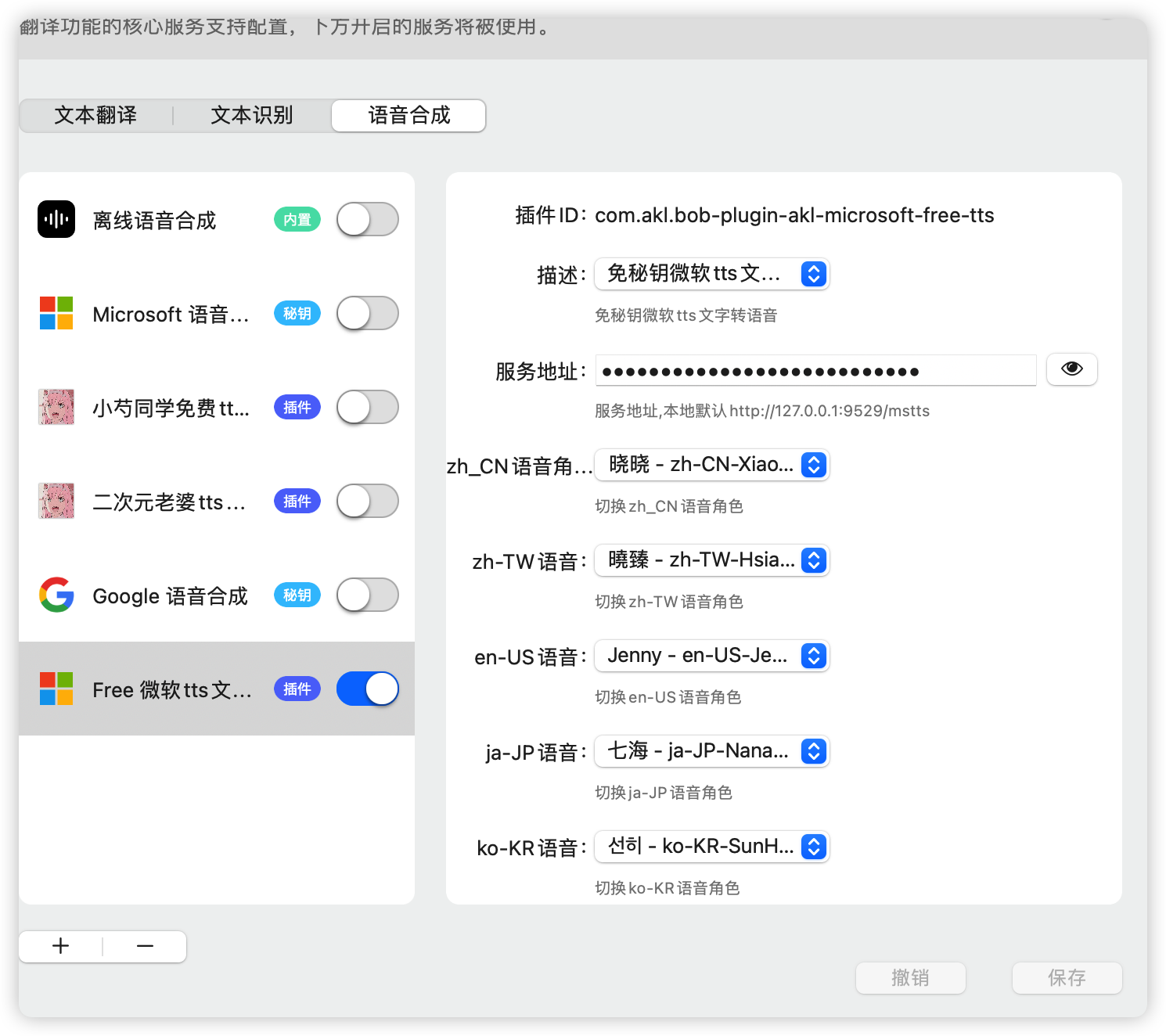
1. Download mstts_server_MacOS (remember to open the terminal under the path of the downloaded file)
 sudo mv mstts_server_MacOS /usr/local/bin/mstts
sudo chmod +x /usr/local/bin/mstts
2. Download and move com.akl.mstts.free.plist (remember to open the terminal under the path of the downloaded file)
mv com.akl.mstts.free.plist ~/Library/LaunchAgents/com.akl.mstts.free.plist
3. Add self-start service
 launchctl load ~/Library/LaunchAgents/com.akl.mstts.free.plist
launchctl start ~/Library/LaunchAgents/com.akl.mstts.free.plist
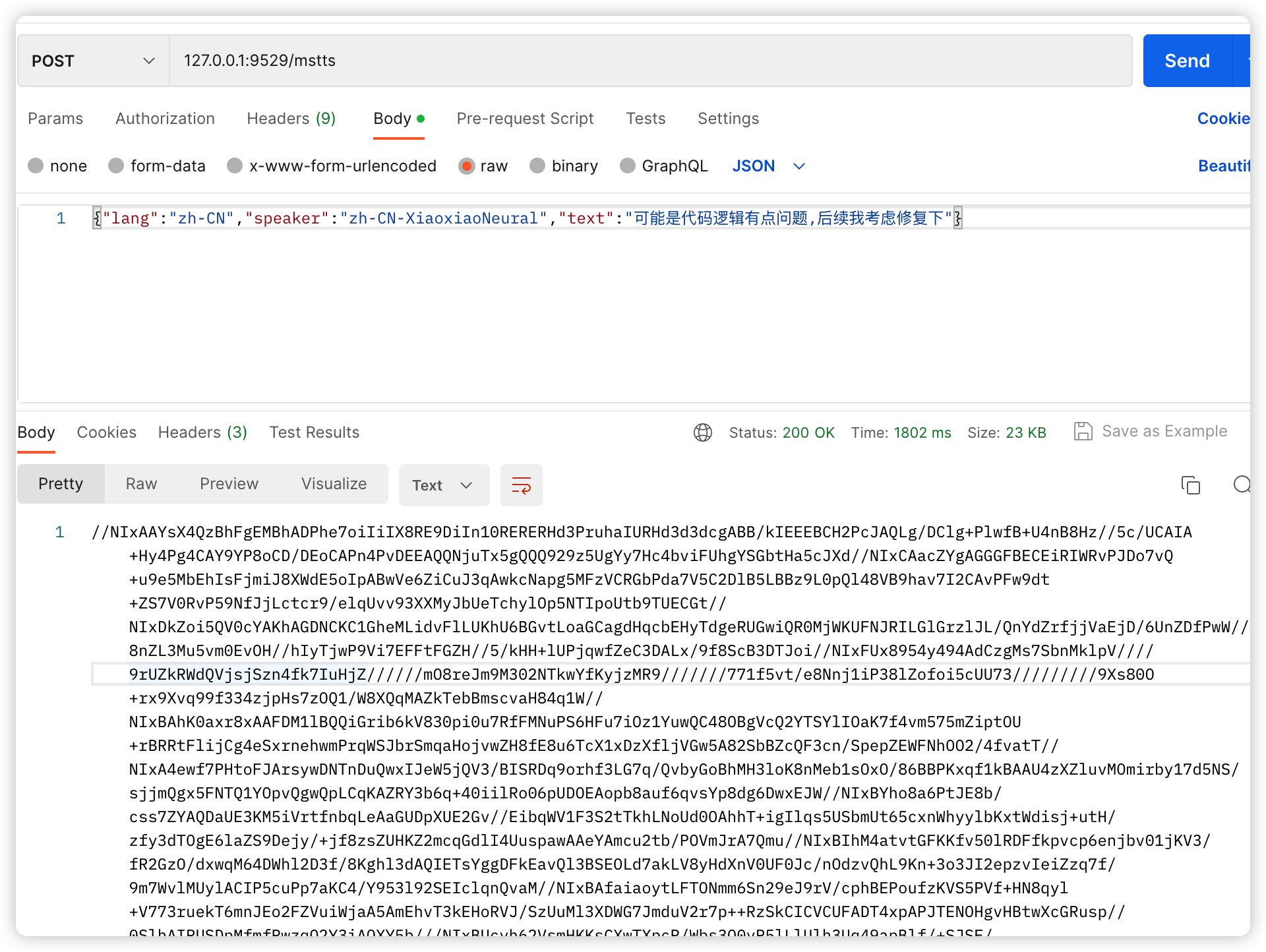
The separate call to the service is as follows:
Input parameters: {"lang":"zh-CN","speaker":"zh-CN-XiaoxiaoNeural","text":"Maybe there is a problem with the code logic, I will consider fixing it later"} Return: base64
Desktop version ChatGPT download address: OpenAI-ChatGPT free desktop version client
Mobile version ChatGPT download address: OpenAI-ChatGPT free mobile version client
Microsoft Voice TTS Keyless Bob Plugin
OpenAI ChatGPT (key-free) plug-in
DeepL translation plugin (no secret key)
Youdao Translation Plugin (No secret key)
CNKI Academic Translation Plugin (No Secret Key)
Volcano Translation Plugin (No secret key)
Baidu Translation Plugin (No secret key)
Tencent Translation Jun Plugin (No secret key)
Tencent Interactive Translation Plugin (No secret key)
Caiyun Xiaoyi Plugin (No secret key)
For Japanese only - MOJi Quotation (じしょ)
Papago Naver Korean translation (no secret key)
Bob Translate AlfredWorkflow for Cutting Board Pictures
Bob's Postman interface debugging plugin