SwiftyFitsize
1.4.2

After cloning or downloading the repository to the local area, please run pod install first, and then open SwiftyFitsize.xcworkspace
 use_frameworks!
pod 'SwiftyFitsize' 1. File > Add Packages
2. Search https://github.com/LinXunFeng/SwiftyFitsize.git
3. Select "Up to Next Major" with "1.4.1"
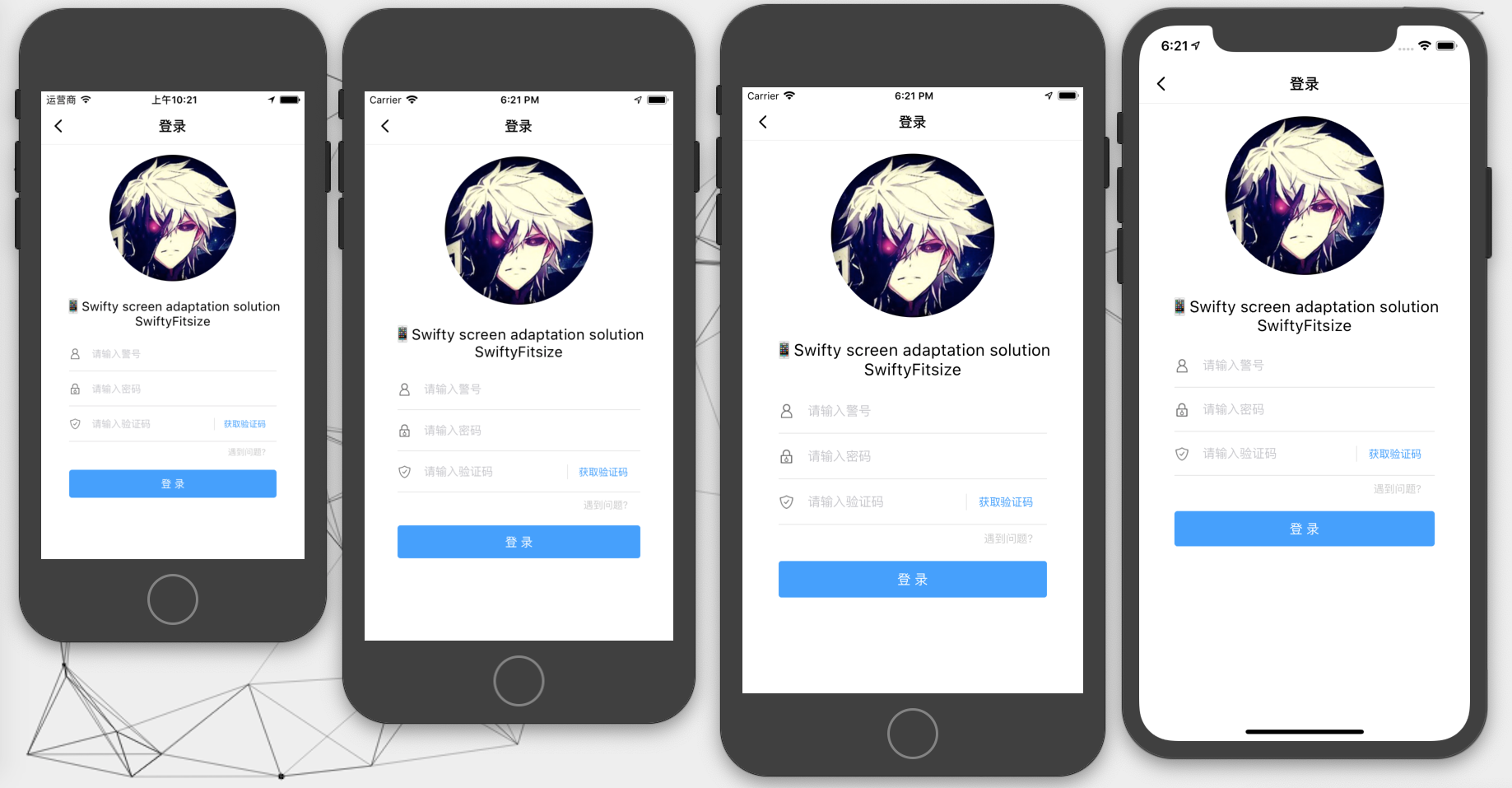
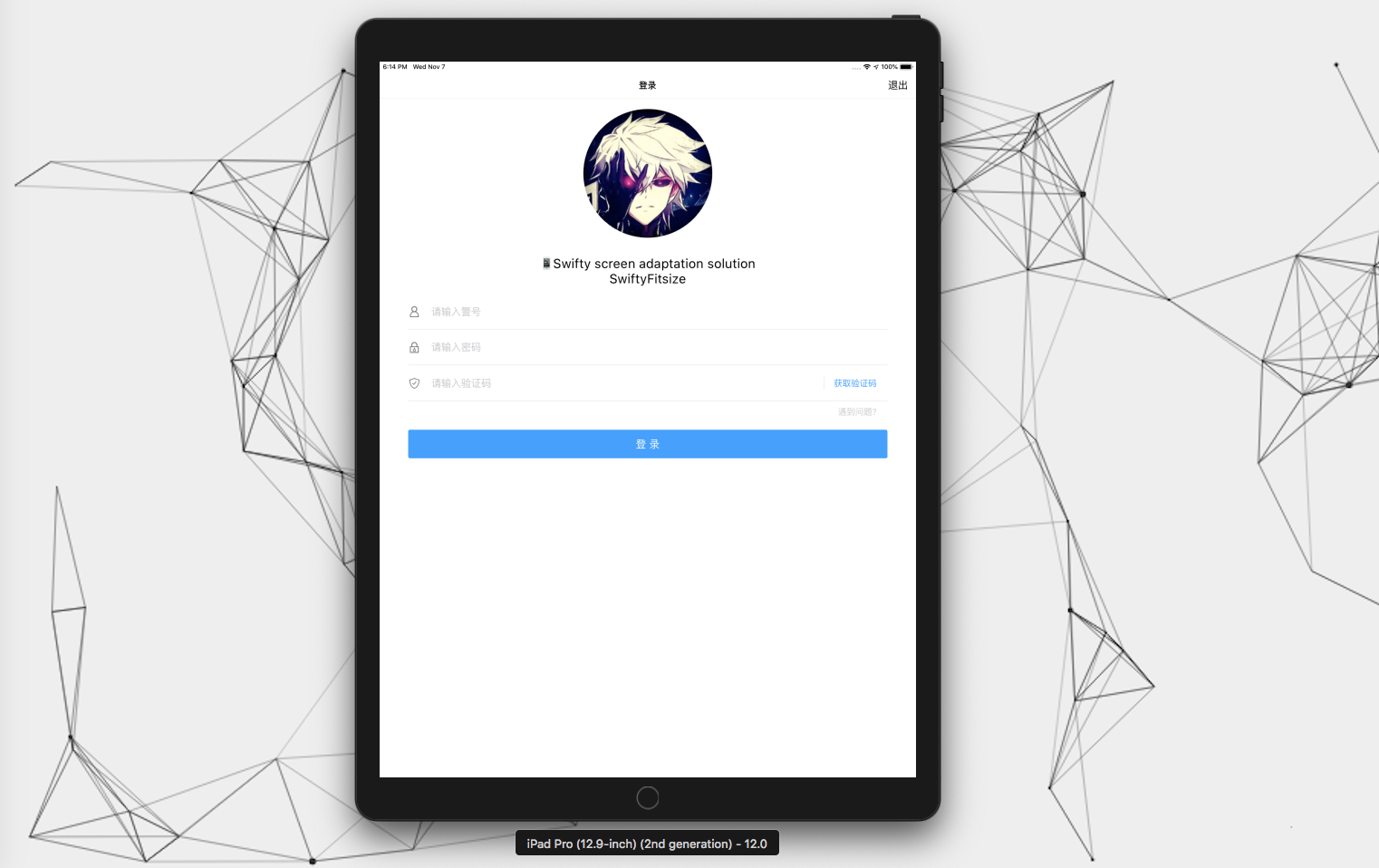
Whether it is
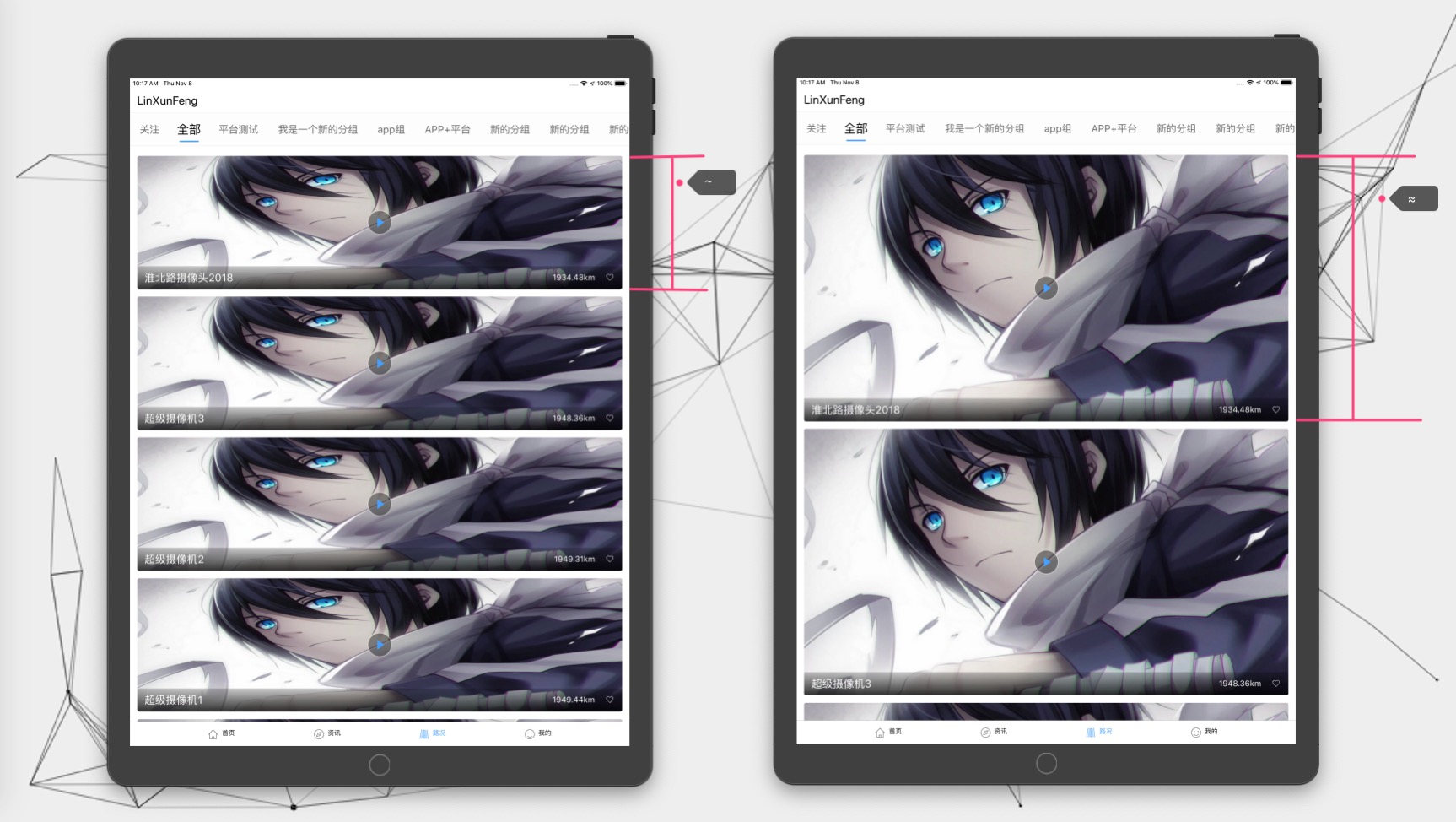
~or≈the adaptation effect foriPhoneis the same. ForiPad,≈the width ofiPadis too large, it will still be calculated according to the width ratio, and the display will be particularly bloated. At this~it will be more suitable for the display.
~On the basis of≈, multiply theiPadiPadFitMultiple.- Generally, use it
~.- The same is true for other operators. Please refer to the instructions below for details.
| Operators | illustrate |
|---|---|
~ | Compare the width. When the device is iPad , value after adaptation will be multiplied to iPadFitMultiple |
≈ | Compare width, force adaptation, neither iPhone nor iPad will be multiplied with iPadFitMultiple |
∣ | Comparison height, corresponding to ~ , the entire screen height |
∥ | Comparative height, corresponding to ≈ , the entire screen height |
∣= | Comparison height, corresponding to ∣ , height within the safe area |
∥= | Comparison height, corresponding to ∥ , height within the safe area |
∣- | Comparison height, corresponding to ∣ , remove the height within the safe area of the bang area |
∥- | Comparison height, corresponding to ∥ , remove the height within the safe area of the bang area |
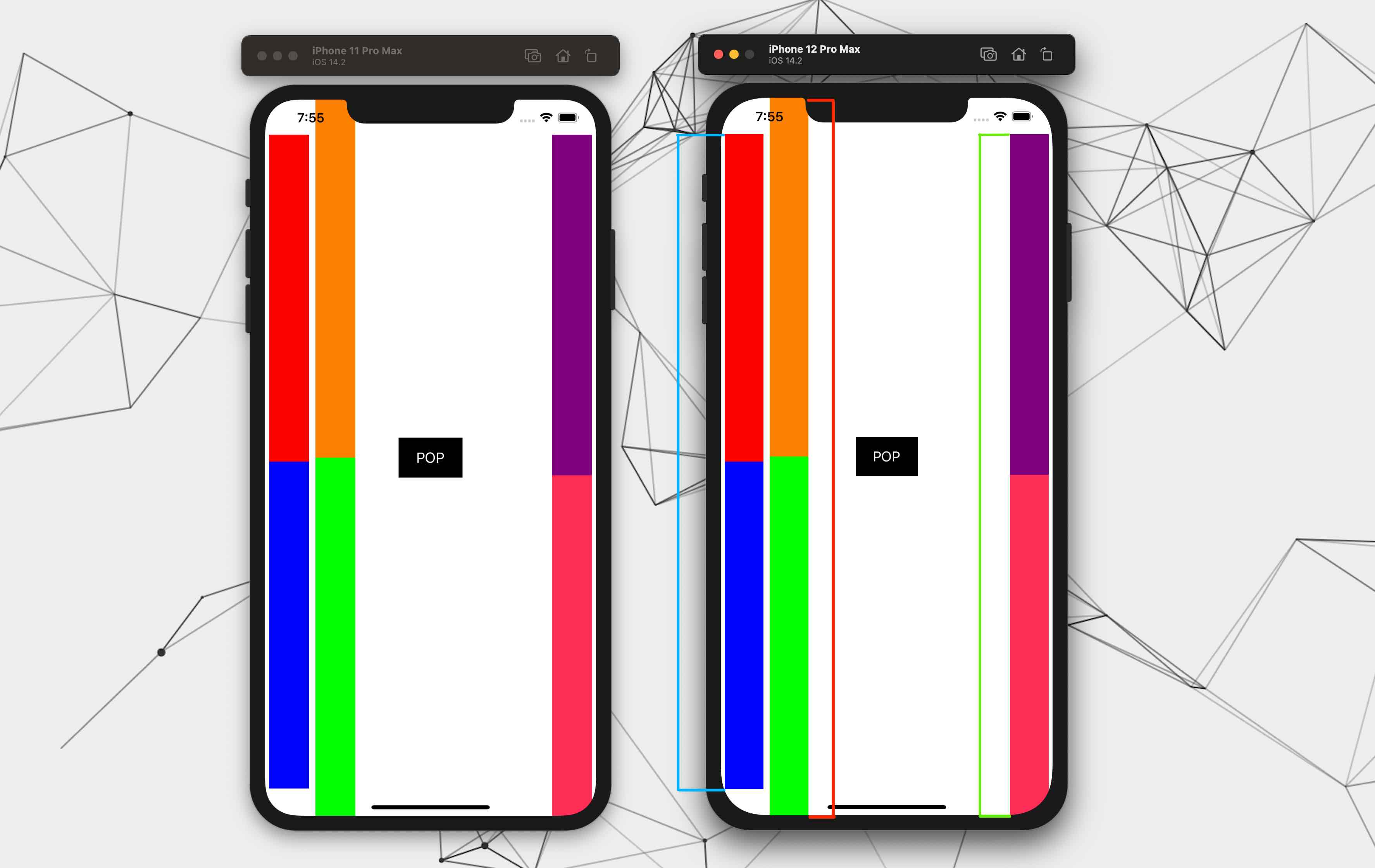
Comparison of height adaptation
- Red:
∣and∥, adapt to the height of the entire screen- Blue:
∣=and∥=Adapt to the height of the central security area- Green:
∣-and∥-adapt to a safe area including the bottom
Give an example
~ : When the device is iPad , the adapted value will be multiplied with iPadFitMultiple
 100 ~
UIFont . systemFont ( ofSize : 14 ) ~
CGPoint ( x : 10 , y : 10 ) ~
CGRect ( x : 10 , y : 10 , width : 100 , height : 100 ) ~
UIEdgeInsetsMake ( 10 , 10 , 10 , 10 ) ~
≈ : (option + x) The adapted value will not be multiplied by iPadFitMultiple
 100 ≈
UIFont . systemFont ( ofSize : 14 ) ≈
CGPoint ( x : 10 , y : 10 ) ≈
CGRect ( x : 10 , y : 10 , width : 100 , height : 100 ) ≈
UIEdgeInsetsMake ( 10 , 10 , 10 , 10 ) ≈ Modify参照宽度,参照高度,是否为iPhoneX系列的参照高度and iPadFitMultiple can call the following method
/// 设置参照的相关参数
///
/// - Parameters:
///   - width: 参照的宽度
///   - height: 参照的高度
///   - isIPhoneXSeriesHeight: 是否为iPhoneX系列的参照高度
///   - iPadFitMultiple: iPad 在适配后所得值的倍数 (0 , 1]
SwiftyFitsize . reference (
  width : 414 ,
  height : 896 ,
  isIPhoneXSeriesHeight : true ,
  iPadFitMultiple : 0.5
) enum SwiftyFitType : Int {
/// Original Value
case none = 0
/// ~
case flexibleWidth = 1
/// ≈
case forceWidth = 2
/// ∣
case flexibleHeight = 3
/// ∥
case forceHeight = 4
/// ∣=
case flexibleSafeAreaCenterHeight = 5
/// ∥=
case forceSafeAreaCenterHeight = 6
/// ∣-
case flexibleSafeAreaWithoutTopHeight = 7
/// ∥-
case forceSafeAreaWithoutTopHeight = 8
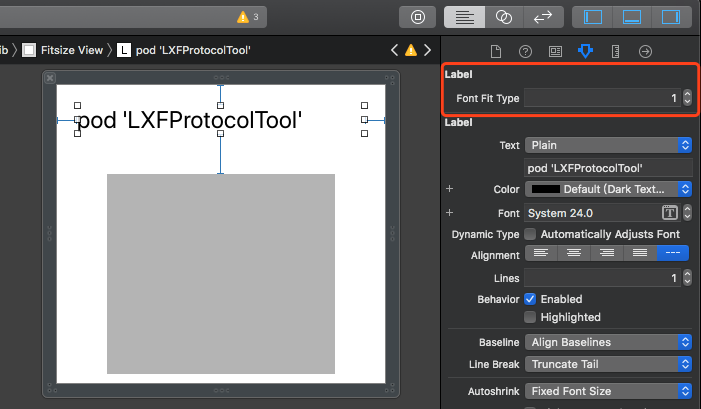
} Supported UI controls are: UILabel UIButton UITextView UITextField
Please refer to enum SwiftyFitType above FontFitType
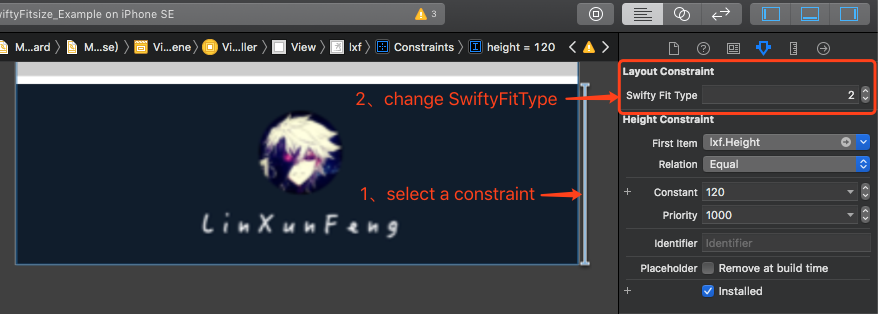
Constraint adaptation
iPad About ~ and ≈ in usage
Since
OCdoes not support operator overloading, it can only be adapted with macros.
XibandStoryboardare used the same as mentioned above.
Swift运算符correspond to OC宏
| Swift operator | OC macro |
|---|---|
~ | SF_xx |
≈ | SFZ_xx |
∣ | SF_FH_xx |
∥ | SFZ_FH_xx |
∣= | SF_SCH_xx |
∥= | SFZ_SCH_xx |
∣- | SF_SBH_xx |
∥- | SFZ_SBH_xx |
Note: xx supports the following types Font , Int , Float , Point , Size , Rect , EdgeInsets
@import SwiftyFitsize;Note: If you are using a dependency added by
SPMand need to use a macro (such as:SF_Float),You need to import
SwiftyFitsizeOCSupport, whileSwiftyFitsizecan not be imported.
@import SwiftyFitsizeOCSupport;参照宽度,参照高度,是否为iPhoneX系列的参照高度and iPadFitMultiple [SwiftyFitsize referenceWithWidth: 414
height: 896
isIPhoneXSeriesHeight: YES
iPadFitMultiple: 0.6 ];~ UIFont *font = [UIFont systemFontOfSize: 14 ];
UIFont *font1 = font.sf;
UIFont *font2 = SF_Font(font);
CGFloat num = SF_Float( 14 );
CGPoint point = SF_Point(CGPointMake( 10 , 10 ));
CGSize size = SF_Size(CGSizeMake( 100 , 100 ));
CGRect rect = SF_Rect(CGRectMake( 10 , 10 , 100 , 100 ));
UIEdgeInsets edge = SF_EdgeInsets(UIEdgeInsetsMake( 0 , 0 , 100 , 100 ));
≈ UIFont *font1 = font.sfz;
UIFont *font2 = SFZ_Font(font);
CGFloat num = SFZ_Float( 14 );
CGPoint point = SFZ_Point(CGPointMake( 10 , 10 ));
CGSize size = SFZ_Size(CGSizeMake( 100 , 100 ));
CGRect rect = SFZ_Rect(CGRectMake( 10 , 10 , 100 , 100 ));
UIEdgeInsets edge = SFZ_EdgeInsets(UIEdgeInsetsMake( 0 , 0 , 100 , 100 ));The same is true for other operators
Scenario: The left and right spacing of
tableViewis10when the screen size is different. After excluding the left and right spacing of10,Cellis adapted in an equal way.Usage idea: minus
20width in total, and adapt to the remaining size.
It is recommended to use the PropertyWrapper scheme for the following calling methods: one and two.
 struct Metric {
    static let tableViewLeftRightMargin : CGFloat = 10 // 定义 tableView 的左右间距
    ...
    static let tableViewHeight : CGFloat = Fit . $width ( 30 ) // 去掉左右边距后进行适配的值
    static let rowLeftViewWidth : CGFloat = Fit . $width ( 177.5 )
    static let rowCenterViewWidth : CGFloat = Fit . $width ( 100.5 )
    static let rowRightViewWidth : CGFloat = Fit . $width ( 77 )
    ...
}

struct Fit {
//    @WrappedSwiftyFitsize(fitType: .flexibleWidth, reduceValue: Metric.tableViewLeftRightMargin)
//    fitType 默认值是 .flexibleWidth,所以可以不传
    @ WrappedSwiftyFitsize ( reduceValue : Metric . tableViewLeftRightMargin * 2 )
    static var width : CGFloat = 375
}
375 is an initialization value, and it has no special meaning. It is just that the value can be obtained when calling Fit.width . If the value of Fit.width is not used, the initialization will not be performed.
Call method:
// 移除指定尺寸后的适配,调用方式:
// 以下都是以适配 tableView 为例,移除 tableView 左右两侧固定的边距,以剩余的宽度来做适配

// 方式一:先赋值再取值
// 将 20 进行适配
Fit . width = 20
print ( "适配后的值 -- ( Fit . width ) " )

// 方式二:使用 $ 将 width 当方法用,传入待适配的值
// 将 30 进行适配
let aVal = Fit . $width ( 30 )
print ( "适配后的值 aVal -- ( aVal ) " )

// 方式三:调用 SwiftyFitsize.fit 方法
let bVal = SwiftyFitsize . fit (
  size : 40 ,
  fitType : . flexibleWidth ,
  reduceValue : Metric . tableViewLeftRightMargin * 2
)
print ( "适配后的值 bVal -- ( bVal ) " ) Is this the case of adapting to tableView , remove the fixed margins on the left and right sides of the tableView, and adapt the remaining width to the tableView.
 CGFloat fitWidth = [SwiftyFitsize fitWithSize: 40
                                      fitType: SwiftyFitTypeFlexibleWidth
                                  reduceValue: 20 ];
It can be used as a macro for easy use
# define kFitWidth ( value )
[SwiftyFitsize fitWithSize: value fitType: SwiftyFitTypeFlexibleWidth reduceValue: 20 ]
Use macros to adapt
 CGFloat fitWidth = kFitWidth ( 40 );
NSLog ( @" fitWidth -- %f " , fitWidth);
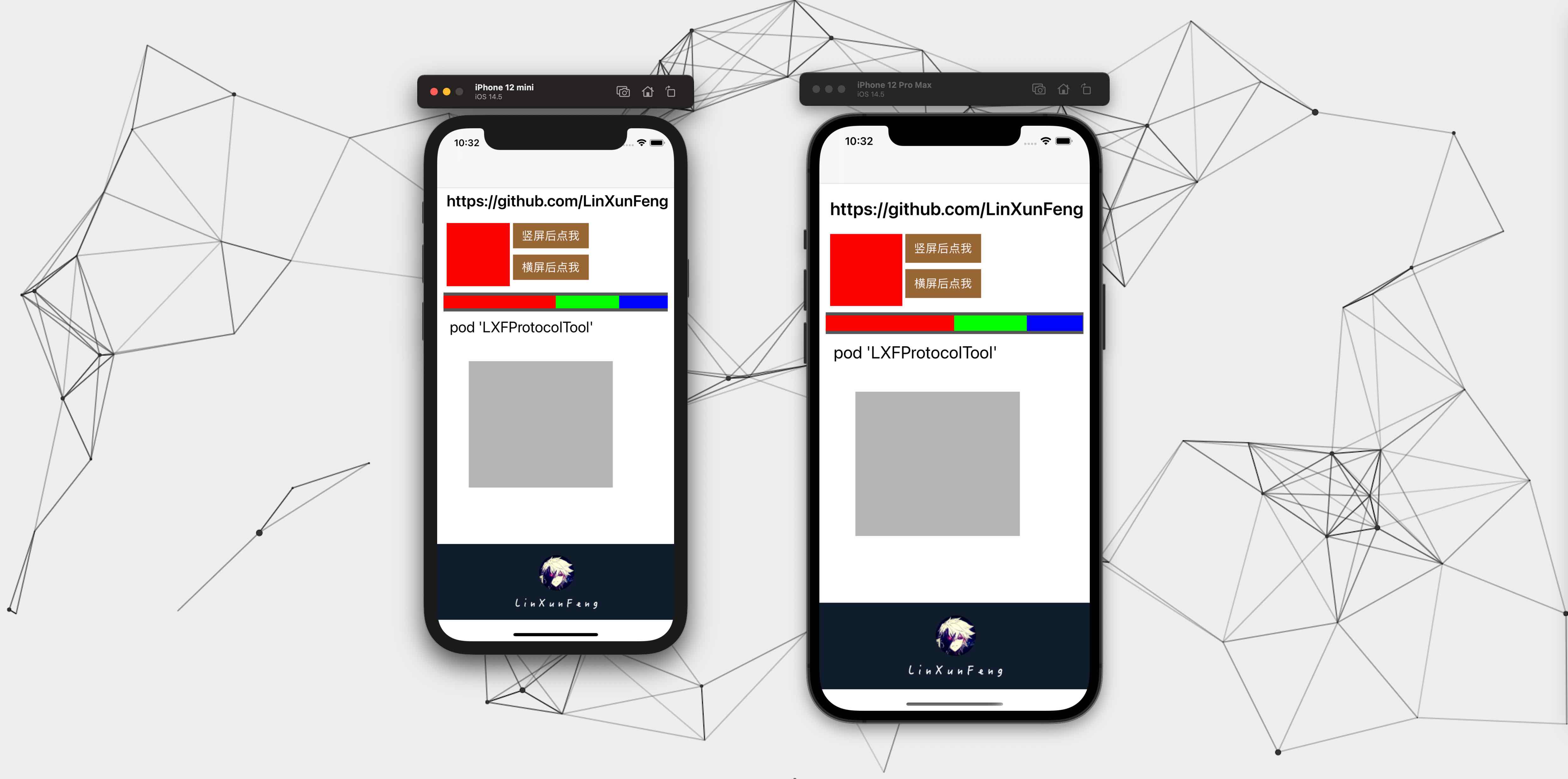
The effect is shown in the bar view containing red, green and blue:
/// 计算结果类型
@ objc public enum SwiftyFitCalcResultType : Int {
    /// 跟随全局配置
    case globalConfig
    /// 原始数据
    case raw
    /// 四舍五入
    case round
    /// 保留一位小数(根据第二位小数进行四舍五入)
    case oneDecimalPlace
} .raw : The impact is ignored.round : Influence range (-0.5, 0.5].oneDecimalPlace : Effect range (-0.05, 0.05]
- If not configured, the default is
.raw.globalConfigtakes the type configured here- If it is still set to
.globalConfighere, it will be reset to.rawinternally
SwiftyFitsize . reference ( width : 375 , calcResultType : . oneDecimalPlace ) // 全局配置计算结果为保留一位小数The following is the global configuration without specifying the
calcResultTypeparameter.
Specify calcResultType separately
 SwiftyFitsize . fit (
    size : 35 , // 36
    fitType : . flexibleWidth ,
    reduceValue : 10 * 2 ,
    calcResultType : . raw // .round .oneDecimalPlace
)
PropertyWrapper method
// calcResultType: .raw .round .oneDecimalPlace
@ WrappedSwiftyFitsize ( reduceValue : Metric . tableViewLeftRightMargin * 2 , calcResultType : . raw )
static var width : CGFloat = 375 The first column is the value before adaptation
The other columns are values calculated according to different SwiftyFitCalcResultType after adaptation
| Original value | raw | round | oneDecimalPlace |
|---|---|---|---|
| 35 | 36.478873239436616 | 36.0 | 36.5 |
| 36 | 37.52112676056338 | 38.0 | 37.5 |
The following lists the corresponding resolutions of some devices for easy search
| equipment | Logical resolution (point) | Device resolution (pixel) |
|---|---|---|
| SE | 320x568 | 640x1136 |
| 6(S)/7/8 / SE (second generation) | 375x667 | 750x1334 |
| 6(S)+/7+/8+ | 414x736 | 1080x1920 |
| X(S) / 11Pro | 375x812 | 1125x2436 |
| XR / 11 | 414x896 | 828x1792 |
| XS Max / 11Pro Max | 414x896 | 1242x2688 |
| 12 mini / 13 mini | 360x780 | 1080x2340 |
| 12(Pro) / 13(Pro) | 390x844 | 1170x2532 |
| 12 Pro Max / 13 Pro Max | 428x926 | 1284x2778 |
SwiftyFitsize is available under the MIT license. See the LICENSE file for more info.

 |  |
|---|---|








