tuesday js
Tuesday JS Release 52

is a simple web-based, free and open-source visual novel editor that can be used in a web browser. It is written in JavaScript without using any third party libraries and thus does not require additional software installation. The engine uses standard HTML5 document elements such as div and img. This allows the use of any media format supported by browsers including vector graphics svg, gif animations and css styles. There is a version of the editor available as a standalone application for Android devices and desktops. All versions are fully compatible with each other and have the same interface.
is free, open source visual novel creation software that is created without waste. Game creation and play can be done on a web browser. Although it is a software developed using JavaScript, it does not use any third-party libraries, so there is no need to install any other software. You can write game scripts using tags and elements familiar to standard HTML5 sentences such as div and img, and use any file that the browser can handle, such as vector images in svg format, animation in gif format, CSS style sheets, etc. There are also download versions that run on Android devices and PC versions for Windows and Mac. Each version is fully compatible and has a common interface.
JavaScript JavaScript that contains information on JavaScript that you can use to support This article explains HTML5, which does not allow you to do so. It does not allow you to do so by adding a message to the extent that it is svg, which means that it is not svg, gif-анию css. Is it possible to use Android devices that support Android devices. Is it possible to access this site? We will notify you of this and other issues.
Run in browser: https://kirilllive.github.io/tuesday-js/translate/en_tuesday_visual.html
GitHub: https://github.com/Kirilllive/tuesday-js/releases
Patreon: https://www.patreon.com/kirill_live
Boosty: https://boosty.to/kirilllive
EN - A quick tutorial to create a visual novel
JA - Tuesday Let's make a visual novel with JS
ES - A para crear una novela visual
RU - A message from the source of the matter
PT - A visual novel
Twitter: https://twitter.com/TuesdayJS_vn
Reddit: https://www.reddit.com/r/TuesdayJS/
The visual editor allows you to create graphics or kinetic novels without any programming knowledge. If is necessary, it is possible to expand the basic functionality using JavaScript and css.
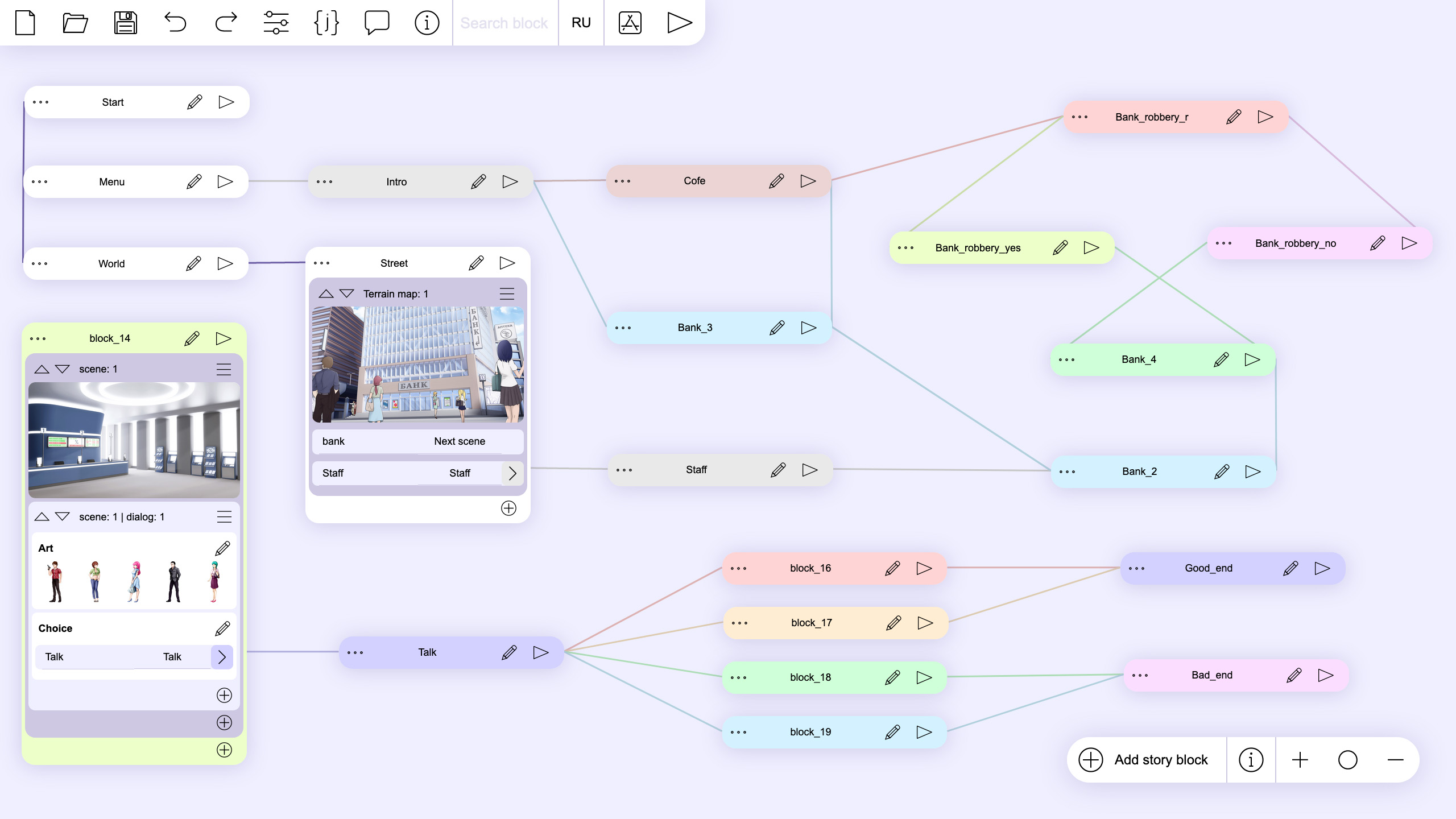
It provides a visual view of the script, along with individual choices and the results that result from the selection. It's easy to understand the structure of the script and makes it easier to edit.
The meaning of the matter is that you have not yet been granted the right to the public. The meaning of this article is, and the question of whether it is necessary to access the site.
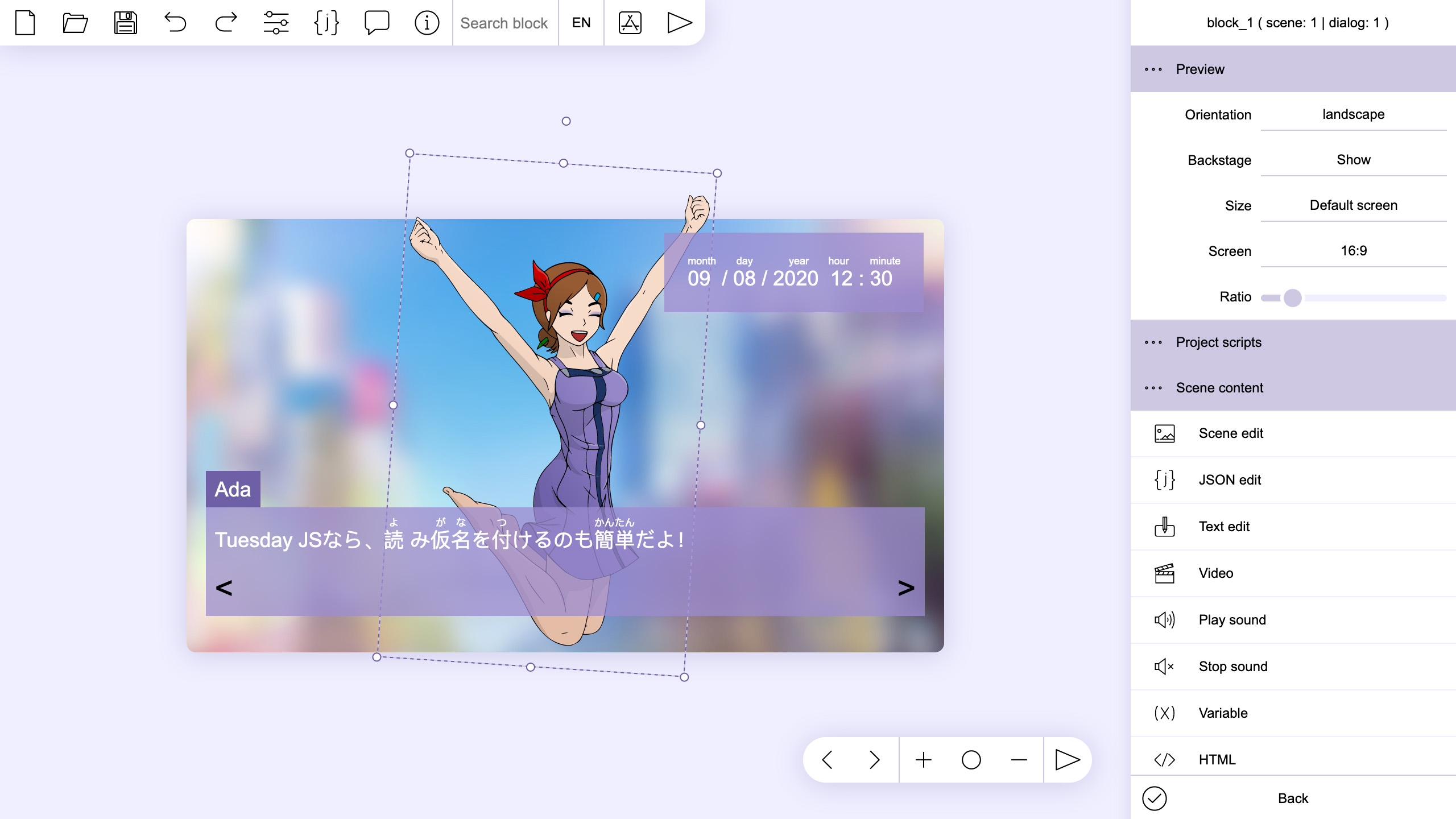
The scene editor can arrange all the elements in their places. It also shows how the scene will change on different screens. In the scene layout you can use standard HTML units in percentage pixels or centimeters to better adapt the scene to different screens.
The feature allows you to classify and manage all types of elements. In addition, you can see changes in the screen structure when the game is run in a different screen environment than the production environment. You can specify the layout in either percentage or centimeters for standard HTML, so you can create an appropriate screen configuration that suits your environment.
It is not possible to do so. It is not possible to use this as a form of service. It is not intended to be used as a way of using the above information. It is not intended to be used in HTML format, but it is not possible to access it. Is it possible to read this article?
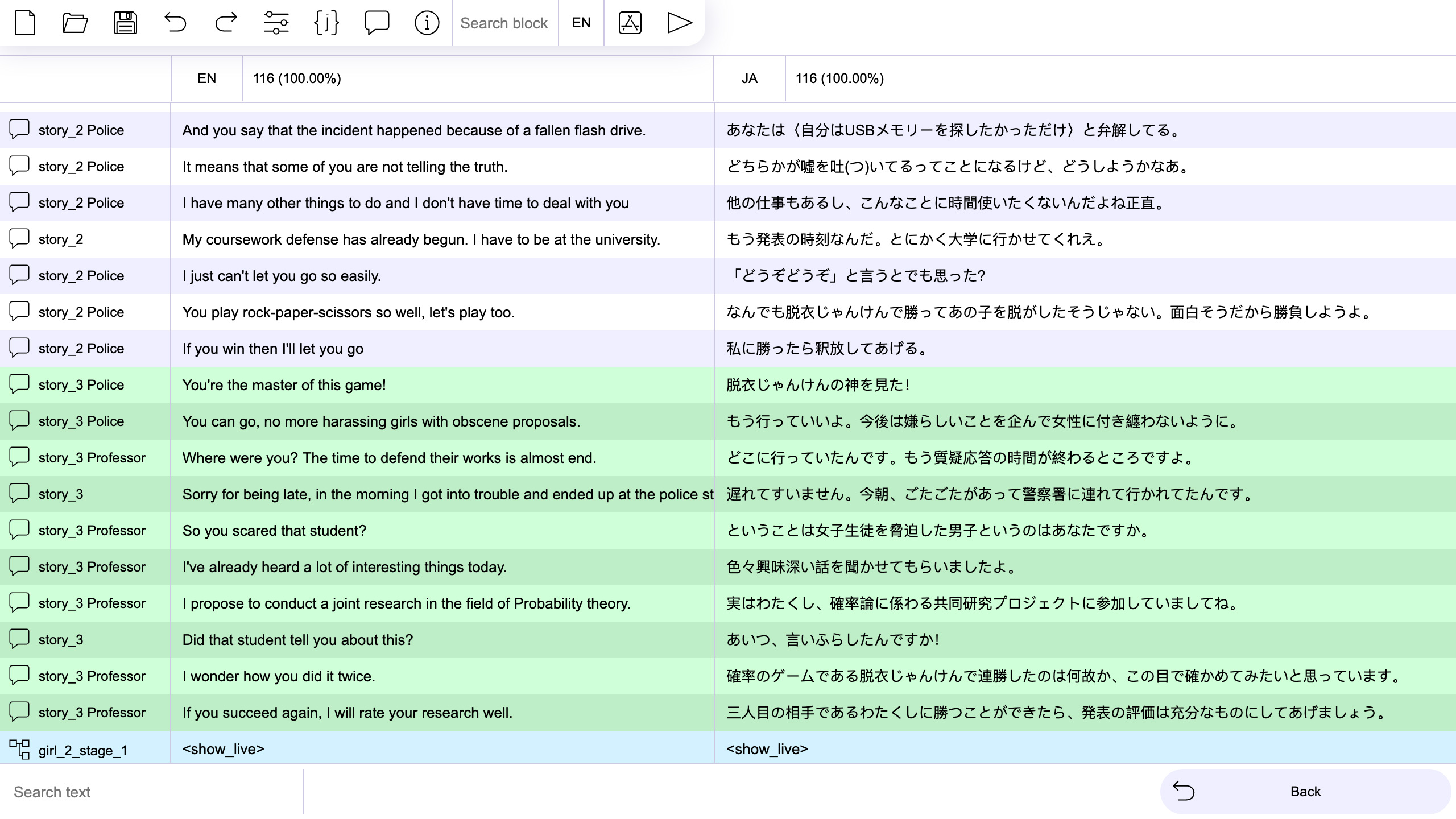
The built-in translation editing tool allows you to quickly add a new translation and edit all the texts in your project without leaving the editor. In addition, it displays the number of completed translations for each language.
With the Tuesday JS built-in translation support tool, you can add translated sentences for other language versions by referencing the original text used in your project like a bilingual table, eliminating the hassle of launching another text editor. You can also check the translation progress rate for each language.
This article does not allow us to share this information with you, but we do not accept any inconvenience caused. языка.
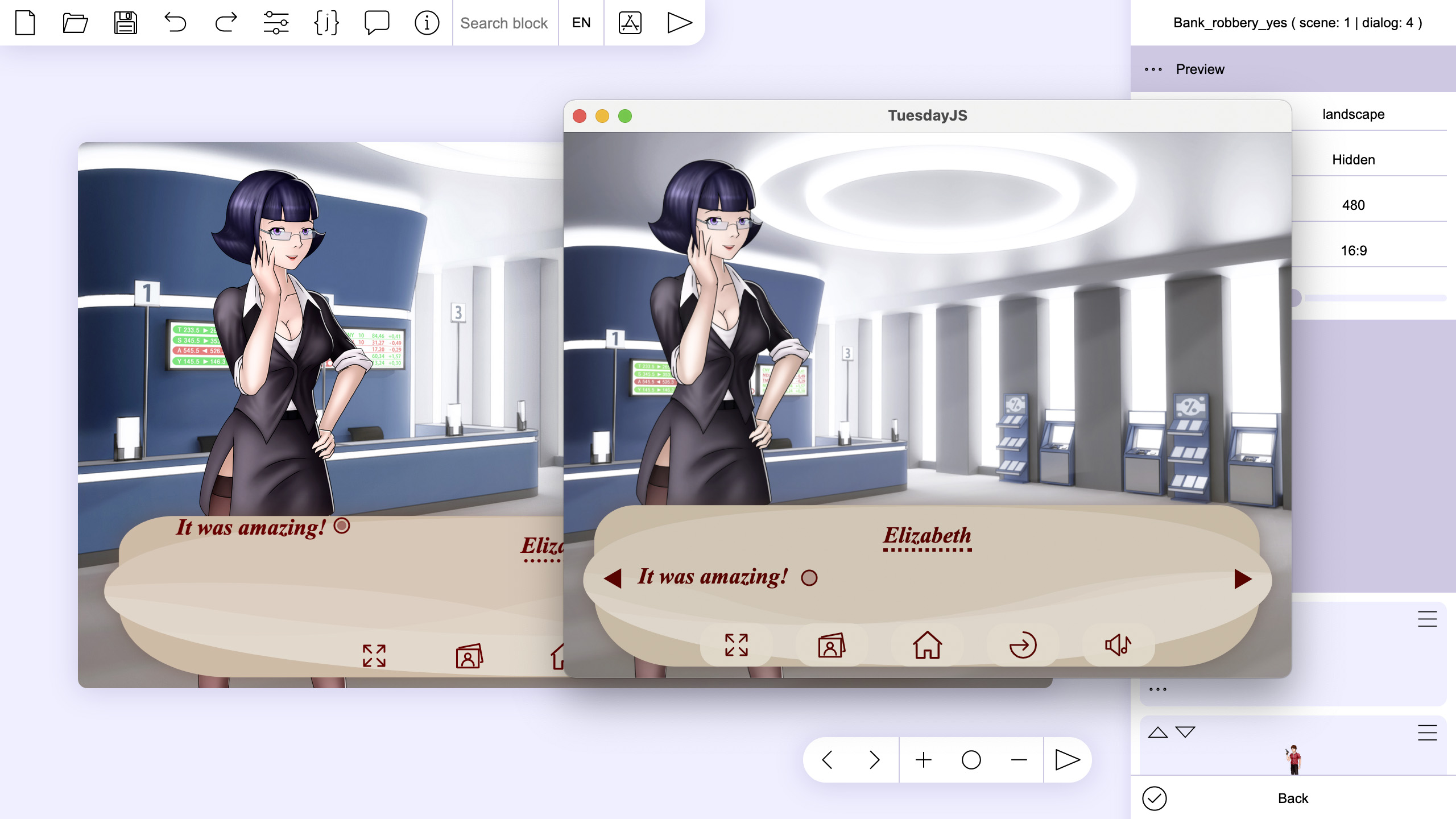
Preview allows you to start a project from a certain point in the script with the selected localization.
Each language setting has a preview feature that lets you test its behavior from any point in time.
It is not possible to do so inappropriately to say that this article is intended to inform you of this information.
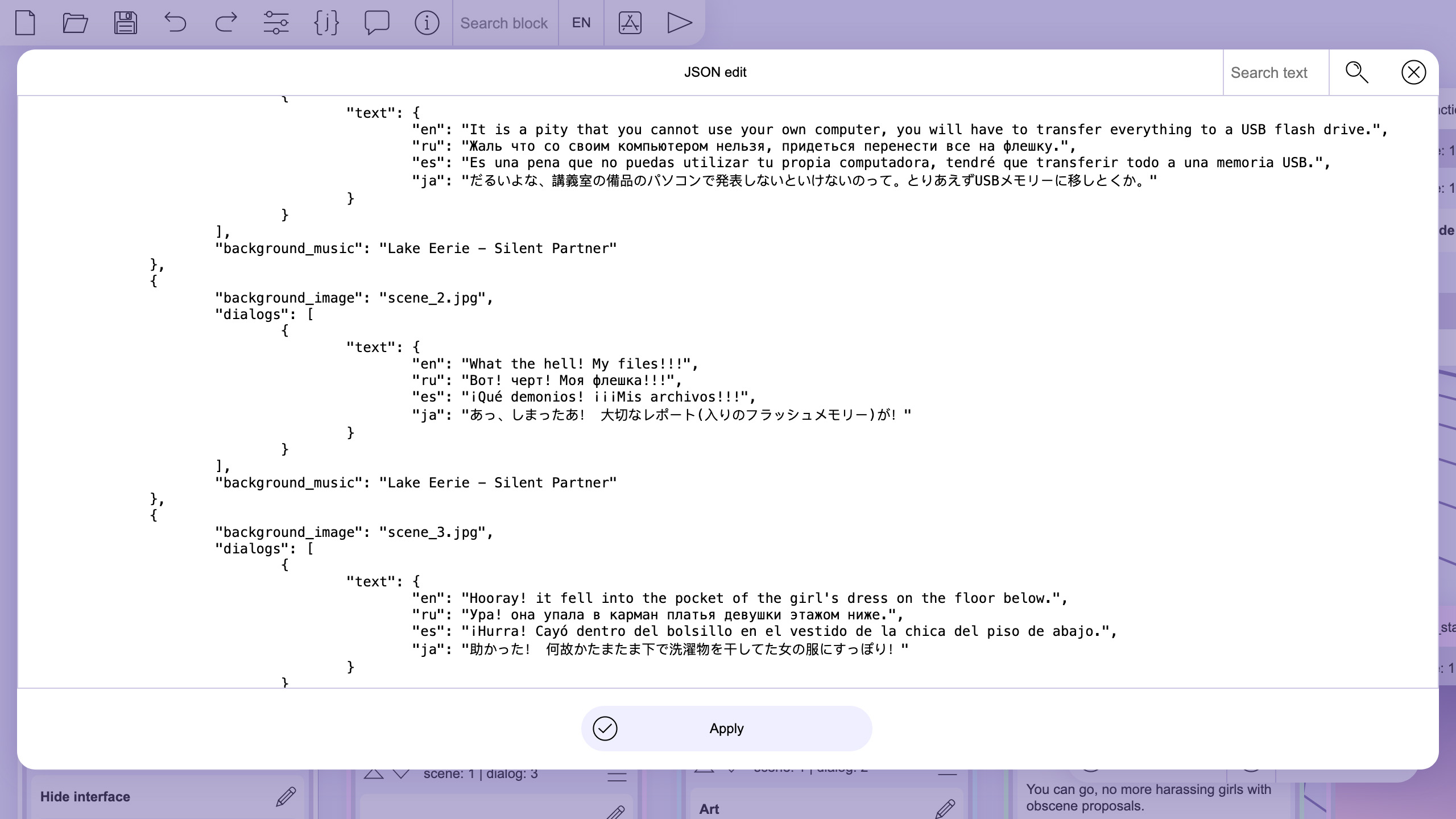
A story script has all the elements stored in a JSON structure. Almost any programming language can work with this format. This allows you to port your script to another engine or platform. The editor has a built-in tool to work with JSON. This will allow you to edit the entire contents of the script or just the selected element.
The game script stores all elements in JSON format. JSON can be used in all programming languages except some, so you can port scripts created with Tuesday JS to other game engines and computers. It has a built-in tool for editing JSON, allowing you to edit the entire script as JSON, or edit only anywhere.
JSON. It is a matter of fact that you have not yet reached the token of the matter. Is it possible to send you a message from JSON, which states that you may have experienced in the event that you have not yet reached the top of the page.
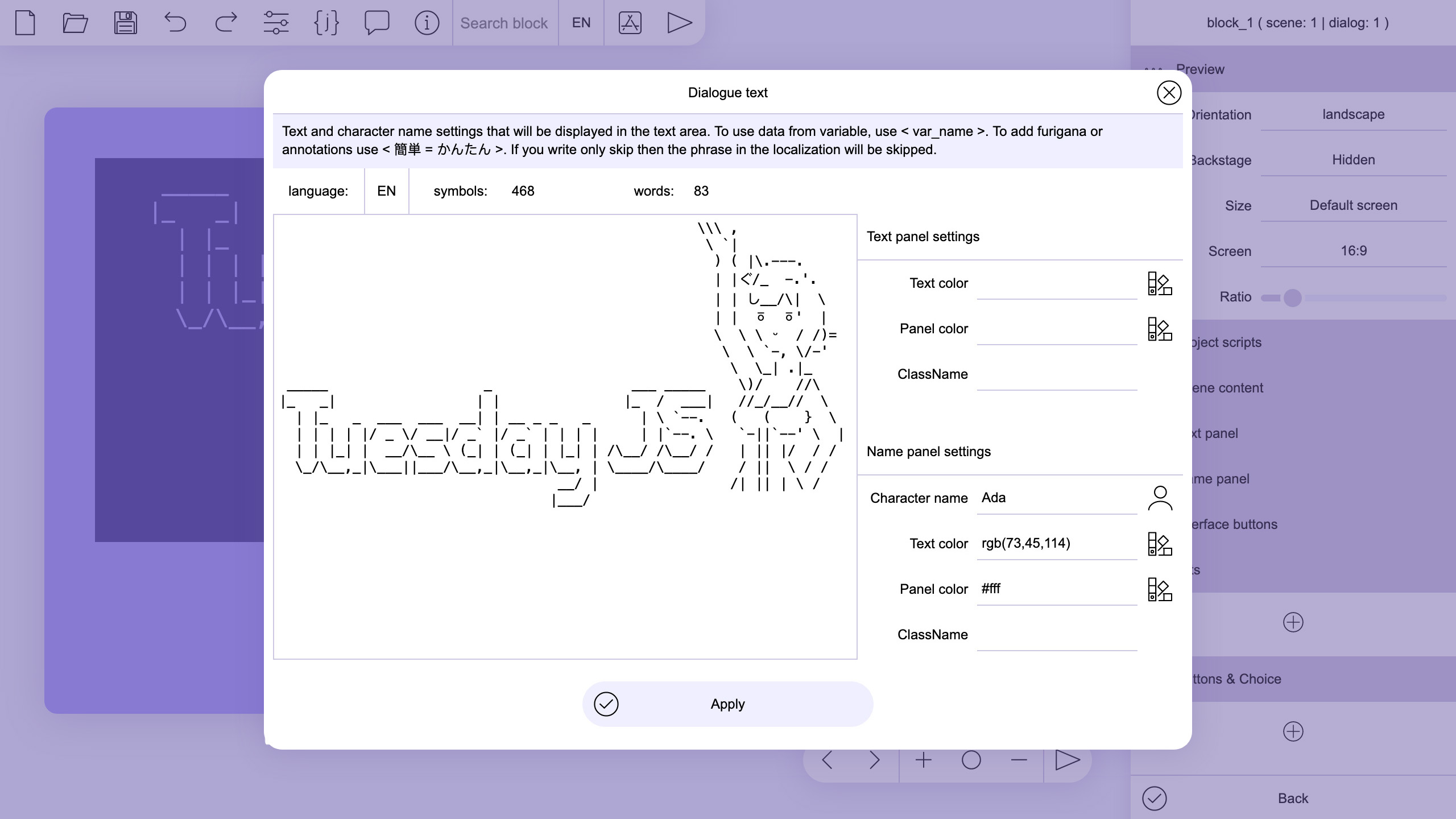
The engine is adapted to use ASCII graphics. With its help, you can diversify the texts with images and patterns made up of text characters.
Tuesday JS Engine can display ASCII Art (AA) appropriately. You can create a variety of pictures and patterns using the text.
The following is a statement from the ASCII-Additional Information Center. The information provided by the authorities for the purpose of providing information on the matter is as follows.
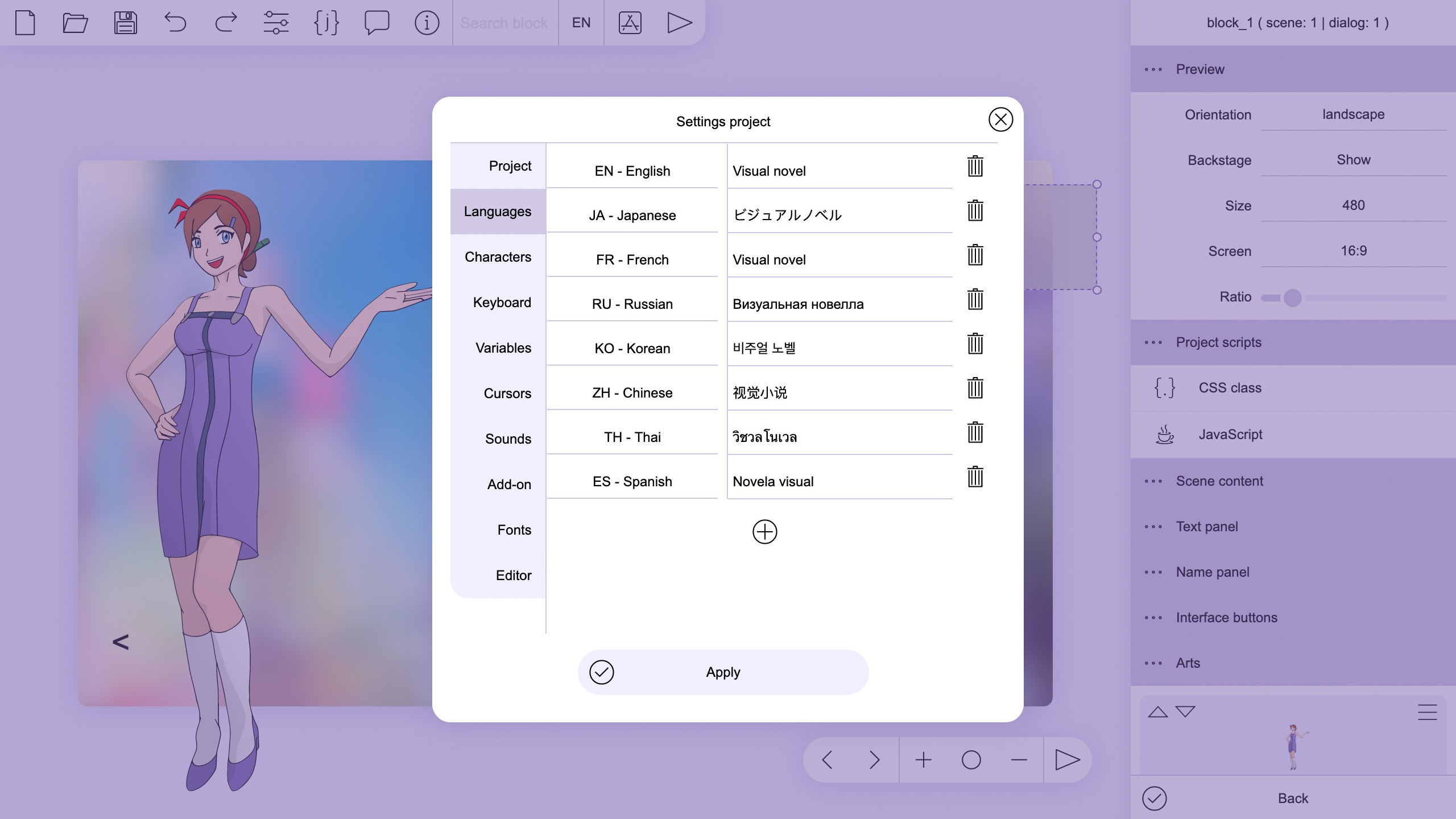
Tuesday JS provides ample opportunities for adapting stories into other languages. You can set the localized translation for almost any element of your project including text and graphics. The preview function allows you to run the project in the selected language. All language texts can also be exported to a table csv file for editing or adding localizations in another editor.
Tuesday JS also has a wealth of features for creating translated versions. You can set the translated version file for each element, such as text and graphics, that makes up the game, and you can check the operation of the translated version provided with the preview function. It can be output as CSV format table data, so you can also edit and add translated text in other text editors.
Tuesday JS Nov 2019 More Copy link to Tweet Embed Tweet Replying to @JS_C_C_C_C_C_C_C_C_C_C_C_C_C_C_C_C_C_C_C_C_C_C_C_C_C_C_C_C_C_C_C_C_C_C_C_C_C_C_C_C_C_C_C_C_C_C_C_C_C_C_C_C_C_C_C_C_C_C_C_C_C_C_C_C_C_C_C_C_C_C_C_C_C_C_C_C_C_C_C_C_C_C_C_C_C_C_C_C_C_C_C_C_C_C_C_C_C_C_C_C_C_C_C_C_C_C_C_C_C_C_C_C_C_C_C_C_C_C_C_C_C_C_C_C_C_C_C_C_C_C_C_C_C_C_C_C_C_C_C_C_C_C_C_C_C_C_C_C_C_C_C_C_C_C_C_C_C_C_C_C_C_C_C_C_C_C_C_C_C_C_C_C_C_C_C_C_C_C_C_C_C_C_C_C_C_C_C_C_C_C_C_C_C_C_C_C_C_C_C_C_C_C_C_C_C_C_C_C_C_C_C_C_C_C_C_C_C_C_C_C_C_C_C_C_C_C_C_C_C_C_C_C_C_C_C_C_C_C_C_C_ The idea behind this article is to say that it is not possible to access this website.
Minimum version of Android 5.1
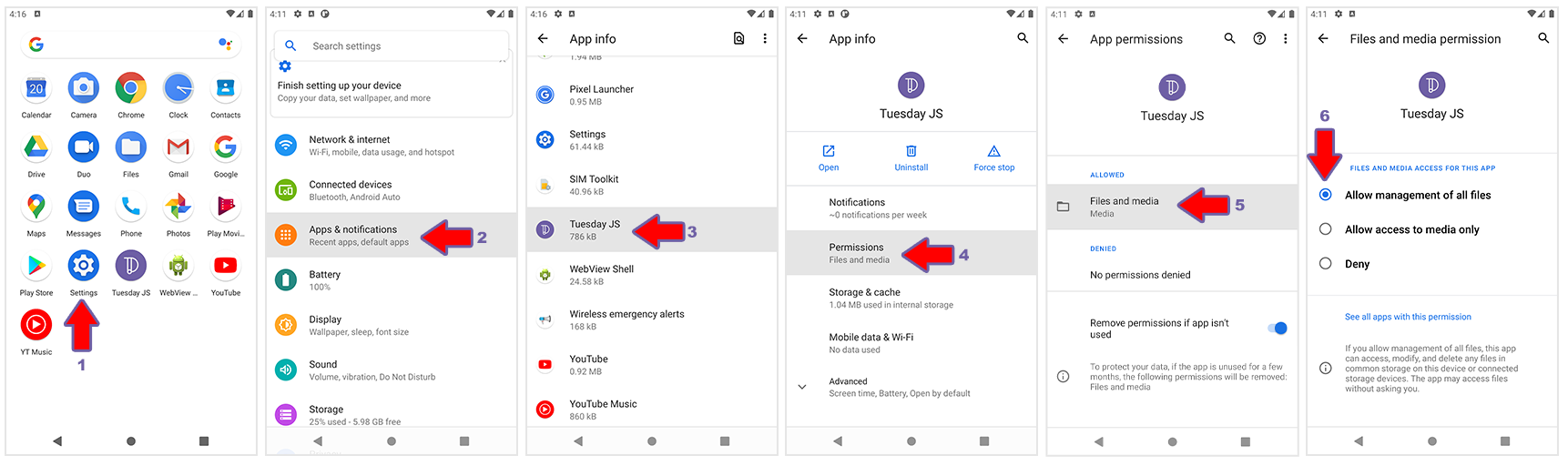
If you have problems with files on Android 10 and higher, then you need to specify 'Allow access to manage all files' in the application settings in 'Permissions' section.
step 1 The engine file "tuesday.js" downloaded from https://kirilllive.github.io/tuesday-js/tuesday.js
step 2 Index.html file with id = 'tuesday' elements to display the novel
 < html >
    < head >
    </ head >
    <!--After loading, the load_story function is launched, indicating a file or array with history-->
    < body onload =" load_story('file','story.json') " >
        <!--display area-->
        < div id =' tuesday ' style =' width:100%; height:90vh; ' > </ div >
        <!--path to the engine file, always at the end of the page-->
        < script type =" text/javascript " src =" tuesday.js " > </ script >
    </ body >
</ html >
step 3 Create a story file story.json
{
    "parameters" : {
        "text_panel" : {
            "size" : [ " 95% " , " 25% " ],
            "color" : " #9cf " ,
            "indent_bottom" : " 32px " ,
            "size_text" : " 20px " ,
            "dialog_speed" : 20
        },
        "name_panel" : {
            "size" : [ " 0 " , " 48px " ],
            "position" : [ " 0 " , " 0 " , " -48px " , " 0 " ],
            "size_text" : " 18px "
        },
        "launch_story" : " main_menu " ,
        "languares" : [ " en " ],
        "buttons" : [
            {
                "name" : " tue_back " ,
                "position" : [ " 0 " , " 55% " , " 0 " , " 8px " ],
                "size" : [ " 52px " , " 52px " ],
                "color" : " #888 " ,
                "size_text" : " 48px " ,
                "text" : " < "
            },{
                "name" : " tue_next " ,
                "position" : [ " 55% " , " 0 " , " 0 " , " 8px " ],
                "size" : [ " 52px " , " 52px " ],
                "color" : " #888 " ,
                "size_text" : " 48px " ,
                "text" : " > "
            }
        ]
    },
    "main_menu" :[
        {
            "dialogs" :[
                {
                    "choice" :[
						{
                            "go_to" : " story " ,
                            "position" : [ " 50% " , " 0 " , " 0 " , " 50% " ],
                            "size" : [ " 128px " , " 48px " ],
                            "color" : " #888 " ,
                            "color_text" : " #fff " ,
                            "text" : " Start "
                        }
                    ]
                }
            ]
        }
    ],
    "story" : [
        {
            "dialogs" :[
                {
                    "back_to" : " main_menu " ,
                    "text" : " 1234567890 " ,
                    "name" : " numbers "
                },{
                    "go_to" : " main_menu " ,
                    "text" : " ABCDEFZHIKLMNOPQRSTVX " ,
                    "name" : " letters "
                }
            ]
        }
    ]
}
Possible startup problems RunTime JSON
Index.html file with id = 'tuesday' elements to display the novel
 < html >
    < head >
    </ head >
    <!--Change load_story value from ('file', 'story.json') to ('data', story) -->
    < body onload =" load_story('data',story) " >
    < div id =' tuesday ' style =' width:100%; height:90vh; ' > </ div >
        <!-- Add script tag before tuesday.js --> ;
        < script >
            let story = <!--insert content from story.json --> ;
        </ script >
        < script type =" text/javascript " src =" tuesday.js " > </ script >
    </ body >
</ html >
More information about RunTime and JSON script you can be found in
documentation: https://kirilllive.github.io/tuesday-js/doc_runetime.html

The goal of Tuesday JS is to make project development no more difficult than working in an office program to make presentations, and does not require special skills from the user.
Japanes translation and adaptation by Onigi
Russian translation and adaptation by LolerFox
Spanish translation and adaptation by Suki Novels
Portuguese translation and adaptation by Sarah Camargo







