semantic search
v1.0.0

An OpenAI-powered CLI to build a semantic search index from your MDX files. It allows you to perform complex searches across your content and integrate it with your platform.
This project uses OpenAI to generate vector embeddings and Pinecone to host the embeddings, which means you need to have accounts in OpenAI and Pinecone to use it.
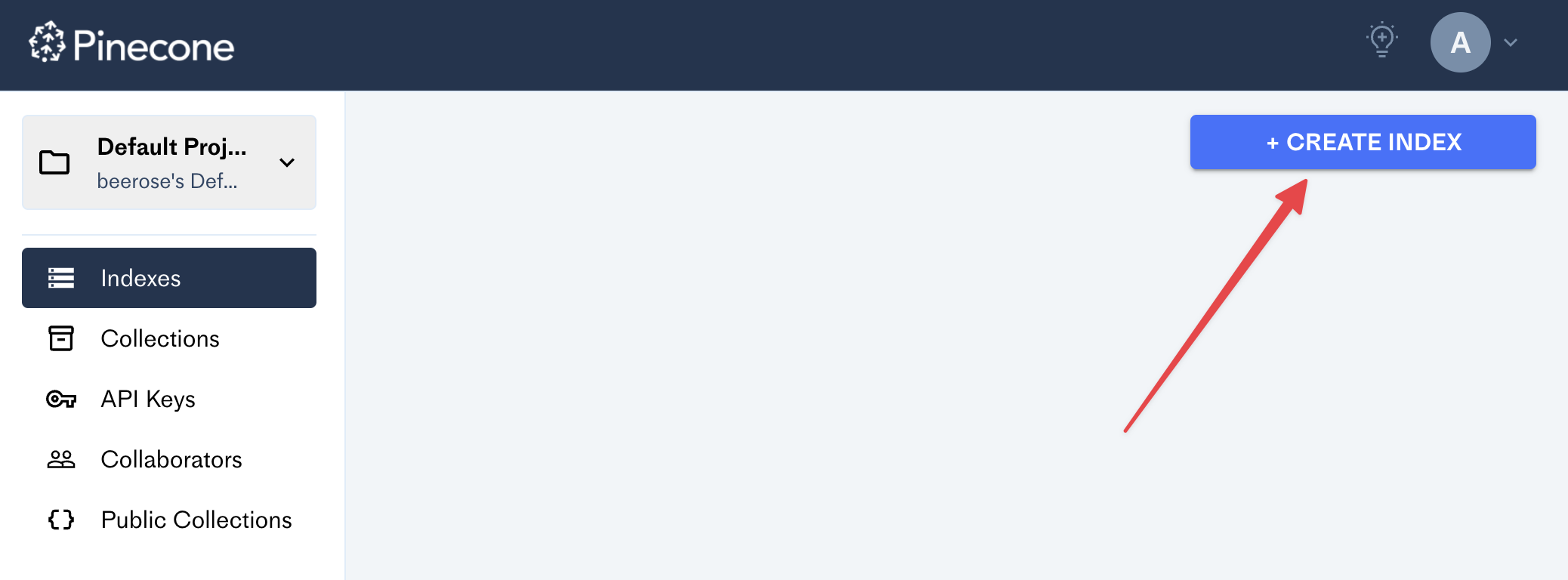
After creating an account in Pinecone, go to the dashboard and click on the
Create Index button:
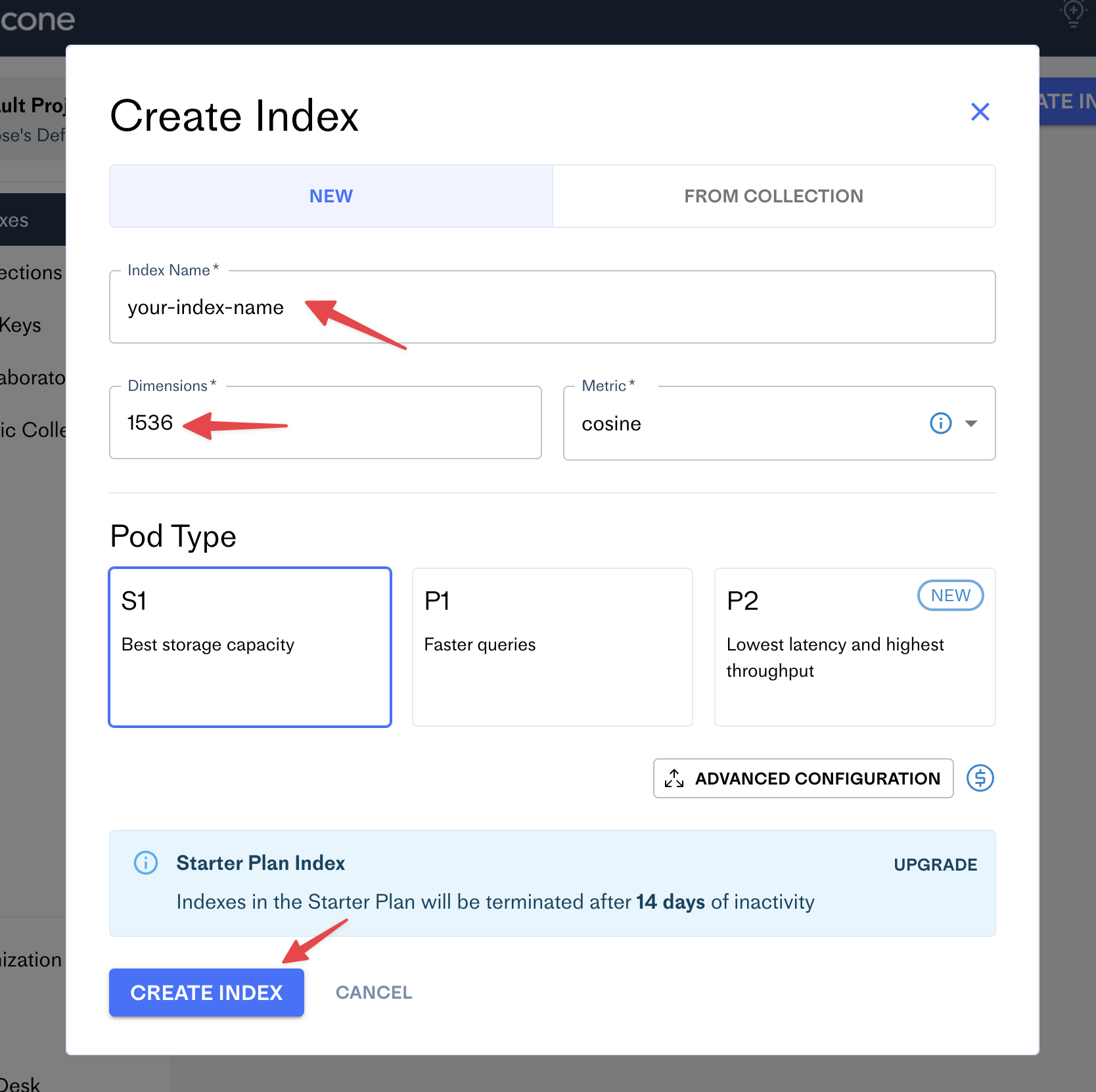
Fill the form with your new index name (e.g. your blog name) and set the number of dimensions to 1536:
Pinecone
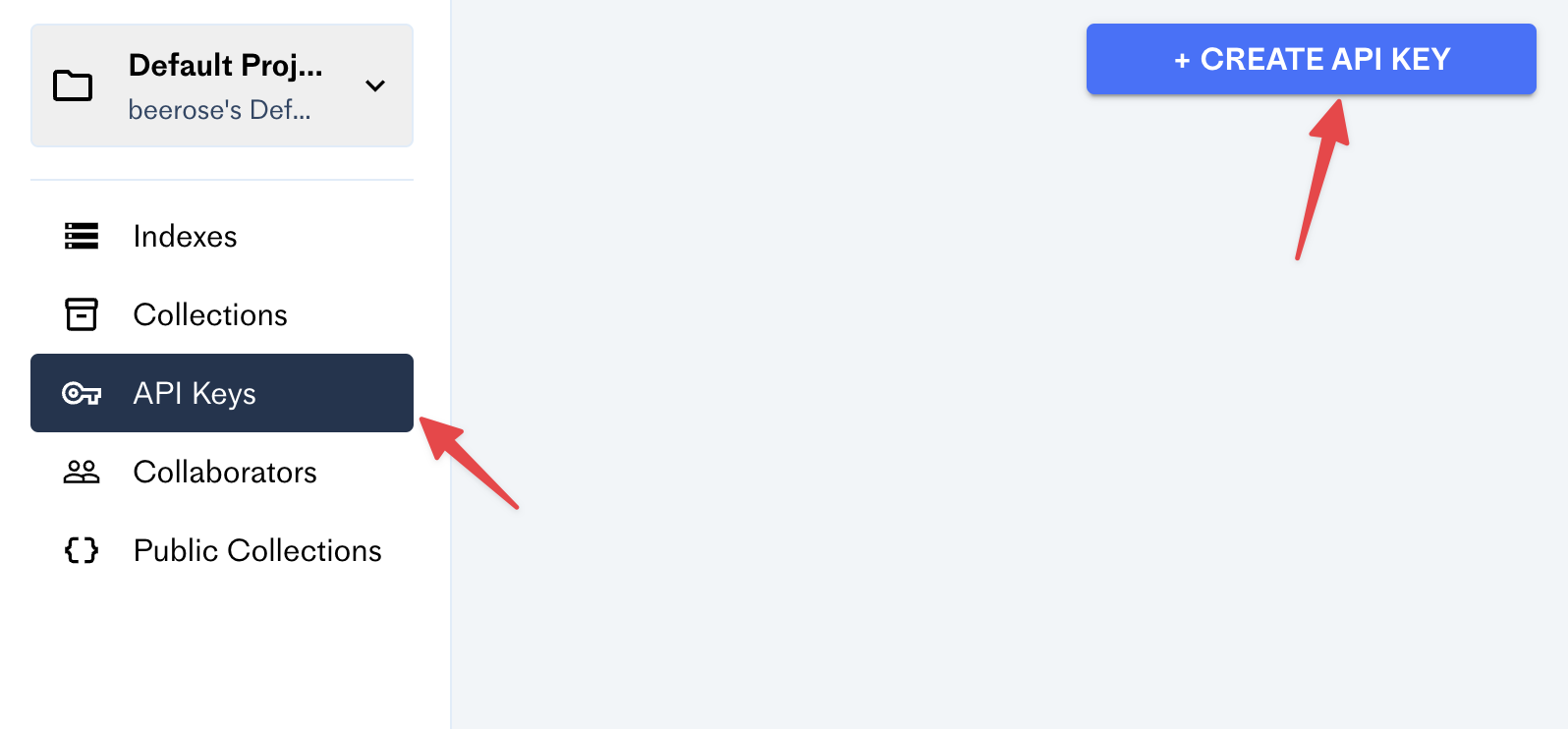
OpenAI
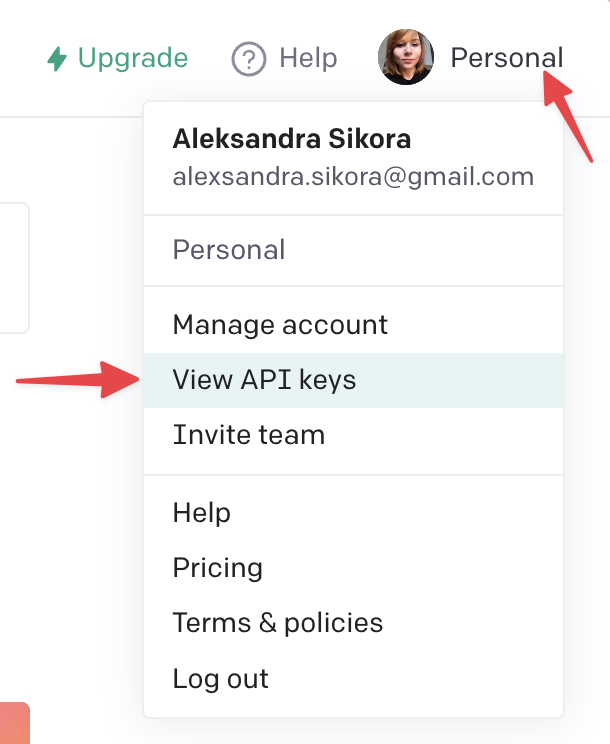
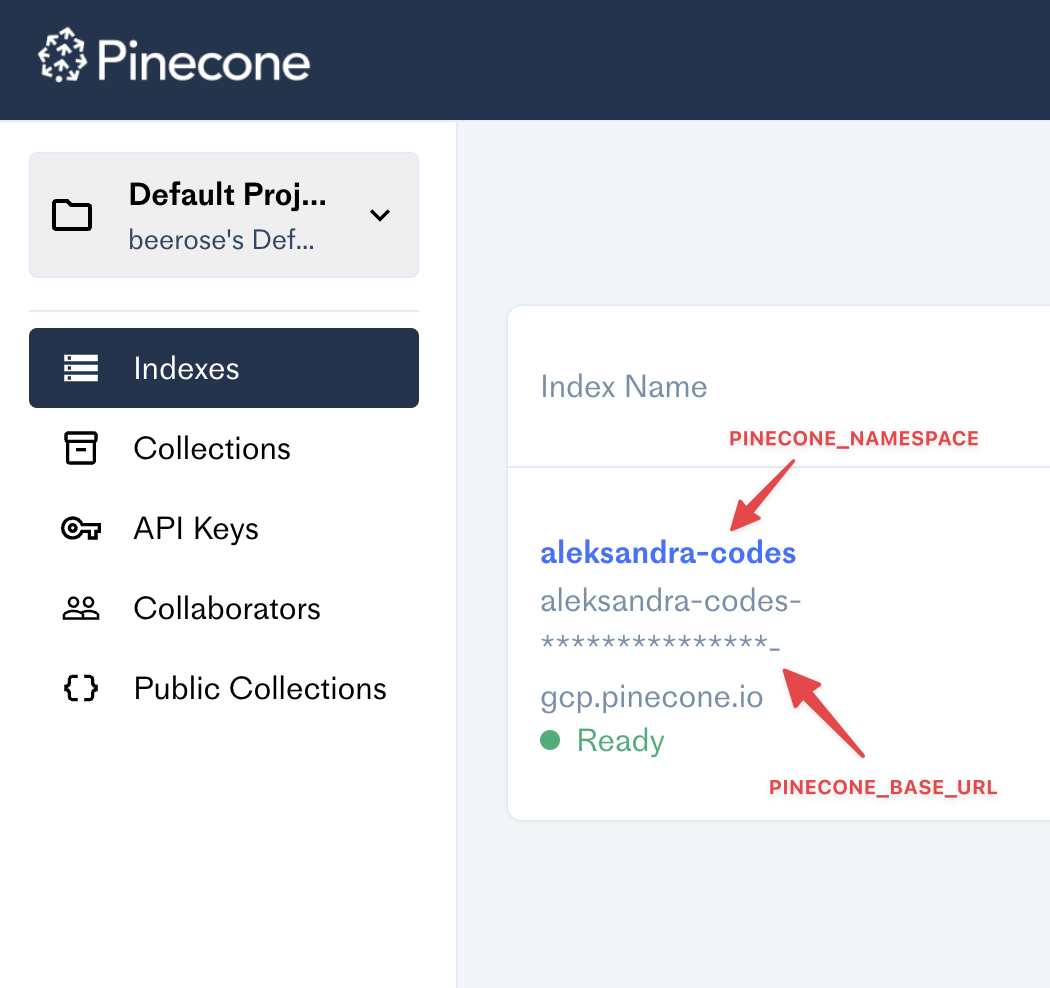
The CLI requires four env keys:
OPENAI_API_KEY=

PINECONE_API_KEY=
PINECONE_BASE_URL=
PINECONE_NAMESPACE=
Make sure to add them before using it!
index <dir> — processes files with your content and upload them to Pinecone.
Example:
$ @beerose/semantic-search index ./postssearch <query> — performs a semantic search by a given query.
Example:
$ @beerose/semantic-search search "hello world"For more info, run any command with the --help flag:
$ @beerose/semantic-search index --help
$ @beerose/semantic-search search --help
$ @beerose/semantic-search --helpYou can use the semanticQuery function exported from this library and
integrate it with your website or application.
Install deps:
$ pnpm add pinecone-client openai @beerose/semantic-search

# or `yarn add` or `npm i`
An example usage:
import { PineconeMetadata, semanticQuery } from "@beerose/semantic-search";
import { Configuration, OpenAIApi } from "openai";
import { PineconeClient } from "pinecone-client";

const openai = new OpenAIApi(
  new Configuration({
    apiKey: process.env.OPENAI_API_KEY,
  })
);

const pinecone = new PineconeClient<PineconeMetadata>({
  apiKey: process.env.PINECONE_API_KEY,
  baseUrl: process.env.PINECONE_BASE_URL,
  namespace: process.env.PINECONE_NAMESPACE,
});

const result = await semanticQuery("hello world", openai, pinecone);
Here's an example API route from aleksandra.codes: https://github.com/beerose/aleksandra.codes/blob/main/api/search.ts
Semantic search can understand the meaning of words in documents and return results that are more relevant to the user's intent.
This tool uses OpenAI to generate vector embeddings with
a text-embedding-ada-002 model.
Embeddings are numerical representations of concepts converted to number sequences, which make it easy for computers to understand the relationships between those concepts. https://openai.com/blog/new-and-improved-embedding-model/
It also uses Pinecone — a hosted database for vector search. It lets us perform k-NN searches across the generated embeddings.
The @beerose/sematic-search index CLI command performs the following steps for
each file in a given directory:
Depending on your content, the whole process requires a bunch of calls to OpenAI and Pinecone, which can take some time. For example, it takes around thirty minutes for a directory with ~25 blog posts and an average of 6 minutes of reading time.
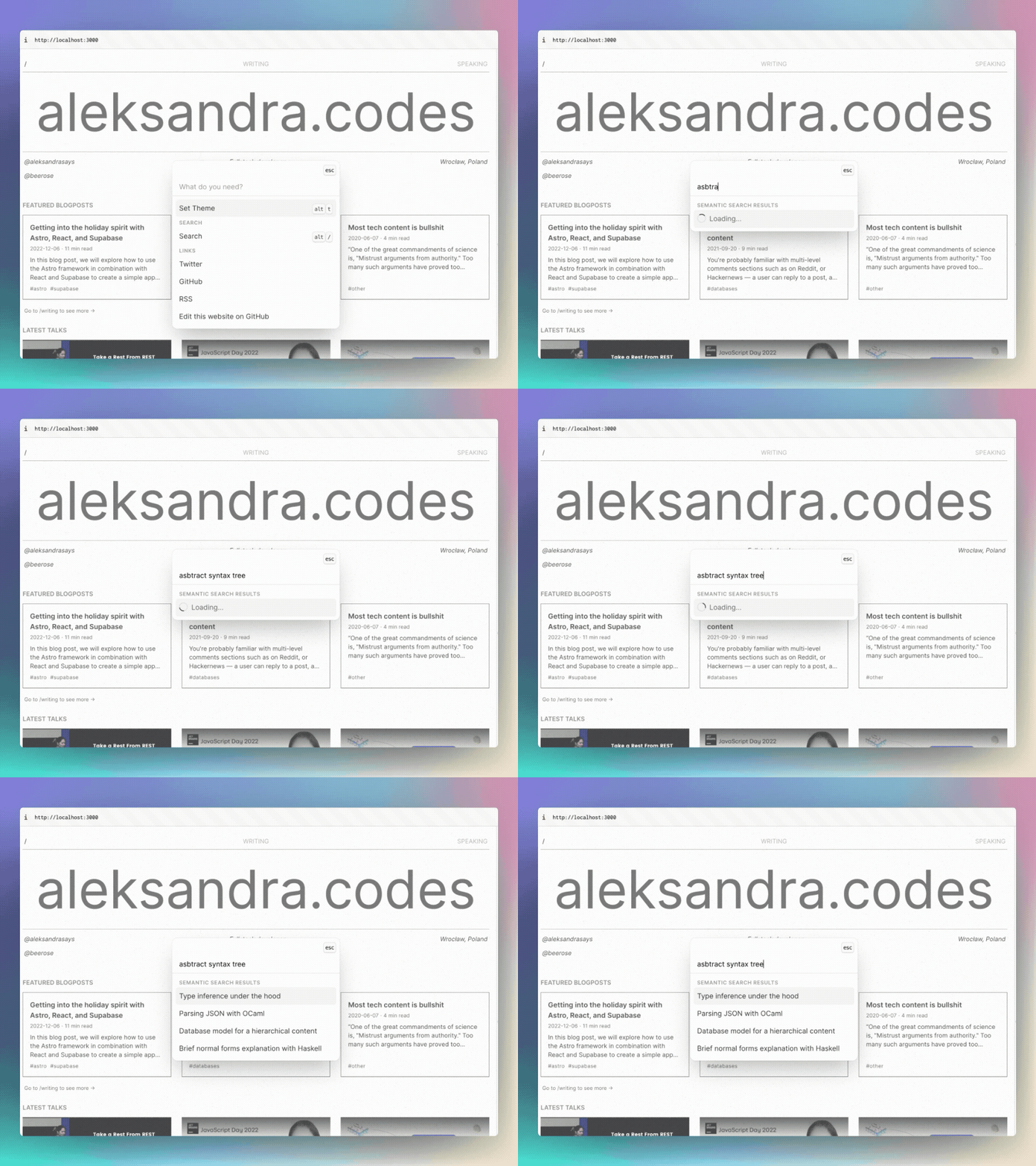
To test the semantic search, you can use @beerose/sematic-search search CLI
command, which:
.
├── bin
│   └── cli.js
├── src
│   ├── bin
│   │   └── cli.ts
│   ├── commands
│   │   ├── indexFiles.ts
│   │   └── search.ts
│   ├── getEmbeddings.ts
│   ├── isRateLimitExceeded.ts
│   ├── mdxToPlainText.test.ts
│   ├── mdxToPlainText.ts
│   ├── semanticQuery.ts
│   ├── splitIntoChunks.test.ts
│   ├── splitIntoChunks.ts
│   ├── titleCase.ts
│   └── types.ts
├── tsconfig.build.json
├── tsconfig.json
├── package.json
└── pnpm-lock.yaml
bin/cli.js — The CLI entrypoint.src:
bin/cli.ts — Files where you can find CLI commands and settings. This
project uses CAC for building CLIs.commands/indexFiles.ts — A CLI command that handles processing md/mdx
content, generating embeddings and uploading vectors to Pinecone.command/search.ts — A semantic search command. It generates an embedding
for a given search query and then calls Pinecone for the results.getEmbeddings.ts — Generating embeddings logic. It handles a call to Open
AI.isRateLimitExceeded.ts — Error handling helper.mdxToPlainText.ts — Converts MDX files to raw text. Uses remark and a
custom remarkMdxToPlainText plugin (also defined in that file).semanticQuery.ts — Core logic for performing semantic searches. It's being
used in search command, and also it's exported from this library so that
you can integrate it with your projects.splitIntoChunks.ts — Splits the text into chunks with a maximum of 100
tokens.titleCase.ts — Extracts a title from a file path.types.ts — Types and utilities used in this project.tsconfig.json - TypeScript compiler configuration.tsconfig.build.json - TypeScript compiler configuration used for
pnpm build.Tests:
src/mdxToPlainText.test.tssrc/splitIntoChunks.test.tsInstall deps and build the project:
pnpm i

pnpm build
Run the CLI locally:
node bin/cli.jspnpm testContributions, issues and feature requests are welcome.
Feel free to check
issues page if you want to
contribute.
Copyright © 2023 Aleksandra Sikora.
This
project is MIT
licensed.





