amazing openai api
v0.8.0

Convert different model APIs into the OpenAI API format out of the box.
10MB+ widget that enables the conversion of various model APIs into OpenAI API formats out of the box.
Current supported models:
Visit the GitHub Release page to download the execution file that suits your operating system.
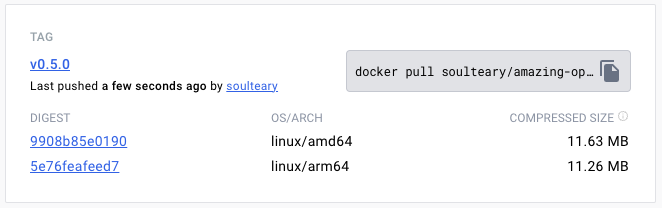
Or use Docker Pull to download the specified version of the image file:
docker pull soulteary/amazing-openai-api:v0.7.0 AOA does not need to write any configuration files, and can adjust the application behavior by specifying environment variables, including "selecting the working model", "setting parameters required for model operation", and "setting model compatibility alias".
By ./aoa , the program will set the working model to azure . At this time, we set the environment variable AZURE_ENDPOINT=https://你的部署名称.openai.azure.com/ and then you can use the service normally.
AZURE_ENDPOINT=https://你的部署名称.openai.azure.com/ ./aoaIf you prefer Docker, you can use the following command:
docker run --rm -it -e AZURE_ENDPOINT=https://你的部署名称.openai.azure.com/ -p 8080:8080 soulteary/amazing-openai-api:v0.7.0 After the service is started, we can access the same API service as OpenAI by visiting http://localhost:8080/v1 .
You can use curl to perform a quick test:
curl -v http://127.0.0.1:8080/v1/chat/completions
    -H " Content-Type: application/json "
    -H " Authorization: Bearer 123 "
    -d ' {
        "model": "gpt-4",
        "messages": [
        {
            "role": "system",
            "content": "You are a poetic assistant, skilled in explaining complex programming concepts with creative flair."
        },
        {
            "role": "user",
            "content": "Compose a poem that explains the concept of recursion in programming."
        }
        ]
    } '
You can also use the official OpenAI SDK for calls, or use any OpenAI-compatible open source software (for more examples, see example):
 from openai import OpenAI

client = OpenAI (
    api_key = "your-key-or-input-something-as-you-like" ,
    base_url = "http://127.0.0.1:8080/v1"
)

chat_completion = client . chat . completions . create (
    messages = [
        {
            "role" : "user" ,
            "content" : "Say this is a test" ,
        }
    ],
    model = "gpt-3.5-turbo" ,
)

print ( chat_completion )
If you want to not expose the API Key to the application, or are worried about whether various complex open source software have the risk of API Key leakage, we can configure an additional AZURE_API_KEY=你的API Key environment variable, and then various open source software do not need to fill in the API key when requesting (or just fill in it).
Of course, because of some limitations of Azure and the difficult adjustment of model call names in some open source software, we can map the models in the original request to our real model name in the following way. For example, replace GPT 3.5/4 with yi-34b-chat :
gpt-3.5-turbo:yi-34b-chat,gpt-4:yi-34b-chat If you want to use yi-34b-chat , or gemini-pro , we need to set AOA_TYPE=yi or AOA_TYPE=gemini , except that, there is no difference.
The project contains the docker compose sample file of the three currently supported model interfaces. We select different files in the example directory as needed. After filling in the required information, we modify the file to docker-compose.yml .
Then use docker compose up to start the service and it can be used quickly.
Adjust the working model AOA_TYPE , optional parameters, default to azure :
 # 选择一个服务, "azure", "yi", "gemini"
AOA_TYPE: " azure "
Program service address, optional parameters, defaults to 8080 and 0.0.0.0 :
 # 服务端口,默认 `8080`
AOA_PORT: 8080
# 服务地址,默认 `0.0.0.0`
AOA_HOST: " 0.0.0.0 " If we want to convert the OpenAI service deployed on Azure to a standard OpenAI call, we can use the following command:
AZURE_ENDPOINT=https:// <你的 Endpoint 地址> .openai.azure.com/ AZURE_API_KEY= <你的 API KEY > AZURE_MODEL_ALIAS=gpt-3.5-turbo:gpt-35 ./amazing-openai-api In the above command, AZURE_ENDPOINT and AZURE_API_KEY include core elements in the Azure OpenAI service, because the deployment name for Azure Deployment GPT 3.5/GPT 4 does not allow it to be included . , so we used AZURE_MODEL_ALIAS to replace the model name in the content we requested with the real Azure deployment name. This technique can even be used to automatically map models used by various open-source and closed-source software to the models we want:
 # 比如不论是 3.5 还是 4 都映射为 `gpt-35`
AZURE_MODEL_ALIAS=gpt-3.5-turbo:gpt-35,gpt-4:gpt-35
Because we have configured AZURE_API_KEY , no need to add Authorization: Bearer <你的API Key> (can also be written casually) whether it is open source software or curl calls. This will play a strict API Key isolation and improve the security of API Key.
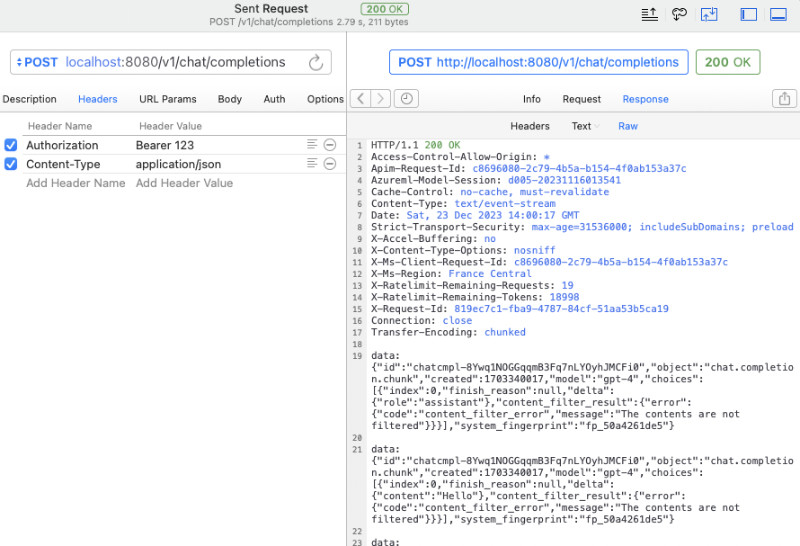
If you are still used to adding authentication content to the request header parameters, you can use the following command that does not contain AZURE_API_KEY , and the program will pass through verification to the Azure service:
AZURE_ENDPOINT=https:// <你的 Endpoint 地址> .openai.azure.com/ AZURE_MODEL_ALIAS=gpt-3.5-turbo:gpt-35 ./amazing-openai-api If you want to specify a special API Version yourself, you can specify AZURE_IGNORE_API_VERSION_CHECK=true to force the API Version validity verification of the program itself.
If you already have Azure GPT Vision, in addition to using SDK calls, you can also refer to this document and use curl to call: GPT Vision.
 # (必选) Azure Deployment Endpoint URL
AZURE_ENDPOINT
# (必选) Azure API Key
AZURE_API_KEY
# (可选) 模型名称,默认 GPT-4
AZURE_MODEL
# (可选) API Version
AZURE_API_VER
# (可选) 是否是 Vision 实例
ENV_AZURE_VISION
# (可选) 模型映射别名
AZURE_MODEL_ALIAS
# (可选) Azure 网络代理
AZURE_HTTP_PROXY
AZURE_SOCKS_PROXY
# (可选) 忽略 Azure API Version 检查,默认 false,始终检查
AZURE_IGNORE_API_VERSION_CHECKIf we want to convert the official YI API to a standard OpenAI call, we can use the following command:
AOA_TYPE=yi YI_API_KEY= <你的 API KEY > ./amazing-openai-api Similar to using Azure services, we can use a trick to automatically map models used by various open-source, closed-source software to the model we want:
 # 比如不论是 3.5 还是 4 都映射为 `gpt-35`
YI_MODEL_ALIAS=gpt-3.5-turbo:yi-34b-chat,gpt-4:yi-34b-chat
If we configure YI_API_KEY when starting the service, we do not need to add Authorization: Bearer <你的API Key> (can also write it curl ), which will provide strict API Key isolation and improve the security of API Key.
If you are still used to adding authentication content to the request header parameters, you can use the following command that does not contain YI_API_KEY , and the program will pass through verification to the Yi API service:
./amazing-openai-api # (必选) YI API Key
YI_API_KEY
# (可选) 模型名称,默认 yi-34b-chat
YI_MODEL
# (可选) YI Deployment Endpoint URL
YI_ENDPOINT
# (可选) API Version,默认 v1beta,可选 v1
YI_API_VER
# (可选) 模型映射别名
YI_MODEL_ALIAS
# (可选) Azure 网络代理
YI_HTTP_PROXY
YI_SOCKS_PROXYIf we want to convert Google's official Gemini API to a standard OpenAI call, we can use the following command:
AOA_TYPE=gemini GEMINI_API_KEY= <你的 API KEY > ./amazing-openai-api Similar to using Azure services, we can use a trick to automatically map models used by various open-source, closed-source software to the model we want:
 # 比如不论是 3.5 还是 4 都映射为 `gpt-35`
GEMINI_MODEL_ALIAS=gpt-3.5-turbo:gemini-pro,gpt-4:gemini-pro
If we configure GEMINI_API_KEY when starting the service, we do not need to add Authorization: Bearer <你的API Key> (can also write it curl ), which will provide strict API Key isolation and improve the security of API Key.
If you are still used to adding authentication content to the request header parameters, you can use the following command that does not contain GEMINI_API_KEY , and the program will pass through verification to Google AI services:
./amazing-openai-api # (必选) Gemini API Key
GEMINI_API_KEY
# (可选) Gemini 安全设置,可选 `BLOCK_NONE` / `BLOCK_ONLY_HIGH` / `BLOCK_MEDIUM_AND_ABOVE` / `BLOCK_LOW_AND_ABOVE` / `HARM_BLOCK_THRESHOLD_UNSPECIFIED`
GEMINI_SAFETY
# (可选) Gemini 模型 版本,默认 `gemini-pro`
GEMINI_MODEL
# (可选) Gemini API 版本,默认 `v1beta`
GEMINI_API_VER
# (可选) Gemini API 接口地址
GEMINI_ENDPOINT
# (可选) 模型映射别名
GEMINI_MODEL_ALIAS
# (可选) Gemini 网络代理
GEMINI_HTTP_PROXY
GEMINI_SOCKS_PROXY




