

Angular 14一項令人興奮的特性就是Angular的獨立組件終於來了。
在Angular 14中, 開發者可以嘗試使用獨立元件開發各種元件,但值得注意的是Angular獨立元件的API仍然沒有穩定下,將來可能存在一些破壞性更新,所以不建議在生產環境中使用。 【相關教學推薦:《angular教學】
對於已有的元件,我們可以在@Component()中加入standalone: true的,然後我們可以在沒有@NgModule()的情況下直接使用imports導入其他模組了。 如果是新元件,可以使用ng generate component <name> --standalone的指令,直接建立一個獨立元件, 例如:
ng generate component button-list --standalone
@Component({
  selector: 'app-button-list',
  standalone: true,
  imports: [
    CommonModule,
  ],
  templateUrl: './button-list.component.html',
  styleUrls: ['./button-list.component.scss']
})
export class ButtonListComponent implements OnInit我們可以在imports中加入現有的模組,以MatButtonModule為例:
imports: [
    CommonModule,
    MatButtonModule,
],這樣子我們就可以在ButtonListComponent中使用MatButtonModule的mat-button元件了:
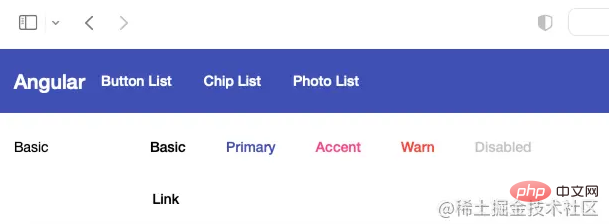
<button mat-button>Basic</button>
<button mat-button color="primary">Primary</button>
<button mat-button color="accent">Accent</button>
<button mat-button color="warn">Warn</button>
<button mat-button disabled>Disabled</button>
<a mat-button href="https://damingerdai.github.io" target="_blank">Link</a>
效果圖:
第一步, 將AppComponent設定為獨立元件:
@Component({
  selector: 'app-root',
  templateUrl: './app.component.html',
  styleUrls: ['./app.component.scss'],
  standalone: true,
})
export class AppComponent {第二步,將AppModule的imports中的導入的模組加入到AppComponent的imports,但是有兩個模組例外: BrowserModule和BrowserAnimationsModule 。
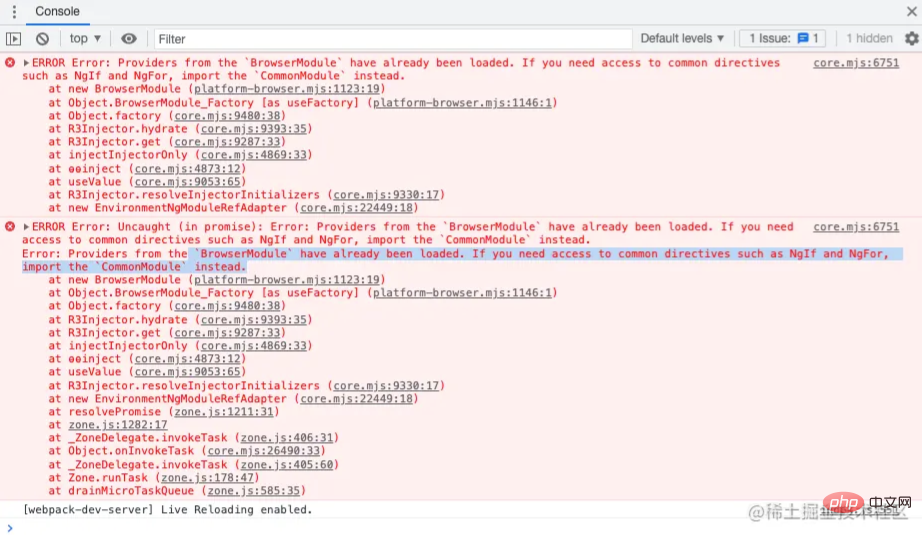
如果導入的話,可能會導致** BrowserModule have already been loaded. If you need access to common directives such as NgIf and NgFor, import the CommonModule instead.**的問題:
第三步,刪除app.module.ts檔案
最後一步, 將main.ts中的:
import { platformBrowserDynamic } from '@angular/platform-browser-dynamic';
platformBrowserDynamic().bootstrapModule(AppModule)
.catch(err => console.error(err));改為:
bootstrapApplication(AppComponent).catch(err => console.error(err));
這樣子我們就實作了使用獨立元件啟動Angular元件了。
我這裡分別有三個獨立元件: HomeComponent , ButtonListComponent和ChipListComponent ,
然後在main.ts中建立ROUTES物件
const ROUTES: Route[] = [
  {
      path: '',
      pathMatch: 'full',
      redirectTo: 'home'
  },
  {
      path: 'home',
      component: HomeComponent
  },
  {
      path: 'button',
      loadComponent: () =>
            import('./app/button-list/button-list.component').then(
                    (mod) => mod.ButtonListComponent
            ),
  },
  {
      path: 'chip',
      loadComponent: () =>
          import('./app/chip-list/chip-list.component').then(
                  (mod) => mod.ChipListComponent
          ),
  },
];其中ButtonListComponent和ChipListComponent使用loadComponent去實作路由懶載入。
然後在bootstrapApplication的第二個參數中使用providers註冊RouterModule好了。
bootstrapApplication(AppComponent, {
  providers: [
    importProvidersFrom(RouterModule.forRoot([...ROUTES])),
  ],
}).catch(err => console.error(err));

效果圖:
當我們想要啟動Angular應用的時候,可能需要注入一些值或服務。 在bootstrapApplication , 我們可以透過providers來註冊值或服務。
例如,我有一個取得圖片的url,需要注入到PhotoService :
bootstrapApplication(AppComponent, {
  providers: [
    {
          provide: 'photoUrl',
          useValue: 'https://picsum.photos',
    },
    {provide: PhotosService, useClass: PhotosService },
    importProvidersFrom(RouterModule.forRoot([...ROUTES])),
    importProvidersFrom(HttpClientModule)
  ],
}) PhotoService程式碼如下:
@Injectable()export class PhotosService {
  constructor(
    @Inject('photoUrl') private photoUrl: string,
    private http: HttpClient ) { }

  public getPhotoUrl(i: number): string {
      return `${this.photoUrl}/200/300?random=${i}`;
  }
}本文所使用的原始碼:https://github.com/damingerdai/angular-standalone-components-app
線上demo:https://damingerdai.github.io/angular-standalone-components-app/
原文網址:https://juejin.cn/post/7107224235914821662