

One of the exciting features of Angular 14 is that Angular’s standalone components are finally here.
In Angular 14, developers can try to use independent components to develop various components, but it is worth noting that the API of Angular independent components is still not stable, and there may be some destructive updates in the future, so it is not recommended for use in a production environment. [Related tutorial recommendation: "angular tutorial"]
For existing components, we can add standalone: true to @Component() , and then we can use imports directly without @NgModule() Import other modules. If you are creating a new component, you can use ng generate component <name> --standalone command to directly create an independent component, for example:
ng generate component button-list --standalone
@Component({
selector: 'app-button-list',
standalone: true,
imports: [
CommonModule,
],
templateUrl: './button-list.component.html',
styleUrls: ['./button-list.component.scss']
})
export class ButtonListComponent implements OnInit We can add existing modules in imports , taking MatButtonModule as an example:
imports: [
    CommonModule,
    MatButtonModule,
],
so that we can use the mat-button component of MatButtonModule in ButtonListComponent :
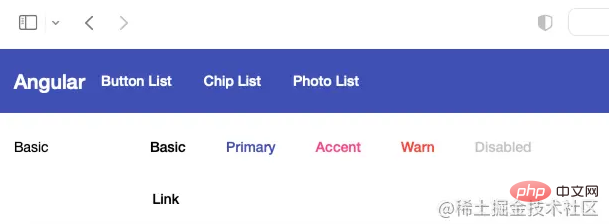
<button mat-button>Basic</button>
<button mat-button color="primary">Primary</button>
<button mat-button color="accent">Accent</button>
<button mat-button color="warn">Warn</button>
<button mat-button disabled>Disabled</button>
<a mat-button href="https://damingerdai.github.io" target="_blank">Link</a>
Rendering:
is to set AppComponent as an independent component:
@Component({
selector: 'app-root',
templateUrl: './app.component.html',
styleUrls: ['./app.component.scss'],
standalone: true,
})
export class AppComponent { The second step is to add the imported modules in AppModule 's imports to AppComponent 's imports, but there are two module exceptions: BrowserModule and BrowserAnimationsModule .
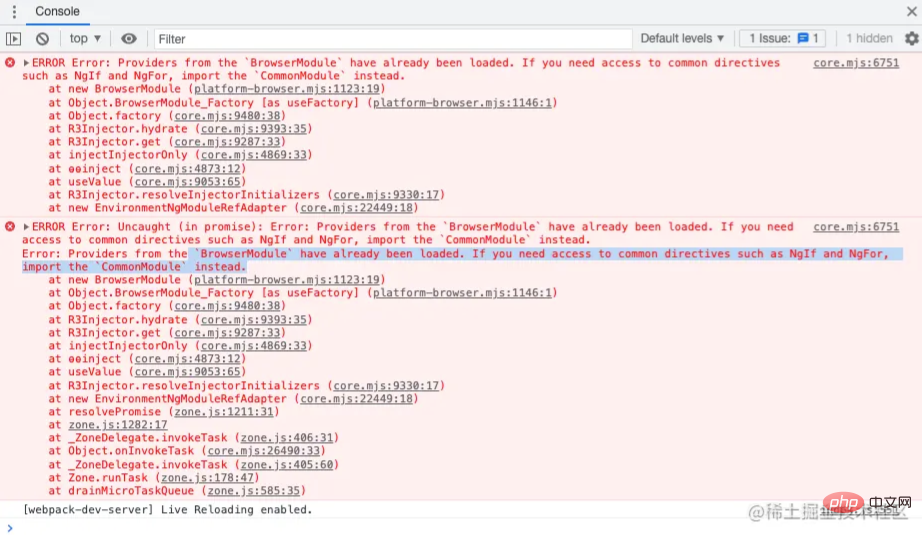
If imported, it may cause problems: ** BrowserModule have already been loaded. If you need access to common directives such as NgIf and NgFor, import the CommonModule instead.**:
The third step is to delete the app.module.ts file.
The last step is to import in main.ts :
import { platformBrowserDynamic } from '@angular/platform-browser-dynamic';
platformBrowserDynamic().bootstrapModule(AppModule)
  .catch(err => console.error(err));
changed to:
bootstrapApplication(AppComponent).catch(err => console.error(err));
In this way, we can use independent components to start Angular components.
I have three independent components here: HomeComponent , ButtonListComponent and ChipListComponent ,
and then create the ROUTES object const ROUTES in main.ts
: Route[] = [
  {
      path: '',
      pathMatch: 'full',
      redirectTo: 'home'
  },
  {
      path: 'home',
      component:HomeComponent
  },
  {
      path: 'button',
      loadComponent: () =>
            import('./app/button-list/button-list.component').then(
                    (mod) => mod.ButtonListComponent
            ),
  },
  {
      path: 'chip',
      loadComponent: () =>
          import('./app/chip-list/chip-list.component').then(
                  (mod) => mod.ChipListComponent
          ),
  },
];
Among them, ButtonListComponent and ChipListComponent use loadComponent to implement lazy loading of routes.
Then use providers to register RouterModule in the second parameter of bootstrapApplication .
bootstrapApplication(AppComponent, {
  providers: [
    importProvidersFrom(RouterModule.forRoot([...ROUTES])),
  ],
}).catch(err => console.error(err));

Rendering:
When we want to start an Angular application, we may need to inject some values or services. In bootstrapApplication , we can register values or services through providers .
For example, I have a url to get pictures, which needs to be injected into PhotoService :
bootstrapApplication(AppComponent, {
  providers: [
    {
          provide: 'photoUrl',
          useValue: 'https://picsum.photos',
    },
    {provide: PhotosService, useClass: PhotosService },
    importProvidersFrom(RouterModule.forRoot([...ROUTES])),
    importProvidersFrom(HttpClientModule)
  ],
})
PhotoService code is as follows:
@Injectable()export class PhotosService {
  constructor(
    @Inject('photoUrl') private photoUrl: string,
    private http: HttpClient ) { }

  public getPhotoUrl(i: number): string {
      return `${this.photoUrl}/200/300?random=${i}`;
  }
}
Source code used in this article: https://github.com/damingerdai/angular-standalone-components-app
Online demo: https://damingerdai.github.io/angular-standalone-components-app/Original
text Address: https://juejin.cn/post/7107224235914821662