

視窗載入事件:
調整視窗大小的事件:
window .open()方法可以用來導覽到指定URL,也可以用來開啟新瀏覽器視窗
window.open("http://www.wrox.com/", "wroxWindow","height=400,width=400,top=10,left=10,resizable=yes");計時器:
window.scroll(x, y)
window.scrollTo(x, y):兩者是一樣的用法改變橫向和垂直的滾動條的位置,前提是必須有捲軸在頁面中
window.scrollBy(x, y):捲軸的累加滾動,正數向下,負數向上window.scrollBy(0, 10):每100毫秒調用一次的時候,滾動條運動10個像素
window.getComputedStyle(elem, 偽類)
對話框
運行js腳本,將js程式碼以同步執行方式放入執行棧,運行執行棧過程中遇見JS非同步程式碼(事件、計時器、ajax、資源載入load、error)放入web APIs(任務佇列),當執行堆疊裡的程式碼執行完成以後,去任務佇列裡拿第一個執行,執行外以後在去任務佇列拿一個過來執行,重複執行(事件循環)直到任務佇列裡的執行完成
window.history 用來取得目前頁面的位址URL,並把瀏覽器重新導向到新的頁面
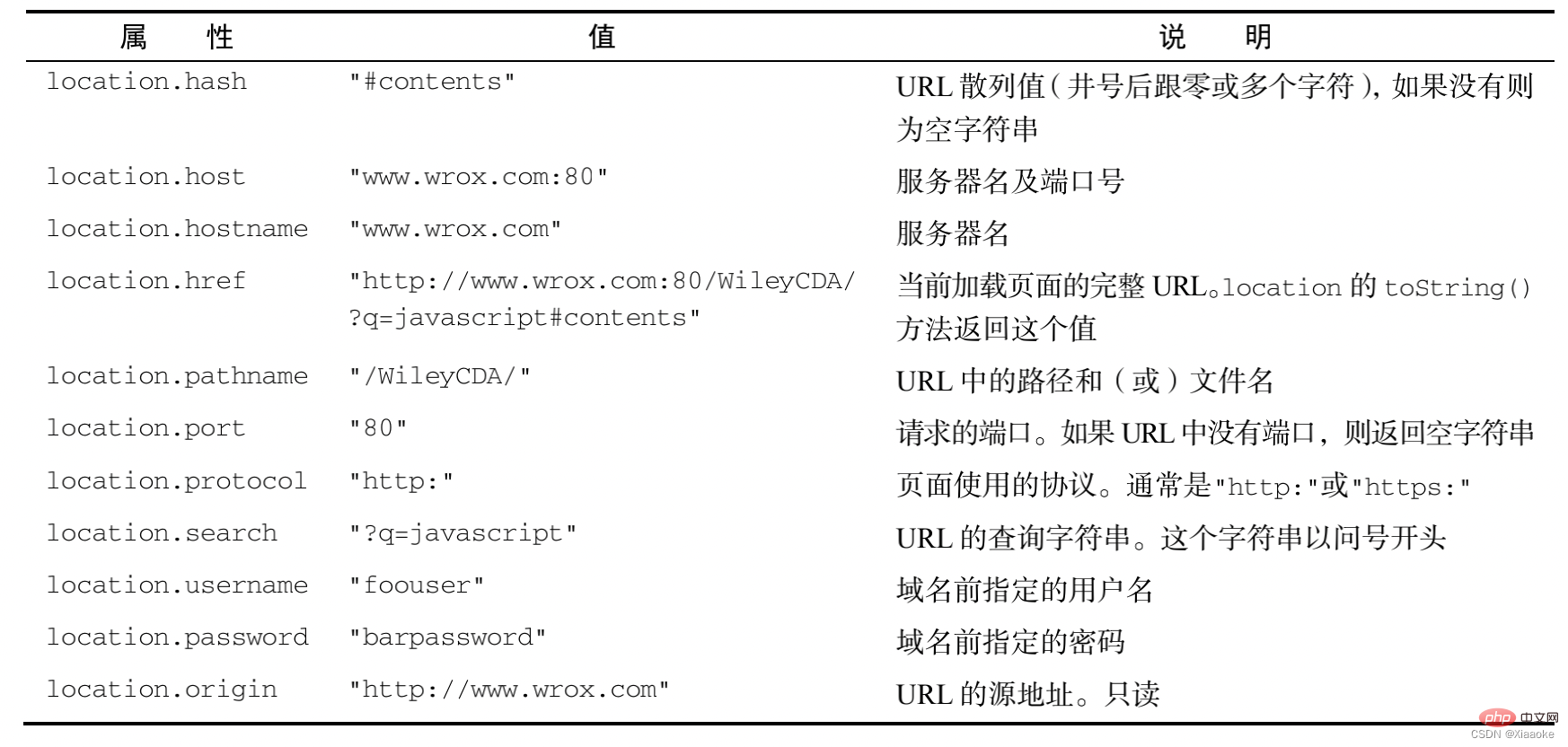
http://www.itcast.cn:80/index.html?name=andy&age=1#link
http:通訊協定www.itcast.cn:網域80:連接埠index.html:路徑?name=andy&age=1:參數#link 片段:錨點、連結物件
屬性:
方法:
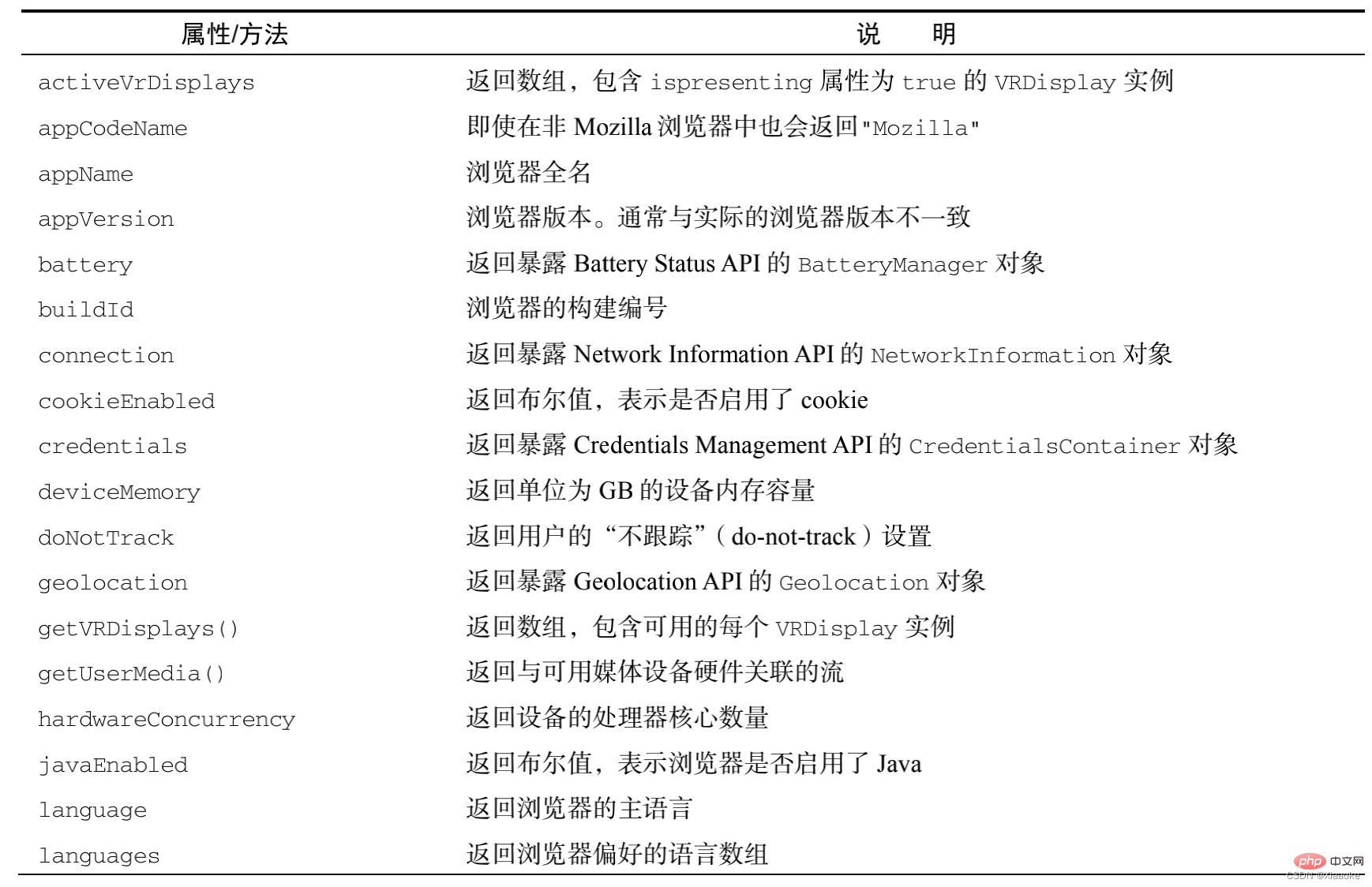
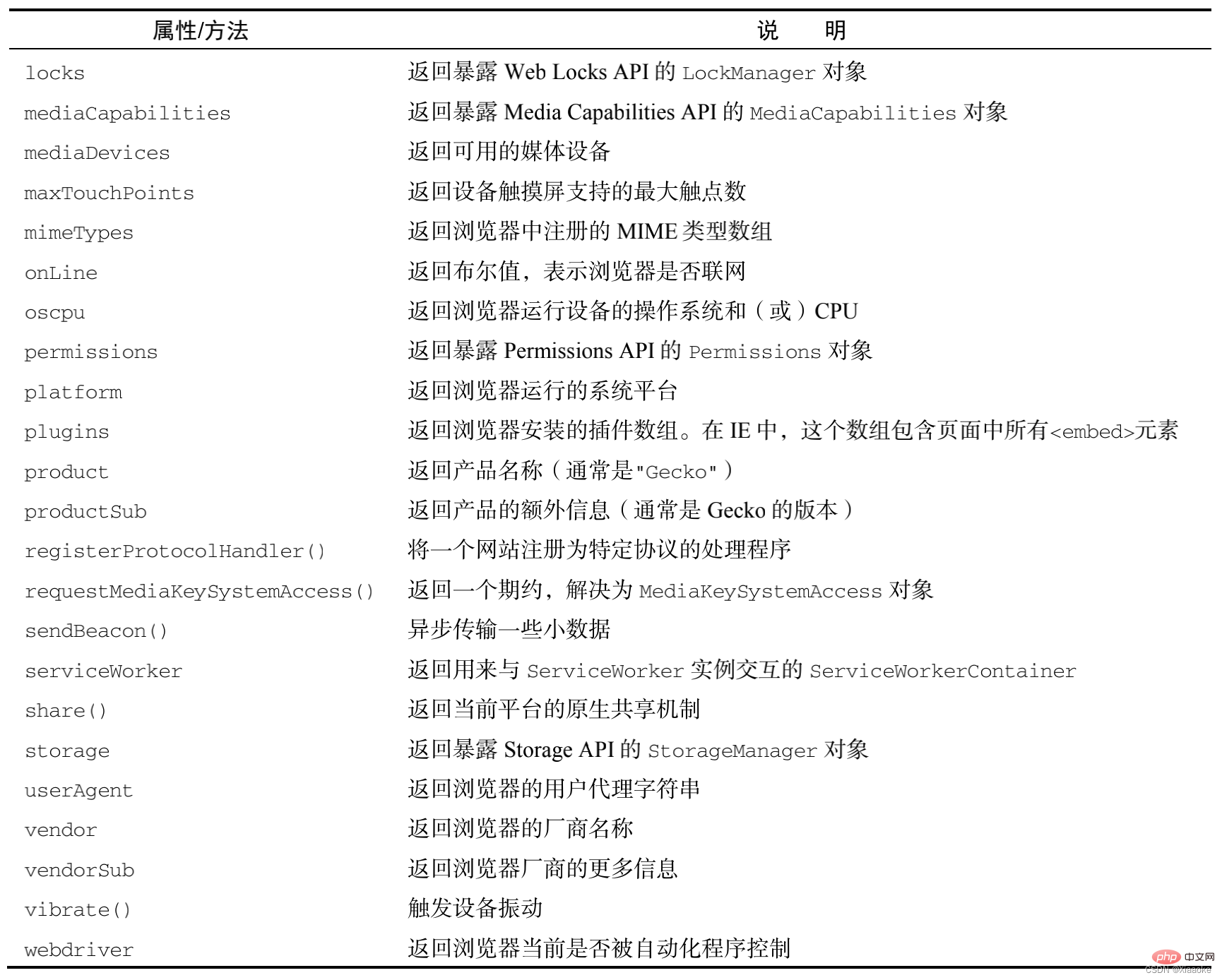
navigator:封裝瀏覽器設定資訊的物件
window.history 物件包括瀏覽器的歷史記錄(url)集合
window.screen 物件包含有關使用者的信息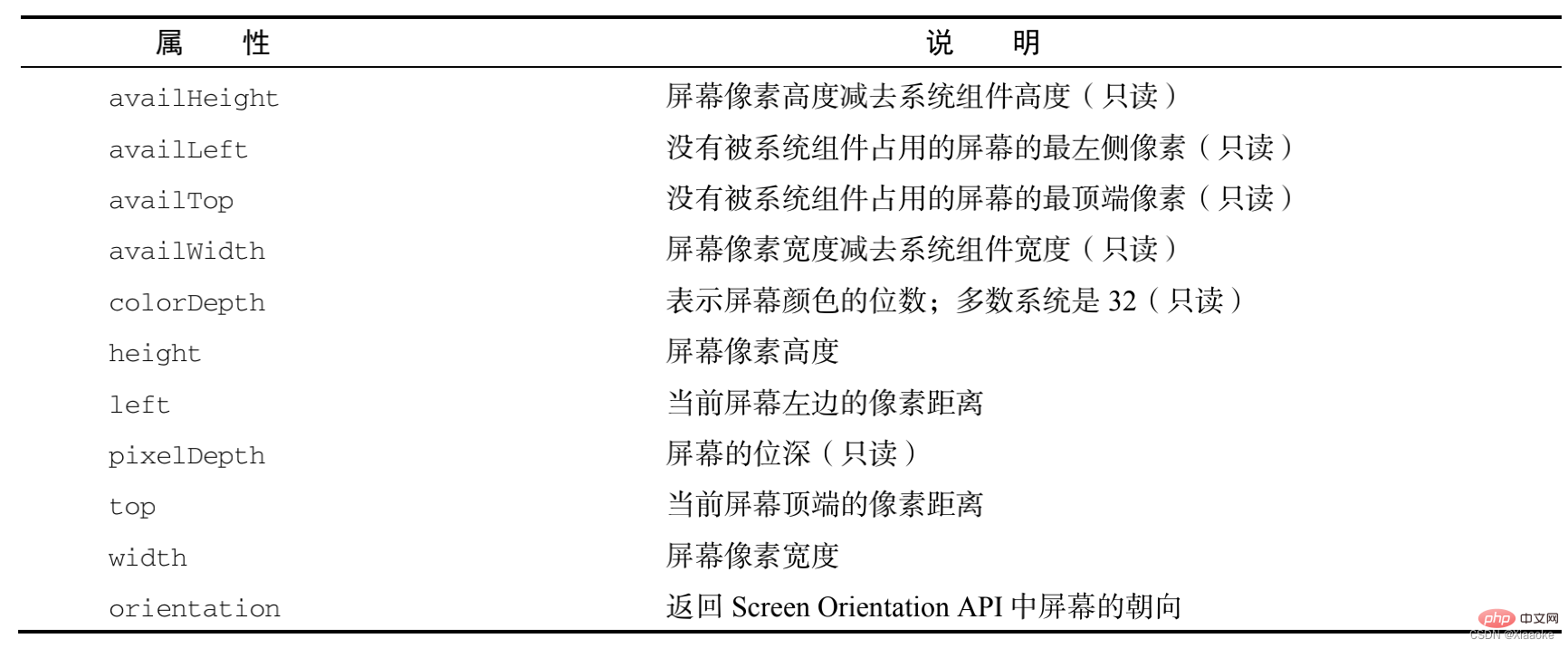
// screen:獲得顯示裝置的解析度大小// 完整的解析度:screen.widht/height
// 如何辨識客戶端的種類相容於所有的客戶端寬度// 大螢幕中屏小螢幕超小螢幕// lg md sm xs
// TV pc pad phone
//寬>= 1200 >=992 >= 768 < 768
// 全掉工作列之後剩餘的解析度// screen.availHeight/availWidth
可以動態得到該元素的位置(偏移)、大小等
offset系列常用屬性:
動態取得元素的邊框大小、元素大小等
常用屬性:
動態取得元素的大小、捲動距離
常用屬性
滾動條在滾動的時候會觸發onscroll事件
window.pageXOffset/pageYOffset IE8 及IE8以下不相容document.body/documentElement.scrollLeft/scrollTop相容性比較混亂,用時取兩個值相加,因為不可能有兩個值同時有值封裝相容性方法,求滾動條滾輪滾動距離getScrollOffet()
/*
封裝一個取得滾動條的滾動距離返回:x:水平滾動條滾動的距離y:垂直滾動條滾動的距離*/function getScrollOffet(){
    if(window.pageXOffset){
        return {//物件的{}一定要在關鍵字後,否則系統會自動加上; 則回傳值會是undefined
            x : window.pageXOffset,
            y : window.pageYOffset }
    }else{//相容IE8以及以下return {
            x : document.body.scrollLeft + document.documentElement.scrollLeft,
            y : document.body.scrollTop + document.documentElement.scrollTop }
}}window.innerWidth/innerHeight IE8及IE8以下不相容(注意:這裡的寬度和高度不包括選單列、工具列以及捲軸等的高度) document.documentElement.clientWidth/clientHeight標準模式下,任意瀏覽器都相容於document.body.clientWidth/clientHeight適用於怪異某事下的瀏覽器封裝相容性方法,傳回瀏覽器視窗尺寸getViewportOffset()
/*封裝傳回瀏覽器視窗尺寸回傳值:
    w :視口的寬度h : 視口的高度*/function getViewportOffset(){
    if(window.innerWidth){
        return {
            w : window.innerWidth,
            h : window.innerHeight }
    }else{ //相容於IE8以及以下的瀏覽器if(document.compatMode == 'BackCompat'){
            //怪異渲染模式下return {
                w : document.body.clientWidth,
                h : document.body.clientHeight }
        }else{
            // 標準模式return {
                w : document.documentElement.clientWidth,
                h : document.documentElement.clientHeight }
        }
}}console.log(document.compatMode);// BackCompat 怪異模式// CSS1Compat 標準模式domElement.getBoundingClientRect()相容性很好;傳回一個對象,該物件中有left、 top、right、bottom等屬性,left、top代表元素左上角的X和Y坐標, right和bottom表示元素右下角的X和Y坐標height 和width屬性老版本IE未實現返回的結果並不是'實時的'
// 取得元素在文件中的位置function getElementPosition(target){
    // 支援BoundingClientRect()方法if(0 && target.getBoundingClientRect){
        var pos = target.getBoundingClientRect();

        return { // 涉及滾動條有移動的情況下加上滾動條的位置x : pos.left + Math.max(document.body.scrollLeft, document.documentElement.scrollLeft),
            y : pos.top + Math.max(document.body.scrollTop, document.documentElement.scrollTop)
        }
    } else {
        var pos = {
            left : 0,
            top : 0
        }
        var _elm = target;
        while(target.offsetParent){
            if(_elm == target){//首次累加left 和top
                pos.left += target.offsetLeft;
                pos.top += target.offsetTop;
            }else{
                pos.left += target.offsetLeft + target.clientLeft;
                pos.top += target.offsetTop + target.clientTop;
            }
            // target 重新賦值target = target.offsetParent;
        }
        return { x : pos.left, y : pos.top}
}}狀態列
視窗位置
其他屬性