

Window loading event:
events to adjust the window size:
window The .open() method can be used to navigate to a specified URL or to open a new browser window.
window.open("http://www.wrox.com/", "wroxWindow","height=400,width=400,top=10,left=10,resizable=yes");timer:
window.scroll(x, y)
window.scrollTo(x, y): Both are the same usage to change the position of the horizontal and vertical scroll bars, provided that there must be The scroll bar is on the page
window.scrollBy(x, y): The cumulative scrolling of the scroll bar, positive numbers go down, negative numbers go up window.scrollBy(0, 10): When called every 100 milliseconds, the scroll bar moves 10 pixels
window.getComputedStyle(elem, pseudo-class)
dialog box
runs the js script and puts the js code into the execution stack in a synchronous execution mode. When running the execution stack, it encounters JS asynchronous code (events, timers, ajax, resource loading, error) is put into web APIs (task queue). When the code in the execution stack is completed, go to the task queue and take the first one for execution. After execution, Get one from the task queue and execute it, and execute it repeatedly (event loop) until the execution in the task queue is completed.
window.history is used to obtain the address URL of the current page and redirect the browser to a new page.
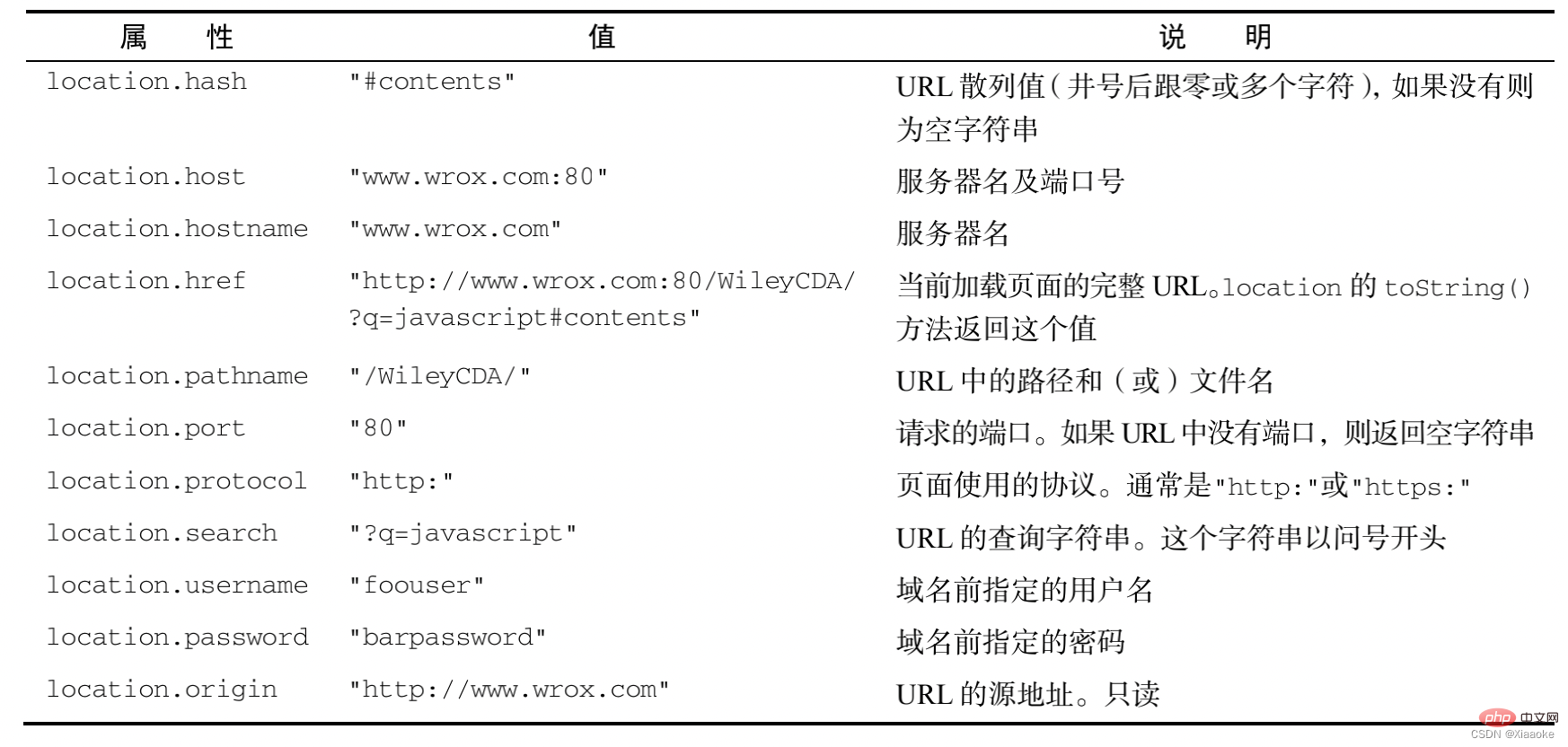
http://www.itcast.cn:80/index.html?name=andy&age=1#link
http: communication protocol www.itcast.cn: domain name 80: port index.html: path?name=andy&age=1: parameter #link fragment: anchor point, link
object attribute:
object method of the current URL:
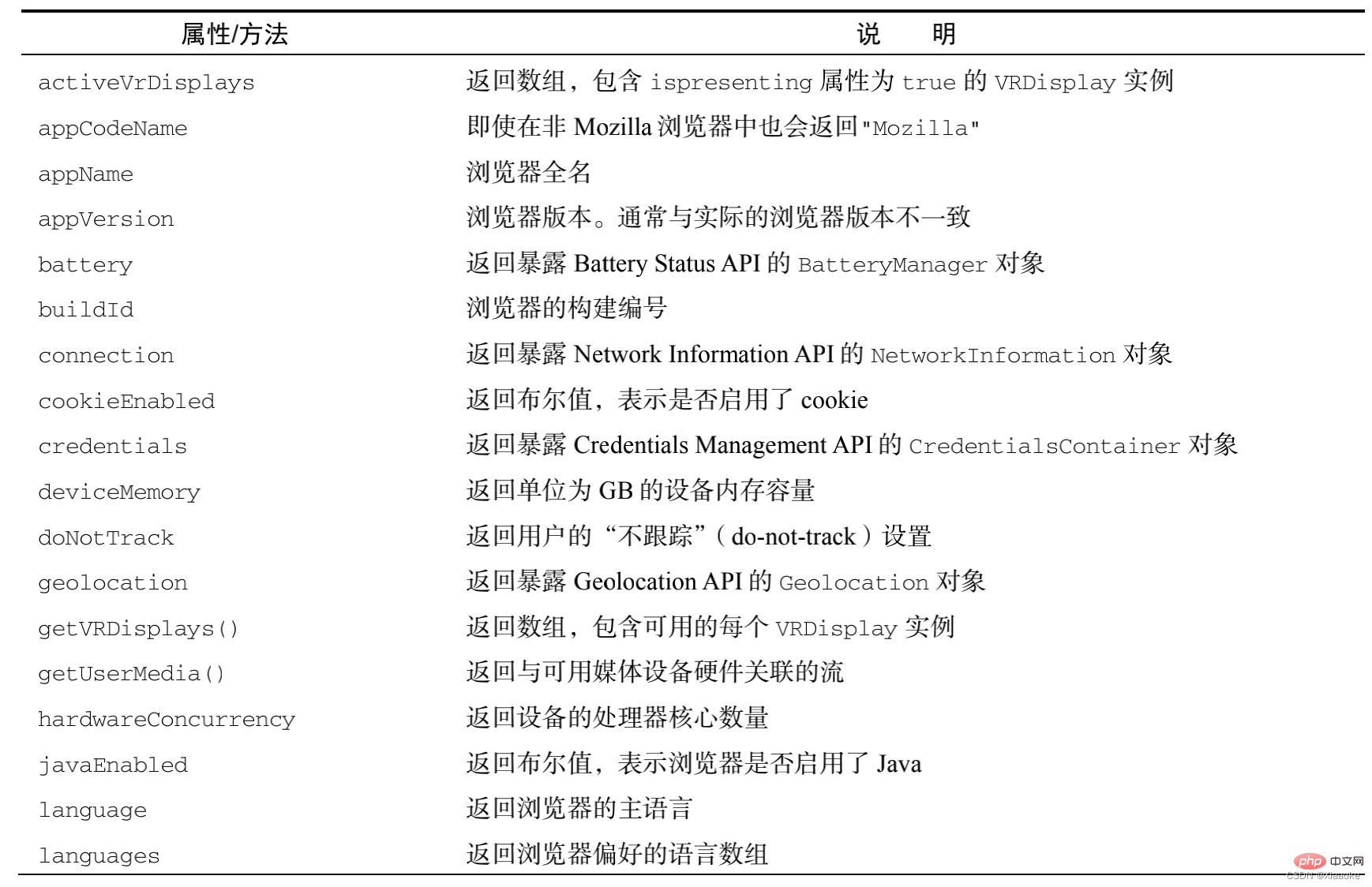
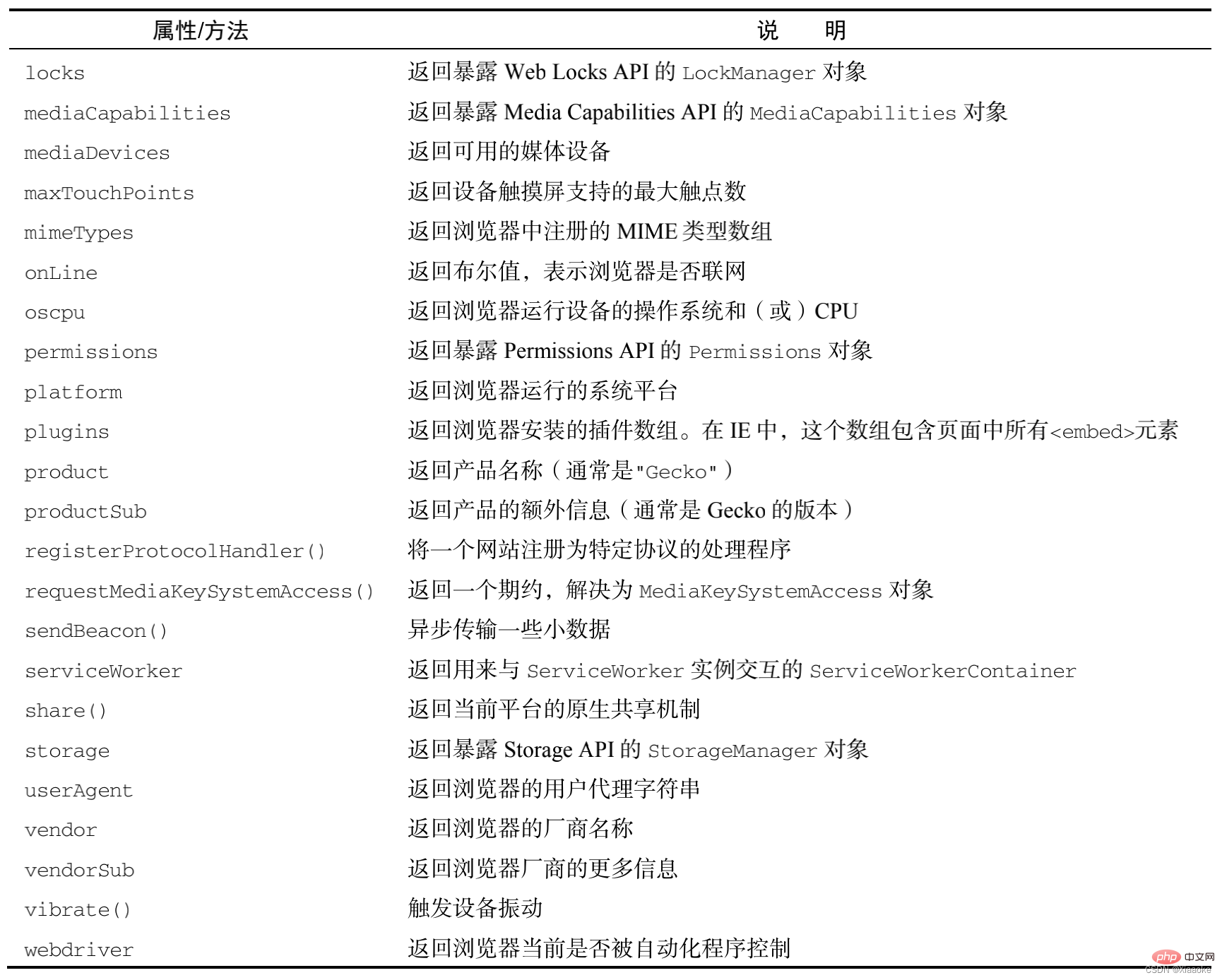
navigator: an object that encapsulates browser configuration information
window.history object includes the browser's history (url) collection
window.screen object contains information about the user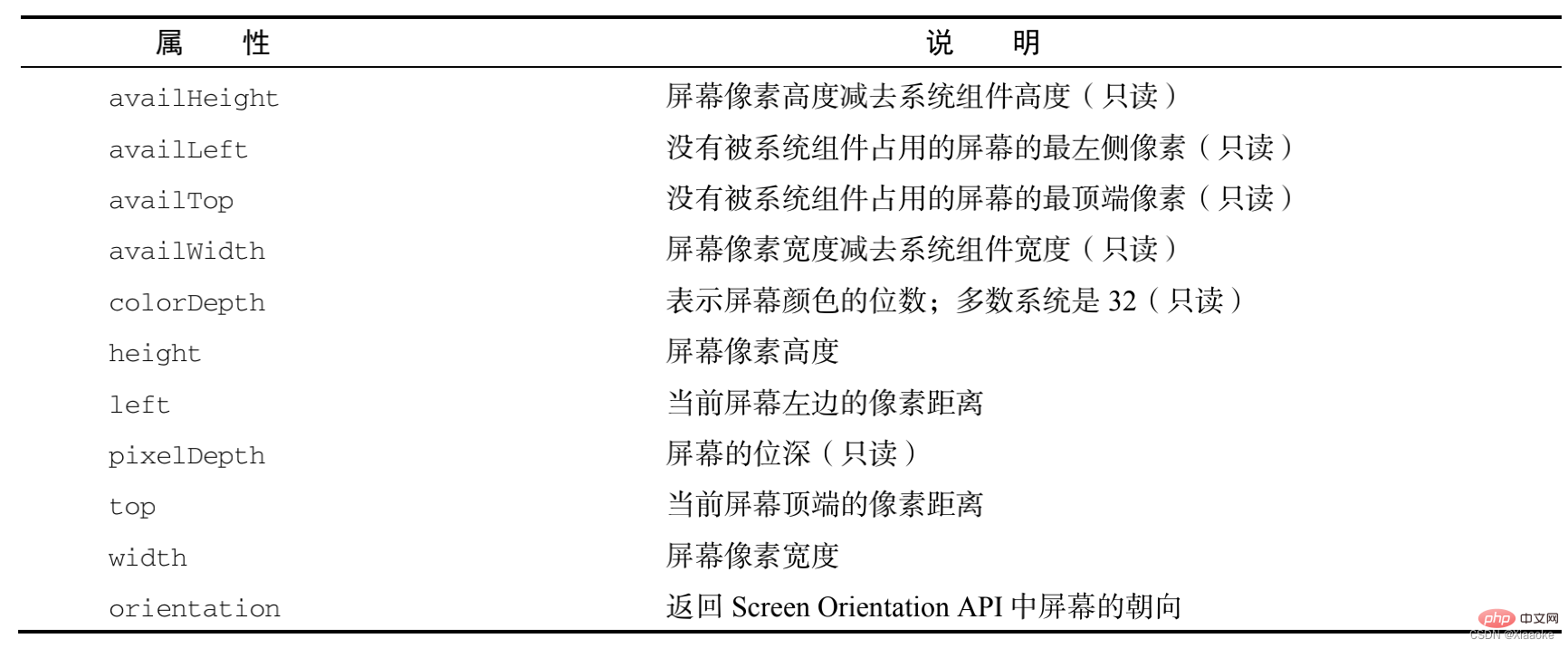
// screen: Get the resolution size of the display device // Full resolution: screen.widht/height
// How to identify the type of client compatible with all client widths // Large screen, medium screen, small screen, ultra-small screen // lg md sm xs
// TV pc pad phone
//Width >= 1200 >=992 >= 768 < 768
//The remaining resolution after removing the taskbar // screen.availHeight/availWidth
can dynamically obtain the position (offset), size, etc. of the element.
Commonly used attributes of the offset series:
common attributes
such as the border size and element size of elements
:dynamically obtains the size and scroll distance of elements.
Common attributes
scroll bar. When scrolling, the onscroll event will be triggered
window.pageXOffset/pageYOffset IE8 and below are not compatible with document.body/documentElement.scrollLeft/scrollTop The compatibility is confusing and takes a long time. Add two values, because it is impossible for two values to have values at the same time . Encapsulation compatibility method, find the rolling distance of the scroll bar wheel getScrollOffet()
/*
Encapsulates a method to get the scrolling distance of the scroll bar. Returns: x: the scrolling distance of the horizontal scroll bar y: the scrolling distance of the vertical scroll bar */function getScrollOffet(){
    if(window.pageXOffset){
        return {//{} of the object must be after the keyword, otherwise the system will automatically add it; then the return value will be undefined
            x : window.pageXOffset,
            y : window.pageYOffset }
    }else{//Compatible with IE8 and below return {
            x : document.body.scrollLeft + document.documentElement.scrollLeft,
            y : document.body.scrollTop + document.documentElement.scrollTop }
}} window.innerWidth/innerHeight is not compatible with IE8 and below (note: the width and height here do not include the height of the menu bar, toolbar, scroll bar, etc.) document.documentElement.clientWidth/clientHeight in standard mode , any browser is compatible with document.body.clientWidth/clientHeight It is a browser encapsulation compatibility method suitable for weird situations. Returns the browser viewport size getViewportOffset()
/*Encapsulation returns the browser viewport size return value:
    w: width of the viewport h: height of the viewport*/function getViewportOffset(){
    if(window.innerWidth){
        return {
            w : window.innerWidth,
            h : window.innerHeight }
    }else{ //Compatible with IE8 and below browsers if(document.compatMode == 'BackCompat'){
            //Return { in weird rendering mode
                w : document.body.clientWidth,
                h : document.body.clientHeight }
        }else{
            //Standard mode return {
                w : document.documentElement.clientWidth,
                h : document.documentElement.clientHeight }
        }
}}console.log(document.compatMode); // BackCompat weird mode // CSS1Compat standard mode domElement.getBoundingClientRect() has good compatibility; returns an object, which contains left, Attributes such as top, right, and bottom. Left and top represent the X and Y coordinates of the upper left corner of the element. Right and bottom represent the X and Y coordinates of the lower right corner of the element. The height and width attributes are not implemented in old versions of IE. The returned results are not real-time. '
// Get the position of the element in the document function getElementPosition(target){
    //Support BoundingClientRect() method if(0 && target.getBoundingClientRect){
        var pos = target.getBoundingClientRect();

        return { // When the scroll bar moves, add the position x of the scroll bar: pos.left + Math.max(document.body.scrollLeft, document.documentElement.scrollLeft),
            y : pos.top + Math.max(document.body.scrollTop, document.documentElement.scrollTop)
        }
    } else {
        var pos = {
            left: 0,
            top : 0
        }
        var _elm = target;
        while(target.offsetParent){
            if(_elm == target){//Accumulate left and top for the first time
                pos.left += target.offsetLeft;
                pos.top += target.offsetTop;
            }else{
                pos.left += target.offsetLeft + target.clientLeft;
                pos.top += target.offsetTop + target.clientTop;
            }
            // target reassigns target = target.offsetParent;
        }
        return { x : pos.left, y : pos.top}
}} status bar
window position
of the browser statusand other attributes