
首先要確保電腦上有node.js的環境
命令列執行下面程式碼,初始化一個package.json檔案
npm init -y
此時,命令列執行mycli一定會報錯。

設定自訂指令
package.json新增bin字段,關聯mycli指令
"bin": {
    "mycli": "./test.js"
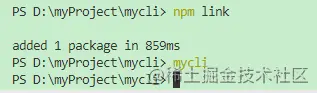
},/test.js檔console.log("mycli指令執行成功");install安裝指令,但是專案還沒發佈到npm,所以暫時先用npm link指令,把mycli指令關聯到全域。此時命令列再執行mycli就不會再報錯。
腳本設定
test.js檔:
console.log("mycli指令執行成功");然後再執行mycli ,此時會出現一個提示錯誤的彈跳窗
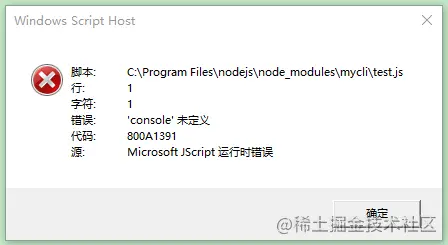
這是因為,執行mycli命令的時候相當於讓計算機執行了這個文件,而計算機系統是無法直接執行js文件的,這就需要我們在腳本代碼第一行加入一個配置,指定計算機上的node.js程式來執行這個js腳本檔。
#!/usr/bin/env node
由於更改了執行環境,需要刪除先前link到的文件,文件位置可能是C:Program Filesnodejsnode_modules ,找到mycli刪除,然後再重新執行npm link 。
現在控制台再來執行mycli ,可以看到控制台正確列印。
Chalk命令列輸出五顏六色的字體Ora載入中loading的效果,類似的還有progress庫commander設計命令inquirer交互功能(如:提問...)Chalk
npm install [email protected] -S
const chalk = require("chalk");

// chalk
// const hello = chalk.red("hello");
// const hello = chalk.blue.bgRed("hello");
// const hello = chalk.blue.bgYellow("hello");
const hello = chalk.rgb(200, 200, 200).bgRgb(0, 200, 3)("hello");
console.log(hello); 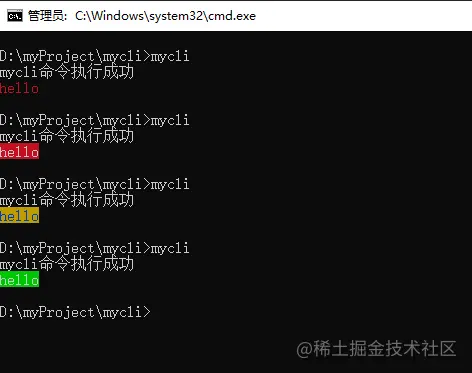
Ora
npm install [email protected] -S
const ora = require("ora");

// ora
const spinner = ora({
  text: "安裝中..."
});
spinner.start();
setTimeout(() => {
  // spinner.stop();
  spinner.succeed("安裝成功");
  // console.log("安裝成功");
}, 2000)start開始載入stop停止載入succeed結束載入並帶有成功的樣式
commander
開發中常用的指令,如vue -V git --version vue create等指令,想要實作這樣的指令就需要用到commander這個函式庫。
使用的指令後面帶的-V --help等,可以理解為是指令的參數,那麼我們就需要取得到這些參數,透過判斷參數的不同來處理不同的事件。
那在node環境中,可以透過process.argv來取得這個參數。而commander庫,幫助我們封裝好了一些方法,不用我們自己去判斷使用者輸入攜帶的指令是什麼。
npm install [email protected] -S
const commander = require("commander");
// ...
commander.parse(process.argv); // 放在後面
安裝完成之後, commander會自動提供給我們一些命令,如--help ,下面來測試一下:
mycli --help
commander. version("1.0.0");執行mycli -V可以看到控制台列印了1.0.0版本號。
自訂指令方法
commander.option(指令名, 描述, 回调函数)
--init指令:commander.option("--init", "this is init", () => {
// chalk
// const hello = chalk.red("hello");
// const hello = chalk.blue.bgRed("hello");
// const hello = chalk.blue.bgYellow("hello");
const hello = chalk.rgb(200, 200, 200).bgRgb(0, 200, 3)("hello");
console.log(hello);
// ora
const spinner = ora({
text: "安裝中..."
});
spinner.start();
setTimeout(() => {
// spinner.stop();
spinner.succeed("安裝成功");
// console.log("安裝成功");
}, 1000)

})現在執行mycli --init測試:
commander.option("--number <num>", "log a number", (num) => {
  console.log(num);
}) <参数名>表示必傳的參數, [参数名]表示非必傳的參數。控制台輸入mycli --number 100回車,可以看到會輸出100 。
自訂指令方法
commander.command("create <projectName>").action((projectName)=>{
  console.log(projectName);
})執行mycli create xx回車,控制台可以看到輸出了xx 。
查看幫助
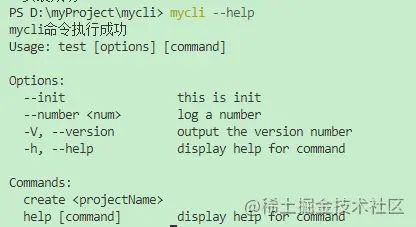
執行mycli --help ,可以看到我們剛剛設定的指令和指令都出現在了說明清單裡。
inquirer
npm install inquirer -S
prompt提問的方法inquirer.prompt([
{
type: "input",
name: "username",
message: "請輸入使用者名稱:"
}
]).then((answer)=>{
}) type表示問題的類型,取值可能是: input , number , password , editor等。
answer是{username: 输入的值}
inputconst inquirer = require("inquirer");
commander.command("add user").action(() => {
inquirer.prompt([
{
type: "input",
name: "username",
message: "請輸入使用者名稱:"
}
]).then((answer) => {
console.log(answer);
})
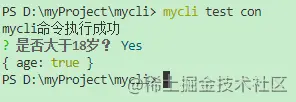
}) confirmcommander.command("testcon").action(() => {
inquirer.prompt([
{
type: "confirm",
name: "age",
message: "是否大於18歲?"
}
]).then((answer) => {
console.log(answer);
})
})輸入y或n來判斷。
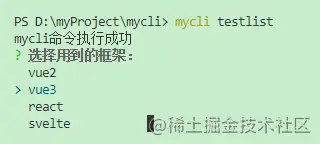
listcommander.command("testlist").action(() => {
inquirer.prompt([
{
type: "list",
name: "lib",
message: "選擇用到的框架:",
choices: [
"vue2",
"vue3",
"react",
"svelte",
]
}
]).then((answer) => {
console.log(answer);
})
})執行mycli testlist指令:
download-git-repo是一個拉取程式碼的工具。
安裝
npm install [email protected] -S
const downgit = require("download-git-repo");

downgit("github:kongcodes/vue3-vant", downUrl, { clone: false }, function (err) {
    console.log(err)
}) downgit方法裡面的第一個參數理解為在github上面下載kongcodes使用者的vue3-vant專案範本。第二個參數downUrl為要將模板下載到什麼目錄下。第三個參數clone是否要用git clone下載。第四個參數為下載完成執行的一些事情。
command方法使用commander.command("create <projectName>").action((projectName) => {
const spinner = ora({
text: "正在下載https://github.com/kongcodes/vue3-vant..."
});
spinner.start();
fs.mkdirSync(`./${projectName}`);
const downUrl = `${process.cwd()}\${projectName}`;
downgit("github:kongcodes/vue3-vant", downUrl, { clone: false }, function (err) {
if (err) throw err;
spinner.stop();
console.log(chalk.green("downgit success"));
})
})執行mycli create pro回車,會在目前目錄下方建立pro目錄,下載vue3-vant範本到這個目錄裡。
https://github.com/kongcodes/mycli