PdoOne
4.10

pdoone。它是與SQL Server(2008 R2或更高),MySQL(5.7或更高)和Oracle(12.1或更高)兼容的PHP PDO庫的簡單包裝器。
該圖書館試圖盡可能快地工作。大多數操作都是簡單的字符串/數組管理,並在PDO庫的裸機中工作,但它還允許使用擴展EFTEC/PDOONEORM創建ORM。
轉
 $ stmt = $ pdo -> prepare ( " SELECT * FROM myTable WHERE name = ? " );
$ stmt -> bindParam ( 1 , $ _POST [ ' name ' ], PDO :: PARAM_STR );
$ stmt -> execute ();
$ result = $ stmt -> get_result ();
$ products =[];
while ( $ row = $ result -> fetch_assoc ()) {
  $ product []= $ row ;
}
$ stmt -> close ();
進入這個
 $ products = $ pdoOne
    -> select ( " * " )
    -> from ( " myTable " )
    -> where ( " name = ? " ,[ $ _POST [ ' name ' ]])
    -> toList ();
或使用ORM(使用EFTEC/PDOONEORM庫)
ProductRepo // this class was generated with echo $pdoOne()->generateCodeClass(['Product']); or using the cli.
    :: where ( " name = ? " ,[ $ _POST [ ' name ' ]])
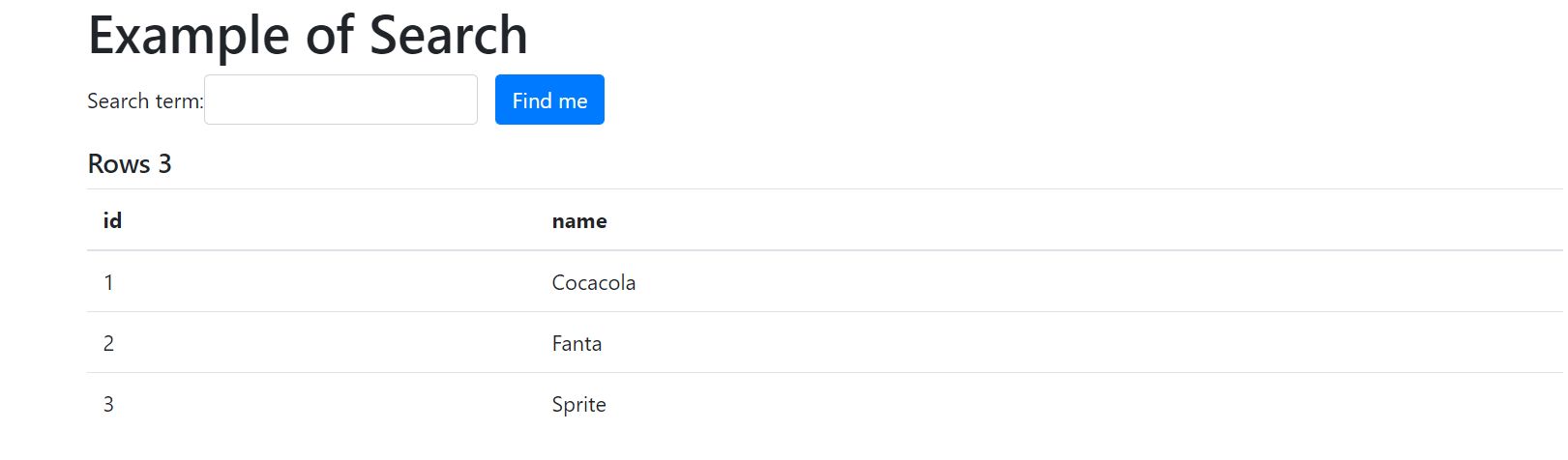
:: toList ();| exeppleticketPHP | 紙杯蛋糕 | 示例搜索 | 示例不同的方法 |
|---|---|---|---|
 |  |  |
更多示例:
示例使用PDOONE的MySQL php和PDO
該庫需要php 7.1及更高版本,並且需要擴展PDO和擴展PDO-MYSQL(MySQL),PDO-SQLSRV(SQL Server)或PDO-OCI(Oracle)
編輯Composer.json下一個要求,然後更新作曲家。
  {
      "require" : {
        "eftec/PdoOne" : " ^4.0.1 "
      }
  }
或使用CLI使用
作曲家需要EFTEC/PDOONE
只需從庫中下載文件夾lib,然後放入您的文件夾項目即可。然後,您必須包括其中包含的所有文件。
如下創建類PDOONE的實例。然後,您可以使用方法Connect()或Open()打開連接()
 use eftec  PdoOne ;
// mysql
$ dao = new PdoOne ( " mysql " , " 127.0.0.1 " , " root " , " abc.123 " , " sakila " , "" );
$ conn -> logLevel = 3 ; // it is for debug purpose and it works to find problems.
$ dao -> connect ();

// sql server 10.0.0.1instance or (local)instance or machinenameinstance or machine (default instance)
$ dao = new PdoOne ( " sqlsrv " , " (local)sqlexpress " , " sa " , " abc.123 " , " sakila " , "" );
$ conn -> logLevel = 3 ; // it is for debug purpose and it works to find problems.
$ dao -> connect ();

// test (mockup)
$ dao = new PdoOne ( " test " , " anyy " , " any " , " any " , " any " , "" );
$ dao -> connect ();

// oci (oracle) ez-connect. Remember that you must have installed Oracle Instant client and added to the path.

$ cs = ' (DESCRIPTION =(ADDRESS = (PROTOCOL = TCP)(HOST = localhost)(PORT = 1521))(CONNECT_DATA =(SERVER = DEDICATED)(SERVICE_NAME = instancia1))) ' ;
$ dao = new PdoOne ( " oci " , $ cs , " sa " , " abc.123 " ); // oracle uses the user as the schema
$ conn -> logLevel = 3 ; // it is for debug purpose and it works to find problems.
$ dao -> connect ();

// oci (oracle) tsnnames (the environment variables TNS_ADMIN and PATH must be correctly configured), also tnsnames.ora must exists.
$ cs = ' instancia1 ' ;
$ dao = new PdoOne ( " oci " , $ cs , " sa " , " abc.123 " ); // oracle uses the user as the schema
$ conn -> logLevel = 3 ; // it is for debug purpose and it works to find problems.
$ dao -> connect ();
在哪裡
$ dao = new Pdoone(“ mysql”,“ 127.0.0.1”,“ root”,“ abc.123”,“ sakila”,“”);
Oracle安裝很棘手。在Windows中,從Oracle Home的bin文件夾中,您必須將所有DLL複製到PHP文件夾和Apache文件夾。
使用方法Runrawquery() ,我們可以在有或沒有參數的情況下直接執行命令到PDO。它可以返回pdostatement或數組。當我們想要速度時,這很有用。
runrawquery($ rowsql,$ param,$ returnarray,$ fetchmode,$ fetchargument)
字符串$ rawSQL執行陣列的查詢| null $ param [type1,value1,type2,value2]或[name1 => value,name2 = value2] bool $ returnaray如果為true(默認),則返回一個數組。如果false,則返回pdostatement int $ fetchmode表示獲取模式。示例:pdo :: fetch_assoc null $ fetchargument fetchmode的參數。
 $ sql = ' select * from table where id=1 ' ;
$ pdoStatement = $ pdoOne -> runRawQuery ( $ sql ,[], false );  // [] are the parameters
但是我們可以將其更改為返回一個數組
 $ sql = ' select * from table where id=1 ' ;
$ values = $ pdoOne -> runRawQuery ( $ sql );  // [] are the parameters
我們也可以傳遞參數。
 $ values = $ con -> runRawQuery ( ' select * from table where id=? ' ,[ 20 ]); // with parameter
$ values = $ con -> runRawQuery ( ' select * from table where id=:name ' ,[ ' name ' => 20 ]); // with named parameter
$ values = $ con -> runRawQuery ( ' select * from table ' ,[]); // without parameter.
請注意,該庫使用已準備好的語句,因此它沒有SQL注入(如果使用參數)
 $ name = " O'hara " ;
$ values = $ con -> runRawQuery ( " select * from table where name=:name " ,[ ' name ' => $ name ]); // it works.✅
$ values = $ con -> runRawQuery ( " select * from table where name=? " ,[ $ name ]); // it works ok.✅
$ values = $ con -> runRawQuery ( " select * from table where name=' $ name ' " ); // it will crash.使用方法runquery(),我們可以在PDO中執行準備好的語句。當我們想將參數傳遞給它時,這很有用。 Runquery()需要準備PDO。
除非您已經使用PDO語句,否則不建議使用此方法,並且不想適應所有代碼。
 $ sql = " insert into `product`(name) values(?) " ;
$ stmt = $ pdoOne -> prepare ( $ sql );
$ productName = " Cocacola " ;
$ stmt -> bind_param ( " s " , $ productName ); // s stand for a string. Also i =integer, d = double and b=blob
$ rows = $ pdoOne -> runQuery ( $ stmt );
$ allRows = $ rows -> fetch_all ( PDO :: FETCH_ASSOC );您可以使用查詢構建器來構建命令。您可以查看有關查詢構建器(DQL)的章節,以獲取更多信息。
 // query builder
$ pdoOne -> set ([ ' name ' => ' cocacola ' ])
    -> from ( ' product ' )
-> insert ();庫eftec pdooneorm允許創建表的[orm] (#orm)。如果您生成了ORM,則可以使用下一個代碼
ProductRepo:: toList ([ ' category ' => ' drink ' ]);其中productrepo是使用ORM生成的服務類。
默認情況下,PDOONE在模式pdo :: fetch_assoc中執行查詢,您可以通過運行查詢來更改為:
 $ pdo -> setFechMode ( PDO :: FETCH_CLASS , ' stdClass ' )-> runRawQuery ( $ query );
// or you can run as
$ pdo -> runRawQuery ( $ query , null , true , false , null , PDO :: FETCH_CLASS , ' stdClass ' )PDOONE允許5種類型的日期。
SQL格式是將日期存儲到數據庫中的格式。這取決於數據庫的類型。例如,MySQL可以使用格式YMD。
人類格式是最終用戶看起來我們日期的格式。
ISO日期格式。這是如何運輸和序列化值的格式。
時間戳:它計算1-1-1970之後的秒數
類 / PHP類:這是一個日期對象。
有3種運行交易的方法:
| 方法 | 描述 |
|---|---|
| startTransaction() | 它開始交易。根據類型數據庫的不同,它可以堆疊。 |
| 犯罪() | 提交(並關閉)交易 |
| 復原() | 回滾(並關閉)交易 |
例子:
 try {
    $ sql = " insert into `product`(name) values(?) " ;
    $ pdoOne -> startTransaction ();
    $ result = $ pdoOne -> runRawQuery ( $ sql ,[ ' Fanta ' => $ productName ], false );
    $ pdoOne -> commit (); // transaction ok
} catch ( Exception $ e ) {
    $ pdoOne -> rollback ( false ); // error, transaction cancelled, the false means that it doesn't throw an exception if we want rollback.
}如果表格存在(當前數據庫/架構),則返回true
返回表的列的統計信息(作為數組)。
$ stats = $ pdoOne -> statValue ( ' actor ' , ' actor_id ' );| 最小 | 最大限度 | avg | 和 | 數數 |
|---|---|---|---|---|
| 1 | 205 | 103.0000 | 21115 | 205 |
返回表的所有列
$ result = $ pdoOne -> columnTable ( ' actor ' );| colname | Coltype | 結腸化 | Colpres | colscale | ISKEY | 現有人士 |
|---|---|---|---|---|---|---|
| actor_id | 小網 | 5 | 0 | 1 | 1 | |
| 名 | Varchar | 45 | 0 | 0 | ||
| 姓 | Varchar | 45 | 0 | 0 | ||
| last_update | 時間戳 | 0 | 0 |
返回表的所有外鍵(源表)
使用定義和主鍵創建表。
注意:您可以通過執行CLI(輸出classcode)來生成代碼使用現有表創建表
php pdoone.php -database mysql -Server 127.0.0.1-用戶根-PWD ABC.123 -DB sakila -Input Film -Output classcode
示例:( mysql)
 $ pdo -> createTable ( ' film ' ,
    [
        " film_id " => " smallint unsigned not null auto_increment " ,
        " title " => " varchar(255) not null " ,
        " description " => " text " ,
        " release_year " => " year " ,
        " language_id " => " tinyint unsigned not null " ,
        " original_language_id " => " tinyint unsigned " ,
        " rental_duration " => " tinyint unsigned not null default '3' " ,
        " rental_rate " => " decimal(4,2) not null default '4.99' " ,
        " length " => " smallint unsigned " ,
        " replacement_cost " => " decimal(5,2) not null default '19.99' " ,
        " rating " => " enum('G','PG','PG-13','R','NC-17') default 'G' " ,
        " special_features " => " set('Trailers','Commentaries','Deleted Scenes','Behind the Scenes') " ,
        " last_update " => " timestamp not null default CURRENT_TIMESTAMP on update CURRENT_TIMESTAMP "
    ],[
        " film_id " => " PRIMARY KEY " ,
        " title " => " KEY " ,
        " language_id " => " FOREIGN KEY REFERENCES`language`(`language_id`) ON UPDATE CASCADE " ,
        " original_language_id " => " FOREIGN KEY REFERENCES`language`(`language_id`) ON UPDATE CASCADE "
    ]);
$ pdo -> createTable ( ' film ' ,
[
" film_id " => " smallint unsigned not null auto_increment " ,
" title " => " varchar(255) not null " ,
" description " => " text " ,
" release_year " => " year " ,
" language_id " => " tinyint unsigned not null " ,
" original_language_id " => " tinyint unsigned " ,
" rental_duration " => " tinyint unsigned not null default '3' " ,
" rental_rate " => " decimal(4,2) not null default '4.99' " ,
" length " => " smallint unsigned " ,
" replacement_cost " => " decimal(5,2) not null default '19.99' " ,
" rating " => " enum('G','PG','PG-13','R','NC-17') default 'G' " ,
" special_features " => " set('Trailers','Commentaries','Deleted Scenes','Behind the Scenes') " ,
" last_update " => " timestamp not null default CURRENT_TIMESTAMP on update CURRENT_TIMESTAMP "
], ' film_id ' ); 示例(SQLSRV)
 $ pdo -> createTable ( ' film ' ,
   [
       " film_id " => " int NOT NULL IDENTITY(1,1) " ,
       " title " => " varchar(255) NOT NULL " ,
       " description " => " text(2147483647) DEFAULT (NULL) " ,
       " release_year " => " varchar(4) " ,
       " language_id " => " tinyint NOT NULL " ,
       " original_language_id " => " tinyint DEFAULT (NULL) " ,
       " rental_duration " => " tinyint NOT NULL DEFAULT ((3)) " ,
       " rental_rate " => " decimal(4,2) NOT NULL DEFAULT ((4.99)) " ,
       " length " => " smallint DEFAULT (NULL) " ,
       " replacement_cost " => " decimal(5,2) NOT NULL DEFAULT ((19.99)) " ,
       " rating " => " varchar(10) DEFAULT ('G') " ,
       " special_features " => " varchar(255) DEFAULT (NULL) " ,
       " last_update " => " datetime NOT NULL DEFAULT (getdate()) "
   ],[
       " language_id " => " FOREIGN KEY REFERENCES language(language_id) " ,
       " original_language_id " => " FOREIGN KEY REFERENCES language(language_id) " ,
       " film_id " => " PRIMARY KEY "
]);它返回按依賴項訂購的表的列表(從無依賴到更依賴)
注意:此操作不是萬無一失的,因為桌子可能具有圓形參考。
 $ dao = new PdoOne ( ' sqlsrv ' , " (local)sqlexpress " , " sa " , " abc.123 " , " sakila " );
$ dao -> open ();
echo " <pre> " ;
var_dump ( $ dao -> tableSorted ( 3 , false , true )); // it returns the tables sortered
var_dump ( $ dao -> tableSorted ( 3 , true , true )); // it returns all the tables that can't be sortered
echo " </pre> " ;如果表與值相關的定義匹配,則驗證表。
 $def=[
       "film_id" => "int NOT NULL IDENTITY(1,1)",
       "title" => "varchar(255) NOT NULL",
       "description" => "text(2147483647) DEFAULT (NULL)",
       "release_year" => "varchar(4)",
       "language_id" => "tinyint NOT NULL",
       "original_language_id" => "tinyint DEFAULT (NULL)",
       "rental_duration" => "tinyint NOT NULL DEFAULT ((3))",
       "rental_rate" => "decimal(4,2) NOT NULL DEFAULT ((4.99))",
       "length" => "smallint DEFAULT (NULL)",
       "replacement_cost" => "decimal(5,2) NOT NULL DEFAULT ((19.99))",
       "rating" => "varchar(10) DEFAULT ('G')",
       "special_features" => "varchar(255) DEFAULT (NULL)",
       "last_update" => "datetime NOT NULL DEFAULT (getdate())"
   ];
$keys=[
       "language_id" => "FOREIGN KEY REFERENCES language(language_id)",
       "original_language_id" => "FOREIGN KEY REFERENCES language(language_id)",
       "film_id" => "PRIMARY KEY"
   ];

var_dump(PdoOne::validateDefTable(self::getPdoOne(),self::TABLE,$def,$keys));
它返回桌子的所有外鍵。
$ result = $ pdoOne -> foreignKeyTable ( ' actor ' );| 同盟國 | tablem | Colrem |
|---|---|---|
| customer_id | 顧客 | customer_id |
| lental_id | 租金 | lental_id |
| Staff_ID | 職員 | Staff_ID |
您還可以構建程序查詢。
例子:
 $ results = $ pdoOne -> select ( " * " )-> from ( " producttype " )
    -> where ( ' name=? ' , [ ' Cocacola ' ])
    -> where ( ' idproducttype=? ' , [ 1 ])
-> toList (); 指示要返回的列。該參數是SQL命令,因此它允許數據庫支持(包括功能,常數,操作員,別名等)的任何操作。
$ results = $ pdoOne -> select ( " col1,col2 " ); //...生成查詢:選擇COL1,COL2 ....
$ results = $ pdoOne -> select ( " select * from table " ); //->...生成查詢:從表中選擇 * * 。
生成一個返回值計數的查詢。這是方法選擇()的宏
 $ result = $ pdoOne -> count ( ' from table where condition=1 ' ); // select count(*) from table where c..
$ result = $ pdoOne -> count ()-> from ( ' table ' )-> where ( ' condition=? ' ,[ 1 ]); // select count(*) from table where c..
$ result = $ pdoOne -> count ( ' from table ' , ' col1 ' ); // select count(col1) from table
$ result = $ pdoOne -> count ()-> from ( ' table ' ); // select count(*) from table生成一個查詢,該查詢返回列的最小值。如果$ arg為空,則使用$ sql作為列的名稱,它是方法select()
 $ result = $ pdoOne -> min ( ' from table where condition=1 ' , ' col ' ); // select min(col) from table where c..
$ result = $ pdoOne -> min ( ' from table ' , ' col1 ' ); // select min(col1) from table
$ result = $ pdoOne -> min ( '' , ' col1 ' )-> from ( ' table ' ); // select min(col1) from table
$ result = $ pdoOne -> min ( ' col1 ' )-> from ( ' table ' ); // select min(col1) from table生成一個查詢,該查詢返回列的最大值。如果$ arg為空,則使用$ sql作為列的名稱,它是方法select()
 $ result = $ pdoOne -> max ( ' from table where condition=1 ' , ' col ' ); // select max(col) from table where c..
$ result = $ pdoOne -> max ( ' from table ' , ' col1 ' ); // select max(col1) from table生成一個返回列的總和值的查詢。如果$ arg為空,則使用$ sql作為列的名稱,它是方法select()
 $ result = $ pdoOne -> sum ( ' from table where condition=1 ' , ' col ' ); // select sum(col) from table where c..
$ result = $ pdoOne -> sum ( ' from table ' , ' col1 ' ); // select sum(col1) from table生成一個查詢,該查詢返回列的平均值。如果$ arg為空,則使用$ sql作為列的名稱,它是方法select()
 $ result = $ pdoOne -> avg ( ' from table where condition=1 ' , ' col ' ); // select avg(col) from table where c..
$ result = $ pdoOne -> avg ( ' from table ' , ' col1 ' ); // select avg(col1) from table生成一個選擇命令。
$ results = $ pdoOne -> select ( " col1,col2 " )-> distinct (); //...生成查詢:選擇不同的COL1,COL2 ....
注意: - >獨特('unique)返回選擇唯一..
生成一個“來自” SQL命令。
$ results = $ pdoOne -> select ( " * " )-> from ( ' table ' ); //...生成查詢:從表中選擇 * *
$表可以是單個桌子或SQL結構。對於ExAMP,下一個命令是有效的:
$ results = $ pdoOne -> select ( " * " )-> from ( ' table t1 inner join t2 on t1.c1=t2.c2 ' ); //...生成一個命令。
 $ results = $ pdoOne -> select ( " * " )
-> from ( ' table ' )
-> where ( ' p1=1 ' ); //...
哪裡可以以不同的方式表達。
可以編寫沒有參數的地方,如下所示:
$ results = $ pdoOne -> select ( " * " )-> from ( ' table ' )-> where ( " p1=1 and p2>2.5 or p3 like '%aa%' " ); $ aa = ' aa ' ;
$ results = $ pdoOne -> select ( " * " )-> from ( ' table ' )-> where ( " p1=? and p2>? or p3 like ? " ,[ 1
, 2.5
, " % $ aa % " ]);它也有效
 // (if there is only a single argument without a type)
$ results = $ pdoOne -> select ( " * " )-> from ( ' table ' )-> where ( " p1=? " ,[ 1 ]);  // = where("p1=?",[1]);
// (if we don't define to where to put the value)
$ results = $ pdoOne -> select ( " * " )-> from ( ' table ' )-> where ( " p1 " ,[ 1 ]); // = where("p1=?",[1]); 它是使用關聯數組的查詢的速記定義,其中鍵是列的名稱,值是要比較的值
它僅適用於平等(=)和邏輯運算符'和' (該類型是自動定義的)
 // select * from table where p1='1' and p2='2.5' and p3='aa'
$ results = $ pdoOne -> select ( " * " )-> from ( ' table ' )-> where ([ ' p1 ' => 1
                                                       , ' p2 ' => 2.5
                                                       , ' p3 ' => ' aa ' ]);
同樣,可以指定參數的類型。
 // select * from table where p1=1 and p2='2.5' and p3='aa'
$ results = $ pdoOne -> select ( " * " )-> from ( ' table ' )-> where ([ ' p1 ' =>[ 1 ]
                                                       , ' p2 ' =>[ 2.5 ]
, ' p3 ' =>[ ' aa ' ]]); 您也可以將關聯數組用作參數,並在查詢中命名參數
 $ results = $ pdoOne -> select ( " * " )-> from ( " table " )
    -> where ( ' condition=:p1 and condition2=:p2 ' ,[ ' p1 ' => ' Coca-Cola ' , ' p2 ' => 1 ])
    -> toList ();
生成查詢:從表中選擇 * *(可口可樂)和條件2 =? (1)
生成查詢:從表中select * wery p1 = 1
注意:ArrayParameters是一個數組,如下:類型,值。
其中類型為i =整數,d = double,s = string或b = blob。如有疑問,請使用“ S”(請參閱表Bellow)
ArrayParameters的示例:
[1,'Hello',20.3,'World']
 $ results = $ pdoOne -> select ( " * " )
-> from ( ' table ' )
-> where ( ' p1=? ' ,[ 1 ]); //...
生成查詢:從表中select * p1 =? (1)
 $ results = $ pdoOne -> select ( " * " )
-> from ( ' table ' )
-> where ( ' p1=? and p2=? ' ,[ 1 , ' hello ' ]); //...
生成查詢:從表中選擇 * * p1 =? (1)和p2 =? ('Hello')
筆記。在哪裡可以嵌套。
 $ results = $ pdoOne -> select ( " * " )
-> from ( ' table ' )
-> where ( ' p1=? ' ,[ 1 ])
-> where ( ' p2=? ' ,[ ' hello ' ]); //...
生成查詢:從表中選擇 * * p1 =? (1)和p2 =? ('Hello')
您也可以使用:
 $ results = $ pdoOne -> select ( " * " )-> from ( " table " )
    -> where ([ ' p1 ' => ' Coca-Cola ' , ' p2 ' => 1 ])
    -> toList ();
生成查詢:從表中選擇 * * p1 =? (可口可樂)和p2 =? (1)
生成訂單命令。
 $ results = $ pdoOne -> select ( " * " )
-> from ( ' table ' )
-> order ( ' p1 desc ' ); //...生成查詢:通過p1 desc從表順序中選擇 * *
生成組命令。
 $ results = $ pdoOne -> select ( " * " )
-> from ( ' table ' )
-> group ( ' p1 ' ); //...生成查詢:通過p1從表組中進行選擇 *
生成一個命令。
注意:它使用與Whese()相同的參數
 $ results = $ pdoOne -> select ( " * " )
-> from ( ' table ' )
-> group ( ' p1 ' )
-> having ( ' p1>? ' , array ( 1 )); //...
生成查詢:p1>? (1)從表組中選擇 * *
注意:可以嵌套() - > ake
注意:沒有參數('col> 10')沒有參數
運行查詢生成。
請注意,如果returnarray為true,則它將返回一個關聯數組。如果returnarray為false,則返回mysqli_result
注意:它重置當前參數(例如當前選擇,從哪裡,哪裡等)
這是rungen()的宏。如果操作失敗,它將返回關聯數組或false。
 $ results = $ pdoOne -> select ( " * " )
-> from ( ' table ' )
-> toList (); 它從當前查詢返回一個pdostatement
注意:如果要循環語句,則可以使用fetchloop()
例子:
 $ stmt = $ pdoOne -> select ( " * " )
  -> from ( ' table ' )
  -> toPdoStatement ();
while ( $ row = $ stmt -> fetch ()) {
  // do something
}它為每一行提供一個查詢。
當我們不想一次閱讀所有信息時,可以使用此方法,因此您可以單獨閱讀和處理每行
例子:
 $ this -> select ( ' select id,name from table ' )
-> fetchLoop ( static function ( $ row ) { return ( $ row );}, PDO :: FETCH_ASSOC )它返回查詢每一列的元(定義)。
 $ results = $ pdoOne -> select ( " * " )
-> from ( ' table ' )
-> toMeta ();
或者
$ results = $ pdoOne -> toMeta ( ' select * from table ' ); 結果:
 array(3) {
  [0]=>
  array(7) {
    ["native_type"]=>
    string(4) "LONG"
    ["pdo_type"]=>
    int(2)
    ["flags"]=>
    array(2) {
      [0]=>
      string(8) "not_null"
      [1]=>
      string(11) "primary_key"
    }
    ["table"]=>
    string(11) "producttype"
    ["name"]=>
    string(13) "idproducttype"
    ["len"]=>
    int(11)
    ["precision"]=>
    int(0)
  }
  [1]=>
  array(7) {
    ["native_type"]=>
    string(10) "VAR_STRING"
    ["pdo_type"]=>
    int(2)
    ["flags"]=>
    array(0) {
    }
    ["table"]=>
    string(11) "producttype"
    ["name"]=>
    string(4) "name"
    ["len"]=>
    int(135)
    ["precision"]=>
    int(0)
  }
}
這是Rungen的宏。它從第一列返回索引數組
 $ results = $ pdoOne -> select ( " * " )
-> from ( ' table ' )
-> toListSimple (); // ['1','2','3','4'] 它返回一個關聯數組,其中第一個值是密鑰,第二個值是值。
如果不存在第二個值,則將索引用作值(第一個值)。
 $ results = $ pdoOne -> select ( " cod,name " )
-> from ( ' table ' )
-> toListKeyValue (); // ['cod1'=>'name1','cod2'=>'name2'] 這是Rungen的宏。它返回mysqli_result或null。
 $ results = $ pdoOne -> select ( " * " )
-> from ( ' table ' )
-> toResult (); // 它返回查詢的第一個標量(一個值)。如果$ colname為null,則使用第一列。
$ count = $ this -> count ( ' from product_category ' )-> firstScalar ();這是Rungen的宏。它返回第一行(如果沒有),則返回false,作為關聯數組。
 $ results = $ pdoOne -> select ( " * " )
-> from ( ' table ' )
-> first (); 這是Rungen的宏。它返回最後一行(如果有的話,如果沒有,則返回false)作為關聯數組。
 $ results = $ pdoOne -> select ( " * " )
-> from ( ' table ' )
-> last ();
有時,運行順序()和first()更有效,因為last()讀取所有值。
它返回SQL命令和字符串。
 $ sql = $ pdoOne -> select ( " * " )
-> from ( ' table ' )
-> sqlGen ();
echo $ sql ; // returns select * from table
$ results = $ pdoOne -> toList (); // executes the query
注意:它不會重置查詢。
有四種方法可以執行每個命令。
假設我們想在col1列中添加一個數值20
架構和值使用值列表:其中第一個值是列,第二個是值的類型(i = integer,d = double,s = string,b = blob),第二個數組包含值。
 $ pdoOne -> insert ( " table "
    ,[ ' col1 ' ]
,[ 20 ]);同一列表中的架構和值:其中第一個值是列,第二個是值的類型(i = integer,d = double,s = string,b = blob),第三個是值。
 $ pdoOne -> insert ( " table "
,[ ' col1 ' , 20 ]);模式和值使用兩個關聯數組:
 $ pdoOne -> insert ( " table "
    ,[ ' col1 ' ]
,[ ' col1 ' => 20 ]);模式和值使用單個關聯數組:類型是自動計算的。
 $ pdoOne -> insert ( " table "
,[ ' col1 ' => 20 ]);生成一個插入命令。
 $ pdoOne -> insert ( " producttype "
    ,[ ' idproducttype ' , ' name ' , ' type ' ]
    ,[ 1 , ' cocacola ' , 1 ]);
使用嵌套鍊(單個數組)
    $ pdoOne -> from ( " producttype " )
        -> set ([ ' idproducttype ' , 0 , ' name ' , ' Pepsi ' , ' type ' , 1 ])
        -> insert ();
使用嵌套鍊多組
    $ pdoOne -> from ( " producttype " )
        -> set ( " idproducttype=? " ,[ 101 ])
        -> set ( ' name=? ' ,[ ' Pepsi ' ])
        -> set ( ' type=? ' ,[ 1 ])
        -> insert ();
或(該類型是由MySQL自動定義的)
    $ pdoOne -> from ( " producttype " )
        -> set ( " idproducttype=? " ,[ 101 ])
        -> set ( ' name=? ' , ' Pepsi ' )
        -> set ( ' type=? ' , 1 )
-> insert (); $ pdoOne -> insertObject ( ' table ' ,[ ' Id ' => 1 , ' Name ' => ' CocaCola ' ]);使用嵌套鍊聲明集
    $ pdoOne -> from ( " producttype " )
        -> set ( ' (idproducttype,name,type) values (?,?,?) ' ,[ 100 , ' Pepsi ' , 1 ])
-> insert ();生成查詢:插入productype(idProductType,name,type)values(?,?,?) ....
生成一個插入命令。
 $ pdoOne -> update ( " producttype "
    ,[ ' name ' , ' type ' ] //set
    ,[ 6 , ' Captain-Crunch ' , 2 ] //set
    ,[ ' idproducttype ' ] // where
    ,[ 6 ]); // where
$ pdoOne -> update ( " producttype "
,[ ' name ' => ' Captain-Crunch ' , ' type ' => 2 ] // set
,[ ' idproducttype ' => 6 ]); // where $ pdoOne -> from ( " producttype " )
-> set ( " name=? " ,[ ' Captain-Crunch ' ]) //set
-> set ( " type=? " ,[ 6 ]) //set
-> where ( ' idproducttype=? ' ,[ 6 ]) // where
-> update (); // update或者
 $ pdoOne -> from ( " producttype " )
    -> set ( " name=? " , ' Captain-Crunch ' ) //set
    -> set ( " type=? " , 6 ) //set
    -> where ( ' idproducttype=? ' ,[ 6 ]) // where
-> update (); // update生成查詢:更新productType set
name=? ,type=?idproducttype=在哪裡? ...
生成刪除命令。
 $ pdoOne -> delete ( " producttype "
    ,[ ' idproducttype ' ] // where
    ,[ 7 ]); // where
$ pdoOne -> delete ( " producttype "
,[ ' idproducttype ' => 7 ]); // where生成查詢:從productType中刪除的地方
idproducttype=? ...
您也可以通過DQL構建器鏈刪除。
 $ pdoOne -> from ( " producttype " )
    -> where ( ' idproducttype=? ' ,[ 7 ]) // where
    -> delete ();
$ pdoOne -> from ( " producttype " )
-> where ([ ' idproducttype ' => 7 ]) // where
-> delete (); 生成查詢:從productType中刪除的地方
idproducttype=? ...
可以選擇緩存查詢結果。查詢的持續時間也在查詢中定義。如果查詢的結果未緩存,則將其正常計算(在數據庫中執行查詢)。為了將查詢識別為唯一的問題,系統將在使用查詢,參數,方法和操作類型中創建的SHA256中生成一個唯一的ID(UID)。
該庫不直接執行任何緩存操作,而是允許使用外部庫來緩存結果。
 class CacheService implements  eftec IPdoOneCache {
    public $ cacheData =[];
    public $ cacheCounter = 0 ; // for debug
    public  function getCache ( $ uid , $ family = '' ) {
        if ( isset ( $ this -> cacheData [ $ uid ])) {
            $ this -> cacheCounter ++;
            echo " using cache n" ;
            return $ this -> cacheData [ $ uid ];
        }
        return false ;
    }
    public function setCache ( $ uid , $ family = '' , $ data = null , $ ttl = null ) {

        $ this -> cacheData [ $ uid ]= $ data ;
    }
    public function invalidateCache ( $ uid = '' , $ family = '' ) {
        unset( $ this -> cacheData [ $ uid ]);
    }
}
$ cache = new CacheService ();
(2)設置緩存服務
    $ pdoOne = new PdoOne ( " mysql " , " 127.0.0.1 " , " travis " , "" , " travisdb " );
    $ cache = new CacheService ();
$ $ pdoOne -> setCacheService ( $ cache );(3)使用如下的緩存,我們必須在查詢的任何部分中添加usecache()方法。
    $ pdoOne -> select ( ' select * from table ' )
        -> useCache ()-> toList (); // cache that never expires
    $ pdoOne -> select ( ' select * from table ' )
-> useCache ( 1000 )-> toList (); // cache that lasts 1000ms. class CacheService implements eftec IPdoOneCache {
public function getCache ( $ uid , $ family = '' ) {
return apcu_fetch ( $ uid );
}
public function setCache ( $ uid , $ family = '' , $ data = null , $ ttl = null ) {
apcu_store ( $ uid , $ data , $ ttl );
}
public function invalidateCache ( $ uid = '' , $ family = '' ) {
// invalidate cache
apcu_delete ( $ uid );
}
}
$ cache = new CacheService ();序列是auto_numeric(身份)字段的替代方法。它具有創建序列的兩種方法:雪花和序列。它主要是因為它返回一個數字是一種替代方法(GUID通常是索引和存儲更昂貴的字符串)
序列的目的是創建一個從未重複的唯一數字。
 $ dao -> nodeId = 1 ; // optional
$ dao -> tableSequence = ' snowflake ' ; // optional
$ dao -> createSequence (); // it creates a table (and it could create a store procedure) called snowflake and a function called next_snowflake(). You could create it only once.可以創建一個沒有任何表的新序列。它很快,但是可能會遇到碰撞問題。
它僅在我們不執行超過一個0.0001秒操作的情況下確保無碰撞數字,但是,它還添加了一個偽隨機數(及時基於0-4095),因此碰撞的機會為1/4095 (每兩個操作每兩個操作每0.0001秒進行)。它基於Twitter的雪花號碼。 IE。如果您每秒進行少於100萬次操作(從技術上講:4500萬),則可以安全碰撞。
$ pDO-> getSequencePhp([unrephictable = false])在不使用表的情況下返回序列。該順序比$ dao-> get序列更有效,但是它使用隨機值來處理碰撞。
如果上升是正確的,那麼它將返回一個不可預測的數字(它翻轉一些數字)
$ pdo -> getSequencePHP () // string(19) "3639032938181434317" $ dao -> getSequencePHP ( true ) // string(19) "1739032938181434311" $ pdo ->getSequence() // string(19) "3639032938181434317"
$ pdo -> getSequencePHP () // string(19) "3639032938181434317" $ pdo -> getSequence ( true ) // returns a sequence by flipping some values.
$ pdo -> getSequencePHP ( true ) // string(19) "1739032938181434311" | 場地 | 描述 | 例子 |
|---|---|---|
| $ prefixbase | 如果我們需要在每個表中添加一個前綴 | $ this-> prefixbase ='example_'; |
| $ InternalCacheCounter | 內部緩存命中的計數器。 | $ this-> internalCacheCounter =; |
| $ nodeid | 由序列(雪花)使用。 nodeid是節點的標識符。它必須在0..1023之間 | $ this-> nodeid = 3; |
| $ tablesequence | 桌子序列的名稱(雪花) | $ this-> tablesequence =“ tableseq1”; |
| $ masks0 | 如果我們要生成一個不可預測的數字(按序列使用) | $ this-> maskS0 = [0,1,2,3,4]; |
| $ masks1 | 如果我們要生成一個不可預測的數字(按序列使用) | $ this-> masks1 = [4,3,2,1,0]; |
| $ databaseType | 當前類型的數據庫。它是通過EL構造器設置的 | echo $ this-> databaseType; |
| $服務器 | 當前的服務器機器 | echo $ this->服務器; |
| $用戶 | 當前用戶 | echo $ this->用戶; |
| $ PWD | 當前密碼 | Echo $ this-> pwd; |
| $ db | 當前數據庫或模式(Oracle忽略此值) | echo $ this-> dB; |
| $ charset | 設置默認字符集。必須通過構造函數設置 | echo $ this-> charset; |
| $ iSopen | 如果數據庫否則連接,則是錯誤的,這是錯誤的 | 如果($ this-> iSopen){…}; |
| $ throwonError | 如果是true(默認),則如果發生錯誤,則會引發錯誤。如果是錯誤的,則執行繼續 | $ this-> throwonError = false; |
| $ conn1 | PDO的實例。您可以設置或直接使用它。 | $ this-> conn1-> pdostatement(..); |
| $ TransactionOpen | 如果交易開放,則為true | 如果($ this-> transactionopen){…}; |
| $ readonly | 如果數據庫僅讀取模式。如果為tum,那麼我們必須避免在數據庫中寫入 | $ this-> readonly = true; |
| $ logfile | 日誌文件的完整文件名。如果是空的,則不會存儲日誌文件。日誌文件僅限於1MB | $ this-> logFile =“/folder/file.log”; |
| $ errortext | 它存儲最後一個錯誤。 Runget和快捷店重置 | echo $ this-> errortext; |
| $ isthrow | 托多 | $ this-> isthrow =; |
| $ loglevel | 它指示當前日誌級別。 0 =無日誌(用於生產),3 =完整日誌 | $ this-> loglevel = 3; |
| $ LastQuery | 執行最後查詢 | Echo $ this-> LastQuery; |
| $ LASTPARAM | 最後一個參數。這是一個關聯陣列 | echo $ this-> lastparam; |
該庫允許對信息的加密/解密。
要設置加密,您可以使用下一個命令:
 $ this -> setEncryption ( 12345678 , '' , ' INTEGER ' ); // the type of encryption is integer and it only works with integers. It doesn't use a salt value
$ this -> setEncryption ( ' password ' , ' some-salt ' , ' AES-256-CTR ' ); // the password, the salt and the type of encryption (aes-256-ctr), you can use other methods
$ this -> setEncryption ( ' passwrd ' , '' , ' SIMPLE ' ); // the type of encryption is simple and it only works with primitive values. It doesn't use a salt.
然後,您可以使用
 $ encrypted = $ this -> encrypt ( $ original ); // encrypt $original
$ original = $ this -> decrypt ( $ encrypted ); // decrypt $encrypted
例子:
 $ this -> setEncryption ( ' 12345 ' , ' salt-1234 ' ); // it will use AES-256-CTR, the password and the salt must be secret.
// create user
$ this -> set ([ ' username ' => 1 , ' password ' => $ this -> encrypt ( $ password )])
     -> from ( ' user ' )
     -> insert ();
// validate user
$ user = $ this -> select ([ ' username ' , ' password ' ])
    -> from ( ' user ' )
    -> where ([ ' username ' , ' password ' ],[ 1 , $ this -> encrypt ( $ password )])
             -> first ();
// $user= if false or null then the user does not exist or the password is incorrect. 您可以將日誌級別設置為3。當操作失敗時,日誌級別工作,日誌級別越高,則顯示大多數信息。
$ pdoOne -> logLevel = 3 ; // the highest for debug.默認情況下,PDOONE會引發PHP錯誤,但是我們可以通過將字段$ throwoneror設置為false來避免。
$ pdoOne -> throwOnError = false ; // it could be used in production. var_dump ( $ pdoOne -> lastQuery ); // it shows the last query
var_dump ( $ pdoOne -> lastParam ); // and it shows the last parameters.如果空,則不會生成日誌文件(使用PHP日誌文件)
$ pdoOne -> logFile = true ; Pdoone僅在CLI中可用一些功能。
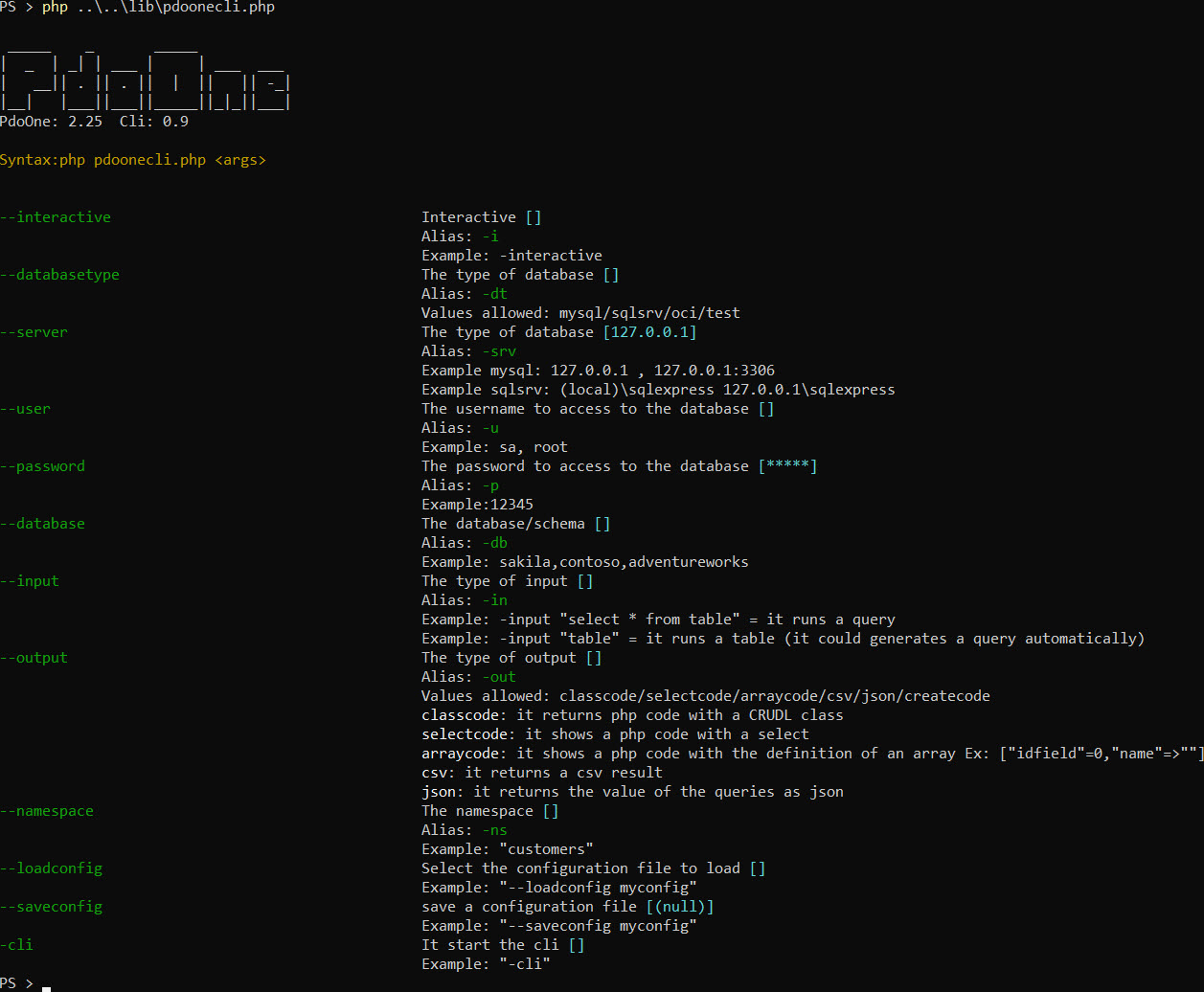
執行下一行(在LIB文件夾中)
php pdoonecli.php
(或指向正確的文件夾)
php/var/web/供應商/eftec/lib/pdoonecli
您可以使用標誌“ -i”以在交互式模式下輸入。
您可以使用Tab鍵自動完成值(如果有)。
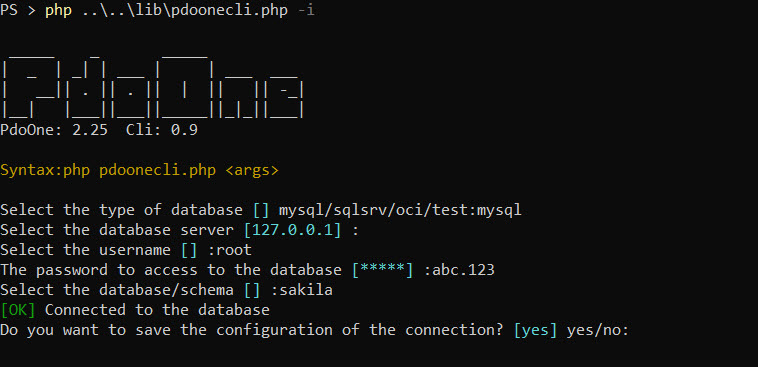
注意:您還可以保存和加載配置。
連接到MySQL並從表“ Actor”中生成CSV
 # # via arguments
php pdoonecli --databasetype mysql --server 127.0.0.1 -u root -p abc.123 --database sakila -in actor -out csv
# # via user input (interactive)
php pdoonecli -i -in actor -out csv
將配置保存在文件中
php pdoonecli --databasetype mysql --server 127.0.0.1 -u root -p abc.123 --database sakila --saveconfig myconfig從文件加載配置
php pdoonecli --loadconfig myconfig -in actor -out csv您可以使用標誌“ -cli”來生成存儲庫類
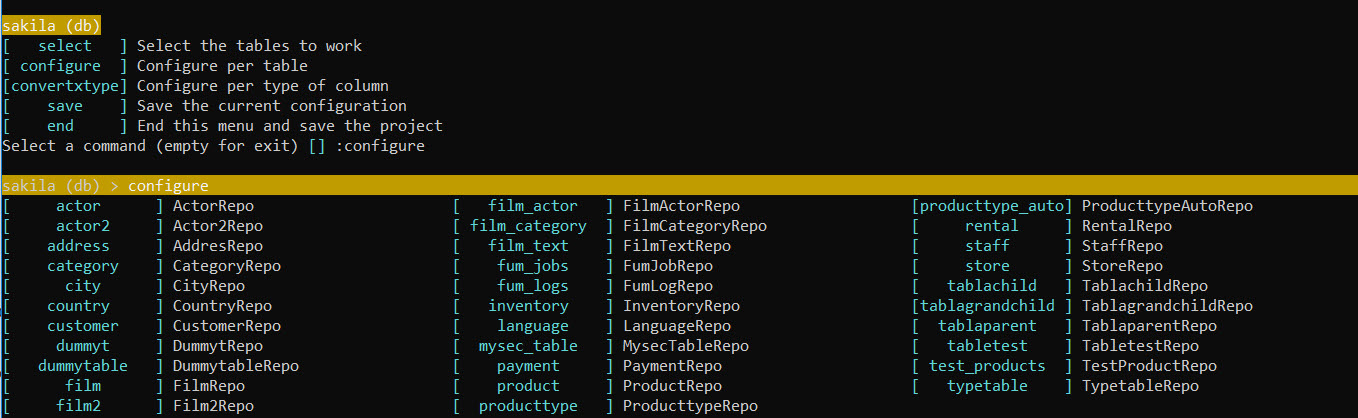
CLI是交互式的,它允許加載和保存配置。
該功能將生成現成的存儲庫類。
假設下一個例子
mysql:
php pdoone.php-數據庫mysql-服務器127.0.0.1:3306 - 用戶root -p abc.123 -db sakila -input sakila-輸入“ actor” - 輸出classcode
SQLSRV:
php pdoone.php-數據庫SQLSRV -Server PCJC SQLEXPRESS - 用戶SA -P ABC.123 -DB Sakila -Input“ Actor” - Output classcode
它將連接到數據庫MySQL,IP:127.0.0.1和數據庫Sakila,它將讀取“ Actor”表。
它將返回下一個結果
 /**
 * Generated by PdoOne Version 1.28
 * Class ActorRepo
 */
class ActorRepo
{
    const TABLE = ' Actor ' ;
    const PK = ' actor_id ' ;
    /** @var PdoOne */
    public static $ pdoOne = null ;

    /**
     * It creates a new table<br>
     * If the table exists then the operation is ignored (and it returns false)
     *
     * @param array $definition
     * @param null  $extra
     *
     * @return array|bool|PDOStatement
     * @throws Exception
     */
    public static function createTable ( $ definition , $ extra = null ) {
        if (! self :: getPdoOne ()-> tableExist ( self :: TABLE )) {
            return self :: getPdoOne ()-> createTable ( self :: TABLE , $ definition , self :: PK , $ extra );
        }
        return false ; // table already exist
    }
    // .....
}
此功能將生成一個新的存儲庫類,其中最常見的操作:插入,列表,更新,刪除,get,count,Count,Create Table,Drop Table和Druncate Table
為什麼我們需要生成課? (而不是繼承一個)這個crud類只是一個起點。開發人員可以修改代碼,添加新方法,修改上一個方法等。
對於使用該類,我們可以編寫下一個代碼:
 // 1) option 1, inject an instance of $pdo
ActorRepo:: setPdoOne ( $ pdoOne ); // it inject the current connect to the database

// 2) option 2.
// If the global variable $pdoOne exists, then it is injected. (unless it is defined by using setPdoOne()
$ pdoOne = new PdoOne ( " mysql " , " 127.0.0.1 " , " root " , " abc.123 " , " sakila " , "" );
$ pdoOne -> connect ();

// 3) option 3
// If the global function pdoOne() exists, then it is used for obtain the instance.
function pdoOne () {
    global $ pdo ;
    if ( $ pdo === null ) {
        $ pdo = new PdoOne ( ' mysql ' , ' 127.0.0.1 ' , ' root ' , ' abc.123 ' , ' sakila ' );
    }
    return $ pdo ;
}


$ actorActorRepo :: get ( 2 ); // it will read the actor with the pk=2 and it will return as an array.
$ actors = $ actorArray =ActorRepo:: select (); // it returns all the rows.
另外,您可以自動生成PHP文件,如下所示:
php pdoone.php -database mysql -Server 127.0.0.0.1:3306 -user root -pwd abc.123 -db sakila -input -input“ actor” actor“ -output classcode> actorrepo.phpo.phppo.phppo.phppo.phppo
注意:代碼缺乏PHP標籤,名稱空間和使用,但其他所有內容都在這裡。
它將進行查詢,並使用查詢格式返回PHP代碼。
例子:
php pdoone.php -database mysql -Server 127.0.0.0.1:3306 -user root -pwd abc.123 -db sakila -unput -input“ select * select * select * from actor” -output Selectcode
它將生成下一個代碼:
 /** @var array $result=array(["actor_id"=>0,"first_name"=>'',"last_name"=>'',"last_update"=>'']) */
 $ result = $ pdo
         -> select ( " * " )
         -> from ( " actor " )
-> toList ();它將在選定的查詢或表中生成一個關聯數組(默認值)。
php pdoone.php -database mysql -Server 127.0.0.0.1:3306 -user root -pwd abc.123 -db sakila -unput -input“ select * select * select * from actor” -output arraycode
它將返回:
// ["actor_id"=>0,"first_name"=>'',"last_name"=>'',"last_update"=>'']它將返回查詢結果作為JSON
php pdoone.php -database mysql -Server 127.0.0.0.1:3306 -user root -pwd abc.123 -db sakila -input -input“ select * select * select * from actor” -output json
它將返回:
[{ "actor_id" : " 1 " , "first_name" : " PENELOPE " , "last_name" : " GUINESS " , "last_update" : " 2006-02-15 01:34:33 " }
,{ "actor_id" : " 2 " , "first_name" : " NICK " , "last_name" : " WAHLBERG " , "last_update" : " 2006-02-15 01:34:33 " }
,{ "actor_id" : " 3 " , "first_name" : " ED " , "last_name" : " CHASE " , "last_update" : " 2006-02-15 01:34:33 " }
,{ "actor_id" : " 4 " , "first_name" : " JENNIFER " , "last_name" : " DAVIS " , " last_update " }]它將返回查詢結果作為JSON
php pdoone.php -database mysql -Server 127.0.0.0.1:3306 -user root -pwd abc.123 -db sakila -unput -input“ select * select * select * from actor” -output CSV
它將返回:
 actor_id,first_name,last_name,last_update
1,"PENELOPE","GUINESS","2006-02-15 01:34:33"
2,"NICK","WAHLBERG","2006-02-15 01:34:33"
3,"ED","CHASE","2006-02-15 01:34:33"
4,"JENNIFER","DAVIS","2006-02-15 01:34:33"
或者,與CLI相比,該庫具有接口視覺效果。它可以完成CLI的所有操作。
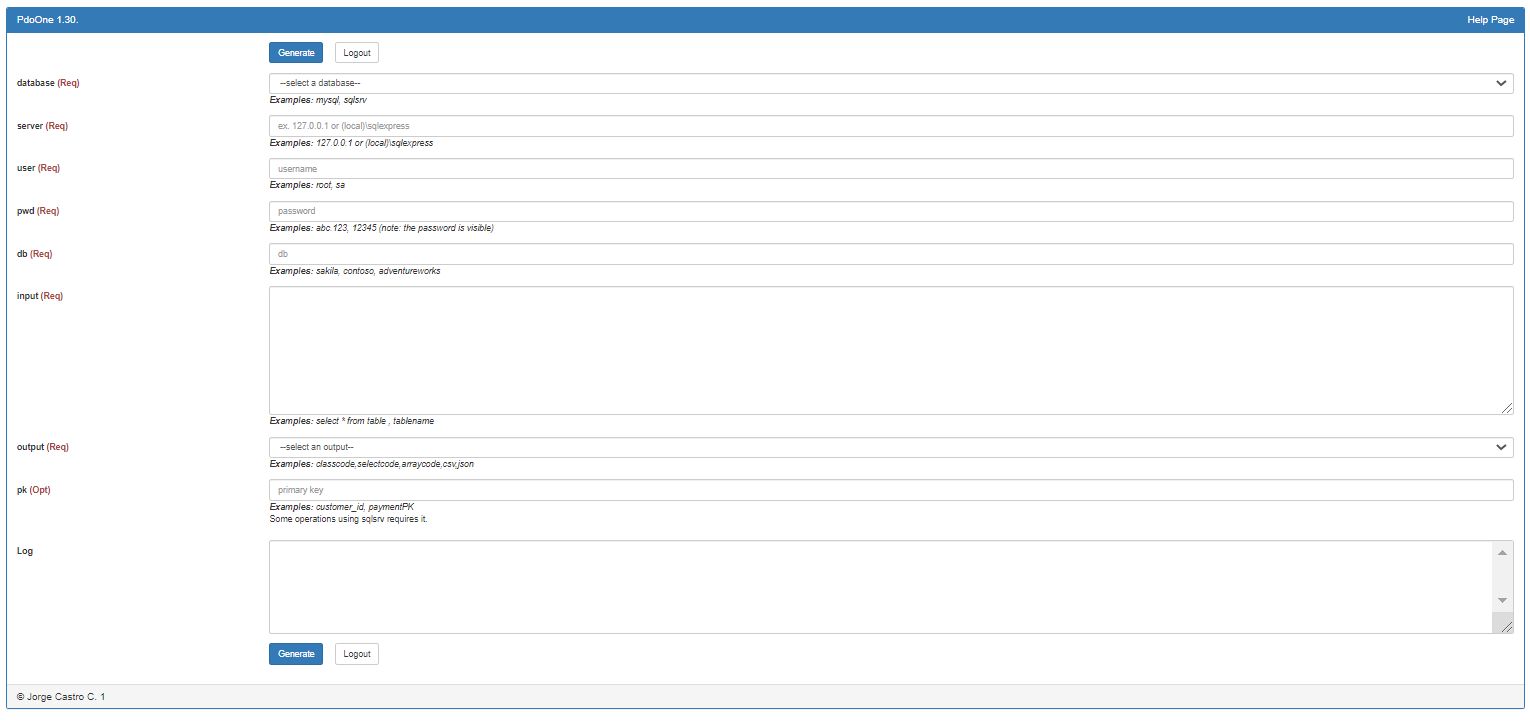
只需調用方法渲染()
 <?php

use eftec  PdoOne ;
use mapache_commons  Collection ;

include " ../vendor/autoload.php " ;

$ dao = new PdoOne ( " test " , " 127.0.0.1 " , " dummy " , " dummy " , " dummy " ); // we need any connection.
$ dao -> logLevel = 3 ;

$ dao -> render ();
文件夾示例/testui.php中有一個示例
下一個命令通常是單獨執行的(不是在方法鏈中)
| 方法 | 描述 | 例子 |
|---|---|---|
| cretetable() | 使用存儲庫中的定義創建表格和索引 | tablaparentrepo :: createTable(); |
| createforeignkeys() | 創建桌子的所有外鍵 | TablaparentRepo :: CreateForeignKeys(); |
| droptable() | 丟下桌子 | TablaparentRepo :: Droptable(); |
| 截短() | 截斷表 | tablaparentrepo :: truncate(); |
| 有效table() | 驗證桌子是否沒有更改 | $ ok = tablaparentrepo :: valiveTable(); |
TablaParentRepo:: createTable ();
TablaParentRepo:: createForeignKeys ();
TablaParentRepo:: dropTable ();
TablaParentRepo:: truncate ();
// We don't have a method to alter a table.
$ ok =TablaParentRepo:: validTable (); // it returns true if the table matches with the definition stored into the clas嵌套運算符是我們方法鏈之間應介紹的方法。
classRepo :: op():: where():: finalop()為✅
classrepo :: op():: op():: where()將使鏈條打開
例如:
 // select *
//        from table
//        inner join table2 on t1=t2
//        where col=:arg
//        and col2=:arg2
//    group by col
//        having col3=:arg3
//    order by col
//    limit 20,30
$ results = $ pdo -> select ( ' * ' )
    -> from ( ' table ' )
    -> innerjoin ( ' table2 on t1=t2 ' )
    -> where ( ' col=:arg and col2:=arg2 ' ,[ 20 , 30 ])
    // it also works with ->where('col=:arg',20)->where('col2'=>30)
    // it also works with ->where('col=?',20)->where('col2=?'=>30)
    -> group ( ' col ' )
    -> having ( ' col3=:arg3 ' , 400 )
    -> order ( ' col ' )
    -> limit ( ' 20,30 ' )
-> toList (); // end of the chain| 方法 | 描述 | 例子 |
|---|---|---|
| 在哪裡() | 它在鏈條上增加了一個 | tablaparentrepo :: where() |
| 命令() | 它向鏈條添加了訂單 | tablaparentrepo :: order() |
| 團體() | 它增加了一個鏈條 | tablaparentrepo :: group() |
| 限制() | 它限制了結果 | tablaparentrepo :: limit() |
| 頁() | 它類似於限制,但使用頁面 | tablaparentrepo :: page() |
| Innerjoin() | 它在查詢中添加了內心連接 | tablaparentrepo :: innerjoin() |
| 左邊() | 它在查詢中添加了一個左鍵 | tablaparentrepo :: left() |
| 正確的() | 它為查詢添加了正確的加入 | tablaparentrepo :: right() |
我們有不同的方法來在數據庫中生成DQL(QUERY)命令。
如果操作失敗,他們會返回一個錯誤,並且可能會觸發異常。
下一個方法應在鏈的末端。示例:
classRepo :: op():: op():: tolist()為✅
classrepo :: op():: tolist():: op()將觸發異常
| 命令 | 描述 | 例子 |
|---|---|---|
| tolist() | 返回一系列元素 | $ data = tablenamerepo :: tolist(); //從tablerepo中選擇 * $ data = tablenamerepo :: where('a1 =?',[$ value]):: tolist(); //從tablerepo中選擇 * a1 = $ value |
| 第一的() | 返回一個簡單的行 | $ data = tablenamerepo :: first($ pk); //從tablerepo中選擇 * pk = $ pk(它總是返回1或零值) $ data = tablenamerepo :: where('a1 =?',[$ value]):: first(); //它返回第一個值(或錯誤如果找不到的話) |
| 存在() | 如果存在主鍵,則返回true | $ data = tablenamerepo ::存在($ pk); //如果對象存在,則返回true。 |
| 數數() | 返回查詢中的行數 | $ data = tablenamerepo :: count($條件); $ data = tablenamerepo :: where('a1 =?',[$ value]):: count(); |
下一個方法允許在數據庫中插入,更新或刪除值。
| 方法 | 描述 | 例子 |
|---|---|---|
| 插入 | 它將值插入數據庫。它可以返回身份 | $ IDENTITY = TablaparentRepo :: insert($ obj); |
| 更新 | 它將值更新到數據庫中。 | tablaparentrepo ::更新($ obj); |
| 刪除 | 它從數據庫中刪除一個值。 | tablaparentrepo :: delete($ obj); |
| DeleteByid | 它從數據庫中刪除一個值(使用主鍵作為條件)。 | TablaparentRepo :: DeleteById($ pk); |
 // where obj is an associative array or an object, where the keys are the name of the columns (case sensitive)
$ identity =TablaParentRepo:: insert ( $ obj );
TablaParentRepo:: update ( $ obj );
TablaParentRepo:: delete ( $ obj );
TablaParentRepo:: deleteById (id);可以驗證模型。使用數據庫的信息,使用列的類型,長度,如果值允許null以及是否為識別(自動數字),則使用數據庫的信息進行驗證。
 $ obj =[ ' IdUser ' => 1 , ' Name ' ='John Doe'];
UserRepo:: validateModel ( $ obj , false ,[ ' _messages ' ]); // returns true if $obj is a valid User.遞歸陣列是一個可以讀取或獲得或比較的值的字符串陣列。例如,有條件地加入表。 Pdoone不直接使用它,而是_basepdoonerepo使用它(_basepdoonerepo是當我們自動生成存儲庫服務類時使用的類)。
例子
 $ this -> select ( ' * ' )-> from ( ' table ' )-> recursive ([ ' table1 ' , ' table1.table2 ' ]);
// some operations that involves recursive
if ( $ this -> hasRecursive ( ' table1 ' )) {
    $ this -> innerJoin ( ' table1 on table.c=table1.c ' );
}
if ( $ this -> hasRecursive ( ' table1.table2 ' )) {
    $ this -> innerJoin ( ' table1 on table1.c=table2.c ' );
}
$ r = $ this -> toList (); // recursive is resetted. 它設置了遞歸數組。
每次鏈方法結束時,都會重置此值。
它得到遞歸數組。
如果遞歸有一些針,它將返回真實。
如果$ this->遞歸為['*'],那麼它總是返回true。
 $ this -> select ( ' * ' )-> from ( ' table ' )-> recursive ([ ' * ' ]);
$ this -> hasRecursive ( ' anything ' ); // it always returns true. | 圖書館 | 插入 | findpk | 水合 | 和 | 時間 |
|---|---|---|---|---|---|
| PDO | 671 | 60 | 278 | 887 | 3,74 |
| pdoone | 774 | 63 | 292 | 903 | 4,73 |
| Lessql | 1413 | 133 | 539 | 825 | 5,984 |
| Yiim | 2260 | 127 | 446 | 1516年 | 8,415 |
| yiimwithcache | 1925年 | 122 | 421 | 1547年 | 7,854 |
| yii2m | 4344 | 208 | 632 | 1165 | 11,968 |
| YII2 -Marraydrate | 4114 | 213 | 531 | 1073 | 11,22 |
| YII2MScalarydrate | 4150 | 198 | 421 | 516 | 9,537 |
| Propel20 | 2507 | 123 | 1373 | 1960年 | 11,781 |
| Propel20WithCache | 1519年 | 68 | 1045 | 1454 | 8,228 |
| propel20formatondemand | 1501 | 72 | 994 | 1423 | 8,228 |
| 學分 | 2119 | 250 | 1592年 | 1258 | 18,139 |
| doctrinemwithcache | 2084 | 243 | 1634年 | 1155 | 17,952 |
| doptrinemarrayhydrate | 2137 | 240 | 1230 | 877 | 16,83 |
| 學分掃描劑 | 2084 | 392 | 1542 | 939 | 18,887 |
| doctrinemwithoutproxies | 2119 | 252 | 1432 | 1960年 | 19,822 |
| 雄辯 | 3691 | 228 | 708 | 1413 | 12,155 |
PDOONE在PDO上增加了一些Ovehead,但是它簡單地包裝了PDO。
這意味著您已更新PDOONE,並且正在使用ORM生成的一個類。該課程必須重新生成。
簡而言之:
每個主要版本都意味著它可能會破壞舊的代碼。 IE 1.0-> 2.0
每個次要版本都意味著它添加了一個新功能,即1.5-> 1.6(新方法)
每個十進製版本都意味著它可以修補/修復/重構以前的功能IE 1.5.0-> 1.5.1(fix)
4.10 2024-09-06
4.9.2 2024-08-20
4.9.1 2024-08-20
4.9 2024-08-02
4.8 2024-07-06
4.7.1 2024-06-07
4.7 2024-06-07
4.6.2 2024-03-02
4.6.1 2024-03-02
4.6 2024-03-02
4.4 2023-12-12
4.3.3 2023-09-05
4.3.2 2023-09-05
4.3.1 2023-09-02
4.3 2023-07-01
4.2 2023-04-07
4.1.2 2023-03-21
4.1.1 2023-03-21
4.1 2023-03-20
4.0.1 2023-03-11
4.00 2023-11-03
3.16 2023-12-02
3.15 2023-02-03
3.14 2023-01-30
3.13 2023-01-26
3.12.2 2022-09-03
3.12.1 2022-08-26
3.12 2022-08-14
3.11.1 2022-07-30
3.11 2022-07-30
3.10 2022-07-30
3.9 2022-07-23
3.8.1 2022-07-23
3.8 2022-07-22
3.7 2022-07-16
3.6 2022-07-07
3.5 2022-07-06
3.3 2022-06-27
3.2 2022-06-27
3.1.6 2022-06-24
3.1.5 2022-06-23
3.1.4 2022-06-21
3.1.3 2022-06-18
3.1.2 2022-06-18
3.1.1 2022-06-17
3.1 2022-06-11
3.0 2022-06-1
2.32 2022-03-20
2.31 2022-03-04
2.30 2022-02-28
2.29 2022-02-20
2.27 2022-02-19
2.26 2022-02-19
2.25 2022-02-01
2.24.1 2022-02-06
2.24 2022-02-06
2.23 2022-02-04
2.22.2 2022-02-01
2.22.1 2022-01-03
2.22 2022-01-30
2.21 2022-01-28
However, it is far from perfect.
2.20 2022-01-04
2.19
2.18
2.16
2.15 2021-07-24
2.14.3 2021-06-15
2.14.2 2021-06-13
2.14.1 2021-06-09
2.14 2021-06-04
_basepdoonerepo現在與類Pdoonequery更加緊密地工作,因此每個查詢都是一個不同的實例。
[fix]當值不是日期時, pdoone dateconvertInput()不會崩潰。
[fix] pdoone throwerror()不會堆疊錯誤,但仍會觸發最後一個錯誤(如果有)。
[更改] ❗PDOONE聚合函數(sum,min,max,avg)現在返回一個值,而不是生成查詢。
$ result = $ pdo-> sum('xxx') - > firstScalar(); // $ result = $ pdo-> sum('xxx'); // 現在
[fix]用於生成類的PDOONE GENTATECODEARRAY()設置時返回正確的名稱。
[更改] _basepdoonerepo :reset(),getQuery(),droptable(),usecache(),limit(),newquery(),order(),innitjoin(),ninesjoin(),左(),左(),右()
[更改] Pdoonequery :倍數更改。
2.13.1 2021-05-22
2.13 2021-04-17
2.12 2021-04-17
2.11.1 2021-04-17
2.11 2021-04-17
2.10.3 2021-04-14
2.10.2 2021-04-06
2.10.1 2021-04-05
2.10 2021-04-04
2.9.4 2021-03-22
2.9.3 2021-02-22
2.9.2 2021-02-18
2.9.1 2021-02-16
2.9 2021-02-16
2.8 2021-02-13
2.7.1 2021-01-21
2.7 2021-01-10
2.6.3 2020-10-16
2.6.2 2020-10-09
2.6.1 2020-09-24
2.6 2020-09-17
2.5 2020-09-13
2.4.1 2020-09-13
2.4 2020-09-06
2.3 2020-09-06
2.2.6 2020-09-03
2.2.5 2020-08-30
2.2.3 2020-08-23
2.2.2 2020-08-17
2.2.1 2020-08-16
2.2 2020-08-14
 $ this -> setUseInternalCache ( true );
$ rows = $ this -> select ( ' * ' )-> from ( ' table ' )-> where ([ ' i ' => 1 ])-> toList (); // read from the database
// ...
$ rows2 = $ this -> select ( ' * ' )-> from ( ' table ' )-> where ([ ' i ' => 1 ])-> toList (); // read from memory
// ...
$ rows3 = $ this -> select ( ' * ' )-> from ( ' table ' )-> where ([ ' i ' => 2 ])-> toList (); // read from the database because the query is in
                                                                     // memory but the parameters are different

echo $ this -> internalCacheCounter ;
使用Runrawquery(如果返回數組),Tolist(),Meta()和First()測試內部緩存
2.0.1 2020-08-12
2.0 2020-08-11
1.55.1 2020-08-05
1.55 2020-8-05
1.54 2020-8-02
1.53 2020-7-27
1.52 2020-7-19
1.51 2020-7-18
1.50 2020-7-04
1.49 2020-6-19
1.48 2020-6-15
1.47 2020-6-14
1.46 2020-6-13
1.45.1 2020-6-11
1.45 2020-6-7
1.44.2 2020-6-3
1.44.1 2020-6-2
1.44 2020-5-31
1.43 2020-5-31
1.42 2020-5-29
1.41.2 2020-5-29
1.41.1 2020-5-28
1.41 2020-5-28
1.40.1 2020-5-27
1.40 2020-05-21
1.39 2020-05-12
1.38 2020-05-10
1.37 2020-05-03
1.36 2020-05-03
1.35.1 2020-04-30
1.35 2020-04-28
1.34.2 2020-04-27
1.34.1 2020-04-27
1.34 2020-04-27
1.33 2020-04-15
1.32.1 Basepdoonerepo添加了2.0版
1.32 2020-04-12
1.31.1 2020-04-11
1.31 2020-04-11
1.30 2020-04-10
1.29 2020-04-10
1.28.1 2020-04-06
1.28 2020-04-06
1.24 2020-03-26
1.23.1 2020-03-10
1.23 2020-03-10
1.22 2020-02-08
1.21 2020-02-07
1.20 2020-JAN-25
1.19 2020-17
1.16 2020-14-14
1.15 2019-DEC-29
1.14 2019-DEC-26
1.13 2019-DEC-26
1.12 2019 -OCT -20添加參數(可選) - > tolist($ pdomodel)添加方法 - > tolistsimple()
1.11 2019-OCT-01 1.11它仍然與PHP 5.6.兼容為Composer.json
1.10 2019-OCT-01 1.10添加了方法DateConvert()。在投擲中添加了痕跡。
1.9 2019-AUG-10 1.8重新發布
1.8 2019-Aug-10添加了日期格式。方法datesql2text()和dateText2sql()
1.7 2019-Jun-23添加了一些基準。它還解決了標籤的問題。現在:table.field =?轉換為table 。 field =?
1.6 2019-Jun-22 Adgeted_rows()返回正確的值。
1.5 2019年5月31日清理。列(列)返回該列是否可用。
1.4 2019-May-30 InsertObject()
1.3 2019年5月23日的新更改
1.2 2019年 - 5月22日新固定。
1.1 2019年 - 5月21日維護
1.0 2019-May-21第一版








