PdoOne
4.10

Pdoone. Es un envoltorio simple para la biblioteca PDO de PHP compatible con SQL Server (2008 R2 o superior), MySQL (5.7 o superior) y Oracle (12.1 o superior).
Esta biblioteca intenta funcionar lo más rápido posible . La mayoría de las operaciones son administraciones simples de cadena/matriz y funcionan en el metal desnudo de la biblioteca PDO, pero también permite crear un ORM utilizando la extensión EFTEC/PDOOneorm.
Convertir esto
 $ stmt = $ pdo -> prepare ( " SELECT * FROM myTable WHERE name = ? " );
$ stmt -> bindParam ( 1 , $ _POST [ ' name ' ], PDO :: PARAM_STR );
$ stmt -> execute ();
$ result = $ stmt -> get_result ();
$ products =[];
while ( $ row = $ result -> fetch_assoc ()) {
  $ product []= $ row ;
}
$ stmt -> close ();
en esto
 $ products = $ pdoOne
    -> select ( " * " )
    -> from ( " myTable " )
    -> where ( " name = ? " ,[ $ _POST [ ' name ' ]])
    -> toList ();
o usando la biblioteca ORM (usando EFTEC/PDOONEorm)
ProductRepo // this class was generated with echo $pdoOne()->generateCodeClass(['Product']); or using the cli.
    :: where ( " name = ? " ,[ $ _POST [ ' name ' ]])
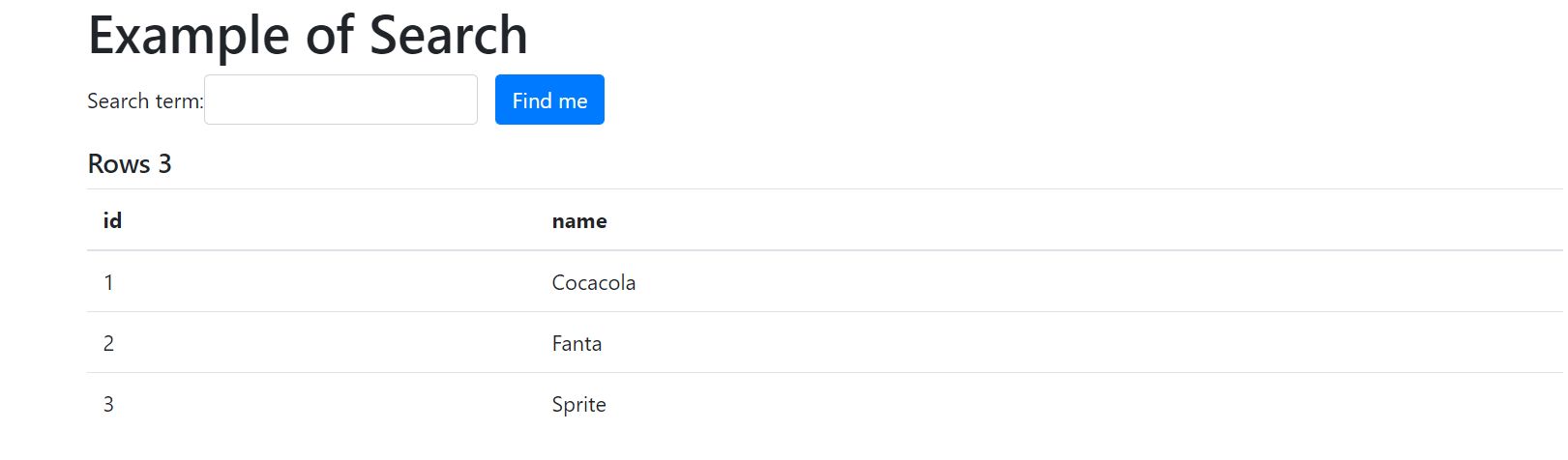
:: toList ();| ExampleticketPhp | Ejemplo de cupcakes | Búsqueda de ejemplo | Ejemplo de método diferente |
|---|---|---|---|
 |  |  |
Más ejemplos:
Ejemplo MySQL PHP y PDO usando PDOONE
Esta biblioteca requiere PHP 7.1 y más, y requiere la extensión PDO y la extensión PDO-MYSQL (MySQL), PDO-SQLSRV (SQL Server) o PDO-OCI (Oracle)
Edite composer.json el siguiente requisito, luego actualice el compositor.
  {
      "require" : {
        "eftec/PdoOne" : " ^4.0.1 "
      }
  }
o instálelo a través de CLI usando
El compositor requiere eftec/pdoone
Simplemente descargue la carpeta lib desde la biblioteca y coloque su proyecto de carpeta. Luego debe incluir todos los archivos incluidos en él.
Cree una instancia de la clase PDOONE de la siguiente manera. Luego, puede abrir la conexión utilizando el método Connect () o abrir ()
 use eftec  PdoOne ;
// mysql
$ dao = new PdoOne ( " mysql " , " 127.0.0.1 " , " root " , " abc.123 " , " sakila " , "" );
$ conn -> logLevel = 3 ; // it is for debug purpose and it works to find problems.
$ dao -> connect ();

// sql server 10.0.0.1instance or (local)instance or machinenameinstance or machine (default instance)
$ dao = new PdoOne ( " sqlsrv " , " (local)sqlexpress " , " sa " , " abc.123 " , " sakila " , "" );
$ conn -> logLevel = 3 ; // it is for debug purpose and it works to find problems.
$ dao -> connect ();

// test (mockup)
$ dao = new PdoOne ( " test " , " anyy " , " any " , " any " , " any " , "" );
$ dao -> connect ();

// oci (oracle) ez-connect. Remember that you must have installed Oracle Instant client and added to the path.

$ cs = ' (DESCRIPTION =(ADDRESS = (PROTOCOL = TCP)(HOST = localhost)(PORT = 1521))(CONNECT_DATA =(SERVER = DEDICATED)(SERVICE_NAME = instancia1))) ' ;
$ dao = new PdoOne ( " oci " , $ cs , " sa " , " abc.123 " ); // oracle uses the user as the schema
$ conn -> logLevel = 3 ; // it is for debug purpose and it works to find problems.
$ dao -> connect ();

// oci (oracle) tsnnames (the environment variables TNS_ADMIN and PATH must be correctly configured), also tnsnames.ora must exists.
$ cs = ' instancia1 ' ;
$ dao = new PdoOne ( " oci " , $ cs , " sa " , " abc.123 " ); // oracle uses the user as the schema
$ conn -> logLevel = 3 ; // it is for debug purpose and it works to find problems.
$ dao -> connect ();
dónde
$ dao = nuevo pdoone ("mysql", "127.0.0.1", "root", "abc.123", "sakila", "");
Oracle es difícil de instalar. En Windows, desde la carpeta Bin de Oracle Home, debe copiar todo el DLL a la carpeta PHP y la carpeta Apache.
Con el método runrawQuery () , podríamos ejecutar un comando directamente a PDO con o sin parámetros. Y podría devolver una PDostatement o una matriz . Es útil cuando queremos velocidad.
RunrawQuery ($ rawsql, $ param, $ returnArray, $ fetchmode, $ fetchargument)
cadena $ rawsql La consulta para ejecutar la matriz | nulo $ param [type1, value1, type2, value2] o [name1 => value, name2 = value2] bool $ returnArray if verdadero (predeterminado) luego devuelve una matriz. Si falsa, entonces devuelve un PDostatement int $ FetchMode indica el modo para obtener. Ejemplo: PDO :: fetch_assoc null $ fetchargument El argumento del FetchMode.
 $ sql = ' select * from table where id=1 ' ;
$ pdoStatement = $ pdoOne -> runRawQuery ( $ sql ,[], false );  // [] are the parameters
Pero podríamos cambiarlo para devolver una matriz
 $ sql = ' select * from table where id=1 ' ;
$ values = $ pdoOne -> runRawQuery ( $ sql );  // [] are the parameters
También podríamos pasar parámetros.
 $ values = $ con -> runRawQuery ( ' select * from table where id=? ' ,[ 20 ]); // with parameter
$ values = $ con -> runRawQuery ( ' select * from table where id=:name ' ,[ ' name ' => 20 ]); // with named parameter
$ values = $ con -> runRawQuery ( ' select * from table ' ,[]); // without parameter.
Nota, esta biblioteca utiliza declaraciones preparadas, por lo que está libre de inyección SQL (si usa parámetros)
 $ name = " O'hara " ;
$ values = $ con -> runRawQuery ( " select * from table where name=:name " ,[ ' name ' => $ name ]); // it works.✅
$ values = $ con -> runRawQuery ( " select * from table where name=? " ,[ $ name ]); // it works ok.✅
$ values = $ con -> runRawQuery ( " select * from table where name=' $ name ' " ); // it will crash.Con el método RunQuery () podríamos ejecutar una declaración preparada en PDO. Es útil cuando queremos transmitirle argumentos. RunQuery () requiere un PDO preparado .
No se recomienda este método a menos que ya esté trabajando con declaraciones PDO, y no desea adaptar todo su código.
 $ sql = " insert into `product`(name) values(?) " ;
$ stmt = $ pdoOne -> prepare ( $ sql );
$ productName = " Cocacola " ;
$ stmt -> bind_param ( " s " , $ productName ); // s stand for a string. Also i =integer, d = double and b=blob
$ rows = $ pdoOne -> runQuery ( $ stmt );
$ allRows = $ rows -> fetch_all ( PDO :: FETCH_ASSOC );Puede usar el creador de consultas para construir su comando. Puede consultar el capítulo sobre Consultor Builder (DQL) para obtener más información.
 // query builder
$ pdoOne -> set ([ ' name ' => ' cocacola ' ])
    -> from ( ' product ' )
-> insert ();La biblioteca Eftec pdooneorm permite crear un [orm] (#orm) de sus tablas. Si se genera un ORM, puede usar el siguiente código
ProductRepo:: toList ([ ' category ' => ' drink ' ]);Donde Productrepo es una clase de servicio generada mediante el uso del ORM.
Por defecto, Pdoone ejecuta las consultas en el modo PDO :: fetch_assoc puede cambiar ejecutando las consultas como:
 $ pdo -> setFechMode ( PDO :: FETCH_CLASS , ' stdClass ' )-> runRawQuery ( $ query );
// or you can run as
$ pdo -> runRawQuery ( $ query , null , true , false , null , PDO :: FETCH_CLASS , ' stdClass ' )PDOONE permite 5 tipos de fechas.
Formato SQL Es el formato de cómo se almacena la fecha en la base de datos. Depende del tipo de base de datos. Por ejemplo, MySQL podría usar el formato YMD.
Formato humano Es el formato cómo el usuario final se ve nuestra fecha.
Formato de fecha ISO . Es el formato cómo el valor podría transportarse y serializarse.
Marca de tiempo : cuenta el número de segundos después del 1-1-1970
Clase / Clase PHP : es un objeto DateTime .
Hay 3 métodos para ejecutar una transacción:
| Método | Descripción |
|---|---|
| startTransaction () | Comienza una transacción. Dependiendo de la base de datos de tipo, podría apilarse o no. |
| comprometerse() | Cometer (y cierra) una transacción |
| Rollback () | Reversión (y cierra) una transacción |
Ejemplo:
 try {
    $ sql = " insert into `product`(name) values(?) " ;
    $ pdoOne -> startTransaction ();
    $ result = $ pdoOne -> runRawQuery ( $ sql ,[ ' Fanta ' => $ productName ], false );
    $ pdoOne -> commit (); // transaction ok
} catch ( Exception $ e ) {
    $ pdoOne -> rollback ( false ); // error, transaction cancelled, the false means that it doesn't throw an exception if we want rollback.
}Devuelve verdadero si la tabla existe (base de datos actual/esquema)
Devuelve las estadísticas (como una matriz) de una columna de una tabla.
$ stats = $ pdoOne -> statValue ( ' actor ' , ' actor_id ' );| mínimo | máximo | aviso | suma | contar |
|---|---|---|---|---|
| 1 | 205 | 103.0000 | 21115 | 205 |
Devuelve todas las columnas de una tabla
$ result = $ pdoOne -> columnTable ( ' actor ' );| nombre | coltype | colonizar | Colpress | colonca | ISKEY | Isidentidad |
|---|---|---|---|---|---|---|
| actor_id | pequeño | 5 | 0 | 1 | 1 | |
| nombre de pila | varar | 45 | 0 | 0 | ||
| apellido | varar | 45 | 0 | 0 | ||
| last_update | marca de tiempo | 0 | 0 |
Devuelve todas las claves extranjeras de una tabla (tabla fuente)
Crea una tabla utilizando una definición y una clave primaria.
Nota: Puede generar un código para crear una tabla utilizando una tabla existente ejecutando CLI (ClassCode de salida)
PHP PDOONE.PHP -DATABASE MYSQL -SERVER 127.0.0.1 -User Root -pwd ABC.123 -DB Sakila -Input Film -Output ClassCode
Ejemplo: (mysql)
 $ pdo -> createTable ( ' film ' ,
    [
        " film_id " => " smallint unsigned not null auto_increment " ,
        " title " => " varchar(255) not null " ,
        " description " => " text " ,
        " release_year " => " year " ,
        " language_id " => " tinyint unsigned not null " ,
        " original_language_id " => " tinyint unsigned " ,
        " rental_duration " => " tinyint unsigned not null default '3' " ,
        " rental_rate " => " decimal(4,2) not null default '4.99' " ,
        " length " => " smallint unsigned " ,
        " replacement_cost " => " decimal(5,2) not null default '19.99' " ,
        " rating " => " enum('G','PG','PG-13','R','NC-17') default 'G' " ,
        " special_features " => " set('Trailers','Commentaries','Deleted Scenes','Behind the Scenes') " ,
        " last_update " => " timestamp not null default CURRENT_TIMESTAMP on update CURRENT_TIMESTAMP "
    ],[
        " film_id " => " PRIMARY KEY " ,
        " title " => " KEY " ,
        " language_id " => " FOREIGN KEY REFERENCES`language`(`language_id`) ON UPDATE CASCADE " ,
        " original_language_id " => " FOREIGN KEY REFERENCES`language`(`language_id`) ON UPDATE CASCADE "
    ]);
$ pdo -> createTable ( ' film ' ,
[
" film_id " => " smallint unsigned not null auto_increment " ,
" title " => " varchar(255) not null " ,
" description " => " text " ,
" release_year " => " year " ,
" language_id " => " tinyint unsigned not null " ,
" original_language_id " => " tinyint unsigned " ,
" rental_duration " => " tinyint unsigned not null default '3' " ,
" rental_rate " => " decimal(4,2) not null default '4.99' " ,
" length " => " smallint unsigned " ,
" replacement_cost " => " decimal(5,2) not null default '19.99' " ,
" rating " => " enum('G','PG','PG-13','R','NC-17') default 'G' " ,
" special_features " => " set('Trailers','Commentaries','Deleted Scenes','Behind the Scenes') " ,
" last_update " => " timestamp not null default CURRENT_TIMESTAMP on update CURRENT_TIMESTAMP "
], ' film_id ' ); Ejemplo (SQLSRV)
 $ pdo -> createTable ( ' film ' ,
   [
       " film_id " => " int NOT NULL IDENTITY(1,1) " ,
       " title " => " varchar(255) NOT NULL " ,
       " description " => " text(2147483647) DEFAULT (NULL) " ,
       " release_year " => " varchar(4) " ,
       " language_id " => " tinyint NOT NULL " ,
       " original_language_id " => " tinyint DEFAULT (NULL) " ,
       " rental_duration " => " tinyint NOT NULL DEFAULT ((3)) " ,
       " rental_rate " => " decimal(4,2) NOT NULL DEFAULT ((4.99)) " ,
       " length " => " smallint DEFAULT (NULL) " ,
       " replacement_cost " => " decimal(5,2) NOT NULL DEFAULT ((19.99)) " ,
       " rating " => " varchar(10) DEFAULT ('G') " ,
       " special_features " => " varchar(255) DEFAULT (NULL) " ,
       " last_update " => " datetime NOT NULL DEFAULT (getdate()) "
   ],[
       " language_id " => " FOREIGN KEY REFERENCES language(language_id) " ,
       " original_language_id " => " FOREIGN KEY REFERENCES language(language_id) " ,
       " film_id " => " PRIMARY KEY "
]);Devuelve una lista de tablas ordenadas por dependencia (de ningún dependiente a más dependiente)
Nota : Esta operación no es infalible porque las tablas podrían tener referencias circulares.
 $ dao = new PdoOne ( ' sqlsrv ' , " (local)sqlexpress " , " sa " , " abc.123 " , " sakila " );
$ dao -> open ();
echo " <pre> " ;
var_dump ( $ dao -> tableSorted ( 3 , false , true )); // it returns the tables sortered
var_dump ( $ dao -> tableSorted ( 3 , true , true )); // it returns all the tables that can't be sortered
echo " </pre> " ;Valida una tabla si la tabla coincide con la definición asignada por los valores.
 $def=[
       "film_id" => "int NOT NULL IDENTITY(1,1)",
       "title" => "varchar(255) NOT NULL",
       "description" => "text(2147483647) DEFAULT (NULL)",
       "release_year" => "varchar(4)",
       "language_id" => "tinyint NOT NULL",
       "original_language_id" => "tinyint DEFAULT (NULL)",
       "rental_duration" => "tinyint NOT NULL DEFAULT ((3))",
       "rental_rate" => "decimal(4,2) NOT NULL DEFAULT ((4.99))",
       "length" => "smallint DEFAULT (NULL)",
       "replacement_cost" => "decimal(5,2) NOT NULL DEFAULT ((19.99))",
       "rating" => "varchar(10) DEFAULT ('G')",
       "special_features" => "varchar(255) DEFAULT (NULL)",
       "last_update" => "datetime NOT NULL DEFAULT (getdate())"
   ];
$keys=[
       "language_id" => "FOREIGN KEY REFERENCES language(language_id)",
       "original_language_id" => "FOREIGN KEY REFERENCES language(language_id)",
       "film_id" => "PRIMARY KEY"
   ];

var_dump(PdoOne::validateDefTable(self::getPdoOne(),self::TABLE,$def,$keys));
Devuelve todas las claves extranjeras de una mesa.
$ result = $ pdoOne -> foreignKeyTable ( ' actor ' );| colocal | tablerem | colrem |
|---|---|---|
| cliente_id | cliente | cliente_id |
| alquiler_id | alquiler | alquiler_id |
| personal_id | personal | personal_id |
También puede construir una consulta de procedimiento.
Ejemplo:
 $ results = $ pdoOne -> select ( " * " )-> from ( " producttype " )
    -> where ( ' name=? ' , [ ' Cocacola ' ])
    -> where ( ' idproducttype=? ' , [ 1 ])
-> toList (); Indica las columnas para regresar. El argumento es un comando SQL, por lo que permite cualquier operación que la base de datos admite, incluidas funciones, constantes, operadores, alias y demás.
$ results = $ pdoOne -> select ( " col1,col2 " ); //...Genera la consulta: Seleccione Col1, Col2 ....
$ results = $ pdoOne -> select ( " select * from table " ); //->...Genera la consulta: seleccione * de la tabla ....
Genera una consulta que devuelve un recuento de valores. Es una macro del método select ()
 $ result = $ pdoOne -> count ( ' from table where condition=1 ' ); // select count(*) from table where c..
$ result = $ pdoOne -> count ()-> from ( ' table ' )-> where ( ' condition=? ' ,[ 1 ]); // select count(*) from table where c..
$ result = $ pdoOne -> count ( ' from table ' , ' col1 ' ); // select count(col1) from table
$ result = $ pdoOne -> count ()-> from ( ' table ' ); // select count(*) from tableGenera una consulta que devuelve el valor mínimo de una columna. Si $ arg está vacío, entonces usa $ sql para el nombre de la columna, es una macro del método select ()
 $ result = $ pdoOne -> min ( ' from table where condition=1 ' , ' col ' ); // select min(col) from table where c..
$ result = $ pdoOne -> min ( ' from table ' , ' col1 ' ); // select min(col1) from table
$ result = $ pdoOne -> min ( '' , ' col1 ' )-> from ( ' table ' ); // select min(col1) from table
$ result = $ pdoOne -> min ( ' col1 ' )-> from ( ' table ' ); // select min(col1) from tableGenera una consulta que devuelve el valor máximo de una columna. Si $ arg está vacío, entonces usa $ sql para el nombre de la columna, es una macro del método select ()
 $ result = $ pdoOne -> max ( ' from table where condition=1 ' , ' col ' ); // select max(col) from table where c..
$ result = $ pdoOne -> max ( ' from table ' , ' col1 ' ); // select max(col1) from tableGenera una consulta que devuelve el valor de suma de una columna. Si $ arg está vacío, entonces usa $ sql para el nombre de la columna, es una macro del método select ()
 $ result = $ pdoOne -> sum ( ' from table where condition=1 ' , ' col ' ); // select sum(col) from table where c..
$ result = $ pdoOne -> sum ( ' from table ' , ' col1 ' ); // select sum(col1) from tableGenera una consulta que devuelve el valor promedio de una columna. Si $ arg está vacío, entonces usa $ sql para el nombre de la columna, es una macro del método select ()
 $ result = $ pdoOne -> avg ( ' from table where condition=1 ' , ' col ' ); // select avg(col) from table where c..
$ result = $ pdoOne -> avg ( ' from table ' , ' col1 ' ); // select avg(col1) from tableGenera un comando seleccionar.
$ results = $ pdoOne -> select ( " col1,col2 " )-> distinct (); //...Genera la consulta: seleccione distintivo Col1, Col2 ....
Nota: -> distinto ('único') devuelve seleccionar único ..
Genera un comando "desde" SQL.
$ results = $ pdoOne -> select ( " * " )-> from ( ' table ' ); //...Genera la consulta: seleccione * de la tabla
$ Tablas podrían ser una sola mesa o una construcción SQL. Para Examp, el siguiente comando es válido:
$ results = $ pdoOne -> select ( " * " )-> from ( ' table t1 inner join t2 on t1.c1=t2.c2 ' ); //...Genera un comando donde el comando.
 $ results = $ pdoOne -> select ( " * " )
-> from ( ' table ' )
-> where ( ' p1=1 ' ); //...
El dónde podría expresarse de diferentes maneras.
Es posible escribir el lugar sin parámetros de la siguiente manera:
$ results = $ pdoOne -> select ( " * " )-> from ( ' table ' )-> where ( " p1=1 and p2>2.5 or p3 like '%aa%' " ); $ aa = ' aa ' ;
$ results = $ pdoOne -> select ( " * " )-> from ( ' table ' )-> where ( " p1=? and p2>? or p3 like ? " ,[ 1
, 2.5
, " % $ aa % " ]);También funciona
 // (if there is only a single argument without a type)
$ results = $ pdoOne -> select ( " * " )-> from ( ' table ' )-> where ( " p1=? " ,[ 1 ]);  // = where("p1=?",[1]);
// (if we don't define to where to put the value)
$ results = $ pdoOne -> select ( " * " )-> from ( ' table ' )-> where ( " p1 " ,[ 1 ]); // = where("p1=?",[1]); Es una definición abreviada de una consulta utilizando una matriz asociativa, donde la clave es el nombre de la columna y el valor es el valor para comparar
Solo funciona con la igualdad (=) y el operador lógico 'y' (el tipo se define automáticamente)
 // select * from table where p1='1' and p2='2.5' and p3='aa'
$ results = $ pdoOne -> select ( " * " )-> from ( ' table ' )-> where ([ ' p1 ' => 1
                                                       , ' p2 ' => 2.5
                                                       , ' p3 ' => ' aa ' ]);
Además, es posible especificar el tipo de parámetro.
 // select * from table where p1=1 and p2='2.5' and p3='aa'
$ results = $ pdoOne -> select ( " * " )-> from ( ' table ' )-> where ([ ' p1 ' =>[ 1 ]
                                                       , ' p2 ' =>[ 2.5 ]
, ' p3 ' =>[ ' aa ' ]]); También puede usar una matriz asociativa como argumento y parámetros nombrados en la consulta
 $ results = $ pdoOne -> select ( " * " )-> from ( " table " )
    -> where ( ' condition=:p1 and condition2=:p2 ' ,[ ' p1 ' => ' Coca-Cola ' , ' p2 ' => 1 ])
    -> toList ();
Genera la consulta: seleccione * de la tabla donde condición =? (Coca-Cola) y condición2 =? (1)
Genera la consulta: seleccione * de la tabla donde p1 = 1
Nota: ArrayParameters es una matriz de la siguiente manera: Tipo, valor.
Donde el tipo es i = entero, d = doble, s = cadena o b = blob. En caso de duda, use "S" (ver tabla a continuación)
Ejemplo de ArrayParameters:
[1, 'hola', 20.3, 'mundo']
 $ results = $ pdoOne -> select ( " * " )
-> from ( ' table ' )
-> where ( ' p1=? ' ,[ 1 ]); //...
Genera la consulta: seleccione * de la tabla donde p1 =? (1)
 $ results = $ pdoOne -> select ( " * " )
-> from ( ' table ' )
-> where ( ' p1=? and p2=? ' ,[ 1 , ' hello ' ]); //...
Genera la consulta: seleccione * de la tabla donde p1 =? (1) y p2 =? ('Hola')
Nota. donde podría ser anidado.
 $ results = $ pdoOne -> select ( " * " )
-> from ( ' table ' )
-> where ( ' p1=? ' ,[ 1 ])
-> where ( ' p2=? ' ,[ ' hello ' ]); //...
Genera la consulta: seleccione * de la tabla donde p1 =? (1) y p2 =? ('Hola')
También podrías usar:
 $ results = $ pdoOne -> select ( " * " )-> from ( " table " )
    -> where ([ ' p1 ' => ' Coca-Cola ' , ' p2 ' => 1 ])
    -> toList ();
Genera la consulta: Seleccione * de la tabla donde P1 =? (Coca-Cola) y P2 =? (1)
Genera un comando de orden.
 $ results = $ pdoOne -> select ( " * " )
-> from ( ' table ' )
-> order ( ' p1 desc ' ); //...
Genera la consulta: seleccione * del orden de la tabla por P1 Desc
Genera un comando de grupo.
 $ results = $ pdoOne -> select ( " * " )
-> from ( ' table ' )
-> group ( ' p1 ' ); //...
Genera la consulta: seleccione * del grupo de tabla por P1
Genera un comando tener.
Nota: Utiliza los mismos parámetros que donde ()
 $ results = $ pdoOne -> select ( " * " )
-> from ( ' table ' )
-> group ( ' p1 ' )
-> having ( ' p1>? ' , array ( 1 )); //...
Genera la consulta: seleccione * del grupo de tabla por P1 que tiene P1>? (1)
Nota: Tener una anidada teniendo ()-> tener ()
Nota: Tener sin parámetros tiene ('col> 10')
Ejecute la consulta generar.
Nota Si ReturnArray es verdadero, entonces devuelve una matriz asociativa. Si ReturnArray es falso, entonces devuelve un mysqli_result
NOTA: Restablece los parámetros actuales (como la selección actual, desde donde, etc.)
Es una macro de rungen () . Devuelve una matriz asociativa o falso si la operación falla.
 $ results = $ pdoOne -> select ( " * " )
-> from ( ' table ' )
-> toList (); Devuelve un PDostatement de la consulta actual
Nota: Si desea recorrer la declaración, puede usar fetchloop ()
Ejemplo :
 $ stmt = $ pdoOne -> select ( " * " )
  -> from ( ' table ' )
  -> toPdoStatement ();
while ( $ row = $ stmt -> fetch ()) {
  // do something
} Obtiene una consulta para cada fila.
Este método podría usarse cuando no queremos leer toda la información a la vez, para que pueda leer y procesar cada línea por separado.
Ejemplo :
 $ this -> select ( ' select id,name from table ' )
-> fetchLoop ( static function ( $ row ) { return ( $ row );}, PDO :: FETCH_ASSOC )Devuelve un metacodo (definiciones) de cada columna de una consulta.
 $ results = $ pdoOne -> select ( " * " )
-> from ( ' table ' )
-> toMeta ();
o
$ results = $ pdoOne -> toMeta ( ' select * from table ' ); resultado:
 array(3) {
  [0]=>
  array(7) {
    ["native_type"]=>
    string(4) "LONG"
    ["pdo_type"]=>
    int(2)
    ["flags"]=>
    array(2) {
      [0]=>
      string(8) "not_null"
      [1]=>
      string(11) "primary_key"
    }
    ["table"]=>
    string(11) "producttype"
    ["name"]=>
    string(13) "idproducttype"
    ["len"]=>
    int(11)
    ["precision"]=>
    int(0)
  }
  [1]=>
  array(7) {
    ["native_type"]=>
    string(10) "VAR_STRING"
    ["pdo_type"]=>
    int(2)
    ["flags"]=>
    array(0) {
    }
    ["table"]=>
    string(11) "producttype"
    ["name"]=>
    string(4) "name"
    ["len"]=>
    int(135)
    ["precision"]=>
    int(0)
  }
}
Es una macro de Rungen. Devuelve una matriz indexada de la primera columna
 $ results = $ pdoOne -> select ( " * " )
-> from ( ' table ' )
-> toListSimple (); // ['1','2','3','4'] Devuelve una matriz asociativa donde el primer valor es la clave y el segundo es el valor.
Si el segundo valor no existe, usa el índice como valor (primer valor).
 $ results = $ pdoOne -> select ( " cod,name " )
-> from ( ' table ' )
-> toListKeyValue (); // ['cod1'=>'name1','cod2'=>'name2'] Es una macro de Rungen. Devuelve un mysqli_result o null.
 $ results = $ pdoOne -> select ( " * " )
-> from ( ' table ' )
-> toResult (); // Devuelve el primer escalar (un valor) de una consulta. Si $ colname es nulo, entonces usa la primera columna.
$ count = $ this -> count ( ' from product_category ' )-> firstScalar ();Es una macro de Rungen. Devuelve la primera fila si lo hay, si no, entonces devuelve falso, como una matriz asociativa.
 $ results = $ pdoOne -> select ( " * " )
-> from ( ' table ' )
-> first (); Es una macro de Rungen. Devuelve la última fila (si la hay, si no, devuelve falso) como una matriz asociativa.
 $ results = $ pdoOne -> select ( " * " )
-> from ( ' table ' )
-> last ();
A veces es más eficiente para ejecutar Order () y First () porque Last () lee todos los valores.
Devuelve el comando SQL y la cadena.
 $ sql = $ pdoOne -> select ( " * " )
-> from ( ' table ' )
-> sqlGen ();
echo $ sql ; // returns select * from table
$ results = $ pdoOne -> toList (); // executes the query
Nota: no restablece la consulta.
Hay cuatro formas de ejecutar cada comando.
Digamos que queremos agregar un entero en la columna COL1 con el valor 20
Esquema y valores utilizando una lista de valores : donde el primer valor es la columna, el segundo es el tipo de valor (i = entero, d = doble, s = cadena, b = blob) y la segunda matriz contiene los valores.
 $ pdoOne -> insert ( " table "
    ,[ ' col1 ' ]
    ,[ 20 ]);
Esquema y valores en la misma lista : donde el primer valor es la columna, el segundo es el tipo de valor (i = entero, d = doble, s = string, b = blob) y el tercero es el valor.
 $ pdoOne -> insert ( " table "
    ,[ ' col1 ' , 20 ]);
Esquema y valores utilizando dos matrices asociativas :
 $ pdoOne -> insert ( " table "
    ,[ ' col1 ' ]
    ,[ ' col1 ' => 20 ]);
Esquema y valores utilizando una sola matriz asociativa : el tipo se calcula automáticamente.
 $ pdoOne -> insert ( " table "
,[ ' col1 ' => 20 ]);Genera un comando de inserción.
 $ pdoOne -> insert ( " producttype "
    ,[ ' idproducttype ' , ' name ' , ' type ' ]
    ,[ 1 , ' cocacola ' , 1 ]);
Uso de una cadena anidada (matriz única)
    $ pdoOne -> from ( " producttype " )
        -> set ([ ' idproducttype ' , 0 , ' name ' , ' Pepsi ' , ' type ' , 1 ])
        -> insert ();
Uso de una cadena anidada múltiples conjuntos
    $ pdoOne -> from ( " producttype " )
        -> set ( " idproducttype=? " ,[ 101 ])
        -> set ( ' name=? ' ,[ ' Pepsi ' ])
        -> set ( ' type=? ' ,[ 1 ])
        -> insert ();
o (el tipo se define, en lo posible, automáticamente por MySQL)
    $ pdoOne -> from ( " producttype " )
        -> set ( " idproducttype=? " ,[ 101 ])
        -> set ( ' name=? ' , ' Pepsi ' )
        -> set ( ' type=? ' , 1 )
-> insert (); $ pdoOne -> insertObject ( ' table ' ,[ ' Id ' => 1 , ' Name ' => ' CocaCola ' ]);Uso de un conjunto declarativo de cadena anidada
    $ pdoOne -> from ( " producttype " )
        -> set ( ' (idproducttype,name,type) values (?,?,?) ' ,[ 100 , ' Pepsi ' , 1 ])
        -> insert ();
Genera la consulta: inserte en Productype (idproductType, nombre, tipo) valores (?,?,?) ....
Genera un comando de inserción.
 $ pdoOne -> update ( " producttype "
    ,[ ' name ' , ' type ' ] //set
    ,[ 6 , ' Captain-Crunch ' , 2 ] //set
    ,[ ' idproducttype ' ] // where
    ,[ 6 ]); // where
$ pdoOne -> update ( " producttype "
,[ ' name ' => ' Captain-Crunch ' , ' type ' => 2 ] // set
,[ ' idproducttype ' => 6 ]); // where $ pdoOne -> from ( " producttype " )
-> set ( " name=? " ,[ ' Captain-Crunch ' ]) //set
-> set ( " type=? " ,[ 6 ]) //set
-> where ( ' idproducttype=? ' ,[ 6 ]) // where
-> update (); // updateo
 $ pdoOne -> from ( " producttype " )
    -> set ( " name=? " , ' Captain-Crunch ' ) //set
    -> set ( " type=? " , 6 ) //set
    -> where ( ' idproducttype=? ' ,[ 6 ]) // where
    -> update (); // update
Genera la consulta: actualizar productType set
name=?,type=? dondeidproducttype=? ....
Genera un comando eliminar.
 $ pdoOne -> delete ( " producttype "
    ,[ ' idproducttype ' ] // where
    ,[ 7 ]); // where
$ pdoOne -> delete ( " producttype "
,[ ' idproducttype ' => 7 ]); // whereGenera la consulta: Eliminar de ProductType donde
idproducttype=? ....
También puede eliminar a través de una cadena de constructor DQL.
 $ pdoOne -> from ( " producttype " )
    -> where ( ' idproducttype=? ' ,[ 7 ]) // where
    -> delete ();
$ pdoOne -> from ( " producttype " )
-> where ([ ' idproducttype ' => 7 ]) // where
-> delete (); Genera la consulta: Eliminar de ProductType donde
idproducttype=? ....
Es posible almacenar en caché opcionalmente el resultado de las consultas. La duración de la consulta también se define en la consulta. Si el resultado de la consulta no se almacena en caché, entonces se calcula normalmente (ejecutando la consulta en la base de datos). Para identificar una consulta como única, el sistema genera una identificación única (UID) basada en SHA256 creada con la consulta, parámetros, métodos y el tipo de operación.
La biblioteca no realiza ninguna operación de caché directamente, sino que permite almacenar en caché los resultados utilizando una biblioteca externa.
 class CacheService implements  eftec IPdoOneCache {
    public $ cacheData =[];
    public $ cacheCounter = 0 ; // for debug
    public  function getCache ( $ uid , $ family = '' ) {
        if ( isset ( $ this -> cacheData [ $ uid ])) {
            $ this -> cacheCounter ++;
            echo " using cache n" ;
            return $ this -> cacheData [ $ uid ];
        }
        return false ;
    }
    public function setCache ( $ uid , $ family = '' , $ data = null , $ ttl = null ) {

        $ this -> cacheData [ $ uid ]= $ data ;
    }
    public function invalidateCache ( $ uid = '' , $ family = '' ) {
        unset( $ this -> cacheData [ $ uid ]);
    }
}
$ cache = new CacheService ();
(2) Establece el servicio de caché
    $ pdoOne = new PdoOne ( " mysql " , " 127.0.0.1 " , " travis " , "" , " travisdb " );
    $ cache = new CacheService ();
    $ $ pdoOne -> setCacheService ( $ cache );
(3) Use el caché de la siguiente manera, debemos agregar el método useCache () en cualquier parte de la consulta.
    $ pdoOne -> select ( ' select * from table ' )
        -> useCache ()-> toList (); // cache that never expires
    $ pdoOne -> select ( ' select * from table ' )
-> useCache ( 1000 )-> toList (); // cache that lasts 1000ms. class CacheService implements eftec IPdoOneCache {
public function getCache ( $ uid , $ family = '' ) {
return apcu_fetch ( $ uid );
}
public function setCache ( $ uid , $ family = '' , $ data = null , $ ttl = null ) {
apcu_store ( $ uid , $ data , $ ttl );
}
public function invalidateCache ( $ uid = '' , $ family = '' ) {
// invalidate cache
apcu_delete ( $ uid );
}
}
$ cache = new CacheService ();La secuencia es una alternativa al campo Auto_Numeric (Identity). Tiene dos métodos para crear una secuencia: copo de nieve y secuencia . Es una alternativa crear un GUID principalmente porque devuelve un número (un GUID generalmente es una cadena que es más costosa indexar y almacenar)
El objetivo de la secuencia es crear un número único que nunca se repite.
 $ dao -> nodeId = 1 ; // optional
$ dao -> tableSequence = ' snowflake ' ; // optional
$ dao -> createSequence (); // it creates a table (and it could create a store procedure) called snowflake and a function called next_snowflake(). You could create it only once.Es posible crear una nueva secuencia sin ninguna tabla. Es rápido, pero podría tener problemas de colisiones.
Asegura un número libre de colisión solo si no hacemos más de una operación por 0.0001 segundos, sin embargo, también agrega un número pseudo aleatorio (0-4095 basado en el tiempo), por lo que las posibilidades de colisión son 1/4095 (por dos operaciones realizadas cada 0.0001 segundos). Se basa en el número de copo de nieve de Twitter. es decir. Está seguro de colisiones si está haciendo menos de 1 millón de operaciones por segundo (técnicamente: 45 millones).
$ pdo-> getSequencephp ([impredecible = falso]) Devuelve una secuencia sin usar una tabla. Esta secuencia es más eficiente que $ dao-> getSequence, pero utiliza un valor aleatorio para tratar con colisiones.
Si Upedictable es verdadero, entonces devuelve un número impredecible (voltea algunos dígitos)
$ pdo -> getSequencePHP () // string(19) "3639032938181434317" $ dao -> getSequencePHP ( true ) // string(19) "1739032938181434311" $ pdo ->getSequence() // string(19) "3639032938181434317"
$ pdo -> getSequencePHP () // string(19) "3639032938181434317" $ pdo -> getSequence ( true ) // returns a sequence by flipping some values.
$ pdo -> getSequencePHP ( true ) // string(19) "1739032938181434311" | Campo | Descripción | Ejemplo |
|---|---|---|
| $ prefixbase | Si necesitamos agregar un prefijo a cada mesa | $ this-> prefixbase = 'Ejemplo_'; |
| $ internercachecounter | El contador de golpes del caché interno. | $ this-> internalCacheCounter =; |
| $ nodeid | Utilizado por secuencia (copo de nieve). nodoid es el identificador del nodo. Debe estar entre 0..1023 | $ this-> nodeid = 3; |
| $ Tablequence | El nombre de la secuencia de la tabla (copo de nieve) | $ this-> TableSequence = "TableSeq1"; |
| $ Masks0 | Si queremos generar un número impredecible (utilizado por secuencia) | $ this-> máscara0 = [0,1,2,3,4]; |
| $ Masks1 | Si queremos generar un número impredecible (utilizado por secuencia) | $ this-> máscaras1 = [4,3,2,1,0]; |
| $ databasetype | El tipo actual de base de datos. Se establece a través de El Constructor | echo $ this-> databasetype; |
| $ servidor | La máquina del servidor actual | echo $ this-> servidor; |
| $ usuario | El usuario actual | echo $ this-> user; |
| $ PWD | La contraseña actual | echo $ this-> pwd; |
| $ dB | La base o esquema de datos actual (Oracle ignora este valor) | echo $ this-> db; |
| $ charset | Para establecer el charset predeterminado. Debe establecerse a través del constructor | echo $ this-> charset; |
| $ isopen | Es cierto si la base de datos está conectada de otra manera, es falso | if ($ this-> isopen) {...}; |
| $ throlonerror | Si es verdadero (predeterminado), entonces arroja un error si ocurre un error. Si es falso, entonces la ejecución continúa | $ this-> throwonError = false; |
| $ Conn1 | La instancia de PDO. Puede configurarlo o usarlo directamente. | $ this-> conn1-> pDostatement (..); |
| $ transaccionOpen | Cierto si la transacción está abierta | if ($ this-> transaccionOpen) {...}; |
| $ Readonly | Si la base de datos está en modo solo de lectura o no. Si es cierto, debemos evitar escribir en la base de datos | $ this-> readonly = true; |
| $ logfile | nombre de archivo completo del archivo de registro. Si está vacío, entonces no almacena un archivo de registro. El archivo de registro está limitado a 1 MB | $ this-> logFile = "/carpeta/file.log"; |
| $ errortext | Almacena el último error. Runget y Begintry lo restablece | echo $ this-> errortext; |
| $ ISTROW | hacer | $ this-> isthrow =; |
| $ Loglevel | Indica el nivel actual de log. 0 = sin registro (para producción), 3 = registro completo | $ this-> logLevel = 3; |
| $ LastQuery | Última consulta ejecutada | echo $ this-> lastQuery; |
| $ LastParam | Los últimos parámetros. Es una matriz asociativa | echo $ this-> LastParam; |
Esta biblioteca permite el cifrado/descifrado de la información.
Para establecer el cifrado, puede usar el siguiente comando:
 $ this -> setEncryption ( 12345678 , '' , ' INTEGER ' ); // the type of encryption is integer and it only works with integers. It doesn't use a salt value
$ this -> setEncryption ( ' password ' , ' some-salt ' , ' AES-256-CTR ' ); // the password, the salt and the type of encryption (aes-256-ctr), you can use other methods
$ this -> setEncryption ( ' passwrd ' , '' , ' SIMPLE ' ); // the type of encryption is simple and it only works with primitive values. It doesn't use a salt.
Entonces puede cifrar y descifrar un valor usando
 $ encrypted = $ this -> encrypt ( $ original ); // encrypt $original
$ original = $ this -> decrypt ( $ encrypted ); // decrypt $encrypted
Ejemplo:
 $ this -> setEncryption ( ' 12345 ' , ' salt-1234 ' ); // it will use AES-256-CTR, the password and the salt must be secret.
// create user
$ this -> set ([ ' username ' => 1 , ' password ' => $ this -> encrypt ( $ password )])
     -> from ( ' user ' )
     -> insert ();
// validate user
$ user = $ this -> select ([ ' username ' , ' password ' ])
    -> from ( ' user ' )
    -> where ([ ' username ' , ' password ' ],[ 1 , $ this -> encrypt ( $ password )])
             -> first ();
// $user= if false or null then the user does not exist or the password is incorrect. Puede establecer el nivel de registro en 3. El nivel de registro funciona cuando la operación falla, mayor es el nivel de registro, entonces muestra la mayor parte de la información.
$ pdoOne -> logLevel = 3 ; // the highest for debug.Por defecto, PDOOne arroja errores de PHP, pero podríamos evitarlo estableciendo el campo $ throwonerror en falso.
$ pdoOne -> throwOnError = false ; // it could be used in production. var_dump ( $ pdoOne -> lastQuery ); // it shows the last query
var_dump ( $ pdoOne -> lastParam ); // and it shows the last parameters.Si está vacío, no generará un archivo de registro (usando el archivo de registro PHP)
$ pdoOne -> logFile = true ; Pdoone tiene algunas características disponibles solo en CLI.
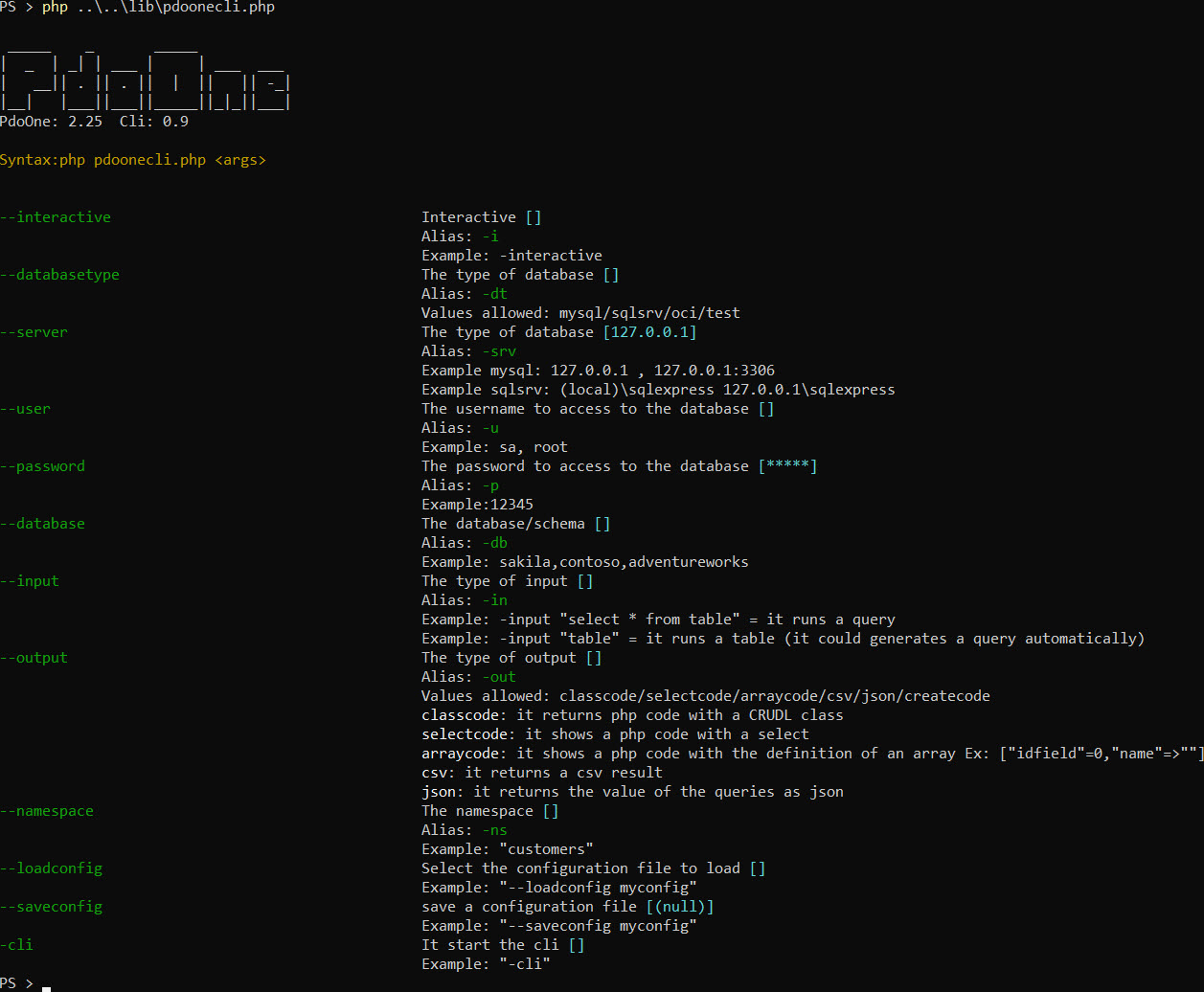
Ejecutar la siguiente línea (en la carpeta lib)
php pdoonecli.php
(o apuntando a la carpeta correcta)
php/var/web/proveor/eftec/lib/pdoonecli
Puede usar la bandera "-i" para ingresar en modo interactivo.
Puede usar la tecla Tab para obtener valores de autocompletar (si los hay).
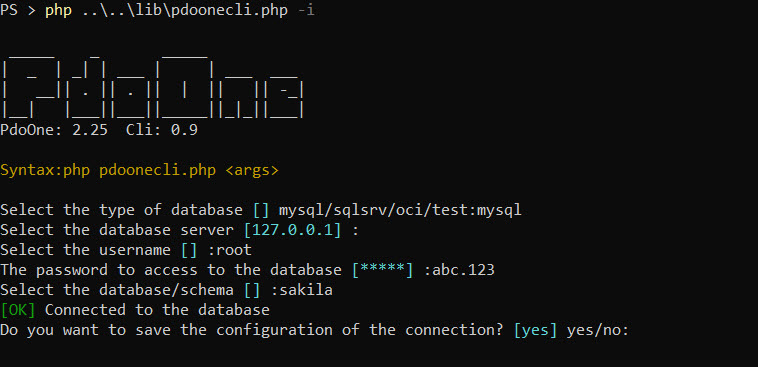
Nota: También puede guardar y cargar la configuración.
Conéctese a MySQL y genere un CSV desde la tabla "Actor"
 # # via arguments
php pdoonecli --databasetype mysql --server 127.0.0.1 -u root -p abc.123 --database sakila -in actor -out csv
# # via user input (interactive)
php pdoonecli -i -in actor -out csv
Guarde la configuración en un archivo
php pdoonecli --databasetype mysql --server 127.0.0.1 -u root -p abc.123 --database sakila --saveconfig myconfigCargue la configuración de un archivo
php pdoonecli --loadconfig myconfig -in actor -out csvPuede usar la bandera "-cli" para generar las clases de repositorio
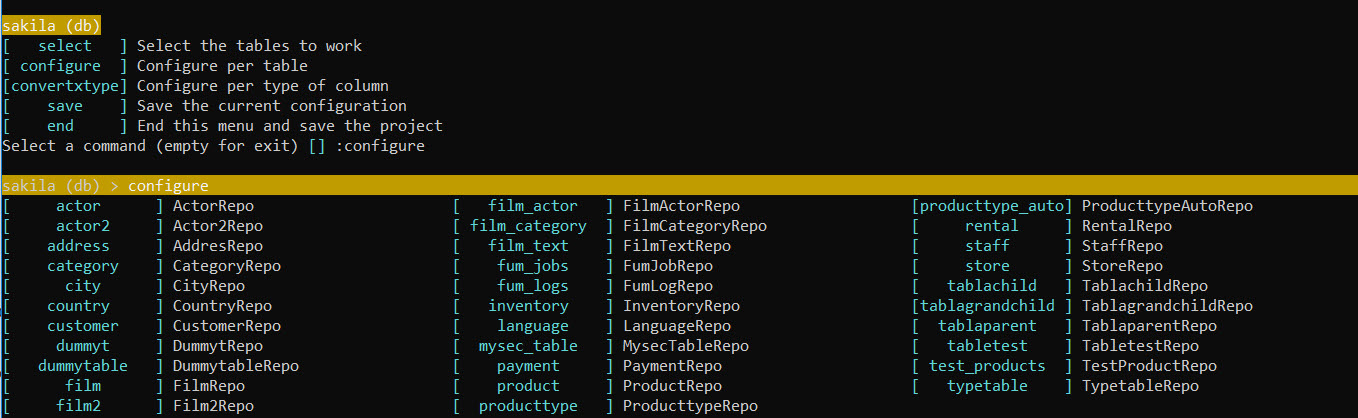
La CLI es interactiva y permite cargar y guardar la configuración.
La funcionalidad generará una clase de repositorio lista para usar.
Digamos el siguiente ejemplo
mysql:
php pdoone.php - -database mysql --server 127.0.0.1:3306 --User root -p abc.123 -db sakila - -input "actor" -output classCode
sqlsrv:
php pdoone.php --database sqlsrv --server pcjc sqlexpress --user sa -p abc.123 -db sakila - -input "actor" --output classcode
Se conectará a la base de datos MySQL, IP: 127.0.0.1 y la base de datos Sakila, y leerá la tabla "Actor".
Devolverá el siguiente resultado
 /**
 * Generated by PdoOne Version 1.28
 * Class ActorRepo
 */
class ActorRepo
{
    const TABLE = ' Actor ' ;
    const PK = ' actor_id ' ;
    /** @var PdoOne */
    public static $ pdoOne = null ;

    /**
     * It creates a new table<br>
     * If the table exists then the operation is ignored (and it returns false)
     *
     * @param array $definition
     * @param null  $extra
     *
     * @return array|bool|PDOStatement
     * @throws Exception
     */
    public static function createTable ( $ definition , $ extra = null ) {
        if (! self :: getPdoOne ()-> tableExist ( self :: TABLE )) {
            return self :: getPdoOne ()-> createTable ( self :: TABLE , $ definition , self :: PK , $ extra );
        }
        return false ; // table already exist
    }
    // .....
}
Esta funcionalidad generará una nueva clase de repositorio con las operaciones más comunes: insertar, lista, actualizar, eliminar, obtener, contar, crear tabla, tabla de caída y tabla truncada
¿Por qué necesitamos generar una clase? (en lugar de heredar uno) Esta clase Crud es solo un punto de partida. El desarrollador podría modificar el código, agregar nuevos métodos, modificar el método anterior, etc.
Para usar la clase, podríamos escribir el siguiente código:
 // 1) option 1, inject an instance of $pdo
ActorRepo:: setPdoOne ( $ pdoOne ); // it inject the current connect to the database

// 2) option 2.
// If the global variable $pdoOne exists, then it is injected. (unless it is defined by using setPdoOne()
$ pdoOne = new PdoOne ( " mysql " , " 127.0.0.1 " , " root " , " abc.123 " , " sakila " , "" );
$ pdoOne -> connect ();

// 3) option 3
// If the global function pdoOne() exists, then it is used for obtain the instance.
function pdoOne () {
    global $ pdo ;
    if ( $ pdo === null ) {
        $ pdo = new PdoOne ( ' mysql ' , ' 127.0.0.1 ' , ' root ' , ' abc.123 ' , ' sakila ' );
    }
    return $ pdo ;
}


$ actorActorRepo :: get ( 2 ); // it will read the actor with the pk=2 and it will return as an array.
$ actors = $ actorArray =ActorRepo:: select (); // it returns all the rows.
Alternativamente, puede generar el archivo PHP automáticamente de la siguiente manera:
php pdoone.php -database mysql -server 127.0.0.1:3306 -user root -pwd abc.123 -db sakila -input "actor" -output classcode> actorrepo.php
Nota: El código carece de etiquetas PHP, espacio de nombres y uso, pero todo lo demás está aquí.
Tomará una consulta y devolverá un código PHP con la consulta formateada.
Ejemplo:
php pdoone.php -database mysql -server 127.0.0.1:3306 -User root -pwd abc.123 -db sakila -inut "select * from actor" -outputCodeCode
Generará el siguiente código:
 /** @var array $result=array(["actor_id"=>0,"first_name"=>'',"last_name"=>'',"last_update"=>'']) */
 $ result = $ pdo
         -> select ( " * " )
         -> from ( " actor " )
-> toList ();Generará una matriz asociativa (con valores predeterminados) basado en la consulta o la tabla seleccionada.
php pdoone.php -database mysql -server 127.0.0.1:3306 -User root -pwd abc.123 -db sakila -inut "select * from actor" -Output Arraycode
Volverá:
// ["actor_id"=>0,"first_name"=>'',"last_name"=>'',"last_update"=>'']Devolverá el resultado de la consulta como un JSON
php pdoone.php -database mysql -server 127.0.0.1:3306 -User root -pwd abc.123 -db sakila -input "select * from actor" -output json
Volverá:
[{ "actor_id" : " 1 " , "first_name" : " PENELOPE " , "last_name" : " GUINESS " , "last_update" : " 2006-02-15 01:34:33 " }
,{ "actor_id" : " 2 " , "first_name" : " NICK " , "last_name" : " WAHLBERG " , "last_update" : " 2006-02-15 01:34:33 " }
,{ "actor_id" : " 3 " , "first_name" : " ED " , "last_name" : " CHASE " , "last_update" : " 2006-02-15 01:34:33 " }
,{ "actor_id" : " 4 " , "first_name" : " JENNIFER " , "last_name" : " DAVIS " , " last_update " }]Devolverá el resultado de la consulta como un JSON
php pdoone.php -database mysql -server 127.0.0.1:3306 -User root -pwd abc.123 -db sakila -input "Seleccione * del actor" -Output CSV
Volverá:
 actor_id,first_name,last_name,last_update
1,"PENELOPE","GUINESS","2006-02-15 01:34:33"
2,"NICK","WAHLBERG","2006-02-15 01:34:33"
3,"ED","CHASE","2006-02-15 01:34:33"
4,"JENNIFER","DAVIS","2006-02-15 01:34:33"
Alternativamente a la CLI, la biblioteca tiene una interfaz visual. Hace todo el funcionamiento de la CLI.
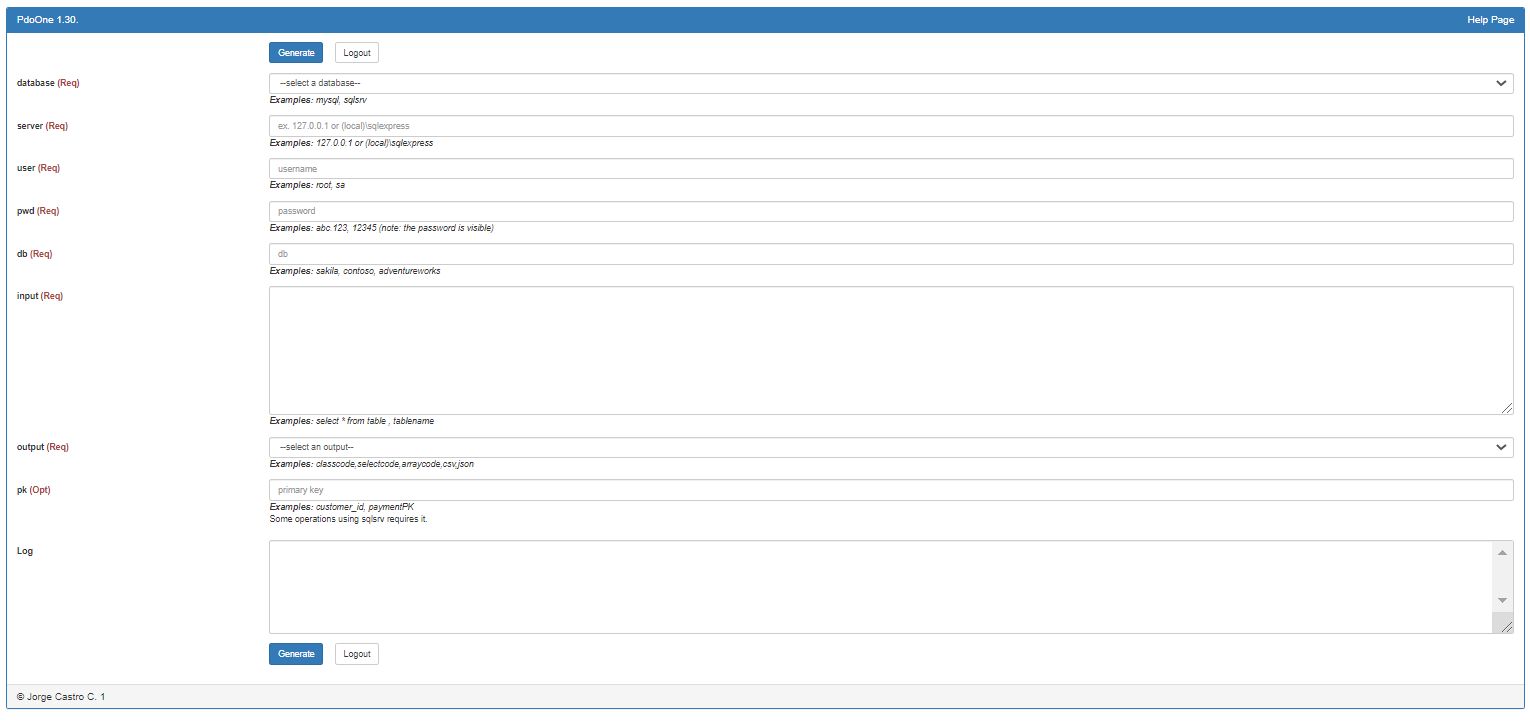
Simplemente llame al render de método ()
 <?php

use eftec  PdoOne ;
use mapache_commons  Collection ;

include " ../vendor/autoload.php " ;

$ dao = new PdoOne ( " test " , " 127.0.0.1 " , " dummy " , " dummy " , " dummy " ); // we need any connection.
$ dao -> logLevel = 3 ;

$ dao -> render ();
Hay un ejemplo en los ejemplos de carpeta/testui.php
Los siguientes comandos generalmente se ejecutan solo (no en una cadena de métodos)
| Método | Descripción | Ejemplo |
|---|---|---|
| createtable () | Crea la tabla e índices utilizando la definición dentro del repositorio | TABTAPARENTREPO :: CreateTable (); |
| create foreignkeys () | Crear todas las claves extranjeras de la mesa | TABTAPARENTREPO :: CREATEFOREIGNKEYS (); |
| droptable () | Dejar caer la mesa | TABTAPARENTREPO :: DropTable (); |
| truncar() | Truncar la mesa | TABTAPARENTREPO :: truncate (); |
| validTable () | Validar si la tabla no ha cambiado | $ OK = TABTAPARENTREPO :: validTable (); |
TablaParentRepo:: createTable ();
TablaParentRepo:: createForeignKeys ();
TablaParentRepo:: dropTable ();
TablaParentRepo:: truncate ();
// We don't have a method to alter a table.
$ ok =TablaParentRepo:: validTable (); // it returns true if the table matches with the definition stored into the clasLos operadores anidados son métodos que deberían estar entre nuestra cadena de métodos.
ClassRepo :: OP () :: Where () :: FinalOp () es ✅
ClassRepo :: op () :: op () :: Where () dejará la cadena abierta
Por ejemplo:
 // select *
//        from table
//        inner join table2 on t1=t2
//        where col=:arg
//        and col2=:arg2
//    group by col
//        having col3=:arg3
//    order by col
//    limit 20,30
$ results = $ pdo -> select ( ' * ' )
    -> from ( ' table ' )
    -> innerjoin ( ' table2 on t1=t2 ' )
    -> where ( ' col=:arg and col2:=arg2 ' ,[ 20 , 30 ])
    // it also works with ->where('col=:arg',20)->where('col2'=>30)
    // it also works with ->where('col=?',20)->where('col2=?'=>30)
    -> group ( ' col ' )
    -> having ( ' col3=:arg3 ' , 400 )
    -> order ( ' col ' )
    -> limit ( ' 20,30 ' )
-> toList (); // end of the chain| Método | Descripción | Ejemplo |
|---|---|---|
| dónde() | Agrega un lugar donde a la cadena | TATAPARENTREPO :: Where () |
| orden() | Agrega un orden a la cadena | TATAPARENTREPO :: Order () |
| grupo() | Agrega un grupo a la cadena | TABTAPARENTREPO :: Group () |
| límite() | Limita los resultados | TABTAPARENTREPO :: LIMIT () |
| página() | Es similar al límite pero usa la página | TABTAPARENTREPO :: PAGE () |
| Innerjoin () | Agrega una unión interna a la consulta | TABTAPARENTREPO :: InnerJoin () |
| izquierda() | Agrega una unión a la izquierda a la consulta | TABTAPARENTREPO :: Left () |
| bien() | Agrega una unión correcta a la consulta | TATAPARENTREPO :: Right () |
Tenemos diferentes métodos para generar un comando DQL (consulta) en nuestra base de datos.
Si la operación falla, devuelven un falso y podrían activar una excepción.
Los siguientes métodos deben ser al final de la cadena. Ejemplos:
ClassRepo :: op () :: op () :: tolist () es ✅
ClassRepo :: op () :: tolist () :: op () activará una excepción
| Dominio | Descripción | Ejemplo |
|---|---|---|
| tolista () | Devuelve una variedad de elementos | $ data = Tablenamerepo :: tolist (); // Seleccionar * de TableRepo $ data = Tablenamerepo :: Where ('a1 =?', [$ valor]) :: tolist (); // Seleccionar * de TableRepo donde A1 = $ valor |
| primero() | Devuelve una fila simple | $ data = TablenAmerepo :: First ($ PK); // Seleccionar * de TableRepo donde pk = $ PK (siempre devuelve 1 o cero valores) $ data = Tablenamerepo :: Where ('a1 =?', [$ value]) :: primero (); // Devuelve el primer valor (o falso si no se encuentra) |
| existir() | Devuelve verdadero si existe una clave principal | $ data = TablenAmerepo :: Exist ($ PK); // Devuelve verdadero si el objeto existe. |
| contar() | Devuelve el número de filas en una consulta | $ data = Tablenamerepo :: Count ($ Condiciones); $ data = Tablenamerepo :: Where ('a1 =?', [$ value]) :: count (); |
Los siguientes métodos permiten insertar, actualizar o eliminar valores en la base de datos.
| Método | Descripción | Ejemplo |
|---|---|---|
| insertar | Inserta un valor en la base de datos. Podría devolver una identidad | $ Identity = TABTAPARENTREPO :: Insert ($ obj); |
| actualizar | Actualiza un valor en la base de datos. | TABTAPARENTREPO :: UPDATY ($ obj); |
| borrar | Elimina un valor de la base de datos. | TABTAPARENTREPO :: delete ($ obj); |
| eliminar | Elimina un valor (usando la clave primaria como condición) de la base de datos. | TABTAPARENTREPO :: DeleteById ($ PK); |
 // where obj is an associative array or an object, where the keys are the name of the columns (case sensitive)
$ identity =TablaParentRepo:: insert ( $ obj );
TablaParentRepo:: update ( $ obj );
TablaParentRepo:: delete ( $ obj );
TablaParentRepo:: deleteById (id);Es posible validar el modelo. El modelo se valida utilizando la información de la base de datos, utilizando el tipo de columna, la longitud, si el valor permite que NULL y si es identidad (auto numérica).
 $ obj =[ ' IdUser ' => 1 , ' Name ' ='John Doe'];
UserRepo:: validateModel ( $ obj , false ,[ ' _messages ' ]); // returns true if $obj is a valid User.Una matriz recursiva es una matriz de cadenas con valores que podría leerse, obtener o comparar. Por ejemplo, para unir una tabla condicionalmente. Pdoone no lo usa directamente, pero _BASEPDoonRepo lo usa (_BASEPDoonRepo es una clase utilizada cuando generamos una clase de servicio de repositorio automáticamente).
Ejemplo
 $ this -> select ( ' * ' )-> from ( ' table ' )-> recursive ([ ' table1 ' , ' table1.table2 ' ]);
// some operations that involves recursive
if ( $ this -> hasRecursive ( ' table1 ' )) {
    $ this -> innerJoin ( ' table1 on table.c=table1.c ' );
}
if ( $ this -> hasRecursive ( ' table1.table2 ' )) {
    $ this -> innerJoin ( ' table1 on table1.c=table2.c ' );
}
$ r = $ this -> toList (); // recursive is resetted. Establece una matriz recursiva.
Este valor se restablece cada vez que termina los métodos de cadena.
Obtiene la matriz recursiva.
Devuelve cierto si recursivo tiene algo de aguja.
Si $ this-> recursivo es ['*'], entonces siempre devuelve verdadero.
 $ this -> select ( ' * ' )-> from ( ' table ' )-> recursive ([ ' * ' ]);
$ this -> hasRecursive ( ' anything ' ); // it always returns true. | Biblioteca | Insertar | findpk | hidratar | con | tiempo |
|---|---|---|---|---|---|
| PDO | 671 | 60 | 278 | 887 | 3,74 |
| Pdoone | 774 | 63 | 292 | 903 | 4,73 |
| Menosql | 1413 | 133 | 539 | 825 | 5,984 |
| Yiim | 2260 | 127 | 446 | 1516 | 8,415 |
| Yiimwithcache | 1925 | 122 | 421 | 1547 | 7.854 |
| Yii2m | 4344 | 208 | 632 | 1165 | 11,968 |
| Yii2marrayhidrato | 4114 | 213 | 531 | 1073 | 11,22 |
| Yii2mscalarhidrato | 4150 | 198 | 421 | 516 | 9,537 |
| Impulsar | 2507 | 123 | 1373 | 1960 | 11,781 |
| Propel20withcache | 1519 | 68 | 1045 | 1454 | 8,228 |
| Propel20Formatondemand | 1501 | 72 | 994 | 1423 | 8,228 |
| Doctrinem | 2119 | 250 | 1592 | 1258 | 18,139 |
| Doctrinemwithcache | 2084 | 243 | 1634 | 1155 | 17,952 |
| Doctrinemarrayhidrato | 2137 | 240 | 1230 | 877 | 16,83 |
| Doctrinemscalarhidrato | 2084 | 392 | 1542 | 939 | 18,887 |
| Doctrinemwithoutproxies | 2119 | 252 | 1432 | 1960 | 19,822 |
| Elocuente | 3691 | 228 | 708 | 1413 | 12,155 |
Pdoone agrega un poco de Ovehead sobre PDO, sin embargo, es simple una envoltura para PDO.
Significa que está actualizado PDOOne, y está utilizando una clase generada por el ORM. Esta clase debe volver a generar.
En una palabra:
Cada versión principal significa que podría romper el código antiguo. Es decir, 1.0 -> 2.0
Cada versión menor significa que agrega una nueva funcionalidad, es decir, 1.5 -> 1.6 (nuevos métodos)
Cada versión decimal significa que parche/corrección/refactorización de una funcionalidad anterior, es decir, 1.5.0 -> 1.5.1 (Fix)
4.10 2024-09-06
4.9.2 2024-08-20
4.9.1 2024-08-20
4.9 2024-08-02
4.8 2024-07-06
4.7.1 2024-06-07
4.7 2024-06-07
4.6.2 2024-03-02
4.6.1 2024-03-02
4.6 2024-03-02
4.4 2023-12-12
4.3.3 2023-09-05
4.3.2 2023-09-05
4.3.1 2023-09-02
4.3 2023-07-01
4.2 2023-04-07
4.1.2 2023-03-21
4.1.1 2023-03-21
4.1 2023-03-20
4.0.1 2023-03-11
4.00 2023-11-03
3.16 2023-12-02
3.15 2023-02-03
3.14 2023-01-30
3.13 2023-01-26
3.12.2 2022-09-03
3.12.1 2022-08-26
3.12 2022-08-14
3.11.1 2022-07-30
3.11 2022-07-30
3.10 2022-07-30
3.9 2022-07-23
3.8.1 2022-07-23
3.8 2022-07-22
3.7 2022-07-16
3.6 2022-07-07
3.5 2022-07-06
3.3 2022-06-27
3.2 2022-06-27
3.1.6 2022-06-24
3.1.5 2022-06-23
3.1.4 2022-06-21
3.1.3 2022-06-18
3.1.2 2022-06-18
3.1.1 2022-06-17
3.1 2022-06-11
3.0 2022-06-1
2.32 2022-03-20
2.31 2022-03-04
2.30 2022-02-28
2.29 2022-02-20
2.27 2022-02-19
2.26 2022-02-19
2.25 2022-02-01
2.24.1 2022-02-06
2.24 2022-02-06
2.23 2022-02-04
2.22.2 2022-02-01
2.22.1 2022-01-03
2.22 2022-01-30
2.21 2022-01-28
However, it is far from perfect.
2.20 2022-01-04
2.19
2.18
2.16
2.15 2021-07-24
2.14.3 2021-06-15
2.14.2 2021-06-13
2.14.1 2021-06-09
2.14 2021-06-04
_BasePdoOneRepo now works more closely with the class PdoOneQuery , so each query is a different instance.
[fix] PdoOne dateConvertInput() does not crash when the value is not a date.
[fix] PdoOne throwError() does not stack errors but still triggers the last error (if any).
[changes] ❗ PdoOne aggregate functions (sum,min,max,avg) now returns a value instead of generating a query.
$result=$pdo->sum('xxx')->firstScalar(); // before $result=$pdo->sum('xxx'); // ahora
[fix] PdoOne generateCodeArray() used for the generation of classes, returns the correct name when it is set.
[changes] _BasePdoOneRepo : reset(),getQuery(),dropTable(),useCache(),limit(),newQuery(),order(),innerjoin(),left() ,right()
[changes] PdoOneQuery : Multiples changes.
2.13.1 2021-05-22
2.13 2021-04-17
2.12 2021-04-17
2.11.1 2021-04-17
2.11 2021-04-17
2.10.3 2021-04-14
2.10.2 2021-04-06
2.10.1 2021-04-05
2.10 2021-04-04
2.9.4 2021-03-22
2.9.3 2021-02-22
2.9.2 2021-02-18
2.9.1 2021-02-16
2.9 2021-02-16
2.8 2021-02-13
2.7.1 2021-01-21
2.7 2021-01-10
2.6.3 2020-10-16
2.6.2 2020-10-09
2.6.1 2020-09-24
2.6 2020-09-17
2.5 2020-09-13
2.4.1 2020-09-13
2.4 2020-09-06
2.3 2020-09-06
2.2.6 2020-09-03
2.2.5 2020-08-30
2.2.3 2020-08-23
2.2.2 2020-08-17
2.2.1 2020-08-16
2.2 2020-08-14
 $ this -> setUseInternalCache ( true );
$ rows = $ this -> select ( ' * ' )-> from ( ' table ' )-> where ([ ' i ' => 1 ])-> toList (); // read from the database
// ...
$ rows2 = $ this -> select ( ' * ' )-> from ( ' table ' )-> where ([ ' i ' => 1 ])-> toList (); // read from memory
// ...
$ rows3 = $ this -> select ( ' * ' )-> from ( ' table ' )-> where ([ ' i ' => 2 ])-> toList (); // read from the database because the query is in
                                                                     // memory but the parameters are different

echo $ this -> internalCacheCounter ;
The internal cache is tested with runRawQuery (if returns an array), toList(), meta() and first()
2.0.1 2020-08-12
2.0 2020-08-11
1.55.1 2020-08-05
1.55 2020-8-05
1.54 2020-8-02
1.53 2020-7-27
1.52 2020-7-19
1.51 2020-7-18
1.50 2020-7-04
1.49 2020-6-19
1.48 2020-6-15
1.47 2020-6-14
1.46 2020-6-13
1.45.1 2020-6-11
1.45 2020-6-7
1.44.2 2020-6-3
1.44.1 2020-6-2
1.44 2020-5-31
1.43 2020-5-31
1.42 2020-5-29
1.41.2 2020-5-29
1.41.1 2020-5-28
1.41 2020-5-28
1.40.1 2020-5-27
1.40 2020-05-21
1.39 2020-05-12
1.38 2020-05-10
1.37 2020-05-03
1.36 2020-05-03
1.35.1 2020-04-30
1.35 2020-04-28
1.34.2 2020-04-27
1.34.1 2020-04-27
1.34 2020-04-27
1.33 2020-04-15
1.32.1 BasePdoOneRepo added version 2.0
1.32 2020-04-12
1.31.1 2020-04-11
1.31 2020-04-11
1.30 2020-04-10
1.29 2020-04-10
1.28.1 2020-04-06
1.28 2020-04-06
1.24 2020-03-26
1.23.1 2020-03-10
1.23 2020-03-10
1.22 2020-02-08
1.21 2020-02-07
1.20 2020-jan-25
1.19 2020-jan-15
1.16 2020-jan-14
1.15 2019-dec-29
1.14 2019-dec-26
1.13 2019-dec-26
1.12 2019-oct-20 Added argument (optional) ->toList($pdomodel) Added method ->toListSimple()
1.11 2019-oct-01 1.11 It is still compatible with php 5.6.Added to composer.json
1.10 2019-oct-01 1.10 Added method dateConvert(). Added trace to the throw.
1.9 2019-aug-10 1.8 republished
1.8 2019-aug-10 Added a date format. Methods dateSql2Text() and dateText2Sql()
1.7 2019-jun-23 Added some benchmark. It also solves a problem with the tags. Now: table.field=? is converted to table . field =?
1.6 2019-jun-22 affected_rows() returns a correct value.
1.5 2019-may-31 some cleanups. columnTable() returns if the column is nullable or not.
1.4 2019-may-30 insertobject()
1.3 2019-may-23 New changes
1.2 2019-may-22 New fixed.
1.1 2019-may-21 Some maintenance
1.0 2019-may-21 First version








