adafruit feather 32u4 lora ota
1.0.0

這是Thomas Telkamp和Matthijs Kooijman的Adafruit Feather 32U4的TTN-OTAA示例的改編。
用Arduino IDE版本1.8.5對此進行了測試。
 // Uncomment this to disable all code related to ping
#define DISABLE_PING
// Uncomment this to disable all code related to beacon tracking.
// Requires ping to be disabled too
#define DISABLE_BEACONS 在“事物”網絡控制台中註冊新設備,您將獲得一個
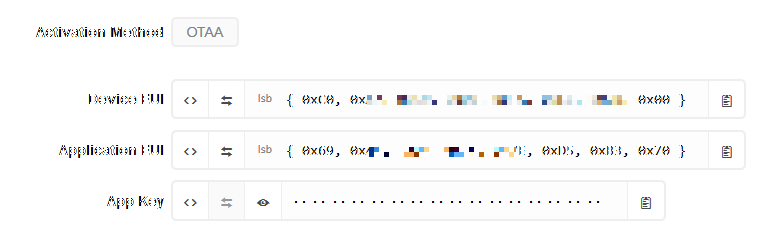
現在,您必須在源代碼中添加這些值:
 static const u1_t PROGMEM APPEUI [ 8 ] = { 0x00 , 0x00 , 0x00 , 0x00 , 0x00 , 0x00 , 0x00 , 0x00 };
void os_getArtEui ( u1_t * buf ) { memcpy_P ( buf , APPEUI , 8 );}

// This should also be in little endian format, see above.
static const u1_t PROGMEM DEVEUI [ 8 ] = { 0x00 , 0x00 , 0x00 , 0x00 , 0x00 , 0x00 , 0x00 , 0x00 };
void os_getDevEui ( u1_t * buf ) { memcpy_P ( buf , DEVEUI , 8 );}

// This key should be in big endian format (or, since it is not really a
// number but a block of memory, endianness does not really apply). In
// practice, a key taken from ttnctl can be copied as-is.
// The key shown here is the semtech default key.
static const u1_t PROGMEM APPKEY [ 16 ] = { 0x00 , 0x00 , 0x00 , 0x00 , 0x00 , 0x00 , 0x00 , 0x00 , 0x00 , 0x00 , 0x00 , 0x00 , 0x00 , 0x00 , 0x00 , 0x00 };
請注意,必須以“小endian格式”指定應用程序和設備EUI。 TTN控制台中有一些按鈕可幫助您將數字序列轉換為LSB格式。
注意:不建議使用所謂的單渠道通道,因為它僅支持三個聯接頻率之一。因此,您只有1:3連接操作實際擊中單個支持的頻率的機會。此外,目前尚不清楚這些網關是否支持從TTN回到設備的通信,因此您可能永遠不會收到連接操作成功的反饋。







