django_dramatiq_charts
v0.2.0

django_dramatiq任務歷史記錄繪製圖表。
圖表類型:負載和時間表。
| Python版本 | 3.6+ |
| 執照 | Apache-2.0 |
| PYPI | https://pypi.python.org/pypi/django_dramatiq_charts/ |
內容
$ pip安裝django-dramatiq-charts
要求:
 INSTALLED_APPS = [
    'django_dramatiq' ,
    'django_dramatiq_charts' ,
    'my_app' ,
    # ...
] from django_dramatiq_charts . views import load_chart , timeline_chart , clean_cache
urlpatterns = [
path ( 'django_dramatiq_charts/load_chart/' , load_chart , name = 'ddc_load_chart' ),
path ( 'django_dramatiq_charts/timeline_chart/' , timeline_chart , name = 'ddc_timeline_chart' ),
path ( 'django_dramatiq_charts/clean_cache/' , clean_cache , name = 'ddc_clean_cache' ),
# ...
]| 範圍 | 描述 | 預設 |
|---|---|---|
| django_dramatiq_charts_perm_fn | 訪問圖表的用戶 | def fn(請求):return request.user.is_superuser |
| django_dramatiq_charts_load_qs_filter | 負載圖表的其他QuerySet過濾器 | 沒有任何 |
| django_dramatiq_charts_timeline_qs_filter | 時間表圖表的其他QuerySet過濾器 | 沒有任何 |
| django_dramatiq_charts_cache_form_data_sec | 幾分鐘以緩存隊列和演員表單字段的選擇(類似於false disable) | 4小時 |
在時間表上的每個時間間隔中顯示同時執行的參與者的數量
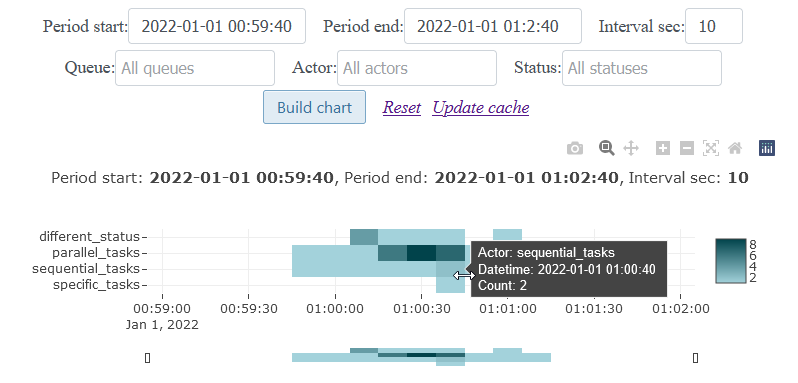
不計算運行超過一天的任務(假定是錯誤)。
在時間表上展示演員
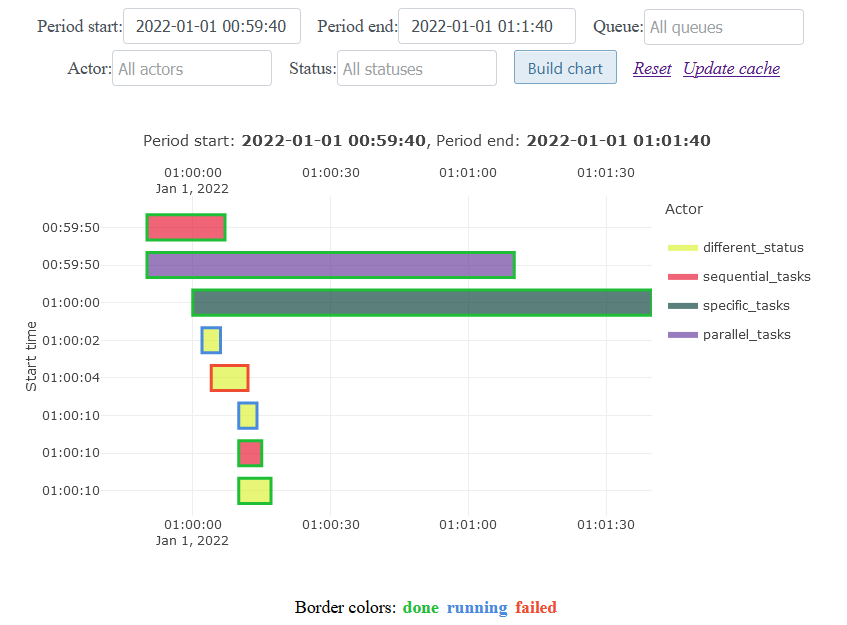
如果任務持續時間小於一秒鐘,則該任務以1秒的時間顯示在圖表上。
重要變化的歷史:Release_notes.rst
感謝所有幫助開發該圖書館的人:
Milkycake,Lexa2907,Python,Django,Plotly,JQuery,Select2,Flaticon.com







