Voice Based AI Assistant with ChatGPT on Raspberry Pi
1.0.0

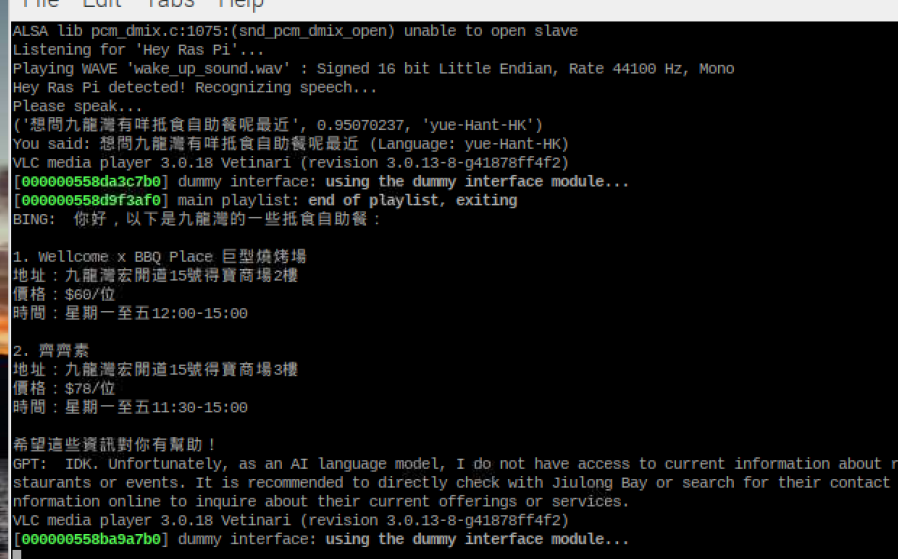
該項目是使用Openai的Chatgpt和Raspberry Pi上的基於語音的AI助手實施的。助手聽喚醒單詞“ Hey Ras Pi”,然後處理用戶的查詢,提供適當的響應。該項目演示瞭如何整合多種語言模型和API,以創建更健壯和上下文感知的AI助手。
git clone https://github.com/yourusername/Voice-Based-AI-Assistant-with-ChatGPT-on-Raspberry-Pi.git
cd Voice-Based-AI-Assistant-with-ChatGPT-on-Raspberry-Pisudo apt-get update
sudo apt-get upgrade
chmod +x install_dependencies.sh
./install_dependencies.shpython3 -m venv env
# on Pi
source env/bin/activate
# on Windows
./env/bin/activatepip install -r requirements.txt
python -m spacy download en_core_web_sm在運行項目之前,您需要使用API鍵在src目錄中創建一個config.py文件。使用提供的config_example.py作為模板,然後填寫必要的信息。
請參閱https://platform.openai.com/examples
從PICOVOICE控制台獲取PICOVOICE訪問鍵。將訪問鍵添加到config.py文件中。
該項目使用來自EggeGPT的非正式Bing API。要生成一個cookie.json文件供bing api使用,請按照邊緣存儲庫中的說明進行操作。
準備好config.py和cookie.json文件後,您可以繼續運行該項目。
請參閱https://www.youtube.com/watch?v=vemzn5rgxbw&ab_channel=assemblyai
python main.py助手將聽喚醒單詞“嘿ras pi”。一旦檢測到,它將提示您會發出查詢。
助手將使用Chatgpt和Bing API處理您的查詢,並提供適當的響應。
 .
├── ./.gitignore
├── ./README.md
├── ./cookies.json
├── ./env
├── ./install_dependencies.sh
├── ./main.py
├── ./models
│   ├── ./models/Hey-Ras-Pi_en_raspberry-pi_v2_1_0.ppn
│   ├── ./models/Hey-Ras-Pi_en_raspberry-pi_v2_1_0.zip
│   └── ./models/alexa_windows.ppn
├── ./output.mp3
├── ./requirements.txt
└── ./src
    ├── ./src/bing.py
    ├── ./src/config.py
    ├── ./src/config_example.py
    ├── ./src/gpt.py
    ├── ./src/nlp.py
    ├── ./src/speech_to_text.py
    ├── ./src/text_to_speech.py
    ├── ./src/translator.py
    └── ./src/wake_up_detect.py
└── ./wake_up_sound.wav