Voice Based AI Assistant with ChatGPT on Raspberry Pi
1.0.0

This project is an implementation of a voice-based AI assistant using OpenAI's ChatGPT and Bing on a Raspberry Pi. The assistant listens for the wake word "Hey Ras Pi" and then processes the user's query, providing an appropriate response. The project demonstrates how to integrate multiple language models and APIs to create a more robust and context-aware AI assistant.
git clone https://github.com/yourusername/Voice-Based-AI-Assistant-with-ChatGPT-on-Raspberry-Pi.git
cd Voice-Based-AI-Assistant-with-ChatGPT-on-Raspberry-Pisudo apt-get update
sudo apt-get upgrade
chmod +x install_dependencies.sh
./install_dependencies.shpython3 -m venv env
#on Pi
source env/bin/activate
#on Windows
./env/bin/activatepip install -r requirements.txt
python -m spacy download en_core_web_smBefore running the project, you need to create a config.py file in the src directory with your API keys. Use the provided config_example.py as a template and fill in the necessary information.
Refer to https://platform.openai.com/examples
Get your PicoVoice access key from the PicoVoice Console. Add the access key to the config.py file.
This project uses an unofficial BING API from EdgeGPT. To generate a cookies.json file for use with the BING API, follow the instructions in the EdgeGPT repository.
Once you have your config.py and cookies.json files ready, you can proceed with running the project.
Refer to https://www.youtube.com/watch?v=vEMzN5RgXbw&ab_channel=AssemblyAI
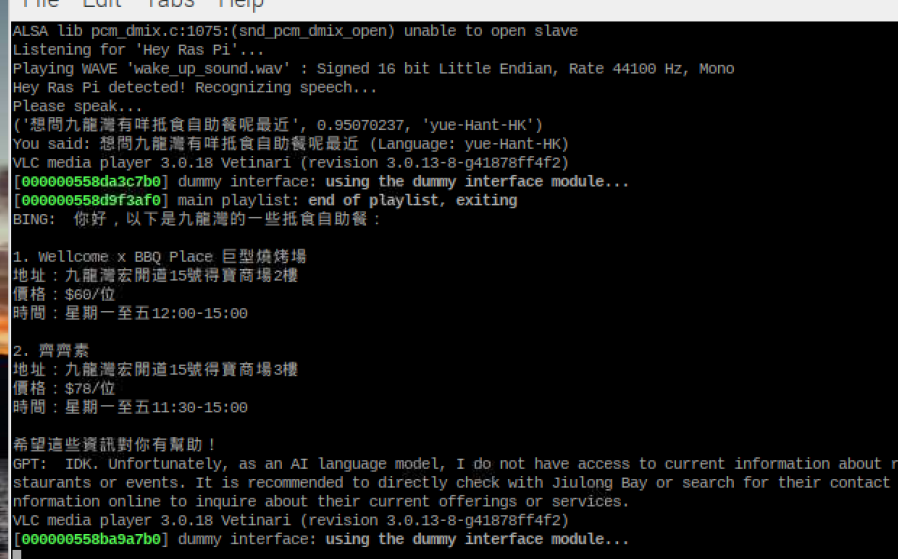
python main.pyThe assistant will listen for the wake word "Hey Ras Pi". Once detected, it will prompt you to speak your query.
The assistant will process your query using ChatGPT and Bing APIs and provide an appropriate response.
.
├── ./.gitignore
├── ./README.md
├── ./cookies.json
├── ./env
├── ./install_dependencies.sh
├── ./main.py
├── ./models
│   ├── ./models/Hey-Ras-Pi_en_raspberry-pi_v2_1_0.ppn
│   ├── ./models/Hey-Ras-Pi_en_raspberry-pi_v2_1_0.zip
│   └── ./models/alexa_windows.ppn
├── ./output.mp3
├── ./requirements.txt
└── ./src
    ├── ./src/bing.py
    ├── ./src/config.py
    ├── ./src/config_example.py
    ├── ./src/gpt.py
    ├── ./src/nlp.py
    ├── ./src/speech_to_text.py
    ├── ./src/text_to_speech.py
    ├── ./src/translator.py
    └── ./src/wake_up_detect.py
└── ./wake_up_sound.wav