vue advanced chat
2.1.0


享受 ?
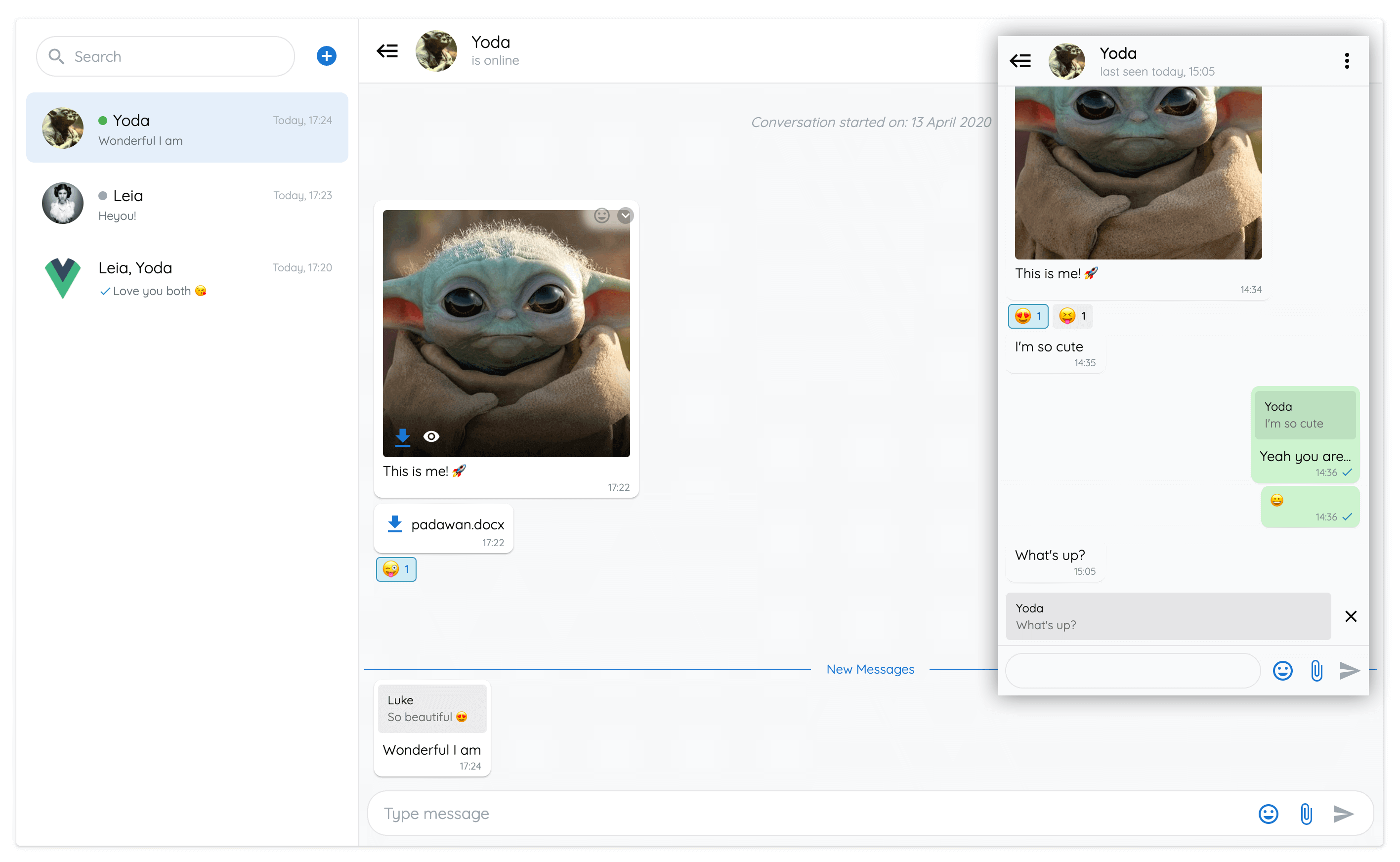
漸進的Web應用程序展示了vue-advanced-chat組件的所有功能。
由Firestore建造,Vuetify和推送通知。
如果您想獲得對現實世界示例源代碼的高級訪問權限,請通過電子郵件與我聯繫。
您將獲得網絡和移動設備的全部工作聊天應用程序:
 # Using npm
npm install --save vue-advanced-chat

# Using yarn
yarn add vue-advanced-chat

# Using CDN
< script src= " https://cdn.jsdelivr.net/npm/[email protected]/dist/vue-advanced-chat.umd.js " ></script >在您的配置文件中註冊vue-advanced-chat和emoji-picker為Web組件:
compilerOptions: {
  isCustomElement : tagName => {
    return tagName === 'vue-advanced-chat' || tagName === 'emoji-picker'
  }
}
演示:https://github.com/advanced-chat/vue-advanced-chat-sandbox/tree/main
演示:https://github.com/advanced-chat/vue-advanced-chat-sandbox/tree/react
演示:https://github.com/advanced-chat/vue-advanced-chat-sandbox/tree/angular
 < template >
  < vue-advanced-chat
    : current-user-id = "currentUserId"
    :rooms = "JSON.stringify(rooms)"
    : messages = "JSON.stringify(messages)"
    : room - actions = "JSON.stringify(roomActions)"
  / >
</ template >

< script >
  import { register } from 'vue-advanced-chat'
  register()

  // Or if you used CDN import
  // window['vue-advanced-chat'].register()

  export default {
    data ( ) {
      return {
        currentUserId : '1234' ,
        rooms : [ ] ,
        messages : [ ] ,
        roomActions : [
          { name : 'inviteUser' , title : 'Invite User' } ,
          { name : 'removeUser' , title : 'Remove User' } ,
          { name : 'deleteRoom' , title : 'Delete Room' }
        ]
      }
    }
  }
</ script >vue-advanced-chat組件是面向性能的,因此您必須遵循特定的規則才能使其正常工作。
push方法 // DO THIS
const rooms = [ ]
for ( let i = 0 ; i < res . length ; i ++ ) {
rooms . push ( res )
}
this . rooms = rooms
// DON'T DO THIS
for ( let i = 0 ; i < res . length ; i ++ ) {
this . rooms . push ( res )
} // DO THIS
this . rooms [ i ] . typingUsers = [ ... this . rooms [ i ] . typingUsers , typingUserId ]
// DON'T DO THIS
this . rooms [ i ] . typingUsers . push ( typingUserId ) // DO THIS
this . rooms [ roomIndex ] = room
this . rooms = [ ... this . rooms ]
// DON'T DO THIS
this . rooms [ roomIndex ] = room
// AND DON'T DO THIS
this . rooms . push ( room )messagesLoaded模式 fetchMessages ( { room , options } ) {
this . messagesLoaded = false
// use timeout to imitate async server fetched data
setTimeout ( ( ) => {
this . messages = [ ]
this . messagesLoaded = true
} )
} 如果您使用的是VUE 3,則可以正常傳遞數組和對象道具:VUE 3中的傳遞域屬性
否則,您需要將這些道具作為字符串傳遞。例如: [messages]="JSON.stringify(messages)"
支柱 | 類型 | 必需的 | 預設 |
|---|---|---|---|
height | 細繩 | - | 600px |
current-user-id (1) | 細繩 | true | - |
rooms | [字符串,數組] | - | [] |
rooms-order | desc / asc | - | desc |
loading-rooms (2) | 布爾 | - | false |
rooms-loaded (3) | 布爾 | - | false |
room-id (4) | 細繩 | - | null |
load-first-room (5) | 布爾 | - | true |
rooms-list-opened | 布爾 | - | true |
custom-search-room-enabled (6) | 布爾 | - | false |
messages | [字符串,數組] | - | [] |
room-message (7) | 細繩 | - | null |
username-options (8) | [字符串,對象] | - | {minUsers: 3, currentUser: false} |
messages-loaded (9) | 布爾 | - | false |
room-actions (10) | [字符串,數組] | - | [] |
menu-actions (11) | [字符串,數組] | - | [] |
message-actions (12) | [字符串,數組] | - | (11) |
message-selection-actions (13) | [字符串,數組] | - | (13) |
templates-text (14) | [字符串,數組] | - | null |
auto-scroll (15) | [字符串,對象] | - | { send: { new: true, newAfterScrollUp: true }, receive: { new: true, newAfterScrollUp: false } } |
show-search | 布爾 | - | true |
show-add-room | 布爾 | - | true |
show-send-icon | 布爾 | - | true |
show-files | 布爾 | - | true |
show-audio | 布爾 | - | true |
audio-bit-rate | 數字 | - | 128 |
audio-sample-rate | 數字 | - | 44100 |
show-emojis | 布爾 | - | true |
show-reaction-emojis | 布爾 | - | true |
show-new-messages-divider (16) | 布爾 | - | true |
show-footer (17) | 布爾 | - | true |
text-messages (18) | [字符串,對象] | - | null |
text-formatting (19) | [字符串,對象] | - | {disabled: false, italic: '_', bold: '*', strike: '~', underline: '°', multilineCode: '```', inlineCode: ' }`' |
link-options (20) | [字符串,對象] | - | { disabled: false, target: '_blank', rel: null } |
room-info-enabled (21) | 布爾 | - | false |
textarea-action-enabled (22) | 布爾 | - | false |
textarea-auto-focus | 布爾 | - | true |
user-tags-enabled | 布爾 | - | true |
emojis-suggestion-enabled | 布爾 | - | true |
media-preview-enabled | 布爾 | - | true |
responsive-breakpoint (23) | 數字 | - | 900 |
single-room (24) | 布爾 | - | false |
scroll-distance (25) | 數字 | - | 60 |
theme (26) | light / dark | - | light |
accepted-files (27) | 細繩 | - | * |
capture-files (28) | 細繩 | - | '' |
multiple-files (29) | 布爾 | - | true |
styles (30) | [字符串,對象] | - | (26) |
show-audio (31) | 布爾 | - | true |
emoji-data-source | 細繩 | - | https://cdn.jsdelivr.net/npm/emoji-picker-element-data@%5E1/en/emojibase/data.json |
(1) current-user-id必須使用聊天(例如:右側的消息位置等)根據用戶顯示UI和触發操作。
(2) loading-rooms可用於在房間加載時顯示/隱藏旋轉器圖標
(3)當所有房間都裝載時,必須設置為true rooms-loaded 。這意味著用戶無法滾動以加載更多分頁的房間
(4) room-id可隨時加載特定的房間
(5)可以使用load-first-room來刪除在初始化時打開第一個房間的默認行為
(6) custom-search-room-enabled
(7)可用於添加默認文本area room-message
(8)可以根據房間內的最小用戶minUsers商數量來顯示username-options用戶名,如果消息用戶是當前的用戶當前用戶currentUser
(9) messages-loaded設置為true 。這意味著用戶不能在頂部滾動以加載更多分頁的消息
(10)當單擊房間列表內每個房間的下拉圖標時,可以使用room-actions顯示您自己的按鈕。
然後,您可以在單擊按鈕後使用室內算手事件來調用自己的操作。前任:
 room - actions = "[
  {
    name : 'archiveRoom' ,
    title : 'Archive Room'
  }
] " (11)在單擊房間內的垂直點圖標時, menu-actions可用於顯示您自己的按鈕。
然後,您可以在單擊按鈕後使用菜單上的處理程序事件來調用自己的操作。前任:
 menu - actions = "[
  {
    name : 'inviteUser' ,
    title : 'Invite User'
  } ,
  {
    name : 'removeUser' ,
    title : 'Remove User'
  } ,
  {
    name : 'deleteRoom' ,
    title : 'Delete Room'
  }
] " (12)在單擊消息中的下拉圖標時,可以使用message-actions顯示您自己的按鈕。
然後,您可以在單擊按鈕後使用消息遞減事件來調用自己的操作。前任:
 message - actions = "[
  {
    name : 'addMessageToFavorite' ,
    title : 'Add To Favorite'
  } ,
  {
    name : 'shareMessage' ,
    title : 'Share Message'
  }
] "單擊時,您可以使用內置的message-actions名稱來觸發特定的UI修改。
當前,可以使用replyMessage , editMessage和deleteMessage操作名稱。
如果未設置messageActions ,它將使用以下默認值。
如果您不想顯示此messageActions菜單,則可以將其傳遞給空數組。
 messageActions = "[
  {
    name : 'replyMessage' ,
    title : 'Reply'
  } ,
  {
    name : 'editMessage' ,
    title : 'Edit Message' ,
    onlyMe : true
  } ,
  {
    name : 'deleteMessage' ,
    title : 'Delete Message' ,
    onlyMe : true
  } ,
  {
    name : 'selectMessages' ,
    title : 'Select'
  }
] "
(13) message-selection-actions與上述selectMessages消息操作有關。選擇消息時,您可以使用它在房間標題中顯示自定義操作按鈕。前任:
 messageActions="[
  {
    name: 'deleteMessages',
    title: 'Delete'
  },
  {
    name: 'forwardMessages',
    title: 'Forward'
  }
]"
(14) templates-text可用於添加自動完整模板在鍵入/在室內文本中添加文本。前任:
 templatesText = "[
  {
    tag : 'help' ,
    text : 'This is the help'
  } ,
  {
    tag : 'action' ,
    text : 'This is the action'
  }
] " (15)在發送/接收消息時, auto-scroll可用於更改自動滾動行為。前任:
 auto - scroll = "{
  send : {
    new : true , // will scroll down after sending a message
    newAfterScrollUp : false // will not scroll down after sending a message when scrolled up
  } ,
  receive : {
    new : false , // will not scroll down when receiving a message
    newAfterScrollUp : true // will scroll down when receiving a message when scrolled up
  }
} " (16)可以使用show-new-messages-divider來顯示/隱藏可見消息和看不見的消息之間的藍線分隔線。
(17)可以使用show-footer來隱藏房間頁腳。例如,以防止用戶發送任何消息或媒體。
(18) text-messages可用於替換默認的I18N文本。前任:
 text - messages = "{
  ROOMS_EMPTY : 'Aucune conversation' ,
  ROOM_EMPTY : 'Aucune conversation sélectionnée' ,
  NEW_MESSAGES : 'Nouveaux messages' ,
  MESSAGE_DELETED : 'Ce message a été supprimé' ,
  MESSAGES_EMPTY : 'Aucun message' ,
  CONVERSATION_STARTED : 'La conversation a commencée le :' ,
  TYPE_MESSAGE : 'Tapez votre message' ,
  SEARCH : 'Rechercher' ,
  IS_ONLINE : 'est en ligne' ,
  LAST_SEEN : 'dernière connexion ' ,
  IS_TYPING : 'est en train de taper...' ,
  CANCEL_SELECT_MESSAGE : 'Annuler Sélection'
} "
(19) text-formatting可用於添加文本格式。當前可用粗體,斜體,罷工,下劃線,內聯代碼和多行代碼格式,可以結合使用。
:text-formatting="{disabled: true}" 。:text-formatting="{italic: '^'}":text-formatting="{bold: null}"| 風格 | 句法 | 例子 | 輸出 |
|---|---|---|---|
| 大膽的 | * * | *This is bold text* | 這是大膽的文字 |
| 斜體 | _ _ | _This text is italicized_ | 該文本是斜體的 |
| 罷工 | ~ ~ | ~This was mistaken text~ | |
| 強調 | ° ° | °This text is underlined° | 此文字被下劃線 |
| 嵌套格式 | * *和_ _ | *This text is _extremely_ important* | 本文非常重要 |
內聯代碼
示例:“這是內聯代碼”
輸出: This is inline code
多行密碼
示例:``這是多行代碼''
輸出:
This is
multiline code
(20) link-options可用於禁用消息中的URL鏈接或更改URL目標。前任:
: link - options = "{ disabled: true, target: '_self', rel: null }" (21) room-info-enabled後,可以在單擊房間標題組件後觸發事件。
然後,您可以在單擊標頭後使用房間內事件來調用自己的操作。
(22) textarea-action-enabled可用於在TextArea的右側添加額外的圖標
然後,您可以在單擊圖標後使用TextArea-Action Handler事件來調用自己的操作。
(23)當responsive-breakpoint可用於折疊左側的房間列表,然後視圖大小低於指定的寬度。
(24)如果您不想在左側顯示房間列表,則可以使用single-room 。您仍然需要將rooms道具作為帶有單個元素的數組。
(25) scroll-distance可用於在滾動以加載更多消息時觸發fetchMessages事件之前更改像素的數量,或者在向下滾動以加載更多房間時觸發fetchMoreRooms事件。
(26) theme可用於更改聊天主題。目前,只有light和dark可用。
(27) accepted-files可用於設置聊天中允許的詳細信息類型。默認情況下,允許所有文件類型: "*" 。
示例:設置accepted-files="image/png, image/jpeg, application/pdf"以允許JPG PNG和PDF文件
(28) capture-files可用於在移動瀏覽器上直接捕獲照片和視頻,而不是僅上載已經在設備上的現有照片和視頻。有關更多信息和公認的值,請參見此處。默認情況下,省略該屬性,移動瀏覽器僅提供圖庫以選擇照片和視頻。注意:這僅影響文件附件。始終使用設備的麥克風記錄音頻消息。
(29)可以使用multiple-files來定義是否接受多個文件選擇。默認情況下,這是真的。
(30) styles可用於自定義自己的主題。您可以在此處找到完整列表
(31) show-audio可用於啟用或禁用音頻圖標
styles = "{
  general : {
    color : '#0a0a0a' ,
    colorSpinner : '#333' ,
    borderStyle : '1px solid #e1e4e8'
  } ,

  footer : {
    background : '#f8f9fa' ,
    backgroundReply : 'rgba(0, 0, 0, 0.08)'
  } ,

  icons : {
    search: '#9ca6af'
  }
} "您的道具必須遵循特定的結構才能正確顯示房間和消息:
 rooms = "[
  {
    roomId : '1' ,
    roomName : 'Room 1' ,
    avatar : 'assets/imgs/people.png' ,
    unreadCount : 4 ,
    index : 3 ,
    lastMessage : {
      _id : 'xyz' ,
      content : 'Last message received' ,
      senderId : '1234' ,
      username : 'John Doe' ,
      timestamp : '10:20' ,
      saved : true ,
      distributed : false ,
      seen : false ,
      new : true
    } ,
    users : [
      {
        _id : '1234' ,
        username : 'John Doe' ,
        avatar : 'assets/imgs/doe.png' ,
        status : {
          state : 'online' ,
          lastChanged : 'today, 14:30'
        }
      } ,
      {
        _id : '4321' ,
        username : 'John Snow' ,
        avatar : 'assets/imgs/snow.png' ,
        status : {
          state : 'offline' ,
          lastChanged : '14 July, 20:00'
        }
      }
    ] ,
    typingUsers : [ 4321 ]
  }
] "如果添加index屬性,則將使用此值訂購您的房間。 index可以是任何可排序的值,例如string , datetime , timestamp ,等。
對於每個房間用戶,您可以添加status屬性,該屬性可以持有state和lastChanged屬性:
state可以是'online'或'offline'lastChanged是state最後修改的日期。 typingUsers是當前正在寫消息的所有用戶的數組
消息對像根據其類型而呈現不同。支持文本,表情符號,圖像,視頻和文件類型。
每個消息對像都有一個符合相應代理的ID的senderId字段。如果senderId匹配currentUserId Prop,則將實施特定的UI和操作。
筆記:
usernamesystem用於顯示具有特定居中顯示的消息indexId ,這阻止了動畫故障。例如,當您不預先知道後端會創建消息ID時。消息指出:
saved: true一個檢查標記distributed: true兩個符號標記seen: true兩個藍色的符號標記deleted: true灰色背景failure: true紅色點擊失敗圖標 messages = "[
{
_id : '7890' ,
indexId : 12092 ,
content : 'Message 1' ,
senderId : '1234' ,
username : 'John Doe' ,
avatar : 'assets/imgs/doe.png' ,
date : '13 November' ,
timestamp : '10:20' ,
system : false ,
saved : true ,
distributed : true ,
seen : true ,
deleted : false ,
failure : true ,
disableActions : false ,
disableReactions : false ,
files : [
{
name : 'My File' ,
size : 67351 ,
type : 'png' ,
audio : true ,
duration : 14.4 ,
url : 'https://firebasestorage.googleapis.com/...' ,
preview : 'data:image/png;base64,iVBORw0KGgoAA...' ,
progress : 88
}
] ,
reactions : {
? : [
'1234' , // USER_ID
'4321'
] ,
? : [
'1234'
]
} ,
replyMessage : {
content : 'Reply Message' ,
senderId : '4321' ,
files : [
{
name : 'My Replied File' ,
size : 67351 ,
type : 'png' ,
audio : true ,
duration : 14.4 ,
url : 'https://firebasestorage.googleapis.com/...' ,
preview : 'data:image/png;base64,iVBORw0KGgoAA...'
}
]
} ,
}
] "事件 | 參數 | 用戶開火 |
|---|---|---|
fetch-messages (1) | { room, options } | 在頂部滾動以加載更多消息 |
fetch-more-rooms (2) | - | 滾動以加載更多的房間 |
send-message | { roomId, content, files(11), replyMessage(12), usersTag } | 發送消息 |
edit-message | { roomId, messageId, newContent, files(11), replyMessage(12) ,usersTag } | 編輯了一條消息 |
delete-message | { roomId, message } | 刪除了一條消息 |
open-file | { message, file } | 單擊查看或下載文件 |
open-user-tag (3) | { user } | 單擊消息中的用戶標籤 |
open-failed-message | { roomId, message } | 單擊消息旁邊的失敗圖標 |
add-room | - | 單擊搜索欄旁邊的加號圖標 |
search-room (4) | { roomId, value } | 在房間搜索輸入中鍵入字符 |
room-action-handler (5) | { roomId, action } | 單擊房間內的垂直點圖標 |
menu-action-handler (6) | { roomId, action } | 單擊房間內的垂直點圖標 |
message-action-handler (7) | { roomId, action, message } | 單擊消息中的下拉圖標 |
message-selection-action-handler (8) | { roomId, action, messages } | 單擊消息中的選擇按鈕 |
send-message-reaction | { roomId, messageId, reaction, remove } | 單擊一條消息中的表情符號圖標 |
room-info (9) | room | 點擊房間標題欄 |
toggle-rooms-list | { opened } | 單擊房間標題內的切換圖標 |
textarea-action-handler (10) | { roomId, message } | 單擊頁腳內的自定義圖標 |
typing-message | { roomId, message } | 開始輸入消息 |
(1)每次打開房間時,都會觸發fetch-messages 。如果房間是第一次打開,則options參數將保持reset: true 。
(1) fetch-messages應是實現分頁系統的方法。它的目的是在用戶滾動頂部滾動時加載對話的舊消息。
(2)在向下滾動房間列表滾動時會觸發fetch-more-rooms ,並且應該是實現分頁系統的方法。
(3)在消息中單擊用戶標籤時,觸發了open-user-tag 。通過在頁腳textarea中鍵入@創建用戶標籤並發送消息時,將使用以下模式識別標籤:
< usertag > TAGGED_USER_ID </ usertag >這將使標籤在消息中可單擊。例如:消息標籤內容send-message和edit-message事件將為您處理該模式,並以content參數傳遞。
(4) room-action-handler是room-actions道具的結果。
在單擊room-actions陣列中的按鈕時, room-action-handler將為您提供單擊的按鈕的名稱。然後,您可以對此做任何想做的事情。前任:
 menuActionHandler ( { roomId , action } ) {
  switch ( action . name ) {
    case 'archiveRoom' :
      // call a method to archive the room
  }
}
(5) menu-action-handler是menu-actions道具的結果。
在單擊menu-actions陣列中的按鈕時, menu-action-handler將為您提供單擊的按鈕的名稱。然後,您可以對此做任何想做的事情。前任:
 menuActionHandler ( { roomId , action } ) {
  switch ( action . name ) {
    case 'inviteUser' :
      // call a method to invite a user to the room
    case 'removeUser' :
      // call a method to remove a user from the room
    case 'deleteRoom' :
      // call a method to delete the room
  }
} (6)可以使用啟用自定義search-room道具custom-search-room-enabled 。這將使您可以調用自己的方法來過濾搜索的房間。
(7) message-action-handler是message-actions道具的結果。
在單擊message-actions陣列中的按鈕時, message-action-handler將為您提供單擊的按鈕和相應的消息數據的名稱。然後,您可以對此做任何想做的事情。前任:
 messageActionHandler ( { roomId , action , message } ) {
  switch ( action . name ) {
    case 'addMessageToFavorite' :
      // call a method to add a message to the favorite list
    case 'shareMessage' :
      // call a method to share the message with another user
  }
}
(8) message-selection-action-handler是message-selection-actions侵蝕的結果。
在單擊message-selection-actions陣列中的按鈕時, message-selection-action-handler將為您提供單擊的按鈕的名稱和相應的選定消息數據。然後,您可以對此做任何想做的事情。前任:
 messageSelectionActionHandler ( { roomId , action , message } ) {
  switch ( action . name ) {
    case 'deleteMessages' :
      // call a method to delete selected messaged
    case 'shareMessage' :
      // call a method to share selected messaged with another user
  }
}
(9) room-info是room-info-enabled的結果。
(10) textarea-action-handler是textarea-action-enabled ACT的結果。
(11)每個文件中包含{ blob, localUrl, name, size, type, extension }文件數組
(12)當用戶通過單擊相應的圖標回復到另一個消息時,可以使用replyMessage對象,並包含單擊的消息信息。
例子:
 < vue-advanced-chat >
  < div slot = "room-header" >
    This is a new room header
  </ div >

  < div v-for = "message in messages" : slot = "'message_' + message._id" >
    < div v-if = "message.system" >
      System message: { { message . content } }
    </ div >
    < div v-else >
      Normal message: { { message . content } }
    </ div >
  </ div >

  < div v-for = "message in messages" : slot = "'message-avatar_' + message._id" >
    New Avatar
  </ div >
</ vue-advanced-chat >
投幣口 | 行動 |
|---|---|
custom-action-icon | 在頁腳中添加自定義圖標 |
rooms-header | 在房間列表的頂部添加模板(搜索欄上方) |
room-list-item_{{ROOM_ID}} | 更換房間列表項目的模板 |
room-list-info_{{ROOM_ID}} | 更換房間列表項目的信息 |
room-list-avatar_{{ROOM_ID}} | 更換房間清單項目的化身 |
room-list-options_{{ROOM_ID}} | 更換列表室選項的模板 |
room-list-options-icon_{{ROOM_ID}} | 更換房間列表選項下拉圖標 |
rooms-header | 更換搜索欄上方的內容 |
rooms-list-search | 更換搜索欄 |
room-header | 更換房間頭的模板 |
room-header-avatar | 更換房間標題Avatar的模板 |
room-header-info | 更換房間標題文字的模板 |
room-options | 更換房間選項的模板 |
message_{{MESSAGE_ID}} | 替換消息的模板(和系統消息)框 |
message-avatar_{{MESSAGE_ID}} | 替換消息阿凡達的模板 |
message-failure_{{MESSAGE_ID}} | 更換消息失敗圖標 |
messages-empty | 替換空消息模板 |
rooms-empty | 更換空房間模板 |
no-room-selected | 替換無空間選定的模板 |
menu-icon | 更換房間菜單圖標 |
toggle-icon | 更換切換房間列表圖標 |
spinner-icon-rooms | 更換房間列表中的加載旋轉器圖標 |
spinner-icon-infinite-rooms | 更換加載旋轉器圖標以加載更多的房間 |
spinner-icon-messages | 更換房間中的加載旋轉器圖標 |
spinner-icon-infinite-messages | 替換加載旋轉器圖標以加載更多消息 |
spinner-icon-room-file | 更換加載旋轉器圖標以加載重型文件 |
spinner-icon-message-file_{{MESSAGE_ID}} | 在包含圖像的消息中替換加載旋轉器圖標 |
scroll-icon | 將滾動替換為最新消息圖標 |
reply-close-icon | 更換回復關閉圖標 |
image-close-icon | 更換圖像關閉圖標 |
file-icon | 替換文件圖標 |
files-close-icon | 替換文件關閉圖標 |
edit-close-icon | 替換編輯關閉圖標 |
preview-close-icon | 替換媒體預覽關閉圖標 |
emoji-picker-icon | 更換錶情符號採摘圖標 |
emoji-picker-reaction-icon_{{MESSAGE_ID}} | 更換錶情符號採摘反應圖標(在消息框中) |
paperclip-icon | 更換回紙圖標 |
send-icon | 更換消息發送圖標 |
eye-icon_{{MESSAGE_ID}} | 更換眼圖(圖像消息) |
document-icon_{{MESSAGE_ID}} | 替換文檔圖標 |
pencil-icon_{{MESSAGE_ID}} | 更換鉛筆圖標 |
checkmark-icon_{{MESSAGE_ID}} | 更換消息的複選標記圖標 |
checkmark-icon_{{ROOM_ID}} | 從房間列表中替換消息的複選標記圖標 |
deleted-icon_{{MESSAGE_ID}} | 替換消息的已刪除圖標 |
deleted-icon_{{ROOM_ID}} | 從房間列表中替換消息的刪除圖標 |
microphone-icon_{{ROOM_ID}} | 更換麥克風圖標 |
dropdown-icon_{{MESSAGE_ID}} | 替換下拉圖標 |
search-icon | 更換搜索圖標 |
add-icon | 更換添加房間圖標 |
audio-stop-icon | 更換音頻錄音機停止圖標 |
audio-check-icon | 更換錄音機確認圖標 |
audio-pause-icon_{{MESSAGE_ID}} | 更換消息音頻暫停圖標 |
audio-play-icon_{{MESSAGE_ID}} | 更換消息音頻播放圖標 |
您可以在demo文件夾中使用Firebase/Firestore找到源代碼,以實現完整的聊天應用程序。
使用您自己的火箱項目對其進行測試:
git clone https://github.com/advanced-chat/vue-advanced-chat.gitdemo/src/database/index.js文件,由您自己的firebase config替換行const config = ...demo文件夾並運行npm run serve如果您決定使用與demo文件夾中相同的代碼來創建聊天應用程序,則需要具有特定的Firestore數據結構。
為了幫助您入門,我添加了demo/src/App.vue addData ,以初始化Firestore數據庫中的某些數據。
users: {
  USER_ID_1 : {
    _id : '1' ,
    username : 'User 1'
  } ,
  USER_ID_2 : {
    _id : '2' ,
    username : 'User 2'
  } ,
  USER_ID_3 : {
    _id : '3' ,
    username : 'User 2'
  }
} chatRooms: {
ROOM_ID_1 : {
users : [ '1' , '3' ]
} ,
ROOM_ID_2 : {
users : [ '1' , '2' , '3' ]
}
} messages: {
MESSAGE_ID_1 : {
content : 'My first message to <usertag>John</usertag>' ,
senderId : '2' ,
timestamp : 'December 11, 2019 at 4:00:00 PM' ,
seen : true
}
} 您的幫助總是很感激
該項目是根據MIT許可證獲得許可的







