vue advanced chat
2.1.0


즐기다 ?
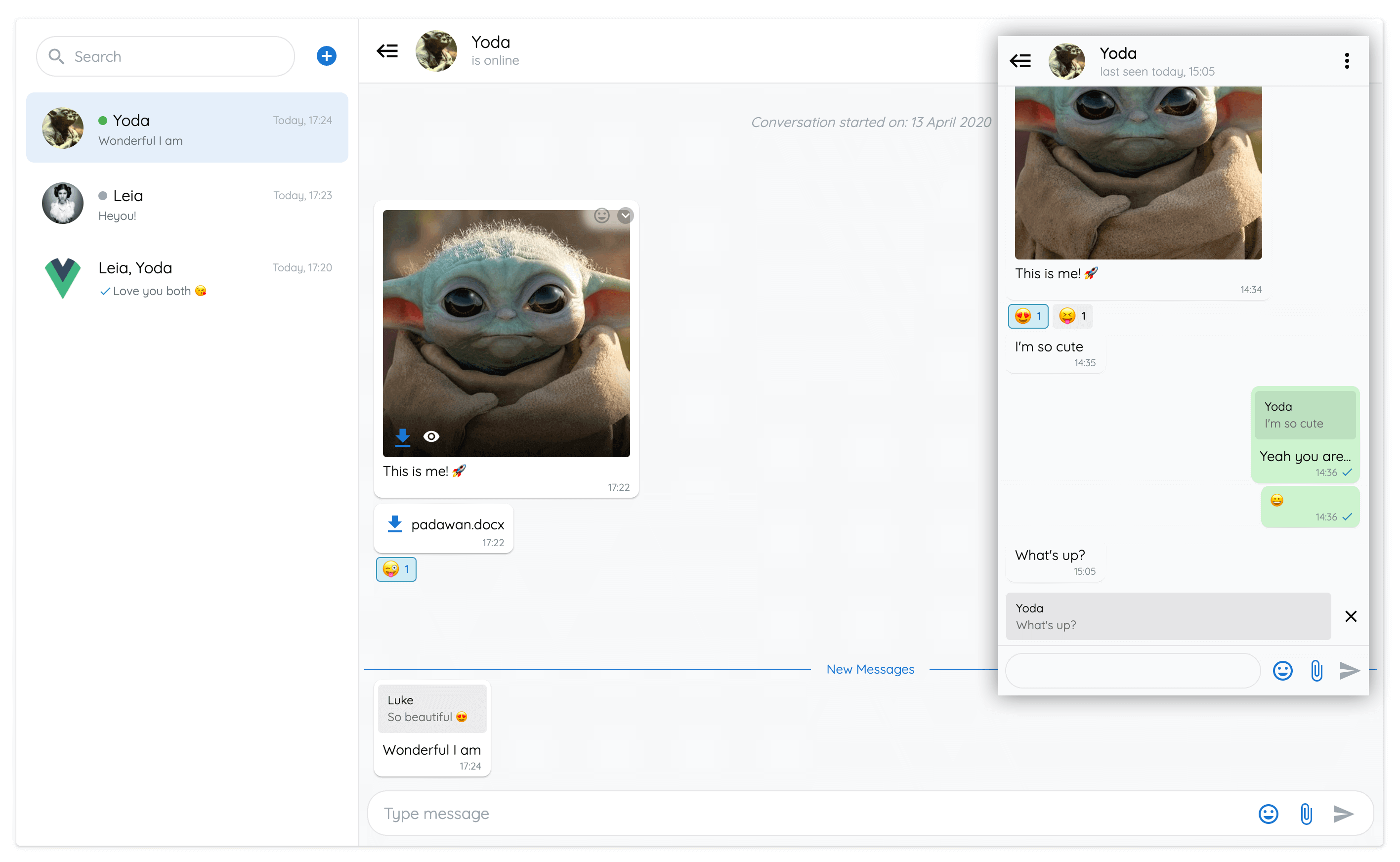
vue-advanced-chat 구성 요소의 모든 기능을 보여주는 점진적인 웹 응용 프로그램.
Firestore, Vuetify 및 Push 알림으로 제작되었습니다.
실제 예제 소스 코드에 대한 프리미엄 액세스를 받으려면 이메일로 저에게 연락하십시오.
웹 및 모바일 용으로 완전히 작동하는 채팅 애플리케이션이 제공됩니다.
 # Using npm
npm install --save vue-advanced-chat

# Using yarn
yarn add vue-advanced-chat

# Using CDN
< script src= " https://cdn.jsdelivr.net/npm/[email protected]/dist/vue-advanced-chat.umd.js " ></script > 구성 파일의 웹 구성 요소로 vue-advanced-chat 및 emoji-picker 등록하십시오.
compilerOptions: {
  isCustomElement : tagName => {
    return tagName === 'vue-advanced-chat' || tagName === 'emoji-picker'
  }
}
데모 : https://github.com/advanced-chat/vue-advanced-chat-sandbox/tree/main
데모 : https://github.com/advanced-chat/vue-advanced-chat-sandbox/tree/react
데모 : https://github.com/advanced-chat/vue-advanced-chat-sandbox/tree/angular
 < template >
  < vue-advanced-chat
    : current-user-id = "currentUserId"
    :rooms = "JSON.stringify(rooms)"
    : messages = "JSON.stringify(messages)"
    : room - actions = "JSON.stringify(roomActions)"
  / >
</ template >

< script >
  import { register } from 'vue-advanced-chat'
  register()

  // Or if you used CDN import
  // window['vue-advanced-chat'].register()

  export default {
    data ( ) {
      return {
        currentUserId : '1234' ,
        rooms : [ ] ,
        messages : [ ] ,
        roomActions : [
          { name : 'inviteUser' , title : 'Invite User' } ,
          { name : 'removeUser' , title : 'Remove User' } ,
          { name : 'deleteRoom' , title : 'Delete Room' }
        ]
      }
    }
  }
</ script > vue-advanced-chat 구성 요소는 성능 지향적이므로 특정 규칙을 따라 올바르게 작동하도록해야합니다.
push 메소드 대신 배열 할당을 사용하십시오 // DO THIS
const rooms = [ ]
for ( let i = 0 ; i < res . length ; i ++ ) {
rooms . push ( res )
}
this . rooms = rooms
// DON'T DO THIS
for ( let i = 0 ; i < res . length ; i ++ ) {
this . rooms . push ( res )
} // DO THIS
this . rooms [ i ] . typingUsers = [ ... this . rooms [ i ] . typingUsers , typingUserId ]
// DON'T DO THIS
this . rooms [ i ] . typingUsers . push ( typingUserId ) // DO THIS
this . rooms [ roomIndex ] = room
this . rooms = [ ... this . rooms ]
// DON'T DO THIS
this . rooms [ roomIndex ] = room
// AND DON'T DO THIS
this . rooms . push ( room )messagesLoaded 소품을 업데이트하여 UI로드 패턴을 따르십시오. fetchMessages ( { room , options } ) {
this . messagesLoaded = false
// use timeout to imitate async server fetched data
setTimeout ( ( ) => {
this . messages = [ ]
this . messagesLoaded = true
} )
} vue 3을 사용하는 경우 배열과 객체 소품을 정상적으로 통과 할 수 있습니다 : VUE 3에서 DOM 속성 전달
그렇지 않으면 해당 소품을 문자열로 전달해야합니다. 예 : [messages]="JSON.stringify(messages)"
소품 | 유형 | 필수의 | 기본 |
|---|---|---|---|
height | 끈 | - | 600px |
current-user-id (1) | 끈 | true | - |
rooms | [문자열, 배열] | - | [] |
rooms-order | desc / asc | - | desc |
loading-rooms (2) | 부울 | - | false |
rooms-loaded (3) | 부울 | - | false |
room-id (4) | 끈 | - | null |
load-first-room (5) | 부울 | - | true |
rooms-list-opened | 부울 | - | true |
custom-search-room-enabled (6) | 부울 | - | false |
messages | [문자열, 배열] | - | [] |
room-message (7) | 끈 | - | null |
username-options (8) | [문자열, 개체] | - | {minUsers: 3, currentUser: false} |
messages-loaded (9) | 부울 | - | false |
room-actions (10) | [문자열, 배열] | - | [] |
menu-actions (11) | [문자열, 배열] | - | [] |
message-actions (12) | [문자열, 배열] | - | (11) |
message-selection-actions (13) | [문자열, 배열] | - | (13) |
templates-text (14) | [문자열, 배열] | - | null |
auto-scroll (15) | [문자열, 개체] | - | { send: { new: true, newAfterScrollUp: true }, receive: { new: true, newAfterScrollUp: false } } |
show-search | 부울 | - | true |
show-add-room | 부울 | - | true |
show-send-icon | 부울 | - | true |
show-files | 부울 | - | true |
show-audio | 부울 | - | true |
audio-bit-rate | 숫자 | - | 128 |
audio-sample-rate | 숫자 | - | 44100 |
show-emojis | 부울 | - | true |
show-reaction-emojis | 부울 | - | true |
show-new-messages-divider (16) | 부울 | - | true |
show-footer (17) | 부울 | - | true |
text-messages (18) | [문자열, 개체] | - | null |
text-formatting (19) | [문자열, 개체] | - | {disabled: false, italic: '_', bold: '*', strike: '~', underline: '°', multilineCode: '```', inlineCode: ' '}` |
link-options (20) | [문자열, 개체] | - | { disabled: false, target: '_blank', rel: null } |
room-info-enabled (21) | 부울 | - | false |
textarea-action-enabled (22) | 부울 | - | false |
textarea-auto-focus | 부울 | - | true |
user-tags-enabled | 부울 | - | true |
emojis-suggestion-enabled | 부울 | - | true |
media-preview-enabled | 부울 | - | true |
responsive-breakpoint (23) | 숫자 | - | 900 |
single-room (24) | 부울 | - | false |
scroll-distance (25) | 숫자 | - | 60 |
theme (26) | light / dark | - | light |
accepted-files (27) | 끈 | - | * |
capture-files (28) | 끈 | - | '' |
multiple-files (29) | 부울 | - | true |
styles (30) | [문자열, 개체] | - | (26) |
show-audio (31) | 부울 | - | true |
emoji-data-source | 끈 | - | https://cdn.jsdelivr.net/npm/emoji-picker-element-data@%5E1/en/emojibase/data.json |
(1) current-user-id 채팅을 사용하는 사용자에 따라 UI를 표시하고 동작을 트리거해야합니다 (예 : 오른쪽의 메시지 위치 등).
(2) loading-rooms 방이 로딩되는 동안 스피너 아이콘을 보여 주거나 숨길 수 있습니다.
(3) 모든 객실이로드 된 경우 rooms-loaded true 되어야합니다. 사용자가 더 많은 페이지 진화 실을로드하기 위해 스크롤 할 수 없음을 의미합니다.
(4) room-id 언제든지 특정 방을로드하는 데 사용될 수 있습니다.
(5) load-first-room 사용하여 초기화시 첫 번째 방을 열는 기본 동작을 제거 할 수 있습니다.
(6) custom-search-room-enabled 사용하여 검색장 이벤트를 사용하여 자신의 방법을 호출하여 객실을 걸러 낼 수 있습니다.
(7) room-message 사용하여 기본 Textarea 값을 추가 할 수 있습니다.
(8) username-options 객실 내부의 최소 사용자 minUsers 수에 따라 방 메시지 사용자 이름을 표시/숨기는 데 사용될 수 있으며 메시지 사용자가 현재 사용자 currentUser 인 경우
(9) 대화의 모든 메시지가로드 된 경우 messages-loaded true 로 설정해야합니다. 사용자가 더 많은 페이지에 입은 메시지를로드하기 위해 위에 스크롤 할 수 없음을 의미합니다.
(10) room-actions 사용하여 객실 목록 내부의 각 객실의 드롭 다운 아이콘을 클릭 할 때 자신의 버튼을 표시하는 데 사용될 수 있습니다.
그런 다음 룸 액션 핸들러 이벤트를 사용하여 버튼을 클릭 한 후 자신의 작업을 호출 할 수 있습니다. 전:
 room - actions = "[
  {
    name : 'archiveRoom' ,
    title : 'Archive Room'
  }
] "
(11) menu-actions 사용하여 방 안에있는 수직 점 아이콘을 클릭 할 때 자신의 버튼을 표시하는 데 사용될 수 있습니다.
그런 다음 메뉴 액션 핸들러 이벤트를 사용하여 버튼을 클릭 한 후 자신의 작업을 호출 할 수 있습니다. 전:
 menu - actions = "[
  {
    name : 'inviteUser' ,
    title : 'Invite User'
  } ,
  {
    name : 'removeUser' ,
    title : 'Remove User'
  } ,
  {
    name : 'deleteRoom' ,
    title : 'Delete Room'
  }
] "
(12) message-actions 사용하여 메시지 내부의 드롭 다운 아이콘을 클릭 할 때 자신의 버튼을 표시하는 데 사용될 수 있습니다.
그런 다음 메시지 액션 핸들러 이벤트를 사용하여 버튼을 클릭 한 후 자신의 작업을 호출 할 수 있습니다. 전:
 message - actions = "[
  {
    name : 'addMessageToFavorite' ,
    title : 'Add To Favorite'
  } ,
  {
    name : 'shareMessage' ,
    title : 'Share Message'
  }
] "
내장 message-actions 이름을 사용하여 클릭하면 특정 UI 수정을 트리거 할 수 있습니다.
현재 replyMessage , editMessage 및 deleteMessage 조치 이름을 사용할 수 있습니다.
messageActions 설정되지 않은 경우 아래 기본값을 사용합니다.
이 messageActions 메뉴를 표시하지 않으려면 빈 배열을 전달할 수 있습니다.
 messageActions = "[
  {
    name : 'replyMessage' ,
    title : 'Reply'
  } ,
  {
    name : 'editMessage' ,
    title : 'Edit Message' ,
    onlyMe : true
  } ,
  {
    name : 'deleteMessage' ,
    title : 'Delete Message' ,
    onlyMe : true
  } ,
  {
    name : 'selectMessages' ,
    title : 'Select'
  }
] "
(13) message-selection-actions 위의 selectMessages 메시지 메시지 동작과 관련이있다. 메시지를 선택할 때 룸 헤더에 사용자 정의 작업 버튼을 표시하는 데 사용될 수 있습니다. 전:
 messageActions="[
  {
    name: 'deleteMessages',
    title: 'Delete'
  },
  {
    name: 'forwardMessages',
    title: 'Forward'
  }
]"
(14) templates-text 사용하여 / 텍스트를 입력 할 때 autocomplete 템플릿 텍스트를 추가 할 수 있습니다. 전:
 templatesText = "[
  {
    tag : 'help' ,
    text : 'This is the help'
  } ,
  {
    tag : 'action' ,
    text : 'This is the action'
  }
] "
(15) auto-scroll 메시지를 보내거나받을 때 자동 스크롤 동작을 변경하는 데 사용될 수 있습니다. 전:
 auto - scroll = "{
  send : {
    new : true , // will scroll down after sending a message
    newAfterScrollUp : false // will not scroll down after sending a message when scrolled up
  } ,
  receive : {
    new : false , // will not scroll down when receiving a message
    newAfterScrollUp : true // will scroll down when receiving a message when scrolled up
  }
} "
(16) show-new-messages-divider 보이지 않는 메시지와 보이지 않는 메시지 사이에 파란색 선 분배기를 표시/숨길 수 있습니다.
(17) show-footer 방 바닥 글을 숨기는 데 사용될 수 있습니다. 예를 들어 사용자가 메시지 나 미디어를 보내지 않도록합니다.
(18) text-messages 사용하여 기본 I18N 텍스트를 대체 할 수 있습니다. 전:
 text - messages = "{
  ROOMS_EMPTY : 'Aucune conversation' ,
  ROOM_EMPTY : 'Aucune conversation sélectionnée' ,
  NEW_MESSAGES : 'Nouveaux messages' ,
  MESSAGE_DELETED : 'Ce message a été supprimé' ,
  MESSAGES_EMPTY : 'Aucun message' ,
  CONVERSATION_STARTED : 'La conversation a commencée le :' ,
  TYPE_MESSAGE : 'Tapez votre message' ,
  SEARCH : 'Rechercher' ,
  IS_ONLINE : 'est en ligne' ,
  LAST_SEEN : 'dernière connexion ' ,
  IS_TYPING : 'est en train de taper...' ,
  CANCEL_SELECT_MESSAGE : 'Annuler Sélection'
} "
(19) text-formatting 사용하여 텍스트 형식을 추가 할 수 있습니다. 굵게, 이탤릭체, 스트라이크 로우, 밑줄, 인라인 코드 및 멀티 린 코드 형식을 사용할 수 있으며 함께 사용할 수 있습니다.
:text-formatting="{disabled: true}" .:text-formatting="{italic: '^'}" 변경할 수 있습니다.:text-formatting="{bold: null}" 비활성화 할 수 있습니다.| 스타일 | 통사론 | 예 | 산출 |
|---|---|---|---|
| 용감한 | * * | *This is bold text* | 이것은 대담한 텍스트입니다 |
| 이탤릭체 | _ _ | _This text is italicized_ | 이 텍스트는 이탤릭체입니다 |
| strikethrough | ~ ~ | ~This was mistaken text~ | |
| 밑줄 | ° ° | °This text is underlined° | 이 텍스트는 밑줄이 그어져 있습니다 |
| 중첩 형식 | * * 그리고 _ _ | *This text is _extremely_ important* | 이 텍스트는 매우 중요합니다 |
인라인 코드
예 :`이것은 인라인 코드입니다
출력 : This is inline code
다중 코드
예 :``이것은 멀티 라인 코드 '' '입니다
산출:
This is
multiline code
(20) link-options 사용하여 메시지에서 URL 링크를 비활성화하거나 URL 대상을 변경할 수 있습니다. 전:
: link - options = "{ disabled: true, target: '_self', rel: null }" (21) room-info-enabled 사용하여 룸 헤더 구성 요소를 클릭 한 후 이벤트를 트리거 할 수 있습니다.
그런 다음 Room-Info 이벤트를 사용하여 헤더를 클릭 한 후 자신의 작업을 호출 할 수 있습니다.
(22) textarea-action-enabled 사용하여 Textarea의 오른쪽에 추가 아이콘을 추가 할 수 있습니다.
그런 다음 Textarea-Action-Hander 이벤트를 사용하여 아이콘을 클릭 한 후 자신의 작업을 호출 할 수 있습니다.
(23) responsive-breakpoint 사용하여 뷰포트 크기가 지정된 너비 아래로 이동할 때 왼쪽의 객실 목록을 무너 뜨릴 수 있습니다.
(24) 왼쪽의 객실 목록을 표시하지 않으려면 single-room 사용할 수 있습니다. 여전히 rooms 소품을 단일 요소의 배열로 전달해야합니다.
(25) 더 많은 메시지를로드하기 위해 스크롤 할 때 fetchMessages 이벤트가 트리거되거나 더 많은 객실을로드하기 위해 스크롤 할 때 FetchMorerooms 이벤트가 트리거 될 때 fetchMoreRooms 이벤트가 트리거되기 전에 scroll-distance 사용하여 픽셀 수를 변경할 수 있습니다.
(26) theme 사용하여 채팅 테마를 변경할 수 있습니다. 현재는 light dark 것만 사용할 수 있습니다.
(27) accepted-files 채팅에서 허용되는 파일 유형을 설정하는 데 사용될 수 있습니다. 기본적으로 모든 파일 유형이 허용됩니다. "*" .
예 : set accepted-files="image/png, image/jpeg, application/pdf" JPG PNG 및 PDF 파일 만 허용합니다.
(28) capture-files 사용하여 이미 장치에있는 기존 사진 및 비디오를 업로드하는 것만 달리 모바일 브라우저에서 사진 및 비디오를 직접 캡처 할 수 있습니다. 자세한 정보 및 인식 된 값은 여기를 참조하십시오. 기본적으로 속성은 생략되며 모바일 브라우저는 사진과 비디오를 선택할 수있는 갤러리 만 제공합니다. 참고 : 파일 첨부 파일에만 영향을 미칩니다. 오디오 메시지는 항상 장치의 마이크를 사용하여 녹화됩니다.
(29) multiple-files 사용하여 다중 파일 선택이 허용되는지 정의 할 수 있습니다. 기본적으로 이것은 사실입니다.
(30) styles 사용하여 자신의 테마를 사용자 정의 할 수 있습니다. 여기에서 전체 목록을 찾을 수 있습니다
(31) show-audio 오디오 아이콘을 활성화 또는 비활성화하는 데 사용될 수 있습니다.
styles = "{
  general : {
    color : '#0a0a0a' ,
    colorSpinner : '#333' ,
    borderStyle : '1px solid #e1e4e8'
  } ,

  footer : {
    background : '#f8f9fa' ,
    backgroundReply : 'rgba(0, 0, 0, 0.08)'
  } ,

  icons : {
    search: '#9ca6af'
  }
} "소품은 특정 구조를 따라 방과 메시지를 올바르게 표시해야합니다.
 rooms = "[
  {
    roomId : '1' ,
    roomName : 'Room 1' ,
    avatar : 'assets/imgs/people.png' ,
    unreadCount : 4 ,
    index : 3 ,
    lastMessage : {
      _id : 'xyz' ,
      content : 'Last message received' ,
      senderId : '1234' ,
      username : 'John Doe' ,
      timestamp : '10:20' ,
      saved : true ,
      distributed : false ,
      seen : false ,
      new : true
    } ,
    users : [
      {
        _id : '1234' ,
        username : 'John Doe' ,
        avatar : 'assets/imgs/doe.png' ,
        status : {
          state : 'online' ,
          lastChanged : 'today, 14:30'
        }
      } ,
      {
        _id : '4321' ,
        username : 'John Snow' ,
        avatar : 'assets/imgs/snow.png' ,
        status : {
          state : 'offline' ,
          lastChanged : '14 July, 20:00'
        }
      }
    ] ,
    typingUsers : [ 4321 ]
  }
] "
index 속성을 추가하면이 값을 사용하여 객실이 주문됩니다. index string , datetime , timestamp 등과 같은 정렬 가능한 값 일 수 있습니다.
각 객실 사용자마다 state 및 lastChanged 속성을 보유 할 수있는 status 속성을 추가 할 수 있습니다.
state 'online' 또는 'offline' 일 수 있습니다.state 마지막으로 수정 lastChanged 날짜입니다. typingUsers 현재 메시지를 작성하는 모든 사용자의 배열입니다.
메시지 객체는 유형에 따라 다르게 렌더링됩니다. 텍스트, 이모티콘, 이미지, 비디오 및 파일 유형이 지원됩니다.
각 메시지 객체에는 해당 에이전트의 ID를 보유하는 senderId 필드가 있습니다. senderId currentUserId Prop과 일치하면 특정 UI 및 작업이 구현됩니다.
참고 :
username 표시됩니다.system 특정 중앙 디스플레이가있는 메시지를 표시하는 데 사용됩니다.indexId 사용할 수있어 애니메이션 결함이 방지됩니다. 예를 들어, 미리 알지 못하는 경우 메시지 ID가 백엔드가 생성됩니다.메시지 상태 :
saved: true One Checkmarkdistributed: true 두 개의 확인 표시seen: true 두 개의 파란색 확인 표시deleted: true 회색 배경failure: true 빨간색 클릭 가능 실패 아이콘 messages = "[
{
_id : '7890' ,
indexId : 12092 ,
content : 'Message 1' ,
senderId : '1234' ,
username : 'John Doe' ,
avatar : 'assets/imgs/doe.png' ,
date : '13 November' ,
timestamp : '10:20' ,
system : false ,
saved : true ,
distributed : true ,
seen : true ,
deleted : false ,
failure : true ,
disableActions : false ,
disableReactions : false ,
files : [
{
name : 'My File' ,
size : 67351 ,
type : 'png' ,
audio : true ,
duration : 14.4 ,
url : 'https://firebasestorage.googleapis.com/...' ,
preview : 'data:image/png;base64,iVBORw0KGgoAA...' ,
progress : 88
}
] ,
reactions : {
? : [
'1234' , // USER_ID
'4321'
] ,
? : [
'1234'
]
} ,
replyMessage : {
content : 'Reply Message' ,
senderId : '4321' ,
files : [
{
name : 'My Replied File' ,
size : 67351 ,
type : 'png' ,
audio : true ,
duration : 14.4 ,
url : 'https://firebasestorage.googleapis.com/...' ,
preview : 'data:image/png;base64,iVBORw0KGgoAA...'
}
]
} ,
}
] " 이벤트 | 매개 변수 | 사용자가 해고됩니다 |
|---|---|---|
fetch-messages (1) | { room, options } | 더 많은 메시지를로드하기 위해 위에 스크롤했습니다 |
fetch-more-rooms (2) | - | 더 많은 방을로드하기 위해 스크롤했습니다 |
send-message | { roomId, content, files(11), replyMessage(12), usersTag } | 메시지를 보냈습니다 |
edit-message | { roomId, messageId, newContent, files(11), replyMessage(12) ,usersTag } | 메시지를 편집했습니다 |
delete-message | { roomId, message } | 메시지를 삭제했습니다 |
open-file | { message, file } | 파일을 보거나 다운로드하려면 클릭했습니다 |
open-user-tag (3) | { user } | 메시지 내부의 사용자 태그를 클릭했습니다 |
open-failed-message | { roomId, message } | 메시지 옆에 실패 아이콘을 클릭했습니다 |
add-room | - | SearchBar 옆에있는 플러스 아이콘을 클릭했습니다 |
search-room (4) | { roomId, value } | 실내 검색 입력에 문자를 입력했습니다 |
room-action-handler (5) | { roomId, action } | 방 안에서 수직 점 아이콘을 클릭했습니다 |
menu-action-handler (6) | { roomId, action } | 방 안에서 수직 점 아이콘을 클릭했습니다 |
message-action-handler (7) | { roomId, action, message } | 메시지 내부의 드롭 다운 아이콘을 클릭했습니다 |
message-selection-action-handler (8) | { roomId, action, messages } | 메시지 내부의 선택 버튼을 클릭했습니다 |
send-message-reaction | { roomId, messageId, reaction, remove } | 메시지 내부의 이모티콘 아이콘을 클릭했습니다 |
room-info (9) | room | 룸 헤더 바를 클릭했습니다 |
toggle-rooms-list | { opened } | 객실 헤더 내부의 토글 아이콘을 클릭했습니다 |
textarea-action-handler (10) | { roomId, message } | 바닥 글 내부의 사용자 정의 아이콘을 클릭했습니다 |
typing-message | { roomId, message } | 메시지 입력을 시작했습니다 |
(1) 방이 열릴 때마다 fetch-messages 트리거됩니다. 방이 처음 열리면 options 매개 변수가 reset: true .
(1) fetch-messages 페이지 매김 시스템을 구현하는 방법이어야합니다. 그 목적은 사용자가 맨 위에 스크롤 할 때 대화의 오래된 메시지를로드하는 것입니다.
(2) 객실 목록 아래로 스크롤 할 때 fetch-more-rooms 트리거되며 페이지 매김 시스템을 구현하는 방법이어야합니다.
(3) 메시지 내에서 사용자 태그를 클릭하면 open-user-tag 트리거됩니다. 바닥 글 래스 테어에서 @ 입력하여 메시지를 보내서 사용자 태그를 만들 때 태그는 아래 패턴으로 식별됩니다.
< usertag > TAGGED_USER_ID </ usertag > 이것은 메시지 내부에서 태그를 클릭 할 수있게합니다. 예 : 메시지 태그 내용
send-message 및 edit-message 이벤트는 해당 패턴을 처리하여 content Param에 전달합니다.
(4) room-action-handler room-actions 소품의 결과입니다.
room-actions 배열에서 버튼을 클릭하면 room-action-handler 클릭 한 버튼의 이름을 제공합니다. 그런 다음 원하는 것을 할 수 있습니다. 전:
 menuActionHandler ( { roomId , action } ) {
  switch ( action . name ) {
    case 'archiveRoom' :
      // call a method to archive the room
  }
}
(5) menu-action-handler menu-actions 소품의 결과입니다.
menu-actions 배열에서 버튼을 클릭하면 menu-action-handler 클릭 한 버튼의 이름을 제공합니다. 그런 다음 원하는 것을 할 수 있습니다. 전:
 menuActionHandler ( { roomId , action } ) {
  switch ( action . name ) {
    case 'inviteUser' :
      // call a method to invite a user to the room
    case 'removeUser' :
      // call a method to remove a user from the room
    case 'deleteRoom' :
      // call a method to delete the room
  }
}
(6) custom-search-room-enabled 소품을 사용하여 search-room 활성화 할 수 있습니다. 이를 통해 검색 된 방을 걸러 내기 위해 자신의 방법을 호출 할 수 있습니다.
(7) message-action-handler message-actions 소품의 결과입니다.
message-actions 배열에서 버튼을 클릭하면 message-action-handler 클릭 한 버튼의 이름과 해당 메시지 데이터를 제공합니다. 그런 다음 원하는 것을 할 수 있습니다. 전:
 messageActionHandler ( { roomId , action , message } ) {
  switch ( action . name ) {
    case 'addMessageToFavorite' :
      // call a method to add a message to the favorite list
    case 'shareMessage' :
      // call a method to share the message with another user
  }
}
(8) message-selection-action-handler message-selection-actions 소품의 결과입니다.
message-selection-actions 배열에서 버튼을 클릭하면 message-selection-action-handler 클릭 한 버튼의 이름과 해당 선택된 메시지 데이터를 제공합니다. 그런 다음 원하는 것을 할 수 있습니다. 전:
 messageSelectionActionHandler ( { roomId , action , message } ) {
  switch ( action . name ) {
    case 'deleteMessages' :
      // call a method to delete selected messaged
    case 'shareMessage' :
      // call a method to share selected messaged with another user
  }
}
(9) room-info room-info-enabled 소품의 결과입니다.
(10) textarea-action-handler textarea-action-enabled Prop의 결과입니다.
(11) 각 파일이 포함 된 파일 배열 : { blob, localUrl, name, size, type, extension }
(12) replyMessage 객체는 사용자가 해당 아이콘을 클릭하여 다른 메시지에 응답 할 때 사용할 수 있으며 클릭 한 메시지 정보가 포함되어 있습니다.
예:
 < vue-advanced-chat >
  < div slot = "room-header" >
    This is a new room header
  </ div >

  < div v-for = "message in messages" : slot = "'message_' + message._id" >
    < div v-if = "message.system" >
      System message: { { message . content } }
    </ div >
    < div v-else >
      Normal message: { { message . content } }
    </ div >
  </ div >

  < div v-for = "message in messages" : slot = "'message-avatar_' + message._id" >
    New Avatar
  </ div >
</ vue-advanced-chat >
슬롯 | 행동 |
|---|---|
custom-action-icon | 바닥 글 내부에 사용자 정의 아이콘을 추가하십시오 |
rooms-header | 객실 목록 위에 템플릿 추가 (검색 창 위) |
room-list-item_{{ROOM_ID}} | 룸 목록 항목의 템플릿을 교체하십시오 |
room-list-info_{{ROOM_ID}} | 룸 목록 항목의 정보를 교체하십시오 |
room-list-avatar_{{ROOM_ID}} | 객실 목록 항목의 아바타를 교체하십시오 |
room-list-options_{{ROOM_ID}} | 목록 룸 옵션의 템플릿을 교체하십시오 |
room-list-options-icon_{{ROOM_ID}} | 룸 목록 옵션 드롭 다운 아이콘을 교체하십시오 |
rooms-header | 검색 창 위의 내용을 교체하십시오 |
rooms-list-search | 검색 표시 줄을 교체하십시오 |
room-header | 룸 헤더의 템플릿을 교체하십시오 |
room-header-avatar | 객실 헤더 아바타의 템플릿을 교체하십시오 |
room-header-info | 룸 헤더 텍스트의 템플릿을 교체하십시오 |
room-options | 객실 옵션의 템플릿을 교체하십시오 |
message_{{MESSAGE_ID}} | 메시지 (및 시스템 메시지) 상자의 템플릿 교체 |
message-avatar_{{MESSAGE_ID}} | 메시지 아바타의 템플릿을 교체하십시오 |
message-failure_{{MESSAGE_ID}} | 메시지 실패 아이콘을 바꾸십시오 |
messages-empty | 빈 메시지 템플릿을 교체하십시오 |
rooms-empty | 빈 방 템플릿을 교체하십시오 |
no-room-selected | 방송되지 않은 템플릿을 교체하십시오 |
menu-icon | 객실 메뉴 아이콘을 교체하십시오 |
toggle-icon | 토글 룸 목록 아이콘을 교체하십시오 |
spinner-icon-rooms | 객실 목록의 로딩 스피너 아이콘을 교체하십시오 |
spinner-icon-infinite-rooms | 로딩 스피너 아이콘을 교체하여 더 많은 객실을로드하십시오 |
spinner-icon-messages | 방의 로딩 스피너 아이콘을 교체하십시오 |
spinner-icon-infinite-messages | 로드 스피너 아이콘을 교체하여 더 많은 메시지를로드하십시오 |
spinner-icon-room-file | 로드 스피너 아이콘을 교체하여 무거운 파일을로드하십시오 |
spinner-icon-message-file_{{MESSAGE_ID}} | 이미지가 포함 된 메시지에서 로딩 스피너 아이콘을 교체 |
scroll-icon | 스크롤을 최신 메시지 아이콘으로 바꾸십시오 |
reply-close-icon | 응답 닫기 아이콘을 바꾸십시오 |
image-close-icon | 이미지를 닫는 아이콘을 바꾸십시오 |
file-icon | 파일 아이콘을 바꾸십시오 |
files-close-icon | 파일을 닫는 아이콘을 바꾸십시오 |
edit-close-icon | 닫기 아이콘 편집을 교체하십시오 |
preview-close-icon | 미디어 미리보기 닫기 아이콘을 교체하십시오 |
emoji-picker-icon | 이모티콘 피커 아이콘을 교체하십시오 |
emoji-picker-reaction-icon_{{MESSAGE_ID}} | 이모티콘 피커 반응 아이콘 교체 (메시지 상자에) |
paperclip-icon | 클립 아이콘을 교체하십시오 |
send-icon | 메시지 보내기 아이콘을 바꾸십시오 |
eye-icon_{{MESSAGE_ID}} | 눈 아이콘 교체 (이미지 메시지) |
document-icon_{{MESSAGE_ID}} | 문서 아이콘을 바꾸십시오 |
pencil-icon_{{MESSAGE_ID}} | 연필 아이콘을 교체하십시오 |
checkmark-icon_{{MESSAGE_ID}} | 메시지의 확인 표시 아이콘을 교체하십시오 |
checkmark-icon_{{ROOM_ID}} | 객실 목록에서 메시지의 확인 표시 아이콘 교체 |
deleted-icon_{{MESSAGE_ID}} | 메시지의 삭제 된 아이콘을 교체하십시오 |
deleted-icon_{{ROOM_ID}} | 객실 목록에서 메시지의 삭제 된 아이콘 교체 |
microphone-icon_{{ROOM_ID}} | 마이크 아이콘을 교체하십시오 |
dropdown-icon_{{MESSAGE_ID}} | 드롭 다운 아이콘을 교체하십시오 |
search-icon | 검색 아이콘을 바꾸십시오 |
add-icon | 객실 추가 아이콘을 교체하십시오 |
audio-stop-icon | 오디오 레코더 중지 아이콘을 교체하십시오 |
audio-check-icon | 오디오 레코더 확인 아이콘을 교체하십시오 |
audio-pause-icon_{{MESSAGE_ID}} | 메시지 오디오 일시 정지 아이콘을 교체하십시오 |
audio-play-icon_{{MESSAGE_ID}} | 메시지 오디오 재생 아이콘을 교체하십시오 |
demo 폴더 내부에서 FireBase/Firestore를 사용하여 전체 추천 채팅 앱을 구현할 소스 코드를 찾을 수 있습니다.
자신의 Firebase 프로젝트를 사용하여 테스트하려면 :
git clone https://github.com/advanced-chat/vue-advanced-chat.git 하십시오demo/src/database/index.js 파일 내부 내면 const config = ... 자신의 FireBase Config로 교체하십시오.demo 폴더 안으로 들어가 npm run serve 실행하십시오 demo 폴더와 동일한 코드를 사용하여 채팅 앱을 만들기로 결정한 경우 특정 Firestore 데이터 구조가 있어야합니다.
시작하는 데 도움을주기 위해 demo/src/App.vue 추가하여 메소드 addData 추가하여 Firestore 데이터베이스의 일부 데이터를 초기화합니다.
users: {
  USER_ID_1 : {
    _id : '1' ,
    username : 'User 1'
  } ,
  USER_ID_2 : {
    _id : '2' ,
    username : 'User 2'
  } ,
  USER_ID_3 : {
    _id : '3' ,
    username : 'User 2'
  }
} chatRooms: {
ROOM_ID_1 : {
users : [ '1' , '3' ]
} ,
ROOM_ID_2 : {
users : [ '1' , '2' , '3' ]
}
} messages: {
MESSAGE_ID_1 : {
content : 'My first message to <usertag>John</usertag>' ,
senderId : '2' ,
timestamp : 'December 11, 2019 at 4:00:00 PM' ,
seen : true
}
} 당신의 도움은 항상 감사합니다
이 프로젝트는 MIT 라이센스에 따라 라이센스가 부여됩니다







