react native zss rich text editor
1.0.0

基於ZSSrichTextEditor項目的Android和iOS功能齊全的富文本編輯器。
npm i --save react-native-zss-rich-text-editor
在Android上,將以下內容添加到android/app/build.gradle的末尾
project . afterEvaluate {
    apply from : ' ../../node_modules/react-native-zss-rich-text-editor/htmlCopy.gradle ' ;
    copyEditorHtmlToAppAssets(file( ' ../../node_modules/react-native-zss-rich-text-editor ' ))
}另外,請按照此處的說明添加本機react-native-webview-bridge-updated依賴性。
react-native-zss-rich-text-editor導出了兩個組件和一個const字典:
RichTextEditor編輯器組件。只需將此組件放在視圖層次結構中即可接收功能齊全的豐富文本編輯器。
RichTextEditor採用以下可選道具:
initialTitleHTML
html將在組件加載後立即在標題部分渲染。
initialContentHTML
HTML將在“負載”內容部分呈現。
titlePlaceholder
當標題部分中不存在文本時,將用作佔位符的文本。
contentPlaceholder
當內容部分中不存在文本時,將用作佔位符的文本。
customCSS
您要注入編輯器的任何自定義CSS樣式。
editorInitializedCallback
初始化編輯器時將調用的函數。
RichTextEditor還具有可以在ref上使用的方法,以在當前選擇或光標位置設置樣式:
setBold()setItalic()setUnderline()heading1()heading2()heading3()heading4()heading5()heading6()setParagraph()removeFormat()alignLeft()alignCenter()alignRight()alignFull()insertBulletsList()insertOrderedList()insertLink(url, title)updateLink(url, title)insertImage(attributes)setSubscript()setSuperscript()setStrikethrough()setHR()setIndent()setOutdent()setBackgroundColor(color)setTextColor(color)此方法顯示了一個用於設置鏈接標題和URL的對話框,該對話框將插入當前光標位置。
showLinkDialog(optionalTitle = '', optionalUrl = '')要調整內容,佔位符或CSS,請使用這些方法
setTitlePlaceholder(placeholder)setContentPlaceholder(placeholder)setCustomCSS(css)setTitleHTML(html)setContentHTML(html)當添加內容將與光標位置添加的內容(例如圖像或鏈接)時,使用這些方法。 prepareInsert保存當前選擇,並在完成插入後將restoreSelection替換。它是通過insertImage和insertLink隱式稱為的,因此可能永遠不應直接調用它們。
prepareInsert()restoreSelection()要獲取內容或標題HTML,請使用這些異步方法。
async getTitleHtml()async getTitleText()async getContentHtml()async getSelectedText()要聚焦或模糊部分,請使用這些方法
focusTitle()focusContent()blurTitleEditor()blurContentEditor()要知道標題或內容何時焦點,請使用以下方法。
setTitleFocusHandler(callbackHandler)setContentFocusHandler(callbackHandler)此方法會在光標位置更改或更改光標位置的編輯器樣式時會被調用的函數,該函數將通過在Cusor位置處於活動狀態的一系列actions ,使工具欄對更改做出響應。
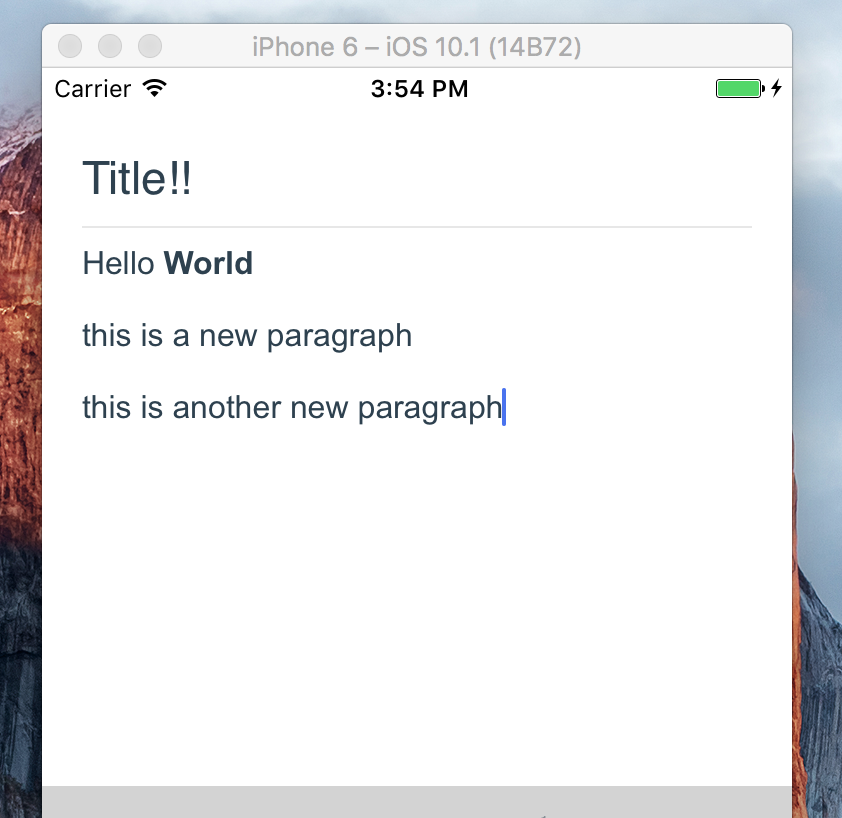
registerToolbar(listener) < RichTextEditor
ref = { ( r ) => this . richtext = r }
initialTitleHTML = { 'Title!!' }
initialContentHTML = { 'Hello <b>World</b> <p>this is a new paragraph</p> <p>this is another new paragraph</p>' }
editorInitializedCallback = { ( ) => this . onEditorInitialized ( ) }
/> 
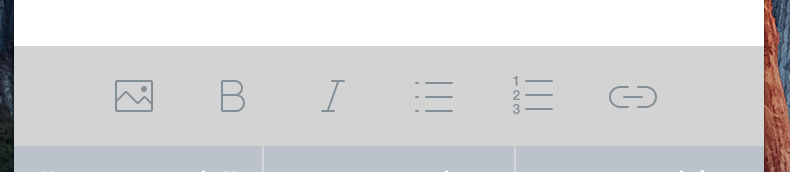
RichTextToolbar這是一個組件,可提供用於輕鬆控制編輯器的工具欄。它旨在與RichTextEditor組件一起使用。
RichTextToolbar擁有一個必需的財產:
getEditor()必須提供一個函數,該函數將ref返回到RichTextEditor組件。
這是因為ref直到第一個渲染之後才創建,在此之前渲染了工具欄。這意味著直接通過的任何ref都將不可避免地通過undefined 。
RichTextToolbar組件支持的其他道具是:
actions
該工具欄提供的array actions 。默認操作是:
actions.insertImageactions.setBoldactions.setItalicactions.insertBulletsListactions.insertOrderedListactions.insertLink onPressAddLink
onPressAddImage
攻擊addLink或addImage動作時調用的函數。
selectedButtonStyle
iconTint
selectedIconTint
unselectedButtonStyle
這些提供了造型操作按鈕的選項。
renderAction
明顯地,您可以提供將使用的渲染函數而不是默認功能,因此您可以完全控制收費表設計。
iconMap
RichTextToolbar帶有默認圖標,用於其呈現的默認操作。要覆蓋這些,或添加用於非默認操作的圖標,請在此道具的字典中提供它們。
 < RichTextToolbar
	getEditor = { ( ) => this . richtext }
/> 
actions這是所有受支持的動作的一組。這些將在數組中將其傳遞給使用registerToolbar()方法在編輯器註冊的所有回調。
 {
	setTitleHtml: 'SET_TITLE_HTML',
  	setContentHtml: 'SET_CONTENT_HTML',
  	getTitleHtml: 'GET_TITLE_HTML',
  	getTitleText: 'GET_TITLE_TEXT',
 	getContentHtml: 'GET_CONTENT_HTML',
  	getSelectedText: 'GET_SELECTED_TEXT',
  	blurTitleEditor: 'BLUR_TITLE_EDITOR',
  	blurContentEditor: 'BLUR_CONTENT_EDITOR',
  	focusTitle: 'FOCUS_TITLE',
  	focusContent: 'FOCUS_CONTENT',

  	setBold: 'bold',
  	setItalic: 'italic',
  	setUnderline: 'underline',
  	heading1: 'h1',
  	heading2: 'h2',
  	heading3: 'h3',
  	heading4: 'h4',
  	heading5: 'h5',
  	heading6: 'h6',
  	setParagraph: 'SET_PARAGRAPH',
  	removeFormat: 'REMOVE_FORMAT',
  	alignLeft: 'justifyLeft',
  	alignCenter: 'justifyCenter',
  	alignRight: 'justifyRight',
  	alignFull: 'justifyFull',
  	insertBulletsList: 'unorderedList',
  	insertOrderedList: 'orderedList',
  	insertLink: 'INST_LINK',
  	updateLink: 'UPDATE_LINK',
  	insertImage: 'INST_IMAGE',
  	setSubscript: 'subscript',
  	setSuperscript: 'superscript',
  	setStrikethrough: 'strikeThrough',
  	setHR: 'horizontalRule',
  	setIndent: 'indent',
  	setOutdent: 'outdent',
  	setTitlePlaceholder: 'SET_TITLE_PLACEHOLDER',
  	setContentPlaceholder: 'SET_CONTENT_PLACEHOLDER',
  	setTitleFocusHandler: 'SET_TITLE_FOCUS_HANDLER',
  	setContentFocusHandler: 'SET_CONTENT_FOCUS_HANDLER',
  	prepareInsert: 'PREPARE_INSERT',
  	restoreSelection: 'RESTORE_SELECTION',
  	setCustomCSS: 'SET_CUSTOM_CSS',
  	setTextColor: 'SET_TEXT_COLOR',
  	setBackgroundColor: 'SET_BACKGROUND_COLOR',
}
react-native-zss-rich-text-editor是圍繞令人驚嘆的ZssrichTexteditor項目的包裝。它還使用Awesome React-Native-Native-webview-Bridge項目的(小叉)與編輯器進行通信。






