laravel form components
vel 10 support (#28)

節省時間並利用一組動態,即時使用和完全可定制的表單組件。
組件是LiveWire兼容的,可以與以下UI框架一起使用:
發現此包裝有幫助嗎?請考慮支持我的工作!
| 拉拉維爾 | Livewire | php | 包裹 |
|---|---|---|---|
| ^9.0 | ^10.0 | ^2.0 | 8.1。 * | 8.2。 * | ^1.2 |
| ^8.0 | ^9.0 | ^2.0 | ^8.1 | ^8.2 | ^1.1 |
| ^8.0 | ^9.0 | ^2.0 | ^8.0 | ^8.1 | ^1.0 |
只需調用您在視圖中需要的組件,然後讓此軟件包負責HTML生成的耗時部分。
< x:form::form class = " row " method = " PUT " :action = " route('user.update', $user) " :bind = " $user " >
    < div class = " col-md-6 " >
        < x:form::input name = " name " />
        < x:form::input type = " email " name = " email " />
        < x:form::textarea name = " biography " :locales = " ['fr', 'en'] " />
    </ div >
    < div class = " col-md-6 " >
        < x:form::select name = " hobbies " :options = " [1 => 'Sport', 2 => 'Cinema', 3 => 'Literature', 4 => 'Travel'] " caption = " Select your favorite hobbies. " multiple />
        < x:form::checkbox name = " technologies " :group = " [1 => 'Laravel', 2 => 'Bootstrap', 3 => 'Tailwind', 4 => 'Livewire'] " inline />
        < x:form::radio name = " gender " :group = " [1 => 'Male', 2 => 'Female', 3 => 'Other'] " inline />
        < x:form::toggle-switch name = " active " />
    </ div >
    < div class = " col-12 mt-2 " >
        < x:form::button .link class = " btn-secondary me-3 " > {{ __ ( ' Cancel ' ) } } </ x:form::button .link >
        < x:form::button .submit />
    </ div >
</ x:form:form >
並顯示這些組件:
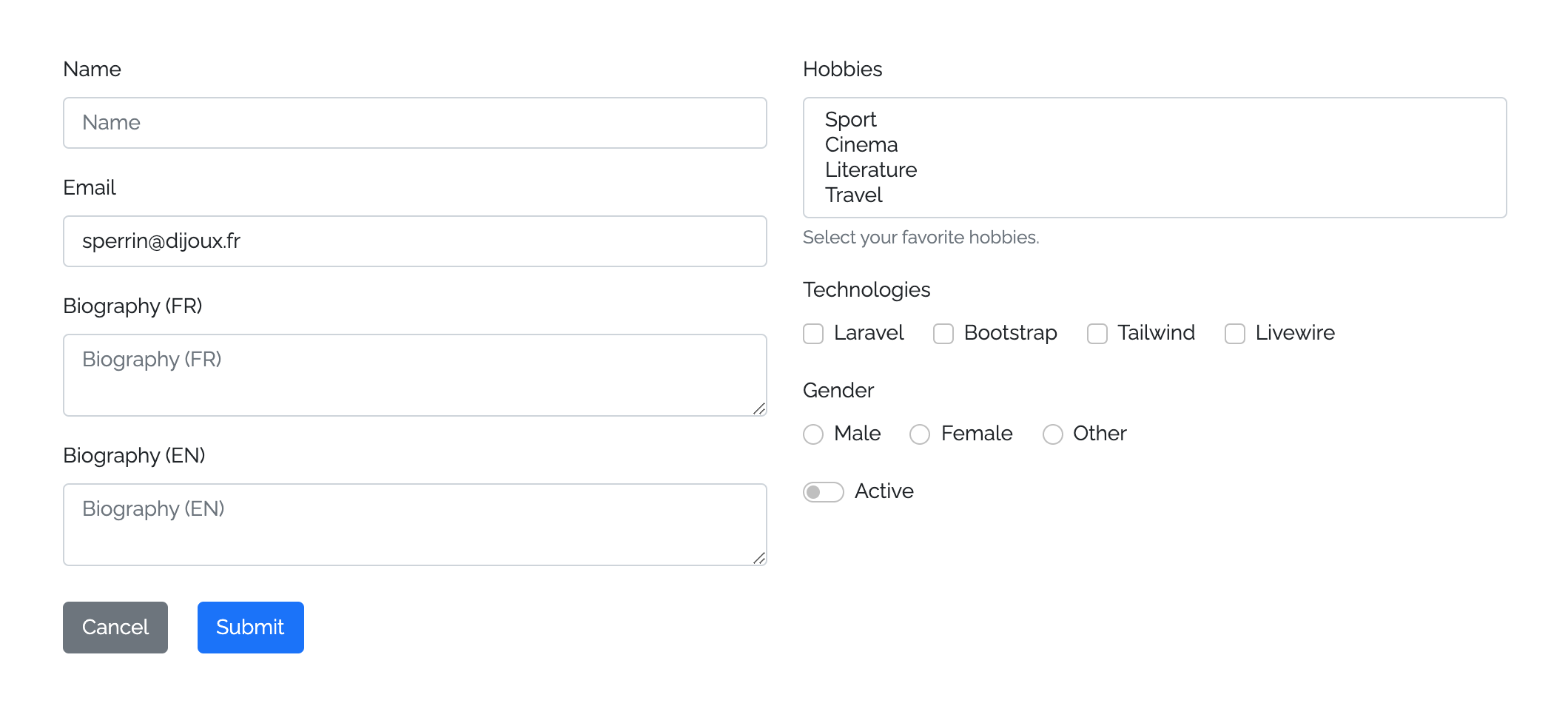
您可以通過作曲家安裝軟件包:
composer require okipa/laravel-form-components您可以使用以下方式發布配置文件
php artisan vendor:publish --tag=form-components:config在其配置中,此軟件包允許您選擇使用哪個UI框架。
請注意,在使用此軟件包之前,您必須安裝和配置要使用的UI框架。
您可以在必要時發佈軟件包視圖以自定義:
php artisan vendor:publish --tag=form-components:views組件可以包裝到形式組件中。
如果未設置自定義方法,則將默認設置GET方法。
根據定義的表單方法,將在需要時自動生成隱藏的CSRF和欺騙方法字段:
@method()指令,直接在action屬性中聲明您的PUT , PATCH或DELETE操作@csrf()指令,它將通過POST , PUT , PATCH和DELETE操作自動聲明表格是用默認的novalidate HTML屬性生成的,該屬性阻止瀏覽器驗證以支持服務器端驗證(這是安全事項的好實踐)。
< x:form::form method = " PUT " >
    < x:form::input name = " first_name " />
    ...
</ x:form::form >將輸入和textarea添加到您的表格中。
如果您不將自定義類型設置為輸入,則將使用默認的text類型。
收音機,複選框和按鈕輸入必須與自己的組件一起使用,因為它們的行為不同。
TextArea組件可以與輸入組件相同,但不聲明類型。
< x:form::input type = " file " name = " avatar " />
< x:form::input name = " first_name " />
< x:form::input type = " email " name = " email " />
...
< x:form::textarea name = " description " />在您的表格中設置選擇組件。
通過提供關聯值/標籤數組來生成選項。
html選擇元素本來不接受佔位符屬性,但是選擇組件允許您處理佔位符的選項。該佔位符將表現為其他組成部分。
默認情況下,選擇,禁用和隱藏此選擇的佔位符選項。但是,如果您需要設置一個nullable字段,則可以允許選擇它。為此,只需將allowPlaceholderToBeSelected屬性添加到您的組件中即可。
在多種模式下,此軟件包將注意將名稱轉換為數組名稱,因此您不必手動添加它。
 @php ( $options = [ 1 => ' Laravel ' , 2 => ' Bootstrap ' , 3 => ' Tailwind ' , 4 => ' Livewire ' ] )
< x:form::select name = " hobby " placeholder = " What is your hobby prefered hobby? " :options = " $options " selected = " 1 " />
< x:form::select name = " hobbies " :options = " $options " :selected = " [2, 3] " allowPlaceholderToBeSelected multiple /> {{-- You'll be able to selected the placeholder and the name will be converted to hobbies[] --}}可以使用複選框,切換開關和無線電組件。
由於無線電輸入永遠不會單獨使用,因此您必須在使用它們時聲明所需的group屬性,等待一個值/標籤的關聯數組,從中生成無線電字段。
關於復選框和切換開關輸入,您可以在單個或組模式下使用它們。要在組模式下使用它們,您也必須聲明一個group屬性。
在組模式下,此軟件包將注意將名稱轉換為數組名稱,因此您不必手動添加它。
如果要在線顯示這些輸入組件,只需定義一個inline屬性即可。
< x:form::checkbox name = " newsletter_subscription " :checked = " true " /> {{-- 1 generated checkbox --}}
< x:form::checkbox name = " technologies " :group = " ['laravel' => 'Laravel', 'bootstrap' => 'Bootstrap'] " :checked = " laravel " /> {{-- 2 generated checkboxes --}}
< x:form::toggle-switch name = " active " :checked = " false " inline /> {{-- 1 generated toggle switch with inline mode --}}
< x:form::toggle-switch name = " technologies " :group = " ['tailwind' => 'Tailwind', 'livewire " => 'Livewire']" :checked="livewire"/> {{-- 2 generated toggle switches --}}
< x:form::radio name = " gender " :group = " ['female' => 'Female', 'male' => 'Male'] " :checked = " male " inline /> {{-- 2 generated radios with inline mode --}}提交和鏈接按鈕組件可用。
提交按鈕允許您觸發表格,如果沒有定義,則將提供默認的__('Submit')主體。
鏈接按鈕允許您通過提供類似按鈕的顯示器提供鏈接來設置Back的操作或Cancel表格中的操作。由於此組件是HTML鏈接,因此它將通過分析其身體來提供默認標題。
默認情況下,如果未定義自定義類屬性,則兩個組件將設置基本背景顏色。
< x:form::form >
    ...
    < div class = " d-grid " >
        < x:form::button .submit >Submit this form</ x:form::submit > {{-- Will provide `btn-primary` class with Bootstrap UI --}}
        < x:form::button .link class = " btn-secondary " href = " {{ back () } } " > {{-- Will auto-generate `title="Back"` --}}
            < i class = " fas fa-undo fa-fw " ></ i >
            Back
        </ x:form::submit >
    </ div >
</ x:form::form >提供的組件是使用刀片組件構建的。
按照刀片組件的工作方式,您可以設置任何HTML屬性和類:
像對任何HTML元素一樣定義組件ID。
如果未設置自定義ID,則將使用烤肉箱殼<type>-<name>值生成一個ID。
< x:form::input id = " custom-id " name = " first_name " /> {{-- Default id: `input-first-name` --}}

< x:form::textarea id = " custom-id " name = " first_name " /> {{-- Default id: `textarea-first-name` --}}默認情況下,所有輸入組件都將聲明底部邊距,以便以形式正確定位自己。
有時您需要禁用此默認的底部邊距:您可以通過將marginBottom屬性設置為false來做到這一點。
< x:form::input name = " first_name " /> {{-- Will declare a bottom margin --}}

< x:form::textarea name = " first_name " :marginBottom = " false " /> {{-- Will not declare any bottom margin --}}您可以在所有輸入組件(無線電除外)上定義標籤。
如果未定義自定義標籤,標籤將採用__('validation.attributes.<name>)默認值。
遵循相同的行為,所有允許使用placeholder的輸入組件(包括選擇)將提供一個默認佔位符,以佔據label值。
您可以通過設置自定義佔位符來覆蓋此默認值。
您還可以將自動生成的標籤和占位符隱藏為false 。
< x:form::input name = " first_name " label = " First Name " placeholder = " Please fill your first name... " /> {{-- Will display the custom label and placeholder --}}
< x:form::input name = " last_name " :label = " false " :placeholder = " false " /> {{-- Will hide the label and placeholder --}}
< x:form::input type = " tel " name = " phone_number " /> {{-- Will display default auto-generated label and placeholder --}}此軟件包允許您啟用或禁用顯示浮動標籤。
您可以使用config('form-components.floating_label')配置設置全局浮動標籤行為。
對於所有包含的組件,您將能夠以形式級別覆蓋這種全局行為。
< x:form::form :floatingLabel = " true " >
    < x:form::input name = " first_name " /> {{-- Will display a floating label even if it has been disabled in config --}}
</ x:form::form >
最後,您還可以覆蓋組件本身上所有其他定義的行為。
< x:form::input name = " first_name " :floatingLabel = " true " />您可以在輸入和TextAarea組件上定義prepend並append HTML附加組件。
    < x:form::input name = " " prepend = " <i class= " fas fa-code fa-fw " ></i> " />
    < x:form::input name = " search " append = " <i class= " fas fa-search fa-fw " ></i> " />
注意:您可以直接使用HTML而不是組件進行複雜的插件管理。
您可以綁定雄辯的模型,對象,集合或數組,以自動填充綁定的組件值。
形式組件上的綁定數據將觸發其所有包含組件的結合。
您可以將數據直接綁定在組件上,並覆蓋形式的綁定。
如果發生驗證誤差,則組件將由覆蓋界值的舊值重新填充。
對於特定用例,您還可以使用@bind($boundDataBatch)和@endbind刀片指令來綁定一組組件。
 @php
    $dataBatch1 = [ ' description ' => ' A wonderful description ' ];
    $dataBatch2 = [ ' first_name ' => ' John ' , ' last_name ' => ' Bonham ' ];
@endphp
< x:form::form :bind = " $user " >
    < x:form::input type = " email " name = " email " /> {{-- Will set the value from `$user->email` --}}
    < x:form::textarea name = " description " :bind = " $dataBatch1 " /> {{-- Will set the value from `$dataBatch1['description`] --}}
    @bind ( $dataBatch2 )
        < x:form::input name = " first_name " /> {{-- Will set the value from `$dataBatch2['first_name`] --}}
        < x:form::input name = " last_name " /> {{-- Will set the value from `$dataBatch2['last_name`] --}}
    @endbind
</ x:form::form >可以通過在組件上設置自定義值來覆蓋數據綁定。
 @php ( $data = [ ' description ' => ' A wonderful description ' ]; )
< x:form::form :bind = " $user " >
    ...
    < x:form::textarea
        name = " description "
        :bind = " $user "
        :value = " $data['description'] " /> {{-- Will set the value from `$data['description`] --}}
</ x:form::form >觸發驗證錯誤時,組件將能夠顯示或隱藏其成功/錯誤狀態和錯誤消息:
您可以在不同層面控制此行為:
config('form-components.display_validation_success')和config('form-components.display_validation_failure')定義全局默認行為< x:form::form displayValidationSuccess = " false " displayValidationFailure = " false " >
< x:form::input type = " email " name = " email " /> {{-- Disabled success/error statuses and error message --}}
< x:form::textarea
name = " description "
displayValidationSuccess = " true "
displayValidationFailure = " true " /> {{-- Enabled success/error statuses and error message --}}
</ x:form::form >您還可以自定義錯誤的錯誤袋,該錯誤袋應用於確定組件上的組件成功/錯誤狀態和錯誤消息。
< x:form::form errorBag = " form_error_bag " > {{-- Error bag for all components within the form --}}
    @errorbag ( ' group_error_bag ' ) {{-- Error bag for a group of components --}}
        < x:form::input name = " first_name " />
        < x:form::input name = " last_name " />
    @enderrorbag
    < x:form::input type = " email " name = " email " errorBag = " component_error_bag " /> {{-- Error bag for a specific component --}}
    ...
</ x:form::form >通過添加字幕來幫助用戶並在組件下方顯示其他說明。
< x:form::input name = " name " caption = " Please fill this input with your full name. " />激活input和textarea組件上的多語言模式,以從以下功能中受益:
name="description"將被轉換為name="description[<locale>]"__(validation.attributes.name)用於生成默認標籤和錯誤消息的翻譯將與(<LOCALE>)一起附加< x:form::input name = " name " :locales = " ['fr', 'en'] " />
< x:form::textarea name = " description " :locales = " ['fr', 'en'] " />形式和輸入組件與LiveWire兼容。
與其定義wire:model HTML屬性在每個組件上,要像沒有此軟件包的情況下要進行的電線一樣,在這裡您只需要定義一條wire="<optional-modifier>" html屬性即可完成此工作。
每個有線輸入組件將使用其自己的name屬性並將其轉換為有效的wire:model="<name>"一個。
< x:form::form wire:submit.prevent = " submit " >
    < x:form::input name = " name " /> {{-- Will not be wired --}}
    < x:form::input type = " email " name = " email " wire /> {{-- Will bind the value from the Livewire component `$email` property with no defined Livewire modifier --}}
    < x-form::input name = " description " wire = " lazy " /> {{-- Will bind the value from the Livewire component `$description` property with the the `lazy` Livewire modifier --}}
    < x-form::submit />
</ x:form::form >
遵循相同的邏輯,您還可以直接從包含的形式直接接線輸入組件。
< x-form::form wire:submit.prevent = " submit " wire >
    < x-form::input type = " email " name = " email " /> {{-- Will bind the value from the Livewire component `$email` property with no defined Livewire modifier --}}
    < x-form::input name = " description " wire = " lazy " /> {{-- Will bind the value from the Livewire component `$description` property with the the `lazy` Livewire modifier --}}
    < x-form::submit />
</ x:form::form >對於特定的用例,您還可以使用@wire($modifier)和@endwire Blade指令將一組組件與特定的LiveWire修飾符接線。
< x-form::form wire:submit.prevent = " submit " wire = " lazy " >
    < x-form::input name = " first_name " /> {{-- Will bind the value from the Livewire component `$first_name` property with the `lazy` Livewire modifier --}}
    @wire ( ' debounce.150ms ' )
        < x-form::input name = " last_name " /> {{-- Will bind the value from the Livewire component `$last_name` property with the `debounce.150ms` Livewire modifier --}}
    @endbind
    @wire ( null )
        < x-form::input type = " email " name = " email " /> {{-- Will bind the value from the Livewire component `$email` property with no defined Livewire modifier --}}
        < x-form::input name = " description " wire = " lazy " /> {{-- Will bind the value from the Livewire component `$description` property with the the `lazy` Livewire modifier --}}
    @endbind
    < x-form::submit />
</ x-form::form >composer test 有關最近發生了變化的更多信息,請參見ChangElog。
請有關詳細信息,請參閱貢獻。
請查看我們有關如何報告安全漏洞的安全政策。
麻省理工學院許可證(麻省理工學院)。請參閱許可證文件以獲取更多信息。








