qiling
Version 1.4.6

QILING的用例,博客及相關工作
Qling是一個高級二進制仿真框架,具有以下功能:
Qilling也參加了各種國際會議。
2022:
2021:
2020年:
2019:
Q林由Unicorn Engine支持。
有關更多信息,請訪問我們的網站https://www.qiling.io。
該項目以免費軟件許可GPLV2和更高版本的版本發布和分發。
有許多開源仿真器,但是最接近Qling的兩個項目是Unicorn&Qemu Usermode。本節解釋了對它們的質量的主要區別。
建立在獨角獸之上,但Qiling&Unicorn是兩種不同的動物。
Qemu Usermode與我們的模擬器類似,即以跨體系結構方式模擬整個可執行二進製文件。但是,Qingil提供了一些與Qemu Usermode的重要差異。
請參閱設置指南文件,以獲取如何安裝QILING框架。
 from qiling import Qiling

if __name__ == "__main__" :
    # initialize Qiling instance, specifying the executable to emulate and the emulated system root.
    # note that the current working directory is assumed to be Qiling home
    ql = Qiling ([ r'examples/rootfs/x86_windows/bin/x86_hello.exe' ], r'examples/rootfs/x86_windows' )

    # start emulation
ql . run () from qiling import Qiling
def force_call_dialog_func ( ql : Qiling ):
# get DialogFunc address from current stack frame
lpDialogFunc = ql . stack_read ( - 8 )
# setup stack memory for DialogFunc
ql . stack_push ( 0 )
ql . stack_push ( 1001 ) # IDS_APPNAME
ql . stack_push ( 0x111 ) # WM_COMMAND
ql . stack_push ( 0 )
# push return address
ql . stack_push ( 0x0401018 )
# resume emulation from DialogFunc address
ql . arch . regs . eip = lpDialogFunc
if __name__ == "__main__" :
# initialize Qiling instance
ql = Qiling ([ r'rootfs/x86_windows/bin/Easy_CrackMe.exe' ], r'rootfs/x86_windows' )
# NOP out some code
ql . patch ( 0x004010B5 , b' x90 x90 ' )
ql . patch ( 0x004010CD , b' x90 x90 ' )
ql . patch ( 0x0040110B , b' x90 x90 ' )
ql . patch ( 0x00401112 , b' x90 x90 ' )
# hook at an address with a callback
ql . hook_address ( force_call_dialog_func , 0x00401016 )
ql . run ()下面的YouTube視頻顯示了上述示例的工作原理。
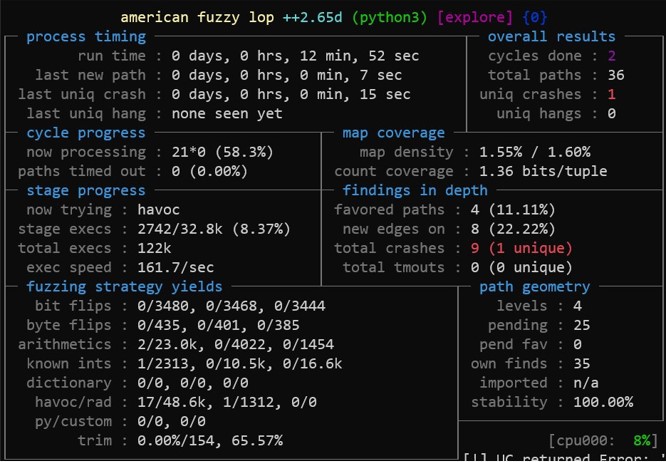
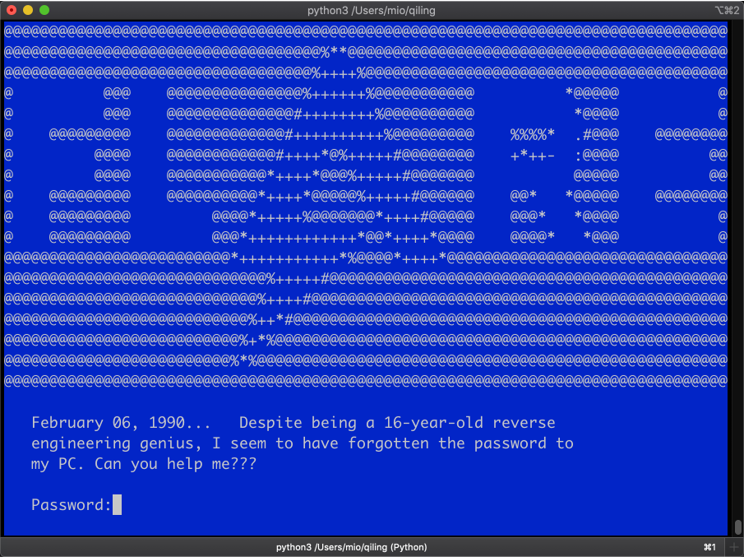
Qling還提供了一個名為qltool的友好工具,以快速模擬ShellCode和可執行二進製文件。
使用QLTool,可以輕鬆執行:
使用shellcode:
$ ./qltool code --os linux --arch arm --format hex -f examples/shellcodes/linarm32_tcp_reverse_shell.hex
使用二進製文件:
$ ./qltool run -f examples/rootfs/x8664_linux/bin/x8664_hello --rootfs examples/rootfs/x8664_linux/
使用二進制和GDB調試器啟用:
$ ./qltool run -f examples/rootfs/x8664_linux/bin/x8664_hello --gdb 127.0.0.1:9999 --rootfs examples/rootfs/x8664_linux
使用代碼覆蓋範圍收集(目前僅UEFI):
$ ./qltool run -f examples/rootfs/x8664_efi/bin/TcgPlatformSetupPolicy --rootfs examples/rootfs/x8664_efi --coverage-format drcov --coverage-file TcgPlatformSetupPolicy.cov
使用JSON輸出(主要是Windows):
$ ./qltool run -f examples/rootfs/x86_windows/bin/x86_hello.exe --rootfs examples/rootfs/x86_windows/ --console False --json
從我們的網站https://www.qiling.io獲取最新信息
通過電子郵件[email protected]或通過Twitter @qiling_io或微博與我們聯繫
請參考Credits.md







