iOS Swift Good Practices
1.0.0

您會發現一些好的實踐/提示我認為非常相關,這對我很有意義:他們可以來自與我合作的人,我遵循的課程/教程以及其他指導方針和良好實踐作者的作者。
一開始,我在檢查特定按鈕是否可容納時遇到問題,僅僅是因為它在(動畫)中褪色,因此在視圖中不直接存在。我發現的一個有趣的解決方案是:
 let enableButton = app . buttons [ NSLocalizedString ( " Enable " , comment : " foo " ) ]
expectationForPredicate ( NSPredicate ( format : " hittable == true " ) , evaluatedWithObject : enableButton , handler : nil )
waitForExpectationsWithTimeout ( 3 , handler : nil )
它將等待3秒鐘,直到謂詞真實(在我們的情況下,按鈕是可容納的,因此直到按鈕出現為止)。經過的時間是不正確的,它將執行xctassert hittable == true 。

單擊“文本”按鈕重定向我,然後單擊正方形檢查。
我想做的只是檢查按鈕,因此只需在左側的小廣場上敲擊即可。我做到了:
 let checkButtonCoordinate = app . buttons [ " CGUButton " ] . coordinateWithNormalizedOffset ( CGVector ( dx : 0 , dy : 0 ) )
checkButtonCoordinate . tap ( ) 您可以在任何類型的變量,甚至全局和本地的任何類型中添加可變觀察者。
讓我們看看一個例子:
 var numberOfPerson = 0 {
 didSet {
  // Do something
 }
}

class Person {
 var name = " Anonyme " {
   didSet {
     // Do something else
   }
 }

 func showResume ( ) {
   var resume : String ? {
     didSet {
       // Do what you need to do
     }
   }

   // ...
 }
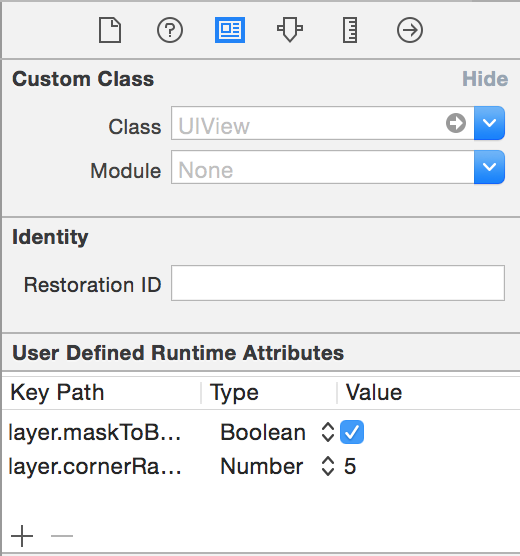
}您可以使用從故事板上使用的,以啟動對象的某些屬性,而不是以編程方式進行操作。
因此,例如,您可以替換:
 self . debtView . layer . maskToBounds = true
self . debtView . layer . cornerRadius = 5.0
經過
使用本機Swift struct Initializer,而不是使用CGGEOMETRY功能。
因此,替換:
let myButton = UIButton ( frame : CGRectMake ( 0.0 , 0.0 , self . bounds . width / 2 , self . bounds . height ) )經過
let myButton = UIButton ( frame : CGRect ( x : 0.0 , y : 0.0 , width : self . bounds . width / 2 , height : self . bounds . height ) )因為在Objective-C中,我們過去使用cgrectMake來獲得一個cgrect struct,因為要初始化支柱,因此(如果我的內存很好)必須先創建結構,然後將值分配給變量。借助Swift,結構有參數的構造函數,因此無需使用外部功能。
當iOS> 9.0時,您無需刪除Deinit函數中的觀察者
來自Apple文檔
在OS X 10.11和iOS 9.0中,NSNOTIFECYCENTER和NSDISTIBEDERDECERTICCENTER將不再向註冊的觀察者發送通知,這些觀察者可能會被交易[...],這意味著觀察者無需在其交易方法中取消註冊。
要檢查一個範圍之間的數字,不要
if number >= 0 && number <= 100使用範圍和新聞運營商:
if 0 ... 100 ~= number當符合某些協議(Uaithitview,可打印,..)時,請使用擴展名,以保持組織良好的代碼,除非它是其作用。
// MARK: - TableView Delegate -

extension HomeViewController : UITableViewDataSource {

func tableView ( tableView : UITableView , numberOfRowsInSection section : Int ) -> Int {
  return 5
}

func numberOfSectionsInTableView ( tableView : UITableView ) -> Int {
  return 1
}

// etc.
} 使用讓直到Xcode yell,以便您可以用var替換
在多個地方引用關閉時,請使用Typealias
typealias CoolClosure = ( foo : Int ) -> Bool 當訪問cgrect的x,y,寬度或高度時,更喜歡使用rect.width,rect.miny等。它是迅速擴展,默認情況下標準化值而不是直接結構成員訪問。從蘋果的CGGEOMETRY參考:
本參考中描述的所有函數將CGRECT數據結構作為輸入作為在計算結果之前隱式標準化這些矩形的標準化。因此,您的應用程序應避免直接讀取和編寫Cgrect數據結構中存儲的數據。相反,使用此處描述的功能來操縱矩形並檢索其特徵。
例如 :
 let rect = CGRect ( origin : CGPoint ( x : 0.0 , y : 0.0 ) , size : CGSize ( width : - 40.0 , height : - 40.0 ) )

rect . size . width // return -40,  Not good, negative value
rect . width      // return 40,  OK

rect . origin . y   // return 0.0,  Not OK
rect . minY // return -40.0, OKStanford提示:實際上,通常,任何具有超過十幾行代碼行的方法可能很難讓您的代碼的讀者理解(並且很可能背叛了一種“少於最佳”的建築方法)。因此,可能的解決方案將是在主函數內添加子功能。如果您的代碼中有5行,請不要濫用這一點。 :]
使用Pragma標記來組織您的代碼
//馬克: - UITAITEVIEWDATASOURCE代表 -
- You can consider making **TODO/FIXME as warning**, sometimes that helps !

- Having a clear application architecuture is good, having a clear/reusable code is awesome. So you better be documented about **design patterns** :
  -  http://www.raywenderlich.com/46988/ios-design-patterns
  -  http://www.raywenderlich.com/86053/intermediate-design-patterns-in-swift
  -  https://github.com/ochococo/Design-Patterns-In-Swift





