iOS Swift Good Practices
1.0.0

您会发现一些好的实践/提示我认为非常相关,这对我很有意义:他们可以来自与我合作的人,我遵循的课程/教程以及其他指导方针和良好实践作者的作者。
一开始,我在检查特定按钮是否可容纳时遇到问题,仅仅是因为它在(动画)中褪色,因此在视图中不直接存在。我发现的一个有趣的解决方案是:
 let enableButton = app . buttons [ NSLocalizedString ( " Enable " , comment : " foo " ) ]
expectationForPredicate ( NSPredicate ( format : " hittable == true " ) , evaluatedWithObject : enableButton , handler : nil )
waitForExpectationsWithTimeout ( 3 , handler : nil )
它将等待3秒钟,直到谓词真实(在我们的情况下,按钮是可容纳的,因此直到按钮出现为止)。经过的时间是不正确的,它将执行xctassert hittable == true 。

单击“文本”按钮重定向我,然后单击正方形检查。
我想做的只是检查按钮,因此只需在左侧的小广场上敲击即可。我做到了:
 let checkButtonCoordinate = app . buttons [ " CGUButton " ] . coordinateWithNormalizedOffset ( CGVector ( dx : 0 , dy : 0 ) )
checkButtonCoordinate . tap ( ) 您可以在任何类型的变量,甚至全局和本地的任何类型中添加可变观察者。
让我们看看一个例子:
 var numberOfPerson = 0 {
 didSet {
  // Do something
 }
}

class Person {
 var name = " Anonyme " {
   didSet {
     // Do something else
   }
 }

 func showResume ( ) {
   var resume : String ? {
     didSet {
       // Do what you need to do
     }
   }

   // ...
 }
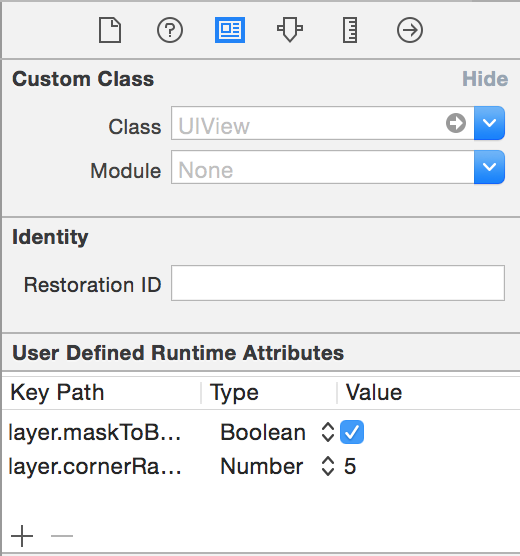
}您可以使用从故事板上使用的,以启动对象的某些属性,而不是以编程方式进行操作。
因此,例如,您可以替换:
 self . debtView . layer . maskToBounds = true
self . debtView . layer . cornerRadius = 5.0
经过
使用本机Swift struct Initializer,而不是使用CGGEOMETRY功能。
因此,替换:
let myButton = UIButton ( frame : CGRectMake ( 0.0 , 0.0 , self . bounds . width / 2 , self . bounds . height ) )经过
let myButton = UIButton ( frame : CGRect ( x : 0.0 , y : 0.0 , width : self . bounds . width / 2 , height : self . bounds . height ) )因为在Objective-C中,我们过去使用cgrectMake来获得一个cgrect struct,因为要初始化支柱,因此(如果我的内存很好)必须先创建结构,然后将值分配给变量。借助Swift,结构有参数的构造函数,因此无需使用外部功能。
当iOS> 9.0时,您无需删除Deinit函数中的观察者
来自Apple文档
在OS X 10.11和iOS 9.0中,NSNOTIFECYCENTER和NSDISTIBEDERDECERTICCENTER将不再向注册的观察者发送通知,这些观察者可能会被交易[...],这意味着观察者无需在其交易方法中取消注册。
要检查一个范围之间的数字,不要
if number >= 0 && number <= 100使用范围和新闻运营商:
if 0 ... 100 ~= number当符合某些协议(Uaithitview,可打印,..)时,请使用扩展名,以保持组织良好的代码,除非它是其作用。
// MARK: - TableView Delegate -

extension HomeViewController : UITableViewDataSource {

func tableView ( tableView : UITableView , numberOfRowsInSection section : Int ) -> Int {
  return 5
}

func numberOfSectionsInTableView ( tableView : UITableView ) -> Int {
  return 1
}

// etc.
} 使用让直到Xcode yell,以便您可以用var替换
在多个地方引用关闭时,请使用Typealias
typealias CoolClosure = ( foo : Int ) -> Bool 当访问cgrect的x,y,宽度或高度时,更喜欢使用rect.width,rect.miny等。它是迅速扩展,默认情况下标准化值而不是直接结构成员访问。从苹果的CGGEOMETRY参考:
本参考中描述的所有函数将CGRECT数据结构作为输入作为在计算结果之前隐式标准化这些矩形的标准化。因此,您的应用程序应避免直接读取和编写Cgrect数据结构中存储的数据。相反,使用此处描述的功能来操纵矩形并检索其特征。
例如 :
 let rect = CGRect ( origin : CGPoint ( x : 0.0 , y : 0.0 ) , size : CGSize ( width : - 40.0 , height : - 40.0 ) )

rect . size . width // return -40,  Not good, negative value
rect . width      // return 40,  OK

rect . origin . y   // return 0.0,  Not OK
rect . minY // return -40.0, OKStanford提示:实际上,通常,任何具有超过十几行代码行的方法可能很难让您的代码的读者理解(并且很可能背叛了一种“少于最佳”的建筑方法)。因此,可能的解决方案将是在主函数内添加子功能。如果您的代码中有5行,请不要滥用这一点。:]
使用Pragma标记来组织您的代码
//马克: - UITAITEVIEWDATASOURCE代表 -
- You can consider making **TODO/FIXME as warning**, sometimes that helps !

- Having a clear application architecuture is good, having a clear/reusable code is awesome. So you better be documented about **design patterns** :
  -  http://www.raywenderlich.com/46988/ios-design-patterns
  -  http://www.raywenderlich.com/86053/intermediate-design-patterns-in-swift
  -  https://github.com/ochococo/Design-Patterns-In-Swift





